also @ TechSpot: Seven Intel P55 Motherboards Compared, Reviewed
Welcome to the TechSpot OpenBoards. Please read the FAQ if you have any questions. Login to participate.

Go Back   TechSpot OpenBoards > Operating Systems & Software > Virus & Malware removal

Windows error after malware removal

Closed Thread
Page 2 of 3 1 2 3
Bookmark Thread Tools
  #21  
Old 06-18-2008
Blind Dragon's Avatar
TechSpot Evangelist
 
Location: Tampa FL
Member since: Oct 2007, 4,048 posts
System specs
No problem, I may have something better worked out for you by then, so check the thread before following the above
  #22  
Old 06-18-2008
Blind Dragon's Avatar
TechSpot Evangelist
 
Location: Tampa FL
Member since: Oct 2007, 4,048 posts
System specs
If you can get MBAM to run, I found one instance where it was able to unhook and remove this one.

I also recommend you uninstall both Norton and Avast ->

Norton removal tool found here -> http://service1.symantec.com/Support...05033108162039

----------------------------------------------------------

Get Avira Anti-virus - update it - run full scan
http://www.download.com/Avira-AntiVi...dlPid=10831109


Install Avira Antirootkit tool (takes seconds to run)
http://www.free-av.com/en/tools/4/av...tkit_tool.html

After scanning click view report and attach here.

Last edited by Blind Dragon; 06-18-2008 at 08:58 PM..
To remove this ad, sign in. To register for a new account, click here.
  
  #23  
Old 06-19-2008
Newcomer, in training
 
Location: NL
Member since: Jun 2008, 35 posts
System specs
Quote:
Originally Posted by Blind Dragon
No problem, I may have something better worked out for you by then, so check the thread before following the above
Since my internetconnection temporarily didnt work, i conducted the DSS scan, since i didnt knew what to do, except that i could do the DSS scan. Here are the results.
Should i still go on with what you suggested in your last post?
Attached Files
File Type: txt extra.txt (27.3 KB, 1 views)
File Type: txt main.txt (37.2 KB, 2 views)
File Type: log hijackthis.log (12.5 KB, 1 views)
  #24  
Old 06-19-2008
Newcomer, in training
 
Location: NL
Member since: Jun 2008, 35 posts
System specs
Just to be sure, I completely deinstalled all Norton stuff via your link of the removal kit, and also deleted Avast. Currently, im running the avira rootkit, and after that i will run the avira scan. When both are done, i will post he logs.
  #25  
Old 06-19-2008
Newcomer, in training
 
Location: NL
Member since: Jun 2008, 35 posts
System specs
And here are the 2 new logs.
Attached Files
File Type: log avirarkd.log (9.1 KB, 1 views)
File Type: log AVSCAN-20080619-115558-07989BDB.LOG (24.5 KB, 1 views)
  #26  
Old 06-20-2008
Blind Dragon's Avatar
TechSpot Evangelist
 
Location: Tampa FL
Member since: Oct 2007, 4,048 posts
System specs
I think we can move this with OTMoveit

OTMoveit2 by OldTimer
Please download the OTMoveIt2 by OldTimer.
  • Save it to your desktop.
  • Please double-click OTMoveIt2.exe to run it. (Vista users, please right click on OTMoveit2.exe and select "Run as an Administrator")
  • Copy the file paths below to the clipboard by highlighting ALL of them and pressing CTRL + C (or, after highlighting, right-click and choose Copy):

    Code:
    C:\Windows\system32\awtrSjgd.dll
    HKEY_LOCAL_MACHINE\SOFTWARE\Microsoft\Windows\CurrentVersion\Explorer\ShellExecuteHooks\{57A52E74-004C-464B-96CC-4DFE5366EA02}
  • Return to OTMoveIt2, right click in the "Paste List of Files/Folders to Move" window (under the light Yellow bar) and choose Paste.
  • Click the red Moveit! button.
  • A log of files and folders moved will be created in the c:\_OTMoveIt\MovedFiles folder in the form of Date and Time (mmddyyyy_hhmmss.log). Please open this log in Notepad and post its contents in your next reply.
  • Close OTMoveIt2
If a file or folder cannot be moved immediately you may be asked to reboot the machine to finish the move process. If you are asked to reboot the machine choose Yes.

Last edited by Blind Dragon; 06-20-2008 at 12:21 AM..
  #27  
Old 06-20-2008
Newcomer, in training
 
Location: NL
Member since: Jun 2008, 35 posts
System specs
Here you are!
Attached Files
File Type: log 06202008_091749.log (838 Bytes, 1 views)
  #28  
Old 06-20-2008
Blind Dragon's Avatar
TechSpot Evangelist
 
Location: Tampa FL
Member since: Oct 2007, 4,048 posts
System specs
Good, Now please run a fresh combofix or DSS log
  #29  
Old 06-20-2008
Newcomer, in training
 
Location: NL
Member since: Jun 2008, 35 posts
System specs
Here's the log.

Thanks again for helping
Attached Files
File Type: txt ComboFix.txt (29.5 KB, 3 views)
To remove this ad, sign in. To register for a new account, click here.
  
  #30  
Old 06-22-2008
Blind Dragon's Avatar
TechSpot Evangelist
 
Location: Tampa FL
Member since: Oct 2007, 4,048 posts
System specs
Can you run MBAM now? I know for a fact that they have added this to the definitions this week. If you can update it and run a full scan, it may need to reboot your system to remove it.

Right click MBAM and select run as administrator
  #31  
Old 06-22-2008
Blind Dragon's Avatar
TechSpot Evangelist
 
Location: Tampa FL
Member since: Oct 2007, 4,048 posts
System specs
if not follow below

'The Avenger by Swandog46'
  • Download The Avenger by Swandog46 from here.
  • Unzip/extract it to a folder on your desktop.
  • Double click on avenger.exe to run The Avenger.
  • Click OK.
  • Make sure that the box next to Scan for rootkits has a tick in it and that the box next to Automatically disable any rootkits found does not have a tick in it.
  • Click the Execute button.
  • You will be asked No script has been entered. Do you want to execute a rootkit scan only?.
  • Click Yes.
  • You will now be asked First step completed --- The Avenger has been successfully set up to run on next boot. Reboot now?.
  • Click Yes.
  • Your PC will now be rebooted.
  • After your PC has completed the necessary reboots, a log should automatically open. If it does not automatically open, then the log can be found at %systemdrive%\avenger.txt (typically C:\avenger.txt).
  • Please post this log, along with a new HijackThis log in your next reply.
  #32  
Old 06-23-2008
Newcomer, in training
 
Location: NL
Member since: Jun 2008, 35 posts
System specs
Okay, so i did the Avenger scan. Still havent done the MBAM scan. Is that scan still necessary?
Here's the Avenger & HJT log.
Attached Files
File Type: txt avenger.txt (894 Bytes, 2 views)
File Type: log hijackthis.log (12.6 KB, 2 views)
  #33  
Old 06-23-2008
Blind Dragon's Avatar
TechSpot Evangelist
 
Location: Tampa FL
Member since: Oct 2007, 4,048 posts
System specs
Avenger by Swandog

Note: This program must be run from an account with Administrator priviledges.
  • Open the Avenger folder and double click Avenger.exe to launch the programme.
  • Copy the text in the code box below and Paste it into the Input script here: box.
Code:
Registry values to delete:
HKEY_LOCAL_MACHINE\software\microsoft\windows\currentversion\explorer\shellexecutehooks | {57A52E74-004C-464B-96CC-4DFE5366EA02}

Files to delete:
C:\Windows\system32\awtrSjgd.dll
  • Note: the above code was created specifically for this user. If you are not this user, do NOT follow these directions as they could damage the workings of your system.

  • Ensure the following:
    • Scan for Rootkits is checked.
    • Automatically disable any rootkits found is Unchecked.
  • Press the Execute key.
  • Avenger will now process the script you've pasted (this may involve more than one re-boot), when finished it will produce a log file.
  • Attach the log back here please. (it can also be found at C:\avenger.txt)
  #34  
Old 06-23-2008
Newcomer, in training
 
Location: NL
Member since: Jun 2008, 35 posts
System specs
Thnx again for the help. Here's the log.
Attached Files
File Type: txt avenger.txt (1.6 KB, 1 views)
  #35  
Old 06-23-2008
Blind Dragon's Avatar
TechSpot Evangelist
 
Location: Tampa FL
Member since: Oct 2007, 4,048 posts
System specs
I think that may have got it but for some reason it didn't find the file. As you can see rootkits can be tricky sometimes. Just to be sure please do the following:

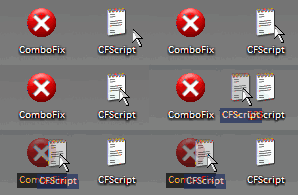
Run CFScript

Open notepad and copy/paste the text in the code box below into it:
NOTE* make sure to only highlight and copy what is inside the quote box nothing out side of it.
Also ..

Pay particular attention to this :-

Make sure the word File:: is on the first line of the text file you save (no blank line above it, & no space in front of it)
Quote:
File::
C:\Windows\system32\awtrSjgd.dll

Driver::
C:\Windows\system32\awtrSjgd.dll
Save this as CFScript.txt

Then drag the CFScript.txt into ComboFix.exe as you see in the screenshot below.


This will start ComboFix again. After reboot, (in case it asks to reboot), post the contents of Combofix.txt in your next reply together with a fresh HJT log.
  #36  
Old 06-23-2008
Newcomer, in training
 
Location: NL
Member since: Jun 2008, 35 posts
System specs
Here it is ...
Attached Files
File Type: txt log.txt (28.6 KB, 1 views)
  #37  
Old 06-23-2008
Blind Dragon's Avatar
TechSpot Evangelist
 
Location: Tampa FL
Member since: Oct 2007, 4,048 posts
System specs
Gone

Now please update and run MBAM to pick up leftovers, I don't think you will have any problems with it now, as it doesn't have to try and remove what we just took off.
  #38  
Old 06-23-2008
Newcomer, in training
 
Location: NL
Member since: Jun 2008, 35 posts
System specs
Scanning right now .... it found a Trojan TR/Vundo.Gen in C:\!KillBox\vtUImmmI.dll
I assume i can select 'Deny access', since it probably some quarantined file?

Also; Can i remove all the programmes used in this thread (KillBox, Combofix, etc), and their respective folders, from my HD? Can i delete them manually, or should i do it via the add/remove programmes option in my control panel?
  #39  
Old 06-23-2008
Blind Dragon's Avatar
TechSpot Evangelist
 
Location: Tampa FL
Member since: Oct 2007, 4,048 posts
System specs
just post log when done, I have a certain way to remove the programs we have used, anything that is left at the end you can remove through add remove, but leave them on there till we are done.
  #40  
Old 06-23-2008
Newcomer, in training
 
Location: NL
Member since: Jun 2008, 35 posts
System specs
Here's the MBAM log. It found some files (4 quarantines), which i deleted just to be sure everything's gone now

Thnx again, Blind Dragon, for all the great help. Due to your services, ive been able to keep on using my laptop the last week, whereas otherwise i would have needed to set it back to factory defaults. That would taken me some 2 full days at least, to get my laptop back on the configuration i have it now.
Your help is really appreciated. If i can do anything in return, and its within my power, please name it

Cheers!
Attached Files
File Type: txt mbam-log-6-23-2008 (18-45-59).txt (1.2 KB, 1 views)
Closed Thread
Page 2 of 3 1 2 3

Tip: Download Advanced SystemCare 3 Freeware - 1 Click A Day to Clean, Repair, Protect & Optimize your PC.

Thread Tools


Similar Topics
Topic Category Replies Last Post
Advanced Malware removal Virus & Malware removal 8 01-05-2008 07:03 PM
Malware popups keep reinstalling after removal Virus & Malware removal 13 11-24-2007 06:10 PM
Malware Removal Logs Virus & Malware removal 7 11-24-2007 08:37 AM
Help, 3 in 1 regenerating malware ( error cleaner privacy protector/ spyware malware Virus & Malware removal 1 07-09-2007 06:02 AM
Following the virus/malware removal steps would like to know something? Virus & Malware removal 23 05-17-2007 04:41 PM


All times are GMT -4. The time now is 06:07 PM.