Welcome to the TechSpot OpenBoards. Please read the FAQ if you have any questions. Sign up or Login to participate.
|
|||||||
Download Now:
Driver problem while playing a game
|
|
Thread Tools | Search this Thread |
|
#1
|
|||
|
|||
|
Driver problem while playing a game
2008.7.9 19:10:54
OS : Windows XP 5.1 (Build: 2600) CPU : GenuineIntel PentiumPro-class processor @ 1498 MHz with 446MB RAM Video : No Video PosCode : LS1:0:0:0 1/0 Please enable Direct3D acceleration. You can do this by starting dxdiag and enabling Direct3D Acceleration in the Display1/2 tab after installing DirectX 8.1b (or later) and the latest drivers for your graphics card. i get thiss error while playing lineage 2 what do i have to do in order to fix i looked in control pannel to c if i had direct x but i could not find it.. but the thing is i have windows xp so it should already come with direct x....but any ways how do i get the latest drivers for your graphics card. ???? thanks you guys have been tons of help in the past hopefull you can be again!
|
|
#2
|
||||
|
||||
|
to make sure you have the latest DirectX click here
Also, to run the DirectX diagnostic tool (for your current version or again should you see it needs updating) click here |
|
#3
|
|||
|
|||
|
yea i did all of that and it says that i am up to date but i cant find any direct x in my control pannel compared to my other computer where i can and where lineage 2 the game i want to play works
|
|
#4
|
|||
|
|||
|
heres to show that i do have direct x but how do i upgrade driver?
<a href="http://s103.photobucket.com/albums/m133/berto67/?action=view¤t=piuc.jpg" target="_blank"><img src="http://i103.photobucket.com/albums/m133/berto67/piuc.jpg" border="0" alt="Photobucket"></a> http://i103.photobucket.com/albums/m...rto67/piuc.jpg |
|
#5
|
|||
|
|||
|
and it says i have no video card or graphics card or idk what it say lol any one know how to fix/
![]() http://i103.photobucket.com/albums/m...to67/pic-1.jpg |
|
|
|
#6
|
|||
|
|||
|
i have to this lab top by the way
m45-s165 system unit |
|
#7
|
||||
|
||||
|
It appears that your laptop comes with ATI Radeon Xpress 200 integrated graphics. If I'm right, go here to download the latest graphics driver: AMD/ATI website
I don't understand what happened to the original graphics driver. Did you reformat recently? |
|
#8
|
|||
|
|||
|
i am not sure cuzz this is not my labtop but from what i remeber my friends saying i think he did
|
|
#9
|
|||
|
|||
|
hey it says that it cant find any divers compatible with that update??? help! thanks for the try but any other tricks up your sleeve?
|
|
#10
|
|||
|
|||
|
or wait what folder am i supposed to install it in?
|
|
#11
|
|||
|
|||
|
"setup did not find a driver compatible with your current hardeware or operating system. setup will now exit."
thats the exact quote that i get when i try to install it but is their a certain place i am supposed to install it in? |
|
#12
|
||||
|
||||
|
Is this the name of the file?: 8-6-igp_xp32_dd_ccc_wdm_sb_gart_enu_64783.exe
When you double click on the file or open it in the Run box, it is supposed to install itself. |
|
#13
|
|||
|
|||
|
ok well yea thats it and thats what i do.... god is it ever gona be fixed.... huaa ok so what if their is a chance that that isnt my video card cuz i honestly dont know what the kid did to his labtop but is their a program that can detect what video card my friends labtop has?
|
|
#14
|
||||
|
||||
|
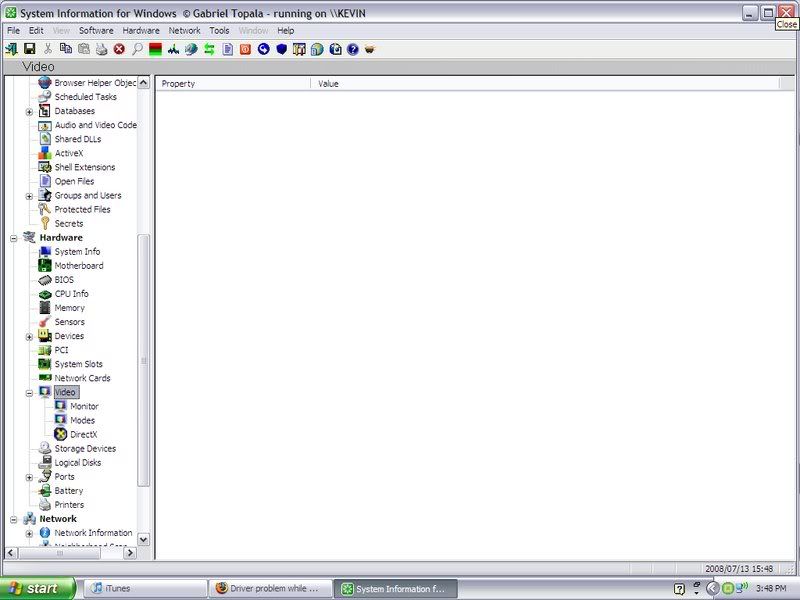
Try SIW. It is a freeware program that should tell you what graphics card you have. Download it from here: SIW
Select the Standalone version. It doesn't have to be installed. Just double click on the file. When it comes up, look at the left column and find and click on Video. |
|
#15
|
|||
|
|||
|
ok i will check it out and get back to you but as of right now i am not at my friends but will be back their like i would say around tomarra if not later todays
|
|
#16
|
|||
|
|||
|
ok so i cant tell what this crap means hehe... so translation to as to what my videocard is or what needs to be done?
![]() http://i103.photobucket.com/albums/m133/berto67/kv.jpg |
|
#17
|
|||
|
|||
|
also i get this VGASAVE when i right click on my desktop then click the settings tab then advanced then adapter it dosent show my videocard so when i wikipedia it said this http://en.wikipedia.org/wiki/VGASAVE
but how do i fix it reinstall is what i heard from some guy i was talking to but how do i reinstall he wasnt quite sure if that was even the problem... do u know how to fix? by the way thanks for all the help |
|
#18
|
||||
|
||||
|
We want to find out what kind of graphics "card" you have so we can find and install the proper graphics driver for it. For that, please highlight "Video" instead of "DirectX."
|
|
#19
|
|||
|
|||
|
i had some guy from geek squad come down to my friends house and he explained to me that his labtob dosent have a graphics card soo i would have to buy one in order to play so thanks for trying....
by the way heres proof
|
![]() |
| Similar Topics | ||||
| Topic | Replies | Forum | ||
What game are you currently playing?
|
3 | Gaming | ||
BSOD while playing a new game
|
2 | Windows BSOD, Freezing, Restarting Help | ||
haveing problems playing a game with out it either randomlly crashing the game...
|
6 | Audio and Video | ||
Playing game on a LAN
|
5 | Gaming | ||
Problem with playing any game, crashes and vpu rocover.
|
7 | Audio and Video | ||
| Thread Tools | Search this Thread |
|
|
All times are GMT -4. The time now is 06:33 PM.


What game are you currently playing?