also @ TechSpot: Digital game purchases: do we really "own" them?
Welcome to the TechSpot OpenBoards. Please read the FAQ if you have any questions. Sign up or Login to participate.

Go Back   TechSpot OpenBoards > Hardware > Processors and Motherboards

Collaborate in the cloud with Office, Exchange, SharePoint, and Lync

Dell Optiplex GX280 won't start, amber light flashing

Page 1 of 3 1 23
Thread Tools Search this Thread
  #1  
Old 08-01-2008
Newcomer, in training
 
Member since: Aug 2008, 4 posts
Dell Optiplex GX280 won't start, amber light flashing

Hi, this is my first post and I have never used any other forum so i hope I'm diong things the right way.

I have a Dell Optiplex Gx280 and it won't start, an amber light is flashing in the power button. I have read the manual and it states the following:

If the power light is blinking amber —

[COLOR="Blue"] The computer is receiving electrical power, but an internal power problem might exist.

Ensure that the voltage selection switch is set to match the AC power at your location (if applicable).
Ensure that the processor power cable is securely connected to the system board.[/COLOR]


I did both things but it still does'nt power up.

I opened the comptuer and the stand by power light is on, (the one in the system board). I don't know if this is ok.

What else can i do?

Thanks for your help.

Hector
  #2  
Old 08-02-2008
TechSpot Addict
 
Location: California; Northern.
Member since: Jul 2007, 718 posts
System specs
How long have you had this machine? Is it brand new? If so take it back. If it's not new, what is the last thing you did to your machine? Any modifications? You are not getting any signal. An amber light means it's running but it's not going to show up on the screen.
  #3  
Old 08-02-2008
Newcomer, in training
 
Member since: Aug 2008, 4 posts
I've had it for 2 1/2 years. About a year ago, I had someone come in and install a wireless card. A few months ago I noticed it was loose so I opened the machine, and put the card back in place. The computer worked fine after I did this, (I never tested the wireless connection). I believe it was some days after I did this, that I got the blinking amber light in the power button for the first time, but Im not sure.

I read the manual and followed the instructions, (disconnected all the cables form the CPU & monitor and reconnected), the blinking amber light was gone. The computer worked fine. Then after several days I got the blinking amber light again. I followed the same procedure but it didn't work this time. When I press the power button all I get is the blinking amber light, the computer doesn't power up, it doesn't seem like it its working because it doesn't even make a sound, the fan is not working... nothing, absolutely nothing happens, just the blinking amber light in the power button.

I remember now the first time I got the amber light and disconnected all the cables form the CPU, while I was reconnecting the screen to the graphics card I felt an electrical discharge. The exact same way you feel if you touch the terminals of a 9V battery with your tongue. I felt the same discharge the second time I followed the procedure.

Hope this can help...

Do you need any details regarding Software installed or uninstalled form the machine? If I post some images, will this help? Thanks for your help.

By the way, the Optiplex GX280 I have is the small form factor computer, the slim one. I just want to clarify because i believe there are about four different types with this same model. If you need to open this machine you just press a couple of locks it has on the side and it pops right away.
  #4  
Old 08-02-2008
TechSpot Enthusiast
 
Location: Cambridge UK
Member since: Jul 2006, 284 posts
System specs
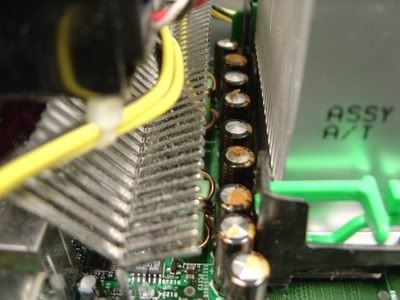
Since this is a Dell 280, open up the case and check the capacitors.

If you see anything like the picture below, or any that aren't completely flat, you need to have the motherboard replaced. Dell WILL do it for free, because it is a known and accepted issue.


If you don't have these issues, I would expect it to be a power supply issue.

You could also try removing the wireless card just in case.
  #5  
Old 08-03-2008
Newcomer, in training
 
Member since: Aug 2008, 4 posts
Ok, I checked all the capacitors and they seem to be fine (they are all flat and absolutely clean),
I also removed the wireless card but it still keep getting the blinking amber light. In case it is a power supply issue, could you recommend one that would be ok for this machine?

Thanks for your help!
  #6  
Old 08-03-2008
TechSpot Enthusiast
 
Location: Cambridge UK
Member since: Jul 2006, 284 posts
System specs
You have an SFF Dell so you'll probably have to get an identical PSU for it. I'd check eBay for replacement PSUs or cases, these PCs are constantly being parted out because of bad mobos or sold cheaply.
  #7  
Old 08-03-2008
mailpup's Avatar
TechSpot Special Forces
 
Location: Los Angeles
Member since: May 2005, 7,336 posts
System specs
Quote:
I remember now the first time I got the amber light and disconnected all the cables form the CPU, while I was reconnecting the screen to the graphics card I felt an electrical discharge. The exact same way you feel if you touch the terminals of a 9V battery with your tongue. I felt the same discharge the second time I followed the procedure.
The electrostatic discharge you felt may have zapped one of your components and destroyed it. Grounding yourself before working on the inside of your PC is a basic procedure because static discharge is a common killer of PC components.
  #8  
Old 08-04-2008
TechSpot Paladin
 
Location: England, UK
Member since: Feb 2003, 499 posts
System specs
i worked at a company with alot of these pcs. The orange light meant "Put it in the bin" unfortunately. I tried changing over with working power supplies but the motherboard was beyond repair.
  #9  
Old 08-11-2008
Newcomer, in training
 
Member since: Aug 2008, 4 posts
Quote:
Originally Posted by yukka View Post
i worked at a company with alot of these pcs. The orange light meant "Put it in the bin" unfortunately. I tried changing over with working power supplies but the motherboard was beyond repair.
Do you mean the flashing amber light on the power button, or the amber light on the motherboard?
  #10  
Old 08-14-2008
TechSpot Enthusiast
 
Location: Georegtown, DE
Member since: Aug 2007, 280 posts
System specs
Quote:
Originally Posted by DarkJP View Post
I've had it for 2 1/2 years. About a year ago, I had someone come in and install a wireless card. A few months ago I noticed it was loose so I opened the machine, and put the card back in place. The computer worked fine after I did this, (I never tested the wireless connection). I believe it was some days after I did this, that I got the blinking amber light in the power button for the first time, but Im not sure.

I read the manual and followed the instructions, (disconnected all the cables form the CPU & monitor and reconnected), the blinking amber light was gone. The computer worked fine. Then after several days I got the blinking amber light again. I followed the same procedure but it didn't work this time. When I press the power button all I get is the blinking amber light, the computer doesn't power up, it doesn't seem like it its working because it doesn't even make a sound, the fan is not working... nothing, absolutely nothing happens, just the blinking amber light in the power button.

I remember now the first time I got the amber light and disconnected all the cables form the CPU, while I was reconnecting the screen to the graphics card I felt an electrical discharge. The exact same way you feel if you touch the terminals of a 9V battery with your tongue. I felt the same discharge the second time I followed the procedure.

Hope this can help...

Do you need any details regarding Software installed or uninstalled form the machine? If I post some images, will this help? Thanks for your help.

By the way, the Optiplex GX280 I have is the small form factor computer, the slim one. I just want to clarify because i believe there are about four different types with this same model. If you need to open this machine you just press a couple of locks it has on the side and it pops right away.
Before you open your computer you should pull the power cord and the push the Power On Button to release the stored energy. Grounding yourself will not help if you haven't removed the stored energy.

Sounds like you need a new video card to me.
Just to be sure remove all internal cards except video card, disconnect CDROM, Floppy, hard drive and see if it posts.

Optiplex GX270 were very bad for blown capacitors, but we have several GX280s and haven't had any problems yet after 3 or more years.
  #11  
Old 10-23-2008
Newcomer, in training
 
Member since: Oct 2008, 1 posts
Dell Opliplex SX280 Blinking Amber Light

I was able to fix a blinking amber light on my optiplex sx280. After testing nearly every component in another system, I concluded that motherboard replacement was the last thing I could attempt. Note that I had no blown or swollen capacitors, so it must have been something else. I ordered a replacement mobo and swapped it out and I am finally back up and running.
  #12  
Old 10-23-2008
TechSpot Enthusiast
 
Location: Georegtown, DE
Member since: Aug 2007, 280 posts
System specs
Opti 280

Dopesheet,
I am glad you got her fixed.
The five or six 270s we had died ended up being less expensive to replace the mobo with an MSI and a new case. The optiplex is made so other mobos don't fit, kinda reminds me of the first IBMs,
LOL
  #13  
Old 10-23-2008
TechSpot Enthusiast
 
Location: Cambridge UK
Member since: Jul 2006, 284 posts
System specs
Bear in mind that if you get a 270 with blown capacitors, Dell will replace the boards for free at your home or business.
  #14  
Old 10-23-2008
TechSpot Enthusiast
 
Location: Georegtown, DE
Member since: Aug 2007, 280 posts
System specs
Optiplex 270

Not so my friend.
I contacted our Small Business account Manager and reported that Support was not doing anything about Out of Warranty computers, and we had a bunch. He never responded or acknowledged.
I prefer Dell computers and Support. But not in this case.
Moot point anyway as we were purchased by a UK group and are now an HP house.
  #15  
Old 10-23-2008
TechSpot Enthusiast
 
Location: Cambridge UK
Member since: Jul 2006, 284 posts
System specs
Quote:
Originally Posted by pjamme View Post
Not so my friend.
I contacted our Small Business account Manager and reported that Support was not doing anything about Out of Warranty computers, and we had a bunch. He never responded or acknowledged.
I prefer Dell computers and Support. But not in this case.
Moot point anyway as we were purchased by a UK group and are now an HP house.
How long ago was that?

I had Dell engineers out to repair two of these about 6 months ago (I'm in the UK too) at no charge. I'd acquired them from a college that were upgrading.

Strange that your small business manager wouldn't help, I just went through regular support.
  #16  
Old 10-23-2008
TechSpot Enthusiast
 
Location: Georegtown, DE
Member since: Aug 2007, 280 posts
System specs
Optiplex 270

I purchased 9, I think four plus years or more ago. They had a buy 2 & get one free.
The first one blew up under warranty so was fine but the next ones I called tech support and they said sorry out of warranty. That is when I contacted the Small Business Account manager.
Thankfully we are just down the street from a great computer repair shop. They moved HD, Video, RAM, Processor, CD, etc to the MSI Mobo and their stock case. for a little over $200. They were all design engineers (we do all one time custom manufacturing) and could not be without a computer for very long.
  #17  
Old 11-13-2008
Newcomer, in training
 
Location: Rochester NY
Member since: Nov 2008, 9 posts
Fix Optiplex machines

Almost every Optiplex SX280 problem I have seen ( we have around 1000 at my job ) has been bad capacitors. They usually last 2-3 years before they stop turning on. Usually 3 820uFs, and the bigger one under the hard drive die due to overheating. You can purchase the replacement capacitors at thecapkingDOTcom and find the instructions at capacitorlabDOTcom. Don't try to use non ultra low ESR caps found at radioshack or other places they won't last. I have recapped a hundred or so of these machines saving a ton of money, Dell wants $220 for a referbed board with a 90 day warranty on it. And you can get the caps for $25. you can do these yourself in around an hour if you can solder.
  #18  
Old 11-13-2008
TechSpot Enthusiast
 
Location: Georegtown, DE
Member since: Aug 2007, 280 posts
System specs
Blown Capacitors

tb421ny,

It has been many years since I soldered. However we dozens of qualified board assemblers (certified solderers) here and I am sure if we had directions they could repair the boards. next time we have one I'll give it a try.
Thanks for the idea,

Last edited by pjamme; 11-13-2008 at 04:47 PM..
  #19  
Old 11-13-2008
Newcomer, in training
 
Location: Rochester NY
Member since: Nov 2008, 9 posts
I have had a 99% sucess rate with these. I have even picked up some boards that were thrown away by other companies from my local recycling center and recapped those so I can hot swap them at work. Its pretty easy to do and saves us money and down time which my boss loves.
  #20  
Old 11-13-2008
TechSpot Enthusiast
 
Location: Georegtown, DE
Member since: Aug 2007, 280 posts
System specs
Blown Capacitors Optiplex 270

tb421ny,
Sounds promising, already disposed of several boards and cases, since their case is not useable for other mobos.
Hopefully we won't see anymore blown capacitors. All of ours have been 270s so far. But, we have quite a few 280s around. Mine is one
Closed Thread
Page 1 of 3 1 23

Similar Topics
Topic Replies Forum
My Dell Optiplex GX520 has the dreaded flashing amber light 4 Other Hardware
Flashing Amber Light... Ugh! 2 Other Hardware
How to fix Dell GX280 amber blinking problem? M/B or PSU 4 Processors and Motherboards
Dell GX280 amber light and hard drive swap 1 Other Hardware

Thread Tools Search this Thread
Search this Thread:

Advanced Search
All times are GMT -4. The time now is 03:32 PM.