also @ TechSpot: Fair Labor Association begins inspections of Foxconn at Apple's request
Welcome to the TechSpot OpenBoards. Please read the FAQ if you have any questions. Sign up or Login to participate.

Go Back   TechSpot OpenBoards > Hardware > Audio and Video

Begin your free trial now Pay-as-you-go options starting at $10/user/month

Compatible video cards for Dimension e-310

Thread Tools Search this Thread
  #1  
Old 08-17-2008
Newcomer, in training
 
Member since: Aug 2008, 8 posts
Compatible video cards for Dimension e-310

have recently come into posession of ati pci express 700 video card will it fit into my dimensions e-310, if not what is the best gaming card that will and where might I find a place to trade the ati card? ,not looking to spend alot $100.00 or less preferably..want to run games like fear and some of the aeria.games online games without texture and lighting problems.will take even up trade on good card that will fit this machine.

Last edited by madcap2day; 08-17-2008 at 12:07 PM.. Reason: more info.
  #2  
Old 08-17-2008
vnf4ultra's Avatar
TechSpot Paladin
 
Location: USA
Member since: Jan 2005, 2,195 posts
System specs
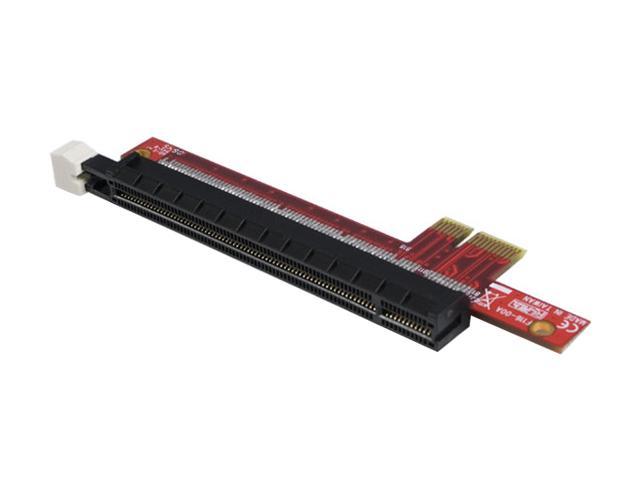
Your system has a pci-e x1 slot, while almost all video cards use the pci-e x16 slot. So if you have a x16 card it won't physically fit in the x1 slot. (unless you use an adapter, or melt the connector to allow larger cards to fit)

There is a very limited selection of pci-e x1 cards available. Of the cards that are easy to buy and in your price range, the x1550 pci-e x1 would probably be best. There are better cards(7300gt, 8400gs, etc), but they are either more money or hard to find.

Also, you could get a pci video card, like the 8500gt.
  #3  
Old 08-30-2008
Newcomer, in training
 
Member since: Aug 2008, 8 posts
thanks for the advice people, got adapter from newegg. however had to alter case as the express 700 is not a low profile card. when i inserted card and adapter it seemed to run as a secondary card just propping up integrated video. am no longer able to get to bios to disable or enable integrated graphics..when I try to plug directly to pci express 700 I get no video input message.bios conflict?. am nervous about disabling integrated graphics through device manager as I may be unable to get back to enable if card still doesn't work as stand alone.
  #4  
Old 08-30-2008
vnf4ultra's Avatar
TechSpot Paladin
 
Location: USA
Member since: Jan 2005, 2,195 posts
System specs
So you aren't getting any video at any point with the monitor on the x700? Can you connect the monitor to the onboard video and go into the bios to set the video output to external card instead of onboard? (some systems don't have this option available however)

You might try booting into windows with both cards installed, but with the monitor on the onboard video port. Once in windows (assuming xp), right click the desktop and click properties. Click settings, and select the monitor icon for the "monitor" that represents your x700 card's video output. Make sure the "extend my windows desktop..." and "use this device as primary monitor" are checked. Click apply, then swap the monitor connector from onboard to the x700.
  #5  
Old 08-30-2008
electromagnetic's Avatar
TechSpot Enthusiast
 
Location: UK
Member since: May 2008, 179 posts
System specs
If you disable Integrated graphics you get a VGA driver to display on with card in the PC, so do it you'll get a display with the PCI card.

I would know done it myself got the same PC as you.
  #6  
Old 09-02-2008
Newcomer, in training
 
Member since: Aug 2008, 8 posts
okay have card up and running as primary card , have second monitor hooked to integrated...everything seems copasetic.so I thank all who were kind enough to answer my posts... u people are sooooo coooool!! Thanks again.
  #7  
Old 09-04-2008
electromagnetic's Avatar
TechSpot Enthusiast
 
Location: UK
Member since: May 2008, 179 posts
System specs


madcap2day how did you install the pci express x16 card in a pci slot just for curiosity.

Also is that the card I have in link.

Is this the adapter how do you secure it in the bracket.


Last edited by electromagnetic; 09-04-2008 at 05:41 PM..
  #8  
Old 09-08-2008
Newcomer, in training
 
Member since: Aug 2008, 8 posts
card in link looks close is pci--ex16/used same adapter as in photo, used rotary tool to alter back of machine so cards connection ports would come thrue ,,them drilled and screwed card clip to back of machine with small aluminum block for added support.
Closed Thread

Similar Topics
Topic Replies Forum
Are These Graphics Cards Compatible with my PC? 32 Audio and Video
PCI 2.2 compatible with PCI 2.3 cards? 1 Processors and Motherboards
Dell Dimension - HP Pavilion compatible? 2 Processors and Motherboards
650i Chipset compatible Video Cards 1 Audio and Video
cpu's compatible with dimension 4550 3 Processors and Motherboards

Thread Tools Search this Thread
Search this Thread:

Advanced Search
All times are GMT -4. The time now is 12:38 PM.