You are using an out of date browser. It may not display this or other websites correctly.
You should upgrade or use an alternative browser.
You should upgrade or use an alternative browser.
Lost IE icon from desktop
- Thread starter ryaned
- Start date

Bobbye
Posts: 16,313 +36
I lost my IE desktop icon as well as all icons from the Quick launch area off the taskbar
Did you reboot? What loaded?
What mode were you either in or coming from when you 'lost' the icons and Toolbar?
Did you right lick on the desktop> Properties> CHECK 'show icons'?
Did you right click on the Taskbar> Toolbars> CHECK 'Quick Launch?
What did you do before these went missing? Update? What? Install/uninstall? What?
Do You have security program on board? What? Did you scan with them? Results?
I noticed my Internet Explorer icon was missing from my Desktop and Quick Launch after opening my laptop...nothing special done.
The "show icons and Quick Launch" boxes are and have been checked. There were no recent updates or install/uninstall performed.
I have AVG 7.5 running and is approprately updated.
The only way I have to access IE is to type Internet explorer in yahoo taskbar search box...sort of going in the back door. Thanks for your interest.
Regards, Ned
The "show icons and Quick Launch" boxes are and have been checked. There were no recent updates or install/uninstall performed.
I have AVG 7.5 running and is approprately updated.
The only way I have to access IE is to type Internet explorer in yahoo taskbar search box...sort of going in the back door. Thanks for your interest.
Regards, Ned
Bobbye
Posts: 16,313 +36
Ned, you can create a new shortcut for IE:
Right click on Start> Explore> Programs> Internet Explorer> look for iexplore.exe on the right screen and right click on it> > Send To> Desktop to create a shortcut.
The concern is for where the QL Toolbar has gone. Is the rest of the Taskbar intact from left at Start to right with notification Area?
Do a hard shut down, then reboot. See if that restore the desktop. If it does not, do a System Restore to closest date before they went missing.
Sometimes just a reboot will fix a glitch. Also good to keep Chkdsk in mine. Last resort is to check for malware.
Just realized I gave path to Windows Explorer to create new shortcut for Windows XP. You might need to adapt that for Vista.
Right click on Start> Explore> Programs> Internet Explorer> look for iexplore.exe on the right screen and right click on it> > Send To> Desktop to create a shortcut.
The concern is for where the QL Toolbar has gone. Is the rest of the Taskbar intact from left at Start to right with notification Area?
Do a hard shut down, then reboot. See if that restore the desktop. If it does not, do a System Restore to closest date before they went missing.
Sometimes just a reboot will fix a glitch. Also good to keep Chkdsk in mine. Last resort is to check for malware.
Just realized I gave path to Windows Explorer to create new shortcut for Windows XP. You might need to adapt that for Vista.
BOBBYE:
IE shortcut is missing from all areas' desktop, quick launch and start menu.
Did a hard shut down, no luck.
Except for empty Quick Launch the remander of the Taskbar is intact and functions fine.
Here is a solution offered by many if you Google Internet Explorer missing from desktop...
"Internet Explorer 7 Desktop icon missing
View products that this article applies to.
Author: Raghu Boddu MVP
Community Solutions Content Disclaimer
Article ID : 555849
Last Review : January 21, 2007
Revision : 1.0
SUMMARY
The Internet Explorer icon might be missing after either you upgrade the Internet Explorer version to 7, or installed through Windows updates.
Back to the top
CAUSE
This is not an issue and is by design. Unlike the previous versions of Internet Explorer, the option to enable to Internet Explorer icon on the Windows Desktop is not available. The behavior of Internet Explorer 7, which is bundled with Windows Vista is also the same.
Back to the top
RESOLUTION
To resolve the issue, perform the following:
1. Click Start, Run.
2. Type "regedit.exe" (Without quotes).
3. Navigate to the following registry key:
HKEY_CURRENT_USER\Software\Microsoft\Windows\CurrentVersion\Explorer\HideDesktopIcons\NewStartPanel
4. In the right hand pane, double-click {871C5380-42A0-1069-A2EA-08002B30309D} key.
5. Enter dword value as 0 to enable the Internet Explorer icon on the Desktop."
Sorry for the long form but I can't remember how to create a link...I was unable to do this as there is no Hidedesktopicons folder doesn't seem to exist in my HKEY_CURRENT_USER file.
There are many responses when I Googled this topic so I believe this is a "common" problem especially after IE updated but I did not reinstall or update.
Regards, Ned
IE shortcut is missing from all areas' desktop, quick launch and start menu.
Did a hard shut down, no luck.
Except for empty Quick Launch the remander of the Taskbar is intact and functions fine.
Here is a solution offered by many if you Google Internet Explorer missing from desktop...
"Internet Explorer 7 Desktop icon missing
View products that this article applies to.
Author: Raghu Boddu MVP
Community Solutions Content Disclaimer
Article ID : 555849
Last Review : January 21, 2007
Revision : 1.0
SUMMARY
The Internet Explorer icon might be missing after either you upgrade the Internet Explorer version to 7, or installed through Windows updates.
Back to the top
CAUSE
This is not an issue and is by design. Unlike the previous versions of Internet Explorer, the option to enable to Internet Explorer icon on the Windows Desktop is not available. The behavior of Internet Explorer 7, which is bundled with Windows Vista is also the same.
Back to the top
RESOLUTION
To resolve the issue, perform the following:
1. Click Start, Run.
2. Type "regedit.exe" (Without quotes).
3. Navigate to the following registry key:
HKEY_CURRENT_USER\Software\Microsoft\Windows\CurrentVersion\Explorer\HideDesktopIcons\NewStartPanel
4. In the right hand pane, double-click {871C5380-42A0-1069-A2EA-08002B30309D} key.
5. Enter dword value as 0 to enable the Internet Explorer icon on the Desktop."
Sorry for the long form but I can't remember how to create a link...I was unable to do this as there is no Hidedesktopicons folder doesn't seem to exist in my HKEY_CURRENT_USER file.
There are many responses when I Googled this topic so I believe this is a "common" problem especially after IE updated but I did not reinstall or update.
Regards, Ned
Not sure if this is all Xp only or not, but I had this all in a notepad file, so hope it works on your system
The Internet Explorer icon is not actually a shortcut but a desktop element (like My Computer or Recycle Bin, without the shortcut arrow).
To get it on the desktop:
Option #1 (simple)
Go to Control Panel -> Internet Options -> "Advanced" tab -> check "Show Internet Explorer icon on desktop".
Option #2 (MS answer)
Internet Explorer 7 Desktop icon missing
http://support.microsoft.com/kb/555849
Option #3 (a reg file basically to Opt. #2)
Restore Xp missing IE icon reg file:
http://windowsxp.mvps.org/reg/ieiconrestore_xp.reg (Xp Only)
Option #4 (This is it usually!)
Uninstall KB943460 from Control Panel Add/Remove Programs
If you get a pop up and say programs may not work after the KB943460 is removed - don't worry, just continue
Option #5 (Definately should work )
)
If Windows will not give you the Option to remove it, do it manually Here's how:
Browse to the following folder:
C:\WINDOWS\$NtUninstallKB943460$\spuninst\
Run the file spuninst.exe in that folder and manually remove the Hotfix.
Let me know how it goes
The Internet Explorer icon is not actually a shortcut but a desktop element (like My Computer or Recycle Bin, without the shortcut arrow).
To get it on the desktop:
Option #1 (simple)
Go to Control Panel -> Internet Options -> "Advanced" tab -> check "Show Internet Explorer icon on desktop".
Option #2 (MS answer)
Internet Explorer 7 Desktop icon missing
http://support.microsoft.com/kb/555849
Option #3 (a reg file basically to Opt. #2)
Restore Xp missing IE icon reg file:
http://windowsxp.mvps.org/reg/ieiconrestore_xp.reg (Xp Only)
Option #4 (This is it usually!)
Uninstall KB943460 from Control Panel Add/Remove Programs
If you get a pop up and say programs may not work after the KB943460 is removed - don't worry, just continue
Option #5 (Definately should work
)If Windows will not give you the Option to remove it, do it manually Here's how:
Browse to the following folder:
C:\WINDOWS\$NtUninstallKB943460$\spuninst\
Run the file spuninst.exe in that folder and manually remove the Hotfix.
Let me know how it goes
Consensus is option # 2 is the solution...I'm having trouble executing it.
In this folder; HKEY_CURRENT_USER\Software\Microsoft\Windows\CurrentVersion\Explorer\HideDesktopIcons\NewStartPanel
I cannot find a HideDesktopicons file.
I will work on it. Thanks for your help.
Regards, Ned
In this folder; HKEY_CURRENT_USER\Software\Microsoft\Windows\CurrentVersion\Explorer\HideDesktopIcons\NewStartPanel
I cannot find a HideDesktopicons file.
I will work on it. Thanks for your help.
Regards, Ned
Oh, here is Option#2 Reg file. To make it easier for you (no manual registry adding/editing)
View attachment ieiconrestore_Xp-Vista.zip
View attachment ieiconrestore_Xp-Vista.zip
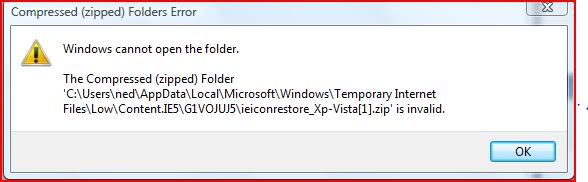
Please try again
I've had an ongoing issue with my Zip program (strangely)
And I will need to rectify it one day !!
Anyway, I downloaded the above and extracted, and it showed the reg file, so hopefully it now works for you
Otherwise you may need to use the MS link, and make your own
I've had an ongoing issue with my Zip program (strangely)
And I will need to rectify it one day !!
Anyway, I downloaded the above and extracted, and it showed the reg file, so hopefully it now works for you
Otherwise you may need to use the MS link, and make your own
Bobbye
Posts: 16,313 +36
Control Panel> Folder OptionsI do not know how to go to Folder options?
I came across this site:
"Create a Shortcut or Hotkey to Turn the Desktop Icons On or Off:
http://www.howtogeek.com/howto/wind...r-hotkey-to-turn-the-desktop-icons-on-or-off/
There are screen shots that will take you through checking the whole process and settings.
Howto create and run a .REG file.
1. Open Notepad (Click Start, Run, type notepad.exe)
2. Copy and Paste the below lines. (Ignore the Start from Here and End Here lines)
# Start from Here
Windows Registry Editor Version 5.00
[HKEY_CURRENT_USER\Software\Microsoft\Windows\CurrentVersion\Explorer\HideDesktopIcons\NewStartPanel]
"{871C5380-42A0-1069-A2EA-08002B30309D}"=dword:00000000
# End Here
3. Save the file with an extension .REG and double-click it to add the Registry value.
4. Refresh (F5) the Desktop.
1. Open Notepad (Click Start, Run, type notepad.exe)
2. Copy and Paste the below lines. (Ignore the Start from Here and End Here lines)
# Start from Here
Windows Registry Editor Version 5.00
[HKEY_CURRENT_USER\Software\Microsoft\Windows\CurrentVersion\Explorer\HideDesktopIcons\NewStartPanel]
"{871C5380-42A0-1069-A2EA-08002B30309D}"=dword:00000000
# End Here
3. Save the file with an extension .REG and double-click it to add the Registry value.
4. Refresh (F5) the Desktop.
Doh!
Just noticed that there is a space above in \HideDe sktopIcons\ (in Desktop)
This has been caused by the maximum allowed characters in a row, without a space (and is common on most forums)
Please remove that space before saving the Notepad file->All Files-> Vista.reg
Just noticed that there is a space above in \HideDe sktopIcons\ (in Desktop)
This has been caused by the maximum allowed characters in a row, without a space (and is common on most forums)
Please remove that space before saving the Notepad file->All Files-> Vista.reg
Bobbye
Posts: 16,313 +36
Ned, did you have any luck resetting shortcut(s) for IE- anywhere?
Remove the Quick Launch Toolbar:
Right click on Taskbar> Toolbars> UNCEHCK Quick Launch
Reboot he computer, then go back an replace Quick Launch.
If the shortcuts are back great. If not, try creating the again, unlocking the Taskbar, and dragging the shortcuts into QL.
Re-lock the Taskbar. Does that work>
Occasionally shortcuts will get corrupt. It's happened a few times to me and I've never known why. I restore with new shortcuts and all was fine. It's worth a try,
Remove the Quick Launch Toolbar:
Right click on Taskbar> Toolbars> UNCEHCK Quick Launch
Reboot he computer, then go back an replace Quick Launch.
If the shortcuts are back great. If not, try creating the again, unlocking the Taskbar, and dragging the shortcuts into QL.
Re-lock the Taskbar. Does that work>
Occasionally shortcuts will get corrupt. It's happened a few times to me and I've never known why. I restore with new shortcuts and all was fine. It's worth a try,
Click on File-->Save As--> All Files (this is in the save as box) --> anyname.reg
The anyname can be Anyname!
But it must be written with .reg
Then Save to Desktop (still in the Save As box, you can select the drop down box, then Desktop)
Then close Notepad, and double click on the Reg File-> Yes to merge-> Restart
By the way (BTW) you did remove that space I hope?
Also don't go without saying if it worked !! (it takes a few mins to do !!)
The anyname can be Anyname!
But it must be written with .reg
Then Save to Desktop (still in the Save As box, you can select the drop down box, then Desktop)
Then close Notepad, and double click on the Reg File-> Yes to merge-> Restart
By the way (BTW) you did remove that space I hope?
Also don't go without saying if it worked !! (it takes a few mins to do !!)
Yes that's itOnly got a warning about adding "things" to registry...
add it to registry (there may be other questions and/or popups, just Yes yes yes ok ok (whatever it asks)
Then restart, and tell me the answer (this is all just option2 !)
Similar threads

- Replies
- 11
- Views
- 258


- Replies
- 0
- Views
- 296


-
TechSpot is dedicated to computer enthusiasts and power users.
Ask a question and give support.
Join the community here, it only takes a minute.