Welcome to the TechSpot OpenBoards. Please read the FAQ if you have any questions. Login to participate.

Go Back   TechSpot OpenBoards > Hardware & Tweaking > Overclocking, Cooling and Modding

AGP Fan Air Flow Interrupted? (Diagram)

View Poll Results: How's the air flow?
Good Airflow! 1 11.11%
Bad Airflow! 3 33.33%
It doesn't matter, it's fine. 5 55.56%
Voters: 9. You may not vote on this poll

Reply
Bookmark / Share this page
Thread Tools
  #1  
Old 02-28-2004
XtR-X's Avatar
TechSpot Addict
 
Location: Orange County, CA
Member since: Jun 2003, 1,040 posts
AGP Fan Air Flow Interrupted? (Diagram)

I was wondering if my AGP Card is getting good flow and cooling towards it.

Right next to it, there is a big 120mm fan, pushing lots of air right next to the Video Card. I'm wondering if this is creating a sense of negative pressure or not enough cooling for the video card.

Please check the attatchment, then tell me what you think.

Thank you.
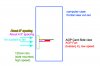
Attached Images
File Type: jpg air-flow-diagram.jpg (53.3 KB, 35 views)
Reply With Quote
  #2  
Old 02-28-2004
Vehementi's Avatar
TechSpot Paladin
 
Location: Bellevue, WA
Member since: Feb 2002, 3,197 posts
System specs
Why would that interrupt your airflow? What was another way of doing it you have in mind?

I have an 80mm fan blowing in on my video card, in the side case window. It works perfectly fine. I still retain my S-shaped airflow model, too.
Reply With Quote
You can remove this banner by registering, join the TS Community for free.
  #3  
Old 02-28-2004
XtR-X's Avatar
TechSpot Addict
 
Location: Orange County, CA
Member since: Jun 2003, 1,040 posts
It's blowing right into the side of the smaller fan, and I was thinking it may slow it down... by any chance... because it's not a mini-fan that blows very fast... it pushes a little CFM.
Reply With Quote
  #4  
Old 02-28-2004
Vehementi's Avatar
TechSpot Paladin
 
Location: Bellevue, WA
Member since: Feb 2002, 3,197 posts
System specs
No, I think you're alright. I had a 70mm Delta on my old 8500, and it was blowing air out of the fins and to the left towards the same 80mm fan I have now, and the air was colliding with each other. I think my situation was worse than yours though, and I certainly was alright

Don't worry about it, if you're worried about it try unplugging your 120mm fan and see if your temps do something strange, like go down even though you reduced the airflow in your case, then you might have a problem. If not, just stop worrying about something so nit-picky. You're being worse then I am
Reply With Quote
  #5  
Old 02-28-2004
StormBringer's Avatar
TechSpot Guru
 
Location: USA
Member since: Apr 2002, 2,871 posts
Are they affecting eachother? Run them one at a time, then together, see if there is a different in the speed, if so, you will have a problem eventually, if nothing else, the negative pressure can kill the fan that is being pulled down.
If they aren't having an affect on eachother then I wouldn't worry any further unless you are trying to locate a cause of an airlow issue. If you have reason to suspect the overall airflow is being compromised, the best thing to do is pump some smoke through the case and put a plate of glass over the side so you can see the flow, then you'll be able to see the path of airflow. This will allow you to see any places affected by turbulence, negative pressure and dead air.
Reply With Quote
  #6  
Old 02-28-2004
Vehementi's Avatar
TechSpot Paladin
 
Location: Bellevue, WA
Member since: Feb 2002, 3,197 posts
System specs
Quote:
Originally posted by StormBringer
Are they affecting eachother? Run them one at a time, then together, see if there is a different in the speed, if so, you will have a problem eventually, if nothing else, the negative pressure can kill the fan that is being pulled down.
If they aren't having an affect on eachother then I wouldn't worry any further unless you are trying to locate a cause of an airlow issue. If you have reason to suspect the overall airflow is being compromised, the best thing to do is pump some smoke through the case and put a plate of glass over the side so you can see the flow, then you'll be able to see the path of airflow. This will allow you to see any places affected by turbulence, negative pressure and dead air.
And just what type of smoke would you reccomend?
Reply With Quote
  #7  
Old 02-28-2004
StormBringer's Avatar
TechSpot Guru
 
Location: USA
Member since: Apr 2002, 2,871 posts
a cheap fog machine works great, though not really practical unless you are going to do a lot of airflow testing, or unless you happen to have one you use for a halloween prop or something.

Last edited by StormBringer; 02-28-2004 at 07:32 PM.
Reply With Quote
You can remove this banner by registering, join the TS Community for free.
  #8  
Old 02-28-2004
XtR-X's Avatar
TechSpot Addict
 
Location: Orange County, CA
Member since: Jun 2003, 1,040 posts
Quote:
Originally posted by StormBringer
a cheap fog machine works great, though not really practical unless you are going to do a lot of airflow testing, or unless you happen to have one you use for a halloween prop or something.
Is this safe... using a fog machine? I can get my hands on one but it uses liquid... and sometimes it's not always gonna be liquid when it shoots out.

Is this a safe method...

I'm going to try it since I have a window case... haha.
Reply With Quote
  #9  
Old 02-28-2004
StormBringer's Avatar
TechSpot Guru
 
Location: USA
Member since: Apr 2002, 2,871 posts
yes, its safe, I wouldn't recommend running it like this on a regular basis, but for testing its fine. You'll only have it set up long enough to see the airflow.
the one I have uses a liquid too, but it creates a gas that is the fog. You might want to check the one you are using to make sure it doesn't use something that can be corrosive, but I'm assuming since mine is safe and doesn't cause any problems, yours prolly is as well.
Also, if your machine shoots out a liquid, don't use it, mine just blows out a smoky fog of whatever kind of gas is created by the liquid in the machine.
Remember, you will only be running this long enought to get a good look at the path of airflow, not like you'll be running it for a prolonged period.
Reply With Quote
  #10  
Old 02-29-2004
acidosmosis's Avatar
TechSpot Chancellor
 
Location: Shelby, NC
Member since: Jan 2003, 1,571 posts
System specs
I think I run the same setup basically as yours. I have a 120mm bracket fan which blows onto the top of all my PCI slots and the AGP slot which also gives the chipset a bit of cooling. I've been using this setup for a pretty long time now with no problems.

The only other cooling I have is a 80mm fan on top of the SLK-900u. Then an 80mm fan sucking air in. I removed one of the fan grills though for a little more air flow (though that creates more dust obviously).
Reply With Quote
  #11  
Old 03-02-2004
lowman's Avatar
TechSpot Enthusiast
 
Location: New York
Member since: Feb 2004, 446 posts
Seems OK to me...
Reply With Quote
  #12  
Old 03-02-2004
Godataloss's Avatar
TechSpot Enthusiast
 
Location: Lorain, Ohio
Member since: Oct 2003, 501 posts
Have the fan on the case blow out instead of in- then the fans will work together.
Reply With Quote
Reply
Thread Tools

Forum Jump

Similar Topics
Thread Thread Starter Forum Replies Last Post
Tricking MB fan sensors jgm23 Overclocking, Cooling and Modding 2 01-11-2004 11:52 AM
air flow snowman Other Hardware 1 12-28-2003 09:03 PM
Fan Positioning pbspike Overclocking, Cooling and Modding 2 08-27-2003 02:20 PM
AGP differences XtR-X Audio and Video 15 07-06-2003 09:26 PM
Shims on Athlon XP Vehementi Overclocking, Cooling and Modding 42 03-05-2002 03:21 PM


All times are GMT -4. The time now is 06:33 AM.