also @ TechSpot: ATI Radeon HD 5970 Review: Dual-GPU Graphics
Welcome to the TechSpot OpenBoards. Please read the FAQ if you have any questions. Login to participate.

Go Back   TechSpot OpenBoards > Operating Systems & Software > Virus & Malware removal

Google redirect

Closed Thread
Page 1 of 2 1 2
Bookmark Thread Tools
  #1  
Old 11-24-2008
Newcomer, in training
 
Location: London, UK
Member since: Nov 2008, 17 posts
Google redirect

Hi,

Links from google are being redirected to ad sites and various other sites aren't loading at all. I haven't noticed any other symptoms.

I've run SuperAntiSpyware and HiJack this and attached logs, but I can't get MalwareBytes to run (or uninstall for that matter).

Any help with this would be hugely appreciated!

Edit: Have uninstalled MalwareBytes and reinstalled it but it still won't run
Edit: Managed to get MalwareBytes to run - had to rename the exe file for it. I ran a quickscan and I've attached the log for it. Currently running a full scan. Will attach the log when it has finished. I really hope someone can help with this.
Attached Files
File Type: log hijackthis.log (13.1 KB, 4 views)
File Type: log SUPERAntiSpyware Scan Log - 11-24-2008 - 06-30-00.log (16.7 KB, 2 views)
File Type: txt mbam-log-2008-11-24 (11-17-44).txt (1.1 KB, 3 views)

Last edited by Karina M; 11-24-2008 at 07:29 AM..
  #2  
Old 11-24-2008
Blind Dragon's Avatar
TechSpot Evangelist
 
Location: Tampa FL
Member since: Oct 2007, 4,048 posts
System specs
I see some norton entries and some mcafee entries - I would guess you uninstalled Norton and installed Mcafee? If so you need to run the Norton Removal Tool

=========================================

Disable the real time monitoring for your antivirus product - this can normally be done by right clicking it in the system tray and checking or unchecking a box.

=========================================

Combofix
  • Download Combofix to your desktop.
  • Double click combofix.exe & follow the prompts.
  • A window will open with a warning.
  • When the scan completes it will open a text window. Please attach that log back here together with a fresh HJT log.
Caution - do not touch your mouse/keyboard until the scan has completed. The scan will temporarily disable your desktop, and if interrupted may leave your desktop disabled. If this occurs, please reboot to restore the desktop. Combofix is a very powerful tool so please do NOT do anything without instruction

Combofix will automatically save the log file to C:\combofix.txt
To remove this ad, sign in. To register for a new account, click here.
  
  #3  
Old 11-24-2008
Newcomer, in training
 
Location: London, UK
Member since: Nov 2008, 17 posts
That's strange - I uninstalled Norton and used the removal tool about 18 months ago! Ah well, ran it again.

Ran combofix and HJT again, have attached logs, along with completed log for mbam full scan.

Google is no longer redirecting either. Hooray! Am I fixed?
Attached Files
File Type: txt hijackthis 2.txt (10.8 KB, 0 views)
File Type: txt mbam-log-2008-11-24 (15-31-42).txt (3.3 KB, 2 views)
File Type: txt combofix log.txt (48.1 KB, 3 views)
  #4  
Old 11-24-2008
Blind Dragon's Avatar
TechSpot Evangelist
 
Location: Tampa FL
Member since: Oct 2007, 4,048 posts
System specs
There is still quite a bit on there, run this program then we can remove the rest manually.

PrevX CSI: http://www.prevx.com/freescan.asp

afterwards - click tools and settings -> save scan results -> attach here
  #5  
Old 11-24-2008
Newcomer, in training
 
Location: London, UK
Member since: Nov 2008, 17 posts
Okay, ran PrevX CSI and it came up clean, didn't find anything. Have attached new combofix log and log for PrevX.

Edit: Have just realised you didn't ask for a new combofix log. Think my brain is scrambled!
Attached Files
File Type: txt combofix log 2.txt (24.4 KB, 1 views)
File Type: log PrevX CSI log.log (92.2 KB, 2 views)
  #6  
Old 11-24-2008
Blind Dragon's Avatar
TechSpot Evangelist
 
Location: Tampa FL
Member since: Oct 2007, 4,048 posts
System specs
Run CFScript

Open notepad and copy/paste the text in the code box below into it:
NOTE* make sure to only highlight and copy what is inside the quote box nothing out side of it.
Also ..

Pay particular attention to this :-

Make sure the word File:: is on the first line of the text file you save (no blank line above it, & no space in front of it)
Quote:
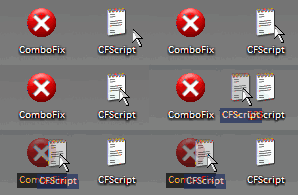
Save this as CFScript.txt

Then drag the CFScript.txt into ComboFix.exe as you see in the screenshot below.


This will start ComboFix again. After reboot, (in case it asks to reboot), post the contents of Combofix.txt in your next reply together with a fresh HJT log.

Last edited by Blind Dragon; 11-27-2008 at 01:52 PM..
  #7  
Old 11-24-2008
Newcomer, in training
 
Location: London, UK
Member since: Nov 2008, 17 posts
Ok, did as instructed and have attached both logs. Thank you for all of this help by the way - it's really appreciated.
Attached Files
File Type: txt combofix log 3.txt (23.7 KB, 2 views)
File Type: txt hijackthis 3.txt (10.8 KB, 2 views)
  #8  
Old 11-24-2008
Blind Dragon's Avatar
TechSpot Evangelist
 
Location: Tampa FL
Member since: Oct 2007, 4,048 posts
System specs
Upload a File to Virustotal
Please visit Virustotal found HERE
  • Click the Browse... button
  • Navigate to the file C:\windows\system32\iwsnec.dll
  • Click the Open button
  • Click the Send button
  • Copy and paste the results back here please.

==============================================

Run Kaspersky Online AV Scanner

In order to use it you have to use Internet Explorer.
Go to Kaspersky and click the Accept button at the end of the page.

Note for Internet Explorer 7 users: If at any time you have trouble with the accept button of the licence, click on the Zoom tool located at the right bottom of the IE window and set the zoom to 75 %. Once the license accepted, reset to 100%.
  • Read the Requirements and limitations before you click Accept.
  • Allow the ActiveX download if necessary.
  • Once the database has downloaded, click Next.
  • Click on "My Computer"
  • When the scan has completed, click Save Report As...
  • Enter a name for the file in the Filename: text box and then click the down arrow to the right of Save as type: and select text file (*.txt)
  • Click Save - by default the file will be saved to your Desktop, but you can change this if you wish.
Attach the report into your next reply
  #9  
Old 11-24-2008
Newcomer, in training
 
Location: London, UK
Member since: Nov 2008, 17 posts
I'm running the Kaspersky online scanner. I can't find the other file you specified though - it doesn't seem to be there.
To remove this ad, sign in. To register for a new account, click here.
  
  #10  
Old 11-24-2008
Blind Dragon's Avatar
TechSpot Evangelist
 
Location: Tampa FL
Member since: Oct 2007, 4,048 posts
System specs
We will get to that after kaspersky scan then. We may have to change the files attributes for you to be able to see it
  #11  
Old 11-25-2008
Newcomer, in training
 
Location: London, UK
Member since: Nov 2008, 17 posts
Finally finished the Kaspersky scan! Have attached the log.

Edit: It's back again! Same symptoms as before. Running mbam again, will post the log when it's done.
Edit: Found out that my husband was trying to download somethig he shouldn't have. That's why it's back.
Edit: Mbam log attached, PrevX also popped up with a virus warning so I've attached the log for that too.
Attached Files
File Type: txt Kaspersky log.txt (1.4 KB, 4 views)
File Type: txt mbam-log-2008-11-25 (18-03-26).txt (2.3 KB, 3 views)
File Type: log PREVX CSI 2.log (92.1 KB, 3 views)

Last edited by Karina M; 11-25-2008 at 02:10 PM..
  #12  
Old 11-25-2008
TechSpot Booster
 
Location: Illinois, USA
Member since: Feb 2007, 908 posts
System specs
Update the scanning tools: MBAM & SAS.

Please observe MBAM log file for the following: "Delete on reboot'. A restart of the computer is necessary.

Scan with MBAM twice. First scan in the quick mode. Check the log. Restart the computer. The final MBAB scan specifying complete mode so as to root-out files/folders related to the infection.

Scan with other tools that have proven value to you.

Note to B.D. - pardon my intrusion. I spotted the need to update MBAM.
  #13  
Old 11-25-2008
Blind Dragon's Avatar
TechSpot Evangelist
 
Location: Tampa FL
Member since: Oct 2007, 4,048 posts
System specs
Please run Combofix again, it is the exact same files

attach the log here

that just set us back a few steps - but once we are all done, you should be asked before the malware is installed. We will get the security to a point where if you are infected again, it will be because you said okay to something.

Last edited by Blind Dragon; 11-25-2008 at 05:57 PM..
  #14  
Old 11-25-2008
Newcomer, in training
 
Location: London, UK
Member since: Nov 2008, 17 posts
Ok, attached combofix log. Nobody will be going near the computer till we've got it sorted now!

Edit: IE Stopped working properly - Images not loading. Ran mbam and combofix again but it hasn't helped. Have attached the logs.
Attached Files
File Type: txt combofix log 4.txt (24.7 KB, 4 views)
File Type: txt combofix log 5.txt (22.6 KB, 4 views)
File Type: txt mbam-log-2008-11-27 (07-46-58).txt (6.7 KB, 4 views)

Last edited by Karina M; 11-26-2008 at 04:08 AM..
  #15  
Old 11-26-2008
Blind Dragon's Avatar
TechSpot Evangelist
 
Location: Tampa FL
Member since: Oct 2007, 4,048 posts
System specs
Please update, and run a full scan with MBAM again attaching the fresh log here.

I would also like to try another free tool from my favorite antivirus company
Avira AntiRootkit Tool

After the anti-rootkit scan please click View Report - Save that report to attach here

I would also like to see a fresh hijackthis log.

So in your reply I want:
1) MBAM log
2) Avira AR log
3) fresh hijackthis ran after
  #16  
Old 11-26-2008
Newcomer, in training
 
Location: London, UK
Member since: Nov 2008, 17 posts
Okay, all 3 scans run. I didn't take any action after the rootkit scan except to save the log.
Attached Files
File Type: txt hijackthis 4.txt (10.4 KB, 2 views)
File Type: txt mbam-log-2008-11-27 (22-16-29).txt (1.4 KB, 3 views)
File Type: log avirarkd.log (7.2 KB, 4 views)
  #17  
Old 11-26-2008
Blind Dragon's Avatar
TechSpot Evangelist
 
Location: Tampa FL
Member since: Oct 2007, 4,048 posts
System specs
Good work. It's adding known bad sites to your trusted zone. I suggest you install a free tool called Spyware Blaster when we get you clean to prevent this in the future. You may also consider using an alternative browser to IE, as most malware from surfing is targeted towards the most popular browser.

==============================================

Remove bad HijackThis entries
  • Run HijackThis
  • Click on the System Scan Only button
  • Put a check beside all of the items listed below (if present):

    O15 - Trusted Zone: *.antimalwareguard.com
    O15 - Trusted Zone: *.antispyexpert.com
    O15 - Trusted Zone: *.avsystemcare.com
    O15 - Trusted Zone: *.gomyhit.com
    O15 - Trusted Zone: *.onerateld.com
    O15 - Trusted Zone: *.safetydownload.com
    O15 - Trusted Zone: *.spyguardpro.com
    O15 - Trusted Zone: *.storageguardsoft.com
    O15 - Trusted Zone: *.trustedantivirus.com
    O15 - Trusted Zone: *.virusremover2008.com
    O15 - Trusted Zone: *.virusschlacht.com
  • Close all open windows and browsers/email, etc...
  • Click on the "Fix Checked" button
  • When completed, close the application.

=======================================================

Right click on this link DelO15Domains.inf and choose Save As. Save it to your desktop. Right click on that file and choose Install. It will run immediately (you won't be able to see anything happen). You may delete it afterwards. NOTE: This script will delete any sites you may have added to the Trusted Sites. So if you want them back, you have to add them back to the Trusted Sites again.

========================================================

Was Avira Root Kit Detection able to fix the 3 registry entries it found? It doesn't look like it, but was curious.

=========================================================
Open Notepad (from accessories)

copy (Ctrl +C) and paste (Ctrl +V) the text in the code box below into Notepad.

Code:
@echo off
ATTRIB -R c:\windows\system32\iwsnec.dll
ATTRIB -R c:\windows\system32\kbmccn.dll
del unhidedll.cmd and exit

Save it to your desktop as File name: unhidedll.cmd
Save as type: All Files

Once done, double click service.cmd to run it. A command window will open briefly, then close. This is quite normal.

==========================================================

Upload a File to Virustotal
Please visit Virustotal found HERE
  • Click the Browse... button
  • Navigate to the file c:\windows\system32\iwsnec.dll
  • Click the Open button
  • Click the Send button
  • Copy and paste the results back here please.

Do the same for c:\windows\system32\kbmccn.dll

===========================================================

After you do this, we have just a few more things to remove, then can clean up and secure the system.
  #18  
Old 11-26-2008
Newcomer, in training
 
Location: London, UK
Member since: Nov 2008, 17 posts
Did everything except upload files to virustotal - they still aren't showing up, sorry.

I don't think ARKD did clean anything up. If it did, it certainly didn't tell me about it!
  #19  
Old 11-26-2008
Blind Dragon's Avatar
TechSpot Evangelist
 
Location: Tampa FL
Member since: Oct 2007, 4,048 posts
System specs
When you scan with the ARKD, after the scan does it give you the option to quarantine, in the left panel?
  #20  
Old 11-26-2008
Newcomer, in training
 
Location: London, UK
Member since: Nov 2008, 17 posts
Just rescanning now. If it does, I assume I should quarantine them?
Closed Thread
Page 1 of 2 1 2

Tip: Download Advanced SystemCare 3 Freeware - 1 Click A Day to Clean, Repair, Protect & Optimize your PC.

Thread Tools


Similar Topics
Topic Category Replies Last Post
Google Redirect Virus & Malware removal 1 10-17-2008 04:27 AM
Google Redirect Virus? Virus & Malware removal 1 09-20-2008 07:08 PM
Google search redirect to nothing IP 85.255.120.226 Virus & Malware removal 28 04-27-2008 03:17 AM
Google redirect Virus & Malware removal 10 05-15-2007 06:14 PM
Google redirect Virus & Malware removal 17 03-01-2007 10:06 PM


All times are GMT -4. The time now is 06:47 PM.