also @ TechSpot: HP TouchPad running Android 4.0 Ice Cream Sandwich
Welcome to the TechSpot OpenBoards. Please read the FAQ if you have any questions. Sign up or Login to participate.

Go Back   TechSpot OpenBoards > Hardware > Overclocking, Cooling and Modding

Download Now:

Comp Heat Problems

Thread Tools Search this Thread
  #1  
Old 03-18-2004
Newcomer, in training
 
Member since: Mar 2004, 2 posts
Comp Heat Problems

I'm posting here because I see some good input from you guys. I currently have a 400W system with a Dragon Soyo Platinum MB, and a Athlon XP 2200+ 1.8ghz.

I've been running applications, and on a cold day outside, it runs at about 47C idling. On a warmer day, it gets up to about 53C. If I don't put a big fan next to it (and i'm talkin household fan) it can get all the way up to almost 60C. When I run applications, it gets even hotter. Next thing you know, I can't play games because it shuts off or restarts. I know it's the temp problems, because when its cold outside I don't tend to have ANY probs.

I have a heatsink/fan combo. It's a Volcano, I'm not sure what model. People have told me it's real good, but so far I'm not having much luck.

What do you reccomend? I don't want to go out and get a new case/mb/processor/cooling setup because the comp I have now suits me pretty well. But I think it's gettin too hot, and I'm having trouble playing some of my favorite games (FFXI most importantly).

Help!

`Knight
  #2  
Old 03-18-2004
Didou's Avatar
Bowtie extraordinair!
 
Location: Brussels, Belgium
Member since: Feb 2002, 5,895 posts
System specs
Is the CPU fan the only fan in all the system & can that fan be manually adjusted ? Maybe you've set the fan on the lowest RPM setting & it's insufficient to cool the CPU effectively.

Are there any emplacements inside the case for extra fans ? Preferably in the front & the back of the case.

PS. Welcome to TechSpot. Hope you enjoy your stay.
  #3  
Old 03-18-2004
Masque's Avatar
TechSpot Chancellor
 
Location: Auburn, MI, USA
Member since: Dec 2003, 1,212 posts
System specs
Didou's right. The best HSF (heat-sink/fan) combination is useless without adequate ventilation. You can pull the heat from the chip but if it's all going to stagnate in the case you've done no good at all. Make sure you area surrounding the case itself is clear of debris and obstacles and keep in mind when positioning case fans that it's a general rule of thumb to intake at the lower front and exhaust from the upper rear or just the rear.

Good luck!
  #4  
Old 03-18-2004
lalaji's Avatar
TechSpot Enthusiast
 
Location: NY
Member since: Aug 2003, 155 posts
I definitely agree with Didou and Masque. I have a Athlon XP 2500+ and it used to idle anywhere from 43-50*C depending on the temp of the room. This was with the stock Heatsink/fan combo and only 1 case fan. I recently dropped in 3 more fans, 2 intakes in front, 2 exhausts in back and now it idles around 35-40*C and rarely hits 50 with a full load. Case fans can make all the difference. If you can, add more to your case. It will make a huge improvement.
  #5  
Old 03-19-2004
Newcomer, in training
 
Member since: Mar 2004, 2 posts
Oh man... this isn't good, at least I don't think it is.

I took off the tower side, and began fooling around with the fan. That volcano fan, I don't know, either it's the fact that I am extremely unexperienced with taking those fans off or what, but it was pretty difficult.

When I finally got the Heatsink/Fan off, I saw my processor. Thermal paste ALL over it....when I built my computer, my friend did that and assured me he knew what he was doing. And from what I've been reading here, it's only suppose to go on the core (and from what I've seen the paste on the core was half-assed).

So now I'm in a bind, I'm not sure what I should do. I'm gettin the feeling that it's real messed up now. Over the past couple days, it's been shutting off at will, freezing/ locking up randomly, and been getting hotter in temperature.

Should I try cleaning it? It's been this way for over a year now... and has endured probably a lot of crap, wondering if I should just save up and invest in a new CPU and tower that can hold plenty of fans.

If so - whats a good tower that I can put MULTIPLE fans in (I have one case fan on the side window, thats it right now - whats a good one with 3-5 places?)

Help!

`Knight
  #6  
Old 03-24-2004
Mictlantecuhtli's Avatar
TechSpot Special Forces
 
Location: Finland
Member since: Feb 2002, 4,886 posts
System specs
If it has worked over a year like that, save a couple of days, I wouldn't blame the thermal paste / heatsink.

One thing that could cause it though is that the heatsink and its fan are full of dust.

[SIZE=1]Owner of a dual-cpu machine with two fans - one for CPUs, one in the PSU[/SIZE]
  #7  
Old 03-24-2004
Rick's Avatar
TechSpot Special Forces
 
Location: Los Angeles, CA
Member since: Feb 2002, 5,600 posts
If your system hasn't been dusted in awhile, high-performance heatsinks can be seriously hampered by dust.

This didn't used to be a problem because the heat fins were further apart, but manufacturers have started cramming the fins very close together and it is very easy for the fins to become clogged with dust.

This in itself could shave off about 10* C from your temperature.
  #8  
Old 03-24-2004
Newcomer, in training
 
Member since: Sep 2003, 20 posts
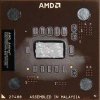
I'll have to agree with what everyone has said so far. Clean your CPU of the paste a reapply it correctly. (see photo: credit to Didou) Clean all dust from your heatsink fan and the heatsink itself, and finally look into extra case cooling wether it be an intake in the front, exhaust in the upper rear, or both. Also be sure to ground yourself well while working inside the case. If you don't have a strap, just touch the metal part of the case.
Attached Images
File Type: jpg thermal paste.jpg (8.5 KB, 18 views)
Closed Thread

Similar Topics
Topic Replies Forum
Heat problems 4 Overclocking, Cooling and Modding
HEAT HEAT HEAT Gateway heat woes 3 Mobile Computing
Heat spreader problems? 7 Overclocking, Cooling and Modding
i think my comp is over heat!!1 9 Overclocking, Cooling and Modding
Heat problems or power supply? 3 Overclocking, Cooling and Modding

Thread Tools Search this Thread
Search this Thread:

Advanced Search
All times are GMT -4. The time now is 12:15 AM.