also @ TechSpot: HDD supply to recover by Q3 2012, prices to remain high
Welcome to the TechSpot OpenBoards. Please read the FAQ if you have any questions. Sign up or Login to participate.

Go Back   TechSpot OpenBoards > Hardware > Mobile Computing

Download Now:

Dell e1505 dead, won't start up

Page 1 of 2 1 2
Thread Tools Search this Thread
  #1  
Old 01-12-2009
TechSpot Member
 
Member since: Jan 2009, 50 posts
Dell e1505 dead, won't start up

I have a family member's Dell e1505 that is over 2 yrs old (purchased 8/06) and out of warranty. No problems with it up until now. They went to turn it on yesterday and couldn't get anything.

Source of power doesn't matter (battery, wall, or both). I hit the power button, power light comes on for 3-4 seconds and then goes off. Nothing else happens. There are not sounds whatsoever coming from the laptop.

I removed the hard drive, and memory just to see if it would change anything and it didn't. I only was able to run across one thread online where someone had the exact same problem. Wasn't much help though as they didn't offer any advice on finding the problem.

I'm suspecting the worse...dead mobo. Any ideas? Anyway to test this? I'm fully capable of working on the laptop, but don't really know what to do. I can't get to a boot menu or anything so I'm lost.

Any help would be appreciated

PS. Haven't had a lot of luck with computers lately it seems like. First my power supply in my desktop went out a couple weeks ago. Last week, my hard drive in MY e1505 finally went out (after months of clicking), and now this problem. This one is by far the worst...I'm hoping it's not the mobo.
  #2  
Old 01-12-2009
Banned
 
Member since: Dec 2008, 333 posts
System specs
Change the adapter before diagnosing motherboard.
  #3  
Old 01-12-2009
TechSpot Member
 
Member since: Jan 2009, 50 posts
Quote:
Originally Posted by adweston View Post
Change the adapter before diagnosing motherboard.
You mean the AC adapter? I did do that, as well as trying different batteries. All resulted in the same outcome. Please let me know if you mean something else.

Thanks for the response.
  #4  
Old 01-12-2009
Ex-TechSpotter
 
Member since: Dec 2007, 18,354 posts
Have a look here: Tutorial: No POST (Power On Self Test)

Depending upon how far you want to go, you may need to dismantle the laptop or "Benchtest" the mobo
  #5  
Old 01-12-2009
AlbertLionheart's Avatar
TechSpot Chancellor
 
Location: UKkers
Member since: Jun 2007, 2,706 posts
System specs
Try connecting the video output to a monitor to see if perhaps there is output there. I have a similar Dell laptop in my wksps with a similar problem and it has a failed screen - and is not worth repairing.
You say there are no noises - not even from the hard drive? Are there any of the lights on?
  #6  
Old 01-12-2009
Banned
 
Member since: Dec 2008, 333 posts
System specs
Quote:
Originally Posted by jstluise View Post
You mean the AC adapter? I did do that, as well as trying different batteries. All resulted in the same outcome. Please let me know if you mean something else.

Thanks for the response.
If you did all that, combined with your other efforts in the OP, then chances are very good it's the motherboard. Probably a faulty component on it.
  #7  
Old 01-12-2009
AlbertLionheart's Avatar
TechSpot Chancellor
 
Location: UKkers
Member since: Jun 2007, 2,706 posts
System specs
Sounds like it needs a specialist repair = if you need one and you are in the UK I know someone.
PM me for contact details?
  #8  
Old 01-12-2009
Ex-TechSpotter
 
Member since: Dec 2007, 18,354 posts
Quote:
Originally Posted by AlbertLionheart View Post
Sounds like it needs a specialist repair = if you need one and you are in the UK I know someone.
PM me for contact details?
Well not quite yet anyway
Still a few tests to run above

By the way, any good tech shop can look at it, if he wants to pay
Better to stick with the free support, until motherboard confirmed dead, as yet not

edit:

oh he can't PM for quite a few posts yet anyway
  #9  
Old 01-12-2009
TechSpot Member
 
Member since: Jan 2009, 50 posts
Thanks for all the responses.

AlbertLionheart - I guess i could hook up an external monitor, but I have a feeling nothing will happen. Yes, no sounds at all come from the machine...no fans, hard drive, etc. The only light that comes on is the power light like I said, but only for a few seconds.

Also, the power light comes on and does the same thing if i push the "media direct" button...if that means anything. I don't even know what the button does as i haven't used it at all...i think it's for the media center on XP.

I was able to get a hold of the individual who had the same problem. He told me he found a replacement mobo (reman) on ebay. Installed it and it works fine now. I guess that is a route to go, but then if I'm spending $200 for a replacement mobo, I might as well think about buying another laptop with better specs for a few hundred more.

kimsland - I will check out that thread. Thanks for posting it.

Kimsland,

I would like to reset the CMOS on my laptop to see if that solves my problem, however, I can't seem to find anything on the web about the jumper or anything for my computer. Is resetting the CMOS the same thing as resetting the BIOS password (this seemed to come up a lot)?

Any info would be great...even just a good place to look for the instructions. I have the service manual for my laptop also, but couldn't find anything in that about resetting the CMOS.

Thank you

Last edited by kimsland; 03-24-2009 at 01:47 AM.. Reason: merged recent posts
  #10  
Old 01-12-2009
Banned
 
Member since: Dec 2008, 333 posts
System specs
You have to take the laptop apart and pull the battery from the motherboard. It's not a quick thing to do, especially on a Dell.
  #11  
Old 01-12-2009
TechSpot Member
 
Member since: Jan 2009, 50 posts
Is it the 3V CR2032 coin cell battery that is on the motherboard? Or is there another battery that must be removed. If it is that 3V coin cell, it is pretty simple to remove on my dell...it's located just under the keyboard.

I really don't have any other choice...I have to do it. So if it isn't a quick thing to do it doesn't matter to me.
  #12  
Old 01-12-2009
Ex-TechSpotter
 
Member since: Dec 2007, 18,354 posts
That's it

Remove all power, and remove the "coin" battery
Hold down the ON button for 30 secs

You still may need to benchtest the mobo though
  #13  
Old 01-12-2009
TechSpot Member
 
Member since: Jan 2009, 50 posts
Quote:
Originally Posted by kimsland View Post
That's it

Remove all power, and remove the "coin" battery
Hold down the ON button for 30 secs

You still may need to benchtest the mobo though
Alright tried that and nada. So, benchtesting the mobo huh? What's involved in doing that? Removing the mobo completely then what? Would I be capable of doing it myself...I mean are there special diagnostic tools that are used?
  #14  
Old 03-21-2009
TechSpot Member
 
Member since: Jan 2009, 50 posts
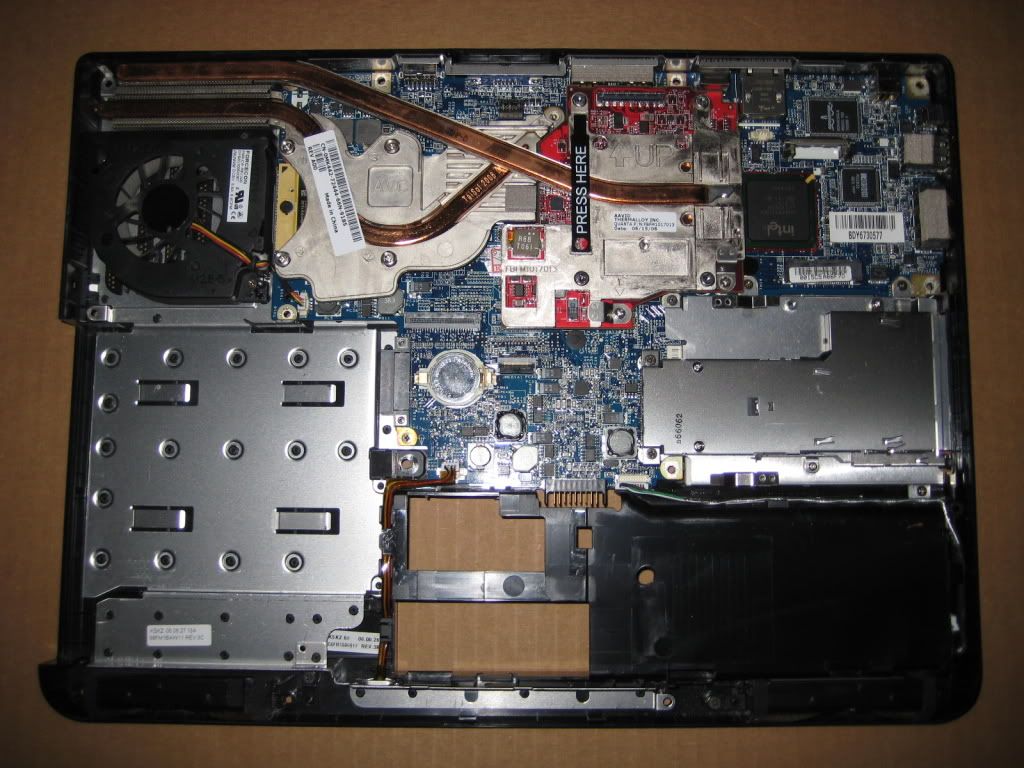
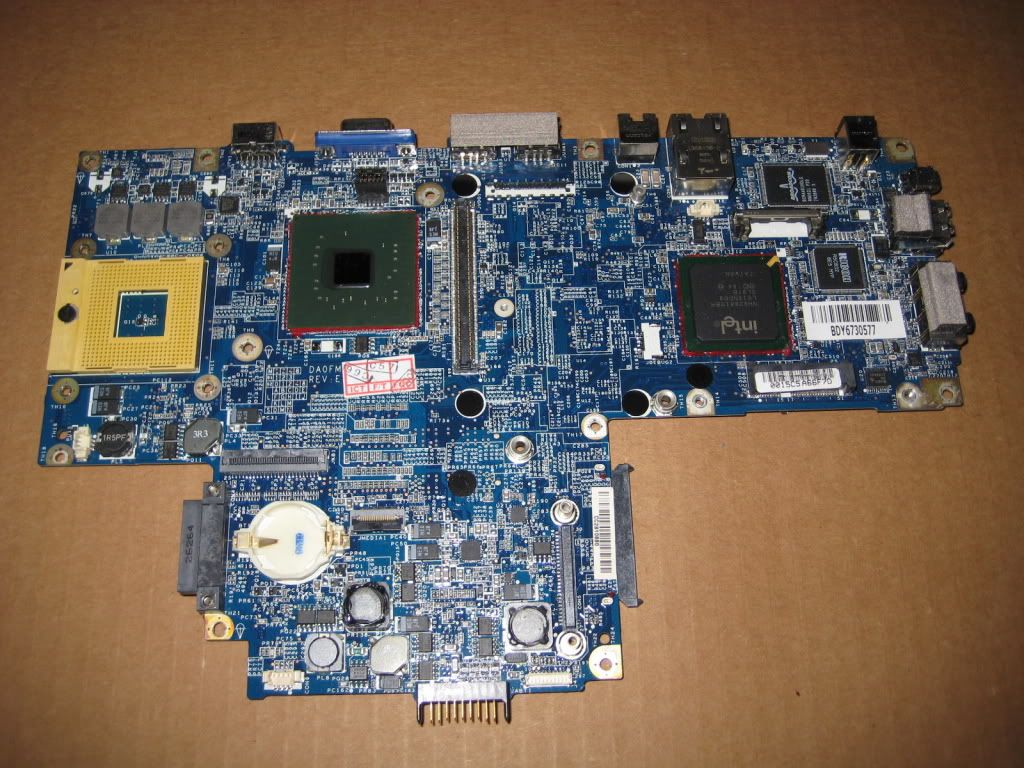
Okay I am back on this project now. Today I dismantled the computer and removed the motherboard completely:


The mobo is as bare as it can get. I plugged in some power to it and installed the power switch on it so I can see if anything happens. Nothing. The power light comes on like before and then goes off after a few seconds. I plugged the fan in also to verify nothing happened.

What else can can I do?...since I really don't know what is involved in "bench testing". Any tips or what I should look for, I would really appreciate it. If I can confidently say the mobo is dead, then I will order a new one.

Thanks all
  #15  
Old 03-21-2009
Ex-TechSpotter
 
Member since: Dec 2007, 18,354 posts
The "BenchTest guide: http://www.techsupportforum.com/1010960-post1.html
Was in the No Post Guide (supplied earlier) http://www.techspot.com/vb/topic113137.html
Which also included, "Reseating your CPU" http://www.arcticsilver.com/arctic_s...structions.htm

But you have done most of it already. You need to check for any obvious signs of damage, and confirm all connections are ok. Actually you could get a can of Circuit Board Cleaner and spray all over it (CPU and Ram out first) Then allow to dry (recommended 1 to 2 days) Then test again
  #16  
Old 03-22-2009
Newcomer, in training
 
Member since: Mar 2009, 4 posts
could just be teeny solder joint gone bad. get a heat gun and reflow that solder concentrate on hottest parts of mobo and cover plastics with foil. i fixed a e1705 that way when it had bad graphcis card, also worked on an xbox 360 i had
  #17  
Old 03-22-2009
Newcomer, in training
 
Member since: Mar 2009, 1 posts
Hi jstluise & All experts,
I Have hit exactly the same problem today on my E1505. I rarely used for 3 months.
When i switch on the power, i see Scroll Lokc, Num Lock and Caps lock lights glow for 3 seconds and then all lights turn off. Doesnt even show the BIOS screen, no fan sound.
Changed RAM, harddisk, power adapter, battery but nothing helped.

jstluise, I think we are seeing same problem. Did you find any recovery for your problem. Plz share your experience.
I'm already scared of bad mobo :-(. I was never a happy customer of DELL.. it should be renamed to HELL

Thanks,
Crony
  #18  
Old 03-22-2009
TechSpot Member
 
Member since: Jan 2009, 50 posts
Crony, we may have the same problem, but the only light that comes on for me is the power light... no num, caps, or scroll lock. So it may be something else. I suggest you go through what Kimsland already recommended for me. Follow that no POST link that was supplied.

I still have to go through the benchtest guide since I got the motherboard out of the computer yesterday. It isn't my laptop so I'm not in a huge hurry to get it fixed lol. If it comes down to it I was finding replacement (reman) motherboards on ebay (using the Dell part #) for around $150.

Spanket, could you elaborate on your technique? Could you see the bad solder joint and fixed it that way? How did you know what to heat up? If I do the benchtest and absolutely know its bad, I may try what you recommend before ordering a new mobo.

Thanks
  #19  
Old 03-24-2009
Newcomer, in training
 
Member since: Mar 2009, 4 posts
no you cant see the bad solder joint but you dont need to cause a heat gun you can heat up a large area. look on youtube for xbox 360 heat gun fixes you will see how its done.
also with your dell can u hold down Fn key while turning it on to do the diagnostics where the LEDS lights up? that could narrow down your problem..
  #20  
Old 03-24-2009
AlbertLionheart's Avatar
TechSpot Chancellor
 
Location: UKkers
Member since: Jun 2007, 2,706 posts
System specs
You may have to have the board "re-flowed" - as this uses a bit of kit that costs about $30K you might like to review the finances.
What this does is heat up the various chips on the board that do not have visible solder joints (like the two in the above image with red lines around them) so that the solder connections underneath reflow. This is a skilled business!
If you need someone in the UK I can provide contact details but it is not cheap!
Closed Thread
Page 1 of 2 1 2

Similar Topics
Topic Replies Forum
Dell e1505 won't turn on 0 Mobile Computing
Dell E1505 Won't Boot 2 Mobile Computing
Speeding up my Dell e1505 1 Mobile Computing
Dell E1505 3 Other Hardware
looking at dell E1505 2 Mobile Computing

Thread Tools Search this Thread
Search this Thread:

Advanced Search
All times are GMT -4. The time now is 03:16 PM.