Welcome to the TechSpot OpenBoards. Please read the FAQ if you have any questions. Sign up or Login to participate.
|
|||||||
Begin your free trial now
Pay-as-you-go options starting at $10/user/month
Artifacts at default GPU clocks! (With AtiTool Scan)
|
|
Thread Tools | Search this Thread |
|
#1
|
|||
|
|||
|
Artifacts at default GPU clocks! (With AtiTool Scan)
I'm trying to overl**** my Geforce 8600gts and
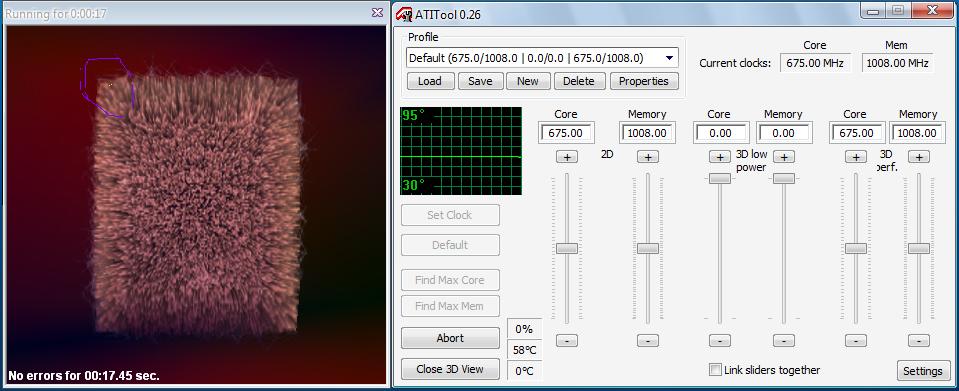
I used AtiTool newest version. I scanned on default for artifacts and I see some.. I circled it in the picture, top left corner... What is wrong with my graphic card!? ![]() ps. This is completely something else but... how do I upload photos? I always upload it sumwhere else, then right click, property for URL.... Is there a way to directly upload from my computer to here? |
|
#2
|
||||
|
||||
|
You must have misspelled "clock"
Your video card is an Nvidia card. Does Nvidia have a video overclocking tool. This tool might be in the Nvidia Control panel. It takes more than a software program to overclock. Your power supply, your motherboard's bios and configuration and the amount of memory can affect overclocking. What are your complete system specs?Pictures files have to be limited to a certain size/type. At the bottom of the posting window you will see the options |
|
#3
|
||||
|
||||
|
to add to Tmajics thoughts Ati tool artifact test includes the heat up phase, in addition to what Tmajic said they can be caused by vram that is getting to hot. many times overheated vram will show up as green lines or blocks, or one of the graphics layers to turn an odd color, like a purple sky or such.
|
|
#4
|
|||
|
|||
|
Ohh I didn't know that so much things are influencing it....;;
I just thought I could use AtiTool ~_~; I've tried nTunes also... But I think this AtiTool is better.. Anyways heres my specs;; ![]() ![]() ![]() ![]() ![]() And about this graphic cards "I thought this was overclocked" clocks, I ran the AtiTool over night and had no error so I think it is pretty stable...; I have 2 Samsung DDR2 1GB PC2-6400U CL6 in dual channel. I bought it not in Canada,or USA but in Korea =) (lol) My graphic card is from some korean company as well as my PSU which is 430w. 20+4 pins, V2.2, +12V = 30A, +5 = 28A, +3 = 28A Some infos.. lol;; I don't really understand what these are @_@ |
![]() |
| Similar Topics | ||||
| Topic | Replies | Forum | ||
OC with ATItool
|
1 | Overclocking, Cooling and Modding | ||
default.pif causes AVG scan to hang
|
11 | Windows OS | ||
ATITool can't recognize my X1800GTO
|
2 | Audio and Video | ||
concerns about x600 pro overclocking with ATItool
|
11 | Audio and Video | ||
| Thread Tools | Search this Thread |
|
|
All times are GMT -4. The time now is 08:40 AM.


Your video card is an Nvidia card. Does Nvidia have a video overclocking tool. This tool might be in the Nvidia Control panel. It takes more than a software program to overclock. Your power supply, your motherboard's bios and configuration and the amount of memory can affect overclocking. What are your complete system specs?


OC with ATItool