also @ TechSpot: Apple working with suppliers on 8-inch iPad, says WSJ
Welcome to the TechSpot OpenBoards. Please read the FAQ if you have any questions. Sign up or Login to participate.

Go Back   TechSpot OpenBoards > Hardware > Overclocking, Cooling and Modding

Collaborate in the cloud with Office, Exchange, SharePoint, and Lync

PC Overheat

Thread Tools Search this Thread
  #1  
Old 04-12-2004
Newcomer, in training
 
Location: uk
Member since: Jan 2004, 15 posts
PC Overheat

Hi all,

I replaced my P4 standard CPU fan with a quieter one, its called a cooler master. Only thing is my PC now overheats, i had got a program called Inter Active Monitor and i can view the RPM of the fan, when it gets hot it does not speed up to cool the system down it there a way of sorting this out?

Thanks

Paul
  #2  
Old 04-12-2004
Rick's Avatar
TechSpot Special Forces
 
Location: Los Angeles, CA
Member since: Feb 2002, 5,596 posts
Usually, more quiet means fewer RPMs. Your fan may be maxed out at whatever speed you are seeing.

Its very difficult to find the right cominbation of cooling and silence.
  #3  
Old 04-12-2004
Newcomer, in training
 
Location: uk
Member since: Jan 2004, 15 posts
Would it help if i fixed a fan to the casing on the back to suck the air out or fix one to the front to blow the air in?
  #4  
Old 04-12-2004
Arris's Avatar
TechSpot Evangelist
 
Location: Aberdeen, Scotland, UK
Member since: Feb 2002, 4,083 posts
System specs
What is your current air flow setup.

Most systems benefit most from an intake fan (usually found mounted at the bottom front of the case) and an exhaust fan (usually found mounted at the top back of the case). These don't have to be high rpm fans, Having a flow of air through the case without excessively tangled cables can result in lower running temperatures without having to get a high rpm fan on the CPU heatsink and suffering noise levels comparable to a jet engine
  #5  
Old 04-12-2004
Arris's Avatar
TechSpot Evangelist
 
Location: Aberdeen, Scotland, UK
Member since: Feb 2002, 4,083 posts
System specs
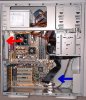
See the basic patronising image attached for details
(aren't my PaintShop Pro arrows lovely)

Basically cold air in from the front and as hot air rises the fan at the back pulls it out. So the system should have a flow of cool air passing through it. Often the PSU unit has fans as well which assist further in exhausting the hot air.

If your PSU has 2 fans (one on the bottom to pull air into it as well as one at the back of it) then the best addition would be to have a bottom front case fan attached. An 80mm one at around 2000rpm-2500rpm should be enough.
Attached Images
File Type: jpg airflow.jpg (95.5 KB, 17 views)

Last edited by Arris; 04-12-2004 at 08:14 AM..
Closed Thread

Similar Topics
Topic Replies Forum
CPU overheat and pc restart 16 Processors and Motherboards
Alienware overheat? need help 1 Audio and Video
overheat/shutting down 2 Overclocking, Cooling and Modding
WoW Overheat Cpu? 1 Gaming
Videocard overheat? 3 Audio and Video

Thread Tools Search this Thread
Search this Thread:

Advanced Search
All times are GMT -4. The time now is 09:38 PM.