also @ TechSpot: Weekend Open Forum: Have you upgraded to Windows 7 yet?
Welcome to the TechSpot OpenBoards. Please read the FAQ if you have any questions. Login to participate.

Go Back   TechSpot OpenBoards > Operating Systems & Software > The Alternative OS

How should I dual boot vista and linux with 2 hard drives?

Closed Thread
Bookmark Thread Tools
  #1  
Old 03-23-2009
¼ of a hotdog's Avatar
TechSpot Member
 
Location: north idaho where else oh in the U.S.
Member since: May 2008, 160 posts
System specs
How should I dual boot vista and linux with 2 hard drives?

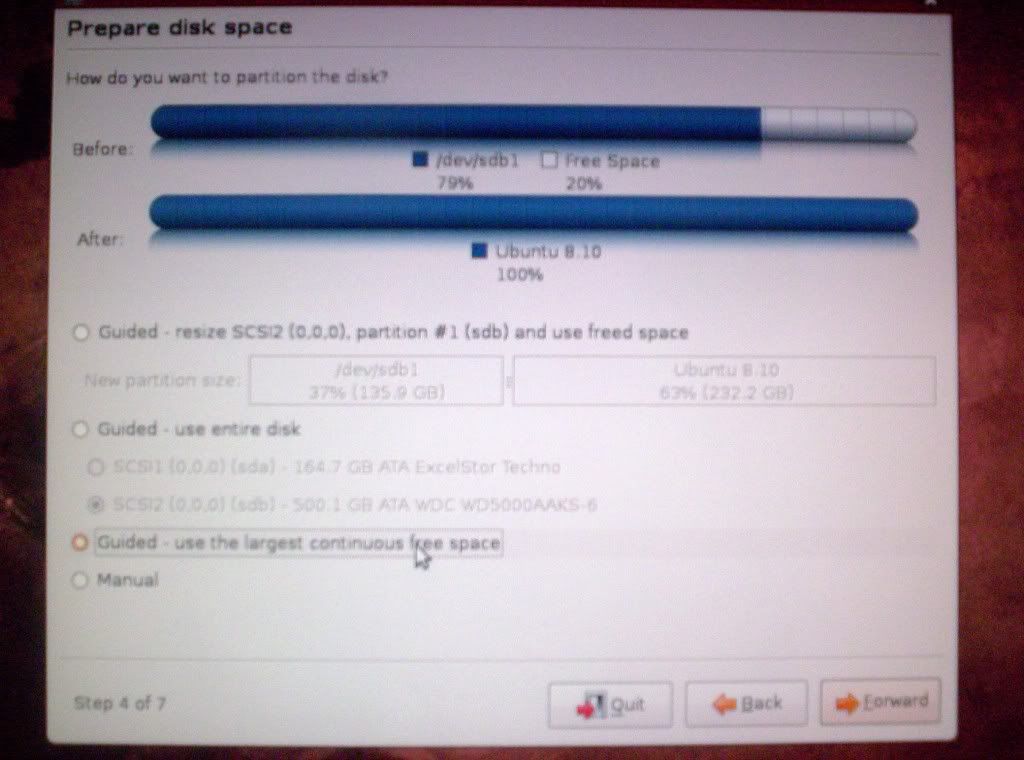
I have been curios about Ubuntu and I want to dual boot it with vista but I noticed on their site they say it’s faster to place it on one of the low numbered cylinders. I want to know if it would make a noticeable difference if I placed it on my other hard drive. I have vista on a 160 GB hard drive and I have a 500 GB hard drive with about 170 GB of random junk on it. Is there any way I can put Ubuntu on the part of the 500 GB hard drive that is fastest without messing up the data that’s already on it or having to place all of that data on a separate hard drive? If it matters I have 64 bit vista and I plan to use 64 bit Ubuntu.

Thanks for any help!
  #2  
Old 03-23-2009
Matthew's Avatar
TechSpot Elite
 
Location: New York
Member since: Feb 2008, 2,865 posts
System specs
Probably won't notice a dramatic performance difference, if at all, and yes you can put it on the 500GB drive without messing your current data up. Create a new partition at the start of the drive in your desired capacity (50GB-100GB is more than sufficient), and the rest of your data should remain untouched as long as you install Linux on the new partition.
To remove this ad, sign in. To register for a new account, click here.
  
  #3  
Old 03-24-2009
¼ of a hotdog's Avatar
TechSpot Member
 
Location: north idaho where else oh in the U.S.
Member since: May 2008, 160 posts
System specs
Is this correct or would it replace all of the data? I did make a new 100gb partition in disk management. Sorry for the bad quality.


Click to Maximize
  #4  
Old 04-10-2009
BorisandBailey's Avatar
TechSpot Member
 
Location: The hot, stinkin' desert of Arizona
Member since: Jun 2008, 200 posts
System specs
That looks correct to me, but you know what I'd do first? Back up the data you presently have on the disk before you do anything else!
  #5  
Old 04-10-2009
Matthew's Avatar
TechSpot Elite
 
Location: New York
Member since: Feb 2008, 2,865 posts
System specs
And to think you were only two weeks late, BorisandBailey.
  #6  
Old 04-10-2009
BorisandBailey's Avatar
TechSpot Member
 
Location: The hot, stinkin' desert of Arizona
Member since: Jun 2008, 200 posts
System specs
Well, you know, Zeno, there's always the chance there are those who may put things on the shelf for awhile and are a little slow to getting around to do things.
  #7  
Old 04-10-2009
Matthew's Avatar
TechSpot Elite
 
Location: New York
Member since: Feb 2008, 2,865 posts
System specs
The screenshot of him showing what's already been done suggests otherwise, but sure.
  #8  
Old 04-10-2009
¼ of a hotdog's Avatar
TechSpot Member
 
Location: north idaho where else oh in the U.S.
Member since: May 2008, 160 posts
System specs
Well actually I still have not installed it because I don't have a way to backup 178 GB. I tried compression and it would take at least 17hours to compress it and I'm not even sure if it would get much smaller. I guess I will just wait until I can get a nether hard drive.
  #9  
Old 04-11-2009
captaincranky's Avatar
TechSpot Evangelist
 
Member since: Oct 2006, 3,484 posts
Wing and a Prayer Installs.......

My personal experience with installing Linux on a HDD with data has been this; you don't need a large partition for the Linux install, 5 to 10 GB should be plenty. The Linux partition manager seems to have enough sense not to overwrite any data.
With the ratio of free space to used space you have, it probably would be all right to just install Linux on the drive in question.

If you just want to play with Linux, then try using the WUBI installer. It installs from Windows as a program would. You always can make a hard install from a Linux disc later if you decide you actually want to keep it.

What worked for me on a HDD of 140GB of capacity with 40GB used was first defragging the drive, then just installing Ubuntu from it's own disc. I created a 40GB partition, which was way too big, but still, no data was lost. I backed everything up, which wound up being a huge waste of time.

Linux reads NTFS files, and you can always create folders on a drive for any files that are only accessable from Linux. It's actually harder to get rid of Linux, than it is to make the install on a drive with data.

However, absolutely, positively defrag the drive FIRST!
To remove this ad, sign in. To register for a new account, click here.
  
Closed Thread

Tip: Download Advanced SystemCare 3 Freeware - 1 Click A Day to Clean, Repair, Protect & Optimize your PC.

Tags
2 hard drive, linix, ubuntu, vista dual boot
Thread Tools


Similar Topics
Topic Category Replies Last Post
Dual boot Vista and Linux The Alternative OS 15 2 Weeks Ago 03:22 AM
Dual boot Vista and Linux Guides and Tutorials 7 06-02-2009 01:06 AM
Dual Hard Drives - Shortcut to safely remove dual boot Windows OS 1 10-19-2008 09:50 PM
Dual Boot - Dual Hard Drives - XP on both Windows OS 6 06-24-2007 12:49 PM
How to Dual Boot between 2 Hard Drives Windows OS 4 09-19-2006 10:21 PM


All times are GMT -4. The time now is 07:54 AM.