
Captain828
Posts: 301 +32
Quick sytem info:
OS: Vista Ultimate w/ SP1, 32bits
GPU: ASUS EN9600GT
Drivers used: 182.50, 185.68
The very weird issue I'm getting:
Every time I try a 3D app, my screen goes black and the dreaded "nvidia drivers have stopped working, but have recovered." message appears. This is where I end the faulty 3D app by terminating it's process.
This affects absolutely all my games! CS:Source, GRiD, GTAIV etc. Always the same thing. In fact I get this extra error in GTAIV:
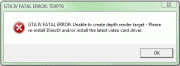
And sometimes, I get an error referring to the buffer in CS:Source and GRiD.
Another weird thing is that I can sometimes make a few frags in CS, but sometimes the issue pops-up right when I join a game.
This issue seems to affect only 3D games, since I can play StarCraft without issues.
What I've done:
- totally uninstalled the nVidia drivers, rebooting into safe mode, uninstalling the default MS drivers and then erasing all info about nVidia (using Driver Sweeper and Driver Cleaner Pro), then installing new drivers
- used both the new 185.68 drivers and the latest WHQL 182.50 drivers
- updated to latest March '09 DirectX
- checked with DXdiag: it shows no issues
More important info:
I "upgraded" to this 9600GT since my old ASUS 8800GTS-320 died on me a couple of days ago. So there was another GPU in my system before this, but I had no driver issues.
Also, I got the 9600GT as a temporary replacement (since I would have to wait ~1 week for ASUS service) and the card was brand new, thus haven't been tested.
I'm thinking of testing this GPU in a fresh Vista environment in order to exclude a possible faulty GPU... though I doubt this is the issue.
If anyone can give me any extra advice, or knows what the issue is, please help me!
Thanks in advance!
OS: Vista Ultimate w/ SP1, 32bits
GPU: ASUS EN9600GT
Drivers used: 182.50, 185.68
The very weird issue I'm getting:
Every time I try a 3D app, my screen goes black and the dreaded "nvidia drivers have stopped working, but have recovered." message appears. This is where I end the faulty 3D app by terminating it's process.
This affects absolutely all my games! CS:Source, GRiD, GTAIV etc. Always the same thing. In fact I get this extra error in GTAIV:
And sometimes, I get an error referring to the buffer in CS:Source and GRiD.
Another weird thing is that I can sometimes make a few frags in CS, but sometimes the issue pops-up right when I join a game.
This issue seems to affect only 3D games, since I can play StarCraft without issues.
What I've done:
- totally uninstalled the nVidia drivers, rebooting into safe mode, uninstalling the default MS drivers and then erasing all info about nVidia (using Driver Sweeper and Driver Cleaner Pro), then installing new drivers
- used both the new 185.68 drivers and the latest WHQL 182.50 drivers
- updated to latest March '09 DirectX
- checked with DXdiag: it shows no issues
More important info:
I "upgraded" to this 9600GT since my old ASUS 8800GTS-320 died on me a couple of days ago. So there was another GPU in my system before this, but I had no driver issues.
Also, I got the 9600GT as a temporary replacement (since I would have to wait ~1 week for ASUS service) and the card was brand new, thus haven't been tested.
I'm thinking of testing this GPU in a fresh Vista environment in order to exclude a possible faulty GPU... though I doubt this is the issue.
If anyone can give me any extra advice, or knows what the issue is, please help me!
Thanks in advance!
![hellokitty[hk]](/community/data/avatars/m/169/169488.jpg?1355088591)
 perhaps I should have edited my old post.


