Welcome to the TechSpot OpenBoards. Please read the FAQ if you have any questions. Login to participate.
|
|||||||
Redirects
![]() |
|
|
|
Thread Tools |
|
#1
|
|||
|
|||
|
Redirects
I completed the 8 steps. It really helped, but still get redirected frequently and many pages simply will not load. I'm using IE7, until I can disable the proxy server in Firefox 3.0.
One deviation from the 8 steps is that I used McAfee, which comes from my ISP, rather than Avira. I couldn't find a log for McAfee. I hope someone has time to look. |
|
#2
|
||||
|
||||
|
Concerned about a few things, did you set these?
Code:
R1 - HKCU\Software\Microsoft\Windows\CurrentVersion\Internet Settings,ProxyServer = http=localhost:7171 R1 - HKCU\Software\Microsoft\Windows\CurrentVersion\Internet Settings,ProxyOverride = *.local;<local> Code:
O4 - HKUS\S-1-5-18\..\Run: [SYS32DLL] SYS32DLL (User 'SYSTEM') O4 - HKUS\S-1-5-18\..\Run: [] C:\WINDOWS\TEMP\yyrgppw7lx.exe (User 'SYSTEM') O4 - HKUS\S-1-5-18\..\Run: [nzdflkioezncfiunfindiuchiuenfcdc] C:\WINDOWS\TEMP\yyrgppw7lx.exe (User 'SYSTEM') O4 - HKUS\.DEFAULT\..\Run: [SYS32DLL] SYS32DLL (User 'Default user')Unknown Code:
Killall:: Snapshot:: File:: C:\windows\system32\SYS32DLL.exe C:\WINDOWS\TEMP\yyrgppw7lx.exe ![]() You should also go into Hijackthis and tick the first two things I mentioned (if you didn't set them), and click fix after doing combofix. After doing those things, please restart, and upload the ComboFix and a new HijackThis log taken after the restart. Last edited by ChrisDown; 06-28-2009 at 01:21 PM.. Reason: unsure on that particular fh |
|
|
|
#3
|
||||
|
||||
|
kel, I'm going to intervene here and make this suggestion. First, you can't run CFFix without running Combofix first, so please skip that for now.
Open HijackThis to do system scan only Put a check by each of the following entries,- complete all entries before clicking in Fix Checked: R1 - HKCU\Software\Microsoft\Internet Explorer\Main,Search Bar = http://ie.redirect.hp.com/svs/rdr?TY...ario&pf=laptop R0 - HKCU\Software\Microsoft\Internet Explorer\Main,Local Page = R1 - HKCU\Software\Microsoft\Windows\CurrentVersion\Internet Settings,ProxyServer = http=localhost:7171 R1 - HKCU\Software\Microsoft\Windows\CurrentVersion\Internet Settings,ProxyOverride = *.local;<local> O4 - HKLM\..\Run: [MsmqIntCert] regsvr32 /s mqrt.dll O4 - HKCU\..\Run: [SUPERAntiSpyware] C:\Program Files\SUPERAntiSpyware\SUPERAntiSpyware.exe O4 - HKUS\S-1-5-18\..\Run: [SYS32DLL] SYS32DLL (User 'SYSTEM') O4 - HKUS\S-1-5-18\..\Run: [] C:\WINDOWS\TEMP\yyrgppw7lx.exe (User 'SYSTEM') O4 - HKUS\S-1-5-18\..\Run: [nzdflkioezncfiunfindiuchiuenfcdc] C:\WINDOWS\TEMP\yyrgppw7lx.exe (User 'SYSTEM') O4 - HKUS\.DEFAULT\..\Run: [SYS32DLL] SYS32DLL (User 'Default user') O4 - S-1-5-18 Startup: Vongo Tray.lnk = C:\Program Files\Vongo\Tray.exe (User 'SYSTEM') O4 - .DEFAULT Startup: Vongo Tray.lnk = C:\Program Files\Vongo\Tray.exe (User 'Default user') O4 - .DEFAULT User Startup: Vongo Tray.lnk = C:\Program Files\Vongo\Tray.exe (User 'Default user') O4 - Startup: Vongo Tray.lnk = C:\Program Files\Vongo\Tray.exe O14 - IERESET.INF: START_PAGE_URL=http://ie.redirect.hp.com/svs/rdr?TYPE=3&tp=iehome&locale=EN_US&c=64&bd=presario&pf=laptop O16 - DPF: {E06E2E99-0AA1-11D4-ABA6-0060082AA75C} - O18 - Filter hijack: text/html - {b13c0e3d-95e0-4f9f-afe7-e30c28f7b125} - (no file) O23 - Service: Vongo Service - Starz Entertainment Group LLC - C:\Program Files\Vongo\VongoService.exe Now close all Windows except for HijackThis and click on Fix Checked Boot into Safe Mode[*] Restart your computer and start pressing the F8 key on your keyboard.[*] Select the Safe Mode option when the Windows Advanced Options menu appears, and then press ENTER. Start> Run> type in msconfig> enter> Selective Startup> Startup tab> UNCHECK all of the following if present:[*]ALL Vongo entries[*]Superantispyware Start> Run> type in services.msc> right click on Vongo Service> Properties> Change the Startup Type to Disabled> Stop the Service. Control Panel> Add/Remove Programs> UNINSTALL Vongo Right click on start> Explore> Programs> right click on Vongo> delete the entire folder. Reboot into Normal Mode: NOTE: Ignore the nag message and close it after checking 'don't show this message again.' Stay in Selective Startup. Run Eset NOD32 Online AntiVirushere: http://www.eset.eu/online-scanner Note: You will need to use Internet Explorer for this scan.
(Logs to include: Eset Nod32, HijackThis) FYI: SYSDLL is added by the W32/Aimdes-C WORM to insure automatically running, it will exploit AOL instant messenger and harvest email addresses. Tray.exe (Vongo) is a homepage hijacker re-directing browsers to adult content websites |
|
#4
|
|||
|
|||
|
Trouble with ComboFix
I removed the files you recommended, but had trouble with combofix. The error message said "unable to create C:windows\erdnt\Hiv-backup" A popup mentioned C:Qoobox\BackEnv and C:windows\erdnt\Hiv-backup already existed.
I did attach the new hijackthis log. |
|
#5
|
|||
|
|||
|
Bobbye
Didn't see you message before I entered my last one. Thanks for your suggestions. It may take me a while to get to them, because I've got to run, but I will get to them soon and appreciate the assistance.
|
|
#6
|
|||
|
|||
|
Thanks for the advice Bobbye. I spent many unsuccessful hours trying to remove Vongo. (I can't beleive HP would put such crap on a computer!) The problems on my machine affected both IE 7 and Firefox 3.0, however, I downloaded Google Chrome, and it works just fine. I'm not done with Vongo, but its a little less urgent.
|
|
#7
|
||||
|
||||
|
This board has had problems the past few days. I've had to delete several duplicates of replies I made and I haven't gotten feedback on some when reply was made- yours is one of those.
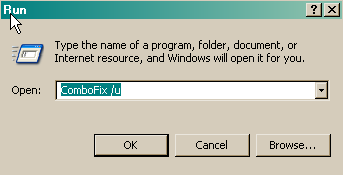
You had McAfee running in your first HijackThis log- it's gone now except of an Active X entry for an online scan. Please get an antivirus program on the system before doing anything else. Here are two recommendations: Avira Free Avast Free Choose either one. Once installed, run a full system scan. Save the log. Attach it with your next reply. We need to get Combofix working- it looks like you might already have run it, so I want you to uninstall it: To uninstall ComboFix.exe
Please download ComboFix HERE:
Do not click on the ComoboFix window, as it may cause it to stall. CF disconnects your machine from the internet. The connection is automatically restored before CF completes its run. If CF runs into difficulty and terminates prematurely, the connection can be manually restored by restarting your machine. In the HijackThis log, some of the entries I had marked were removed, others weren't: Please reopen HijackThis to 'do system scan only.' Check each of the following if present. NOTE: do not click on 'Fix Checked" until all of the following have been checked: C:\Program Files\Vongo\VongoService.exe C:\Program Files\Vongo\Tray.exe O4 - Global Startup: Adobe Reader Speed Launch.lnk = C:\Program Files\Adobe\Acrobat 7.0\Reader\reader_sl.exe O18 - Filter hijack: text/html - {b13c0e3d-95e0-4f9f-afe7-e30c28f7b125} - (no file) O23 - Service: Java Quick Starter (JavaQuickStarterService) - Sun Microsystems, Inc. - C:\Program Files\Java\jre6\bin\jqs.exe O23 - Service: Vongo Service - Starz Entertainment Group LLC - C:\Program Files\Vongo\VongoService.exe Close all Windows except HijackThis and click on 'Fix Checked.' Boot into Safe Mode[*] Restart your computer and start pressing the F8 key on your keyboard.[*] Select the Safe Mode option when the Windows Advanced Options menu appears, and then press ENTER. Start> Run> type in msconfig> enter> Selective Startup Startup tab> Uncheck the following: All HP entries (including Digital Imaging) All Vongo entries AllAdobe reader entries (reader_sl.exe AllJava entries Start> Run> type in services.msc> Right click on each of the following Services> Properties> reset Startup type as follows: Java Quick Starter (jqs)> Change to Disabled Vongo Service> change to Disabled HP Port Resolver (HPR ) change to Disabled hpqwmiex.exe> Manual Startup LSSrvc.exe> Manual HPZipm12.exe> Manual Control Panel> Add/Remove Programs> Uninstall Vongo Control Panel> Java> Update tab> UNCHECK 'check automatically for updates'> Apply> answer Yes when asked to confirm. Right click on Start> Explore> Programs> scroll to the Vongo folder> right click> Delete Empty the Recycle Bin Reboot into Normal Mode: NOTE: ignore the hag message and close after checking 'don't show this message again.' stay in Selective Startup Please attach logs for AV scan, Combofix report and new HJ scan log. |
![]() |
| Thread Tools | |
|
|
| Similar Topics | ||||
| Topic | Category | Replies | Last Post | |
| Redirects, etc. | Virus and Malware Removal | 1 | 11-16-2008 12:53 PM | |
| Redirects and Framer.S | Virus and Malware Removal | 6 | 11-14-2008 07:12 PM | |
| Redirects?? | Virus and Malware Removal | 6 | 01-28-2008 02:32 PM | |
| IE redirects | Virus and Malware Removal | 1 | 01-11-2007 01:42 AM | |
| vB Redirects removed | Site Feedback and Suggestions | 4 | 06-16-2003 01:40 PM | |
All times are GMT -4. The time now is 05:54 AM.