Welcome to the TechSpot OpenBoards. Please read the FAQ if you have any questions. Login to participate.
|
|||||||
Liquid cooling
![]() |
|
|
|
Thread Tools |
|
#1
|
|||
|
|||
|
Liquid cooling
Hi, I have a Nvidia GeForce 9500GS that came with my computer and is currently fan operated, temperatures idle at 64 degrees celcius and gaming (left 4 dead) go to a max of 90 degrees celcius which causes me some problems and alot of concern. I'd like to switch to liquid cooling.
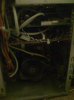
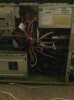
My case is pretty cramped so i was thinking of taking out my tv card and modem out to make space in it. Even with that done, the wires in there still cramp it up alot. Another solution would be to have liquid cooling outside the case which i'd like as a last resort. What liquid cooling product would you recommend for my card? Thank you. EDIT: I posted 2 pictures of the inside of my case. The second (red) card is my graphics card and the one on top is the card for my tv options (unused). |
|
#2
|
||||
|
||||
|
I'd high recommend not getting into watercooling for a 9500gs, If you want lower temps get an aftermarket air cooler, thermalrites are the best imo and by reviews, reducing temps up to 15C on most cards on average.
I recently watercooled my last computer, it cost me 1k usd to do it in the way I want it, if I were to upgrade I dont see myself going back to air. its a bad habit, dont commit to it, especially for a low/mid end card. |
|
|
|
#3
|
|||
|
|||
|
Quote:
What thermalite fan do you recommend for my card/case (pics) Would you recommend http://www.newegg.com/Product/Produc...82E16835118037 I hear good things about this brand. Last edited by Micael; 06-29-2009 at 01:53 AM.. |
|
#4
|
||||
|
||||
|
9500 gs,
buy a new card and keep side pannel off untill you get enough money for a better venilated case. ![]() |
|
#5
|
||||
|
||||
|
Liquid cooling is optimal, but its done 99% of the time on higher end cards. IMO its a waste in your case. I'd recommend going with an aftermarket air cooler and put away with the hasel.
|
|
#6
|
|||
|
|||
|
This card is playing the games i want with the settings i want...the only problem is the heating and i'll admit, my case is a little too small. But the card is fine as it is. I have not had any problems playing any high end game with high settings so far..
supersmashbrada, what do you think about the fan i mentioned? |
|
#7
|
||||
|
||||
|
That's a great fan actually. I'd say get that before you go with water, post back and let me know what you think after you install it.
|
|
#8
|
|||
|
|||
|
Slight problem. My mother board only has 1 3pin connector...so to connect my new fan, i had to disconnect the computer fan which is in the back of the case. to make up for this i left the case open so any hot air just escapes freely...any hints on how to get another 3pin connector for my motherboard? or is there such a wire that has 3 way connection...like...1 wire connects to mother board and then 2 wires which have 3 pins so i can connect both my fans? my gpu is currently at 52 idle and steadily rising, it was at 45 when i first booted the computer and it keeps steadily rising.
|
|
#9
|
||||
|
||||
|
9500gs = low end card.
water cooling = high end water cooling is also unnecessary 100% of the time, water cooling is for high end over clocking, thats why all standard cards come with a FAN and nothing more. Use a program of your choice to turn up your fanspeed, and if you can, get those wires out of the way. My personal favorite by far is EVGA precision. Quote:
|
|
|
|
#10
|
||||
|
||||
|
+1 HK, im using evga precision for a msi 295, it works great.
|
|
#11
|
|||
|
|||
|
Quote:
Now, to the heat i was measuring up. It seems that my fan controller was messed up. if i touched it to get it onto higher/lower settings, the fan on the card would turn off completely. I'd have to turn off the computer and turn it on. What i did was not connect the controller at all and use default fan speeds. It now idles on a steady 45 and i'll post load temps once my cable comes in. |
|
#12
|
|||
|
|||
|
WOW, i downloaded evga precision...temperatures the same as speedfan. i thought i'd try to set my fan settings higher and what happens...blue screen. i had to system restore it. Not too pleased lol.
|
|
#13
|
||||
|
||||
|
Dude if you wanna do it, and you can do it, without breaking your stuff, do it.
|
![]() |
| Thread Tools | |
|
|
| Similar Topics | ||||
| Topic | Category | Replies | Last Post | |
| Liquid Cooling Help | Overclocking, Cooling and Modding | 5 | 01-24-2009 12:11 PM | |
| liquid cooling | Overclocking, Cooling and Modding | 19 | 05-20-2007 02:03 AM | |
| liquid cooling with ice and liquid? | Overclocking, Cooling and Modding | 4 | 03-26-2007 10:46 PM | |
| Liquid Cooling | Overclocking, Cooling and Modding | 21 | 10-24-2006 01:09 PM | |
| liquid cooling | Overclocking, Cooling and Modding | 34 | 04-04-2005 08:01 PM | |
All times are GMT -4. The time now is 09:56 AM.