also @ TechSpot: Nortel's internal network "owned" by hackers for almost a decade
Welcome to the TechSpot OpenBoards. Please read the FAQ if you have any questions. Sign up or Login to participate.

Go Back   TechSpot OpenBoards > TechSpot Editorial and Site Feedback > TechSpot News and Comments

Begin your free trial now Pay-as-you-go options starting at $10/user/month

MSI adds real-time overclocking to P55 boards

Thread Tools Search this Thread
  #1  
Old 07-09-2009
Jos Jos is offline
TechSpot Elite
 
Location: Ecuador
Member since: Apr 2006, 904 posts
System specs
MSI adds real-time overclocking to P55 boards

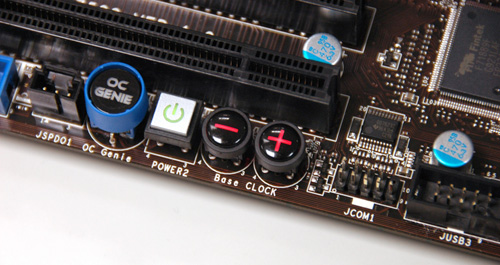
While most people will just dive into their system’s BIOS or use a Windows-based tool to squeeze that extra bit of performance on-the-fly, MSI wants to make things easier for overclockers. With its upcoming P55 motherboards for Lynnfield and Clarkdale processors, the company will be introducing the new Direct OC feature, which will see three overclocking buttons located directly on the printed-circuit board.
Read the whole story
__________________
Jose Vilches
Managing Editor
  #2  
Old 07-09-2009
HaMsTeYr's Avatar
TechSpot Enthusiast
 
Location: Melbourne, Australia
Member since: Apr 2008, 376 posts
System specs
TBH i have my case closed at all times, and i'd prefer dwelling into the bios to do and overclock than to go into my case and press some buttons which would probably be blocked by cables, GFX or just too small to fit my hand in... >.>

gimmick but not practical IMHO.
  #3  
Old 07-09-2009
TechSpot Chancellor
 
Location: Seattle
Member since: Feb 2009, 1,549 posts
System specs
Exactly what hamsteyr said. Who wants to fool around with cracking their case to do the same thing via BIOS in seconds?
  #4  
Old 07-09-2009
Mycologist's Avatar
Newcomer, in training
 
Location: Uk,
Member since: May 2008, 23 posts
System specs
Going to have to third this motion, to be honest I've never quite understood the idea behind 'on the fly' overclocking; overclocking is generally a long process where you slowly increase the clocks, test the stability, increase the voltage, test the stability; not just whack it up a notch when you 'need a bit more juice'. If only it worked like that! :D
  #5  
Old 07-10-2009
skitzo_zac's Avatar
TechSpot Chancellor
 
Location: Australia
Member since: Aug 2005, 455 posts
System specs
I agree with the other comments on this. As an overclocking 'noob' (I have only overclocked once before, my C2D e6300 from 1.86 to 2.45GHz), even I don't trust these sort of OC methadologies. I would much prefer to keep my case closed at all times and have my CPU running at a pre-determined (via BIOS tweaking) overclocked frequency that I know is stable for extended periods of time.
  #6  
Old 07-10-2009
Guest
 
i tweaked my gaming rig for some time, but once i got it squeezed, thats it...no more OC.
Closed Thread

Similar Topics
Topic Replies Forum
News around the web: The Real-Time Revolution 0 TechSpot News and Comments
Gigabyte adds USB 3.0, 6Gbps SATA to AMD boards 48 TechSpot News and Comments
Real time screen capture 11 Software Apps
Real-time Disk I/O? 5 Windows OS
Real-time TV in your cell phone 0 General Discussion

Thread Tools Search this Thread
Search this Thread:

Advanced Search
All times are GMT -4. The time now is 12:42 PM.