also @ TechSpot: Windows logo to get a Metro makeover in Windows 8
Welcome to the TechSpot OpenBoards. Please read the FAQ if you have any questions. Sign up or Login to participate.

Go Back   TechSpot OpenBoards > Hardware > Mobile Computing

Download Now:

Inspiron 1501 won't charge

Thread Tools Search this Thread
  #1  
Old 08-29-2009
Newcomer, in training
 
Member since: Aug 2009, 5 posts
Inspiron 1501 won't charge

Hello!
I have a 2 year old Dell Inspiron laptop 1501 and my dog chewed the end off my old wall charger (the part that connects to my computer) He basically only chewed the white end piece off the end of the charger! But it still wouldn't work. I just got a new replacement charger from an online company and it will not work! It doesn't seem like it doesn't seat in the charging port correctly. I have inspected the charging port and blew it out with compressed air, but still no luck! The charger is a model: ST-C-075-19500334CT ; replacement ac adapter.
Any ideas on what might be wrong or what I need to try? I was trying to keep from paying the high dollar money to dell for a replacement charger.
Help me Please!
Trey
  #2  
Old 08-29-2009
strategic's Avatar
TechSpot Paladin
 
Member since: Dec 2008, 1,274 posts
Welcome to Techspot!
Do you know anyone with a dell laptop that you can try the charger with?
Was it plugged in when your dog did this?
  #3  
Old 08-29-2009
Newcomer, in training
 
Member since: Aug 2009, 5 posts
Dog is Fine! LOL

No the laptop charger was not plugged in.....it was hanging out of mt laptop bag (I think!) And he chewed on the end of the charger. And no, I know nowbody with a laptop/charger like mine that I can try. Thanks,
Trey
  #4  
Old 08-29-2009
TechSpot Evangelist
 
Location: Four Corners, US
Member since: Dec 2006, 10,623 posts
Buy one on eBay... less than $15. I got my last one for 11.94 with free shipping.

But your problem could be unrelated... bad socket, loose socket platform on systemboard.
  #5  
Old 08-29-2009
Newcomer, in training
 
Member since: Aug 2009, 5 posts
I already purchased a new charger on ebay for about that amount and it came in today.....however the charger still wont charge! Nothing! I have blown out the charging port and it looks clean...however the charger doesn't seem to seat properly. Any ideas? Help Please!
Trey
  #6  
Old 08-29-2009
strategic's Avatar
TechSpot Paladin
 
Member since: Dec 2008, 1,274 posts
Please post the specs on all the chargers, I'm concerned about the one not seating properly.
Do the ends look the same? You shouldn't have a problem with the laptop if it wasn't dropped, especially if it wasn't plugged in. That is why I'm concerned about you using the wrong adapter.
Compare the specs, post pictures of both ends if you can.
  #7  
Old 08-29-2009
TechSpot Evangelist
 
Location: Four Corners, US
Member since: Dec 2006, 10,623 posts
See if you can remove the keyboard, and all those little doors and lids... get as much of the system apart as you can and look closely at the power socket on the motherboard. On very man of those Dell 1501's, the socket (which is a separate part about 1 1/8 X 1 3/8) has be come loosened from the system board and requires a cold or flat solder technique to get it properly connected again. On others, it is just a bent connector or a very dirty one.
But it is way too common for the 1501 Inspirons to go bad because of inability to connect to a power source.
Check also the gold colored pins that connect the battery to the system. When they are badly bent, sometimes there is a short circuit that must be remedied.
  #8  
Old 08-29-2009
Newcomer, in training
 
Member since: Aug 2009, 5 posts
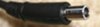
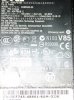
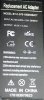
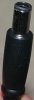
pics of the dell charger & the one I purchased.

The first two pics are of 1) the cell charging end connector that the puppy ate and the next one is of the charger itself. The next two are of the end of my new charger and its main power adapter. Let me know if you need any more info.
Thanks!
Trey
Attached Images
File Type: jpg IMG_6041.JPG (7.7 KB, 11 views)
File Type: jpg IMG_6042.JPG (48.2 KB, 10 views)
File Type: jpg IMG_6045.JPG (36.9 KB, 12 views)
File Type: jpg IMG_6046.JPG (7.8 KB, 11 views)
  #9  
Old 08-29-2009
TechSpot Evangelist
 
Location: Four Corners, US
Member since: Dec 2006, 10,623 posts
Fun pics when it is not your machine.
It is at least possible that you have two problems... Going to test some things on the same 1501, and will get back later.
  #10  
Old 08-30-2009
Newcomer, in training
 
Member since: Aug 2009, 5 posts
Any ideas?

Hey, Just wondering if you came up with any ideas yet? NO RUSH! Just anxious to know ANYTHING.Thanks for everything!
Trey
  #11  
Old 08-31-2009
TechSpot Evangelist
 
Location: Four Corners, US
Member since: Dec 2006, 10,623 posts
Get somebody to test the electronic connection on your power socket. You will likely need a soldering job. If you get somebody good, they can do it for perhaps $20, but the going rate in comptuer shops is $150.
Closed Thread

Similar Topics
Topic Replies Forum
Dell Inspiron 1501 no charge, no boot, no nothing 1 Mobile Computing
Dell Inspiron 1501 won't charge 2 Mobile Computing
Help with Dell Inspiron 1501 1 Mobile Computing
Help inspiron 1501! 1 Introduce yourself
Dell inspiron 1501 1 Introduce yourself

Thread Tools Search this Thread
Search this Thread:

Advanced Search
All times are GMT -4. The time now is 01:21 AM.