also @ TechSpot: Windows logo to get a Metro makeover in Windows 8
Welcome to the TechSpot OpenBoards. Please read the FAQ if you have any questions. Sign up or Login to participate.

Go Back   TechSpot OpenBoards > Tech Support > Windows BSOD, Freezing, Restarting Help

Collaborate in the cloud with Office, Exchange, SharePoint, and Lync

Random blue screens

Thread Tools Search this Thread
  #1  
Old 09-03-2009
Newcomer, in training
 
Member since: Sep 2009, 8 posts
Random blue screens

Hi guys. I.ve been having a problem with my pc bsod ing a few times over the last few months. I run memtest over night with no errors. Reseated all components. Reinstalled windows. Updated all drivers and windows, and still no luck. I’ve no idea how to read a minidump. Would anyone here who knows how to understand them have a look? I’ve attached the mini dumps.
Thank you
Attached Files
File Type: zip minidumps.zip (188.7 KB, 2 views)
  #2  
Old 09-03-2009
Route44's Avatar
TechSpot Ambassador
 
Location: The Socialist Republic of New Jersey
Member since: Sep 2006, 11,804 posts
I read 5 of your most recent dumps. Some only list OS drivers as the cause but OS drivers are often too general to be of much help.

One error is 0x7E: SYSTEM_THREAD_EXCEPTION_NOT_HANDLED
A system thread generated an exception which the error handler did not catch. There are numerous individual causes for this problem, including hardware incompatibility, a faulty device driver or system service, or some software issues.

* The driver it particularly cited as the issue is the Nvidia display driver nv_disp.dll


The error that stands out at this juncture is the 0x24 and that one specifically cited memory corruption as the cause. Bad RAM has been known to pass memtest. Have you tried testing one stick at a time? Also, check your BIOS and see if the motherboard set your RAM voltage at the manufacturer's specs.
  #3  
Old 09-03-2009
Newcomer, in training
 
Member since: Sep 2009, 8 posts
My ram is 4 x 1 GB sticks of Corsair TwinX XMS2, DDR2 PC2-6400. I have set the timing manually to the manufacturers recommended timing of 4-4-4-12 with the voltage manually set to 2.1. I will run memtest on each stick one at a time.
In the past I have had bsod’s that say nv_disp.dll. But apart from updating the driver i.ve no idea what else to try. My video card it an nvidia 8800gt running on an nforce 750i motherboard.
Thank you for replying
  #4  
Old 09-03-2009
Newcomer, in training
 
Member since: Sep 2009, 8 posts
is there a way to test video ram?
  #5  
Old 09-03-2009
B00kWyrm's Avatar
TechSpot Paladin
 
Location: Maryland
Member since: Mar 2009, 1,452 posts
Re: Video Ram - you can use this tool here.
http://majorgeeks.com/Video_Memory_S...st__d5896.html

You had a couple of 0x3b errors too... "This error has been linked to excessive paged pool usage and may occur due to user-mode graphics drivers crossing over and passing bad data to the kernel code."

Wondering if this is occurring during gaming?
If so, there may be information in the forums of your game site.
  #6  
Old 09-03-2009
Newcomer, in training
 
Member since: Sep 2009, 8 posts
it does happen in gaming but it can be on any game.
i,ll run the video memory test and post back.
  #7  
Old 09-03-2009
Route44's Avatar
TechSpot Ambassador
 
Location: The Socialist Republic of New Jersey
Member since: Sep 2006, 11,804 posts
Also, when you updated your drivers did you use a driver cleaner to remove the old before installing the new? If not try the following:

1. Download Driver Cleaner Pro or Driver Sweeper (both have free versions) to your desktop screen and install.

2. Download the latest diver(s) for your video card but don't install them.

3. Uninstall your video card drivers and reboot your PC into Safe Mode. Run Driver Cleaner Pro or Driver Sweeper. If it doesn't find any video card drivers that is quite okay.

4. Reboot and install new video card drivers.
  #8  
Old 09-03-2009
Newcomer, in training
 
Member since: Sep 2009, 8 posts
i alway use driver cleaner first in save mode. i.m getting errors using Video Memory stress Test v1.7. i.ll reset my bios to default and try it again tommorrow.
  #9  
Old 09-07-2009
Newcomer, in training
 
Member since: Sep 2009, 8 posts
Done long memtest on my ram 1 stick at a time, with Video Memory stress Test v1.7 running in windows i get Error at [1F54F300]: must be 00FF, but found 0000 (bits: 0000000011111111) about 100000 times. but if i burn the iso and run it in dos i get no errors.
i., still getting bsod's. with the last one i checked event viewer and under system i got The computer has rebooted from a bugcheck. The bugcheck was: 0x000000d1 (0x0000000003ac3005, 0x0000000000000002, 0x0000000000000001, 0x000000007d6239af). A dump was saved in: C:\WINDOWS\Minidump\Mini090609-01.dmp.
  #10  
Old 09-07-2009
B00kWyrm's Avatar
TechSpot Paladin
 
Location: Maryland
Member since: Mar 2009, 1,452 posts
To Use Event Viewer
Start -> Run -> type in "eventvwr" {omit the quotes!}

Do this on each
  • the System and
  • the Applications logs:
  1. Click to open the log>
  2. Look for the Error>
  3. Right click on the Error> Properties>
  4. Click on Copy button, top right, below the down arrow >
  5. Paste here (Ctrl V)
  6. NOTES
    • You can ignore Warnings and Information Events.
    • If you have a recurring Error with same ID#, same Source and same Description, only one copy is needed.
    • You don't need to include the lines of code in the Data box below the Description Box, if any.
      Just include the description box.
    • Please do not copy the entire Event log.
    • Errors are time coded. Find the error that corresponds to the time of your problem (BSOD etc)
  #11  
Old 09-07-2009
Route44's Avatar
TechSpot Ambassador
 
Location: The Socialist Republic of New Jersey
Member since: Sep 2006, 11,804 posts
To add to what B00kWyrm wrote please attach your 0xD1 minidump. Since it is singular you don't need to zip it.
  #12  
Old 09-07-2009
Newcomer, in training
 
Member since: Sep 2009, 8 posts
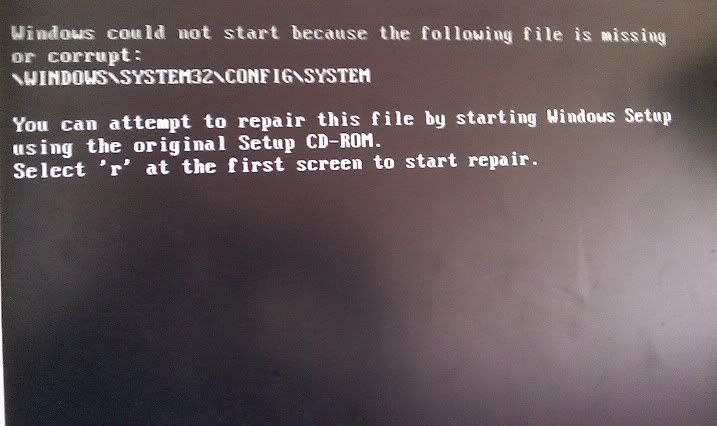
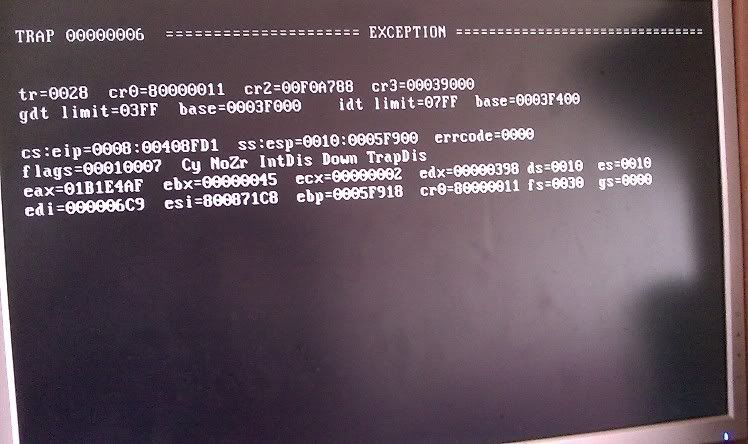
i,ve just had 2 bsod. i,ve atached the minidumps. after each bsod i could not start windows. i got 2 messages which are


i had to turn my pc off by the mains and leave it for 10 mins.
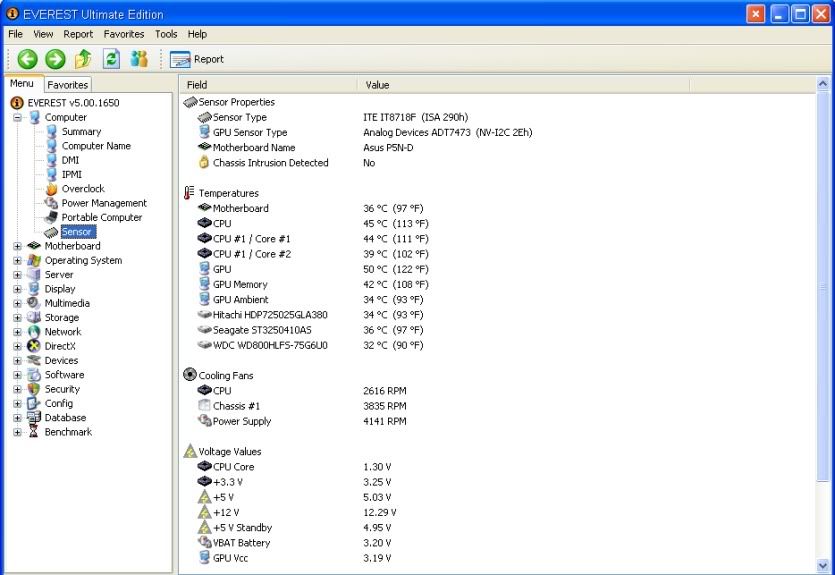
my temps are all fine.

i know i have a hardware fault but the problem is which part. i built this pc my self 14 months ago. most parts are still in warrenty.
my pc hangs a lot now.
Attached Files
File Type: zip minidumps.zip (38.0 KB, 1 views)
  #13  
Old 09-09-2009
TechSpot Member
 
Location: Israel
Member since: Sep 2009, 91 posts
System specs
try doing as the first error message says: boot from the windows cd, type "R" for repair.
problem may be in the hard drive, sound card, or Windows

one minidump says 0x00000109 which is CRITICAL_STRUCTURE_CORRUPTION, which means that the kernel has detected critical kernel code or data corruption.
the other says 0x00000024 which is NTFS_FILE_SYSTEM, which means a problem occurred in ntfs.sys, the driver file that allows the system to read and write to NTFS drives.
  #14  
Old 09-12-2009
Newcomer, in training
 
Member since: Sep 2009, 8 posts
Hi, I’ve solved the problem. I ran memtest again overnight on each stick for a minimum of 16 passes and all four passed. I tested the sticks in the first slot. But during the day I would put in a second stick in the 3rd slot for general use. But on one of the mornings I put a second stick in I got instant blue screen. I rebooted but got a blue screen every time. I tried using the other stick and all ran fine. I kept swapping sticks and slots for a while and found that it only blue screened with that one stick. With Corsairs lifetime warranty I’ve already arranged for an rma.
Thanks for your help and time guys, you’ve been a great help. 
  #15  
Old 09-12-2009
Route44's Avatar
TechSpot Ambassador
 
Location: The Socialist Republic of New Jersey
Member since: Sep 2006, 11,804 posts
Thanks for getting back to us.
Closed Thread

Similar Topics
Topic Replies Forum
Vista 64 bit Random Blue Screens (67 blue screens in 5 months) 18 Windows BSOD, Freezing, Restarting Help
Random blue screens 2 Windows OS
Random Blue Screens PLEASE HELP!!!!!!!! 1 Windows OS
Random Blue Screens (Have tried everything I know) 9 Windows OS
Random Blue Screens 2 Processors and Motherboards

Thread Tools Search this Thread
Search this Thread:

Advanced Search
All times are GMT -4. The time now is 12:04 AM.