also @ TechSpot: AMD Radeon HD 7770 & Radeon HD 7750 Review
Welcome to the TechSpot OpenBoards. Please read the FAQ if you have any questions. Sign up or Login to participate.

Go Back   TechSpot OpenBoards > TechSpot Editorial and Site Feedback > TechSpot News and Comments

Download Now:

Connectify turns Windows 7 laptops into Wi-Fi hotspots

Page 1 of 2 1 2
Thread Tools Search this Thread
  #1  
Old 10-30-2009
Jos Jos is online now
TechSpot Elite
 
Location: Ecuador
Member since: Apr 2006, 904 posts
System specs
Connectify turns Windows 7 laptops into Wi-Fi hotspots

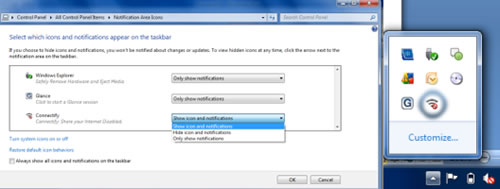
Few years ago a little-known feature called Virtual Wi-Fi was crafted by Microsoft's research group as a way to "virtualize" one wireless card as several separate adapters in Windows. The project was discontinued in 2006, but some of the code apparently made its way into Windows 7, and now at least one company is taking advantage of it with a new application that can turn any laptop into a wireless access point.
Read the whole story
__________________
Jose Vilches
Managing Editor
  #2  
Old 10-30-2009
mattfrompa's Avatar
TechSpot Booster
 
Location: East Coast USA
Member since: Jul 2007, 441 posts
System specs
very interesting concept, although I can't think of many times i would personally find it useful. Anyone with a good example I am all ears.
  #3  
Old 10-30-2009
treeski's Avatar
TechSpot Booster
 
Location: Chicago, USA
Member since: Nov 2007, 444 posts
System specs
Seems pretty cool, but I can't exactly imagine making use of it.
If there's a fee involved, there's no way I would bother toying around with it either, even to find a use for it.
  #4  
Old 10-30-2009
Deso's Avatar
TechSpot Member
 
Location: Wisconsin
Member since: Oct 2009, 130 posts
System specs
wow that's so cool, my wireless router is in the basement, so I'll be able to make my brothers wireless laptop in the middle floor, connect to my laptop in the second floor of the house and hopefully have a better single there then to the router? awesome
  #5  
Old 10-30-2009
elroacho72's Avatar
TechSpot Member
 
Location: ST.Louis
Member since: Aug 2009, 124 posts
System specs
This sounds great! I would beta test this. I can't see how the project got discontinued in 2006.
It would be just as cool back in 2006. I think this would be a great use of that old laptop in a low spot in my house. I can also see using it with a cell phone and a laptop . I can't wait to see all of its applications it could be used for. I will download it now.
  #6  
Old 10-30-2009
Jos Jos is online now
TechSpot Elite
 
Location: Ecuador
Member since: Apr 2006, 904 posts
System specs
It definitely could come in handy whenever you have to pay for expensive Wi-Fi (an airport, for example) and want to share that connection with others... or perhaps even to extend your Wi-Fi range at home.
  #7  
Old 10-30-2009
TechSpot Member
 
Member since: Feb 2008, 46 posts
Wow, this is pretty awesome. I wouldn't be surprised if this was an accident on Microsoft's part, though I would not be surprised if it was intentional either. MS seems to be making some good choices as of late, I'm pretty impressed.

I can see this being very useful, mostly in the ways that Jos mentioned.
  #8  
Old 10-30-2009
MBK's Avatar
MBK MBK is offline
TechSpot Member
 
Member since: Oct 2009, 43 posts
Quote:
Jos said:
It definitely could come in handy whenever you have to pay for expensive Wi-Fi (an airport, for example) and want to share that connection with others... or perhaps even to extend your Wi-Fi range at home.
I had no idea how this could be useful until i read this comment. Seems like a good idea, especially sharing expensive connects (at least fron a consumer's point of view, don't think the network admin are going to like it very much).
  #9  
Old 10-30-2009
Wagan8r's Avatar
TechSpot Booster
 
Member since: Sep 2006, 443 posts
System specs
That's cool, but how is this any different than setting up an ad-hoc network? I've done this a number of times with Vista, and it's also available in XP. It's simply a wireless connection with Internet sharing on.
  #10  
Old 10-30-2009
Guest
 
THIS IS NOTHING NEW....

This feature has always existed in windows. If you had internet plugged into any computer via ethernet and that desktop or laptop also had a wireless nic, all you had to do was right click on the icon for the wireless device, go to properties, and under the sharing tab, select the checkbox that says "Allow other users to connect through this computer's internet connection." Then make sure the output nic is the wireless device and there you go. I guess small minded people who hated vista for no reason never had the opportunity to enjoy that option.
  #11  
Old 10-30-2009
Newcomer, in training
 
Member since: Oct 2009, 11 posts
It is great to see progress like this. Any new ways to connect are always desirable.
  #12  
Old 10-30-2009
TechSpot Booster
 
Location: Darien, IL
Member since: Jan 2008, 442 posts
System specs
To Deso: You can get a repeater router (for wireless g only) and it would use a lot less power than keeping a laptop on all the time. It would also cost a lot less if you're buying new.
  #13  
Old 10-30-2009
TechSpot Member
 
Member since: Oct 2009, 139 posts
I really support this , im using Windows 7 right now and im soo happy . When i had a problem on XP , everytime i turned my PC on i had to restart my modem to get some connectivity ! This is totally awesome !
  #14  
Old 10-30-2009
Newcomer, in training
 
Member since: Oct 2009, 19 posts
Seems very nice. I wonder why is this Window 7 dependent? Why can't it be implemented in other OSs (obviouslly, with more code in the application, compensating for less OS support)?
  #15  
Old 10-30-2009
TechSpot Chancellor
 
Member since: Aug 2005, 693 posts
System specs
Quote:
Guest said:
THIS IS NOTHING NEW....

This feature has always existed in windows. If you had internet plugged into any computer via ethernet and that desktop or laptop also had a wireless nic, all you had to do was right click on the icon for the wireless device, go to properties, and under the sharing tab, select the checkbox that says "Allow other users to connect through this computer's internet connection." Then make sure the output nic is the wireless device and there you go. I guess small minded people who hated vista for no reason never had the opportunity to enjoy that option.
From a bit of reading on the Connectify FAQ you don't have to have your laptop hooked up via a hardwire ethernet connection. You can use your wireless connection, with the same network card, and then re-broadcast it as a new wifi hotspot.

Also, I believe you could do what you are talking about on Xp Pro.

Quote:
Connectify FAQ
You can join a WiFi network and run the Connectify Hotspot on the same WiFi card, at the same time. The Connectify Hotspot is always on the same channel as the WiFi network that you join, but WiFi networks can share the same channel.
  #16  
Old 10-30-2009
TechSpot Enthusiast
 
Member since: Aug 2008, 260 posts
System specs
I am always iffy about wireless hotspot's because they usually aren't very well protected. The cool thing about this is that it encrypts it with WPA.

Windows 7 so far seems to be very well executed and what Vista should have been. A lot of cool features that even third parties are already taking advantage of.
  #17  
Old 10-30-2009
skitzo_zac's Avatar
TechSpot Chancellor
 
Location: Australia
Member since: Aug 2005, 455 posts
System specs
I could of used this last year when I was hosting a LAN at home and was needing to extend the range of my wireless network.

But yeah, is there any reason this is Win 7 exclusive?
  #18  
Old 10-30-2009
Newcomer, in training
 
Member since: Oct 2009, 27 posts
When it stays free, i'd def. have a use for it.

I'm getting a small netbook to be a bit more mobile than with my current 15.4". When i'm home it's running 24/7 most of the time and this would save me some bucks for a wireless router.
  #19  
Old 10-30-2009
Newcomer, in training
 
Member since: Oct 2009, 11 posts
Quote:
elroacho72 said:
I think this would be a great use of that old laptop in a low spot in my house.
Somehow I doubt that you could get Windows 7 to run on an old laptop. If it can run Windows 7 then it's good for far more than a simple access point.
  #20  
Old 10-31-2009
Puiu's Avatar
TechSpot Addict
 
Location: Romania
Member since: Oct 2009, 664 posts
System specs
It's a nice feature to expand your wi-fi connection. This could be more important than 802.11n It's another good reason to buy windows 7.
Closed Thread
Page 1 of 2 1 2

Similar Topics
Topic Replies Forum
Wi-Fi sharing utility Connectify 1.0 launches, remains free 7 TechSpot News and Comments
Dreamweaver Hotspots 3 Software Apps
ipconfig fails at certain hotspots 2 Storage and Networking
New Device turns PCs & Laptops Dual-Screened 0 Audio and Video
External DVD CDRW Drive turns off, turns on, turns off...etc. 1 Storage and Networking

Thread Tools Search this Thread
Search this Thread:

Advanced Search
All times are GMT -4. The time now is 01:31 PM.