Welcome to the TechSpot OpenBoards. Please read the FAQ if you have any questions. Login to participate.
|
|||||||
My PC woke up with the "Google Redirect" social disease. Ran 8 steps twice. Now what?
![]() |
|
|
|
Thread Tools |
|
#1
|
|||
|
|||
|
My PC woke up with the "Google Redirect" social disease. Ran 8 steps twice. Now what?
Happy Thanksgiving, and a sincere thank you for your kind assistance...
Here are the details of my system: Dell Dimension 8300. (3GHz P4, 2.5GB RAM) WD1200 SATA system disk and mirrored WD5000 SATA data disks XP Home (SP3 w/ latest updates) TrendMicro Office Scan. (current) IE 8.0.6001.18702 My Most Recent Cleaning Activity: 1: Full Scan With Trend Micro Office Scan (nothing new found) 2: Ccleaner (including prefetch files) 3: Killed TrendMicro's ntrtscan, ofcpfwsvc, pccntmon & tmlisten processes. (Office Scan wants a password I don't have to unload, so this is the next best thing) 4: Ran MalwareBytes (log attached) 5: Ran SuperAntiSpyware (log attached) 6: Reconfirmed Java is current 7: Ran Hijack This (log attached) Note: These scans find nothing new, but earlier runs did remove some suspect items. I have temporarily disabled TrendMicro's OfcDog.exe to avoid nusiance hits in SAS. I eagerly await your wise counsel. Best Regards, Rwolf01 |
|
#2
|
|||
|
|||
|
Just to be clear, the redirect problem persists even after the standard scans were run.
I've looked through older logs where Tmagic650, Bobbye, Kritius & others helped similarly afflicted people. To save them time, I plan to run the ESET and Kaspersky Online Scanners (but not ComboFix) and post the logs. I've also backed everything up, just in case things get worse... Standing by, - Rwolf |
|
|
|
#3
|
|||
|
|||
|
Logs from Kaspersky & ESET Online Scanners
Here are the logs. Looks like some dubious attachements to old emails, but they are very unlikely to ever get opened, so they are probably not active.
I just reconfirmed that the search link redirect hack is still active. Any advice? Hope you had a good thanksgiving. - Rwolf |
|
#4
|
||||
|
||||
|
Please download GMER from one of the following locations and save it to your desktop:
|
|
#5
|
|||
|
|||
|
Here's what happened.
Thanks for the prompt reply. I'm documenting from my laptop as I try this...
random named GMER file downloaded. Rebooting directly to safe mode w/o networking. (do it right the 1st time) Double clicked on random named file. Clciked Run at the security warning. GMER 1.0.15.15252 window pops up and starts scanning. Found a "suspicious midification" of atapi.sys! Enabled scanning of my data disk, as well as the system disk, and clicked SCAN. 10 seconds into the scan I blue screen: "A problem has been detected and windows has been shut down to prevent damage to your computer. The problem seems to be caused by the following file: kxtdrpod.sys. An attempt was made to write to read-only memory. <snip> Technical information: *** STOP: 0x000000BE (0xF747E078, 0X0AB76161, 0XBAFE3B38, 0x0000000B) *** kxtdrpod.sys - Address BA6D59DB base at BA6CA000, Datestamp 4b07cc32)" I eagerly await further advice. In the mean time, I will attempt to find an appropriate atapi.sys file from another machine and manually replace the modified one. - RWOLF Last edited by Rwolf01; 12-01-2009 at 06:59 AM.. |
|
#6
|
||||
|
||||
|
Do this in normal mode.
Download ComboFix from one of these locations: Link 1 Link 2 * IMPORTANT !!! Save ComboFix.exe to your Desktop
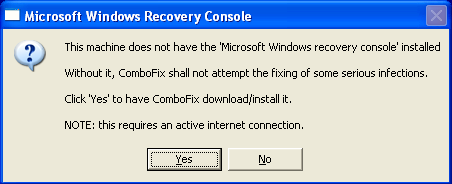
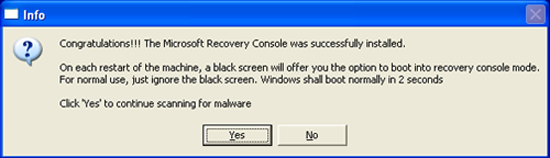
**Please note: If the Microsoft Windows Recovery Console is already installed, ComboFix will continue it's malware removal procedures. ![]() Once the Microsoft Windows Recovery Console is installed using ComboFix, you should see the following message: ![]() Click on Yes, to continue scanning for malware. When finished, it shall produce a log for you. Please include the C:\ComboFix.txt log in your next reply. |
|
#7
|
|||
|
|||
|
Sorry for the delay in replying. I got an unmodified atapi.sys, but when I attempted to rename the suspect one, it would succeed, but the unnamed file would reappear before I could copy over the unmolested file!
Seems like the malware is guarding that file to prevent it from being removed... Bounced into command line safemode & I could rename the file. Copied over the unmolested atapi.sys. COMP said they were different. Set the unhacked driver file to be read only. Bouncing back into normal mode to check if the good version is still there... It lives on, at least for now... Killed monitoring programs & network connection. Retrying GMER to see if it still bluescreens. Yup, it does. Reboot. atapi.sys still the good one. Starting ComboFix as instructed: monitor SW killed combofix started... Accepted disclaimer... Installing Recovery Console... (network reactived) Scanning. Stage 1, stage 2, stage 3, 4, 5, 6, 6A, 7... 33,41,48... preparing log report. Note: At this point the entire desktop is black, and only the combofix console window exists. Log file appears and the desktop returns. Log file will be attached in next posting. |
|
#8
|
|||
|
|||
|
ComboFix log file.
Should be attached.
Note: Internet Explore 8 has started doing a funny thing. In some situations it will go berzerk and start loading multiple copies, as fast as it can spawn them, until there are dozens of IE windows filling the screen and task bar. Not sure if that is related or not. Think I'll rerun the 8 basic steps... |
|
#9
|
||||
|
||||
|
Ok, lets not try to get ahead of ourselves and potentially mess things up.
Follow my instructions and we will sort you out.
|
|
|
|
#10
|
|||
|
|||
|
Aye Aye C'ptn.
I ran Trend Micro, CCleaner and MWB before I got your message. Nothing unusual found. Disabled all real time monitoring. OTL download gives me an "Unsafe Download Security Warning" looks like it's from WIndows Security Center. (captured it as a GIF, let me know if you want to see it) Took a leap of faith and downloaded anyway. OTL starts. Closed all others. Setup as instructed and starting scan. Note: Used COMP.EXE from the command line to confirm that the atapi.sys I manually installed is still in place. The molested version of atapi.sys has been renamed to atapi.sys.spooky. Scan completes. Will upload files in next post. |
|
#11
|
|||
|
|||
|
Requested Files
Standing by for further instructions.
- Rwolf |
|
#12
|
|||
|
|||
|
Redirects fixed! Are we done?
I almost forgot to check, but now that the atapi.sys file has been restored, the redirects seem to have disappeared.
The symptoms have resolved... does that mean I'm fully cured? If not, why not? - Rwolf |
|
#13
|
|||
|
|||
|
Can you please attach your new current Atapi.sys file
It should be version: 5.1.2600.5512 (For Windows XP) |
|
#14
|
|||
|
|||
|
Oops. Still redirecting after all.
I got one or two searches that went through and thought I was cured, but it's still hacked. I rechecked the atapi.sys and it still appears to be the good one, so there is something else going on.
As requested, I am uploading the currently installed atapi.sys from C:\windows\system32\drivers. I am also attaching the suspect file, which I renamed to a harmless extension, incase someone better than me wants to do forensics on it. (it should NOT be installed, unless you plan to wipe your system afterwards!) Note: I get an upload error "Invalid File" when I try to attach. I'm guessing driver files are not allowed to be posted. Will zip it and try to upload that. That worked. Download and open with care. These files are from a hacked system! |
|
#15
|
|||
|
|||
|
The suspect file is not genuine
The new one is No malware found in the suspect one though, but I believe replacing it with the current MS one has fixed it |
|
#16
|
|||
|
|||
|
But I'm still getting redirects...
The atapi.sys problem is now fixed, but something else is still going on....
My earlier post that the problem was resolved was an overly optimistic interpretation of one or two searches that worked.... once I started using the computer again in earnest I quickly found other searches that were getting hijacked. Any advice on how to proceed would be much appreciated... At what point does "FORMAT C:" become the right answer? :-) |
|
#17
|
|||
|
|||
|
Never
You cannot Format C, as the filesystem is on it You must always remove the partition for clean installs (not Format) Please wait for kritius support, I have not followed this thread in full |
|
#18
|
|||
|
|||
|
it was just a metaphore... I could have just as easily said "rm -rf" but that would be showing my age... :-)
But I'll await captain's orders on whether to forge ahead with salvaging this install or wipe the system disk and rebuild windows. (and all the applications... blerg!) Still hoping for a magic bullet! - Rwolf |
|
#19
|
||||
|
||||
|
Can you attach the screenshot. I would say that atapi.sys is still infected, this infection has a habit of showing virus scanners what they want to see.
Also, I believe I have what I need to continue. Print out these instructions to use while in the Recovery Console: 1. Restart your computer. 2. Before Windows loads, you will be prompted to choose which Operating System to start. 3. Use the up and down arrow key to select Microsoft Windows Recovery Console 4. You must enter which Windows installation to log onto. Type 1 and press 'Enter'. 5. At the C:\Windows prompt, type the following bolded entries, and press 'Enter'(note the spaces): cd system32\drivers ren atapi.sys atapi.sys.vir copy c:\windows\system32\dllcache\atapi.sys c:\windows\system32\drivers exit 6. Type y to the prompt and press 'Enter'. 7. Type exit and press 'Enter'. Your computer should reboot. Reboot into Normal mode and run ComboFix and post the log here. |
|
#20
|
|||
|
|||
|
Here's the screen shot & ComboFixLog you requested.
Kimsland said atapi.sys was genuine. I'm inclined to agree, given that CMD COMP.EXE says the file is identical with one I pulled from an uninfected system.
I will never the less follow your instructions to the letter. Rerunning combofix: monitor programs killed combofix is downloading newer version.... made system restore point & backed up registry scanning... done. Logfile is attached. You should know that I've installed a new monitor, keyboard and mouse so some driver files will have legitimately changed within the last 48 hours... I did 1/2 a dozen google searches after ComboFix finished and did not notice any redirects. Will continue exercising the system before declaring victory. Standing by for further instructions.... Thanks again for your assistance and persistance! - Rwolf |
![]() |
| Thread Tools | |
|
|
| Similar Topics | ||||
| Topic | Category | Replies | Last Post | |
| Google Redirect - 8 steps completed | Virus and Malware Removal | 17 | 12-05-2009 01:53 PM | |
| Info on the "Google Redirect/Hijack virus"? | Virus and Malware Removal | 8 | 11-28-2009 05:20 AM | |
| Google Redirect, 8 steps completed | Virus and Malware Removal | 37 | 11-24-2009 01:25 PM | |
| Google redirect/8 steps complete | Virus and Malware Removal | 2 | 07-20-2009 01:22 AM | |
| Completed preliminary steps need help with "bad image error" | Virus and Malware Removal | 0 | 01-05-2009 02:06 PM | |
All times are GMT -4. The time now is 09:25 PM.