Hi. In one room of my house, I have a TiVo, Xbox, and computer. I want them all hooked up to my network. My router [Linksys BEFW11S4] in one room, has 1 cable coming into this room. I have a 4 port router [Linksys BEFSR41] that I want to split the 1 wire coming into this room off to the Xbox, TiVo, and computer. How do I do this? Plugging the incoming wire into the WAN port doesn't seem to work. What do it do?
You are using an out of date browser. It may not display this or other websites correctly.
You should upgrade or use an alternative browser.
You should upgrade or use an alternative browser.
Use 2 Linksys Routers Together
- Thread starter Bloo Ice
- Start date

poertner_1274
Posts: 3,874 +3
I think it needs to be in the first spot on the LAN on the 2nd router, as Nodsu said. But you still need to disable DHCP to get it to work properly.
I've tried plugging the incoming cable [plugged into port 2 on the first router] into the Uplink, WAN, and LAN 1. None of them work. I have DHCP disabled on router 1, nothing, enabled it on 1 and disabled it on 2, nothing. I look at the status of router 2, and it only has the Subnet Mask and the DNS Servers. I tried putting everything else in manually, nothing. I'll give more detailed information when I get home.
Ok. Here's my setup.
DSL Modem>Wireless router [plugged into WAN port]
From the wireless router>Computer 1, 2, and WIRED Router [plugged into Port 1, 3, and 2]
Into WIRED router cable from PORT 2 going into WAN port.
DOES NOT WORK
Into WIRED router cable from PORT 2 going into UPLINK port.
DOES NOT WORK
Into WIRED router cable from PORT 2 going into PORT 1, 2, 3, OR 4.
DOES NOT WORK
I'm stuck here. What do I do?
DSL Modem>Wireless router [plugged into WAN port]
From the wireless router>Computer 1, 2, and WIRED Router [plugged into Port 1, 3, and 2]
Into WIRED router cable from PORT 2 going into WAN port.
DOES NOT WORK
Into WIRED router cable from PORT 2 going into UPLINK port.
DOES NOT WORK
Into WIRED router cable from PORT 2 going into PORT 1, 2, 3, OR 4.
DOES NOT WORK
I'm stuck here. What do I do?

Samstoned
Posts: 1,009 +0
found this
[LEFT]Router \textit{A} [/LEFT] [RIGHT] Router \textit{B}[/RIGHT]
[LEFT] WAN: --> ISP modem [/LEFT] [RIGHT] WAN: Empty ethernet [/RIGHT]
[LEFT]Configured for ISP [/LEFT][RIGHT] Static IP with Gateway 0.0.0.0[/RIGHT]
[LEFT]LAN: [/LEFT] [RIGHT] LAN:[/RIGHT]
[LEFT]IP=192.168.0.1[/LEFT] [RIGHT] IP=192.168.0.233[/RIGHT]
[LEFT] Subnet 255.255.255.0[/LEFT] [RIGHT]Subnet 255.255.255.255[/RIGHT]
[LEFT] DHCP: Enabled [/LEFT] [RIGHT]DHCP: Disabled[/RIGHT]
[CENTER]LAN Ethernet Cabling:[/CENTER]
[CENTER] (1) <======================> (1)[/CENTER]
[CENTER] (2) --> PC1 (2)[/CENTER]
[CENTER](3) --> PC2 (3)[/CENTER]
[CENTER](4) --> PC3 (4)[/CENTER]
router (B) wan set to static 0's
let us know whats up
[LEFT]Router \textit{A} [/LEFT] [RIGHT] Router \textit{B}[/RIGHT]
[LEFT] WAN: --> ISP modem [/LEFT] [RIGHT] WAN: Empty ethernet [/RIGHT]
[LEFT]Configured for ISP [/LEFT][RIGHT] Static IP with Gateway 0.0.0.0[/RIGHT]
[LEFT]LAN: [/LEFT] [RIGHT] LAN:[/RIGHT]
[LEFT]IP=192.168.0.1[/LEFT] [RIGHT] IP=192.168.0.233[/RIGHT]
[LEFT] Subnet 255.255.255.0[/LEFT] [RIGHT]Subnet 255.255.255.255[/RIGHT]
[LEFT] DHCP: Enabled [/LEFT] [RIGHT]DHCP: Disabled[/RIGHT]
[CENTER]LAN Ethernet Cabling:[/CENTER]
[CENTER] (1) <======================> (1)[/CENTER]
[CENTER] (2) --> PC1 (2)[/CENTER]
[CENTER](3) --> PC2 (3)[/CENTER]
[CENTER](4) --> PC3 (4)[/CENTER]
router (B) wan set to static 0's
let us know whats up
Samstoned said:found this
[LEFT]Router \textit{A} [/LEFT] [RIGHT] Router \textit{B}[/RIGHT]
[LEFT] WAN: --> ISP modem [/LEFT] [RIGHT] WAN: Empty ethernet [/RIGHT]
[LEFT]Configured for ISP [/LEFT][RIGHT] Static IP with Gateway 0.0.0.0[/RIGHT]
[LEFT]LAN: [/LEFT] [RIGHT] LAN:[/RIGHT]
[LEFT]IP=192.168.0.1[/LEFT] [RIGHT] IP=192.168.0.233[/RIGHT]
[LEFT] Subnet 255.255.255.0[/LEFT] [RIGHT]Subnet 255.255.255.255[/RIGHT]
[LEFT] DHCP: Enabled [/LEFT] [RIGHT]DHCP: Disabled[/RIGHT]
[CENTER]LAN Ethernet Cabling:[/CENTER]
[CENTER] (1) <======================> (1)[/CENTER]
[CENTER] (2) --> PC1 (2)[/CENTER]
[CENTER](3) --> PC2 (3)[/CENTER]
[CENTER](4) --> PC3 (4)[/CENTER]
router (B) wan set to static 0's
let us know whats up
I followed your instructions, but just can't get it to work. By that, I mean, the computer hooked up to the wired router cannot connect to the internet, or the wireless router's IP. It can connect to the wired router's IP [setup page] and work in there, and that's about all. I had to specify the IP for the computer myself because I turned DHCP off. By subnet, did you mean the subnet for the LAN or WAN? Either way, I can't set it to 255. I'm sorry, but this just doesn't want to cooperate. Just for clarification, my setup. They didn't like having their IP's changed, so I left them alone. [They've been changed, but can go back to 192.168.1.1 and 192.168.1.2 or w/e if needed]
[LEFT]WIRELESS[/LEFT] [RIGHT]WIRED[/RIGHT]
[LEFT]WAN: DSL Modem[/LEFT] [RIGHT]WAN: Nothing[/RIGHT]
[LEFT]LAN IP: 205.100.255.100[/LEFT] [RIGHT]LAN IP: 205.100.255.101[/RIGHT]
[LEFT]WAN IP: ISP's[/LEFT] [RIGHT]WAN IP: 0.0.0.0[/RIGHT]
[LEFT]WAN Subnet: 255.255.255.0[/LEFT] [RIGHT]WAN Subnet: 255.255.255.0[/RIGHT]
[LEFT]WAN Defualt Gateway: ISP's[/LEFT] [RIGHT]WAN Default Gateway: 0.0.0.0[/RIGHT]
[LEFT]DHCP: Enabled[/LEFT] [RIGHT]DHCP: Disabled[/RIGHT]
[LEFT]Port 1: Server[/LEFT] [RIGHT]Port 1: Computer[/RIGHT]
[LEFT]Port 2: Cat-5 going to wired[/LEFT] [RIGHT]Port 2: Cat-5 coming from wireless[/RIGHT]
[LEFT]Port 3: Computer Port[/LEFT] [RIGHT]3: TiVo[/RIGHT]
[LEFT]Port 4: Unused Port[/LEFT] [RIGHT]4: Xbox[/RIGHT]
I set the wired router to act as a router, instead of a gateway [read that somewhere else]
What do I do now?
Samstoned
Posts: 1,009 +0
does wireless use usb cable or cat5e
cannot use usb for this setup
if you connect any device other than the 2nd router to the
wireless do you get a connection
to set the nic cards up you need the normal static ip
something like 192.168.1.150
then you need the DNS of your isp look at the status of your connected router its there 2 sets of numbers
lan side wireless 192.168.1.1 wired 192.168.1.255
try not using the port 1 on the wireless
cannot use usb for this setup
if you connect any device other than the 2nd router to the
wireless do you get a connection
to set the nic cards up you need the normal static ip
something like 192.168.1.150
then you need the DNS of your isp look at the status of your connected router its there 2 sets of numbers
lan side wireless 192.168.1.1 wired 192.168.1.255
try not using the port 1 on the wireless
Samstoned said:does wireless use usb cable or cat5e
cannot use usb for this setup
if you connect any device other than the 2nd router to the
wireless do you get a connection
to set the nic cards up you need the normal static ip
something like 192.168.1.150
then you need the DNS of your isp look at the status of your connected router its there 2 sets of numbers
lan side wireless 192.168.1.1 wired 192.168.1.255
try not using the port 1 on the wireless
There is no USB in the system anywhere.
Yes, I have my desktop running off of the cable I'd normally plug into the second router. [Yes, I plug that into the router when I work on it, but when I deem it not working, I plug it back into the desktop]
After playing around with the routers, they finally changed their IP's. BUT, the wired won't go as high as 255. So, it's 192.168.1.245 instead of 192.168.1.255. I unplugged Port 1 on the wireless, and set the desktop connected to the wired to 192.168.1.150 w/ DNS that of my ISP's. I can connect to the wired's setup page, but not the wireless'. I pinged the wired router, fine. Pinged the wireless, no go. Can't get an outside page on the wired, nor a computer on the wireless. It's like, the wired and wireless aren't even talking to each other. What now? [P.S. Thaks for all your help so far]
Samstoned
Posts: 1,009 +0
here is what linksys says
so you are getting closer the 192.168.1.124 is right
I think the first router needs dhcp disabled see the link
and using the uplink if it is available is first choice
http://linksys.custhelp.com/cgi-bin...HQ9cm91dGVyIHRvIHJvdXRlcg**&p_li=&p_topview=1
so you are getting closer the 192.168.1.124 is right
I think the first router needs dhcp disabled see the link
and using the uplink if it is available is first choice
http://linksys.custhelp.com/cgi-bin...HQ9cm91dGVyIHRvIHJvdXRlcg**&p_li=&p_topview=1
Sorry I took so long. I made a diagram of my network setup, so you could see what I have going, and what is wrong.
I tried what the Linksys site said, but it didn't work.
Edit: Hmm, apparently it didn't upload the picture, even though I attached it. Re-attached it.
I tried what the Linksys site said, but it didn't work.
Edit: Hmm, apparently it didn't upload the picture, even though I attached it. Re-attached it.
Attachments
Samstoned
Posts: 1,009 +0
try setting up the 2nd router lan ip as 192.168.1.125 or something like that
maybe theres an ip number conflict
lookup info on the subnet mask may need to change all from 2nd router to 255.255.254.0
my 3 layer switch uses it's own ip address number ?
so my router goes to the switch ip address of 192.168.1.110
and all other ports are any number above 1
when a add another switch the netmask changes on that switch
ip numbers 192.168.2.100 subnet mask 255.255.254.0
also try unblocking wan Request on 2nd router as last resort
maybe theres an ip number conflict
lookup info on the subnet mask may need to change all from 2nd router to 255.255.254.0
my 3 layer switch uses it's own ip address number ?
so my router goes to the switch ip address of 192.168.1.110
and all other ports are any number above 1
when a add another switch the netmask changes on that switch
ip numbers 192.168.2.100 subnet mask 255.255.254.0
also try unblocking wan Request on 2nd router as last resort
Well, I found out what the problem was. I tried all of the above, and it STILL didn't work. I tried the input in port 1, 2, 3, 4, uplink, and wan. I tried everything I could think of. Then, I got to wondering, does this piece of junk even work? I went into where the main router is, and switched it out. 3 hours later, I still couldn't get it to register a WAN IP. So, I've come to the concluision that it's dead.
I'm going to buy a new something to put in. What do you suggest I get? Hub or switch? What is the cheapest? Which works better? I have one ethernet cable coming into this room, but want to branch off to 3 devices. What should I use? Thanks!!!
I'm going to buy a new something to put in. What do you suggest I get? Hub or switch? What is the cheapest? Which works better? I have one ethernet cable coming into this room, but want to branch off to 3 devices. What should I use? Thanks!!!

Nodsu
Posts: 5,451 +7
A 10/100 Mbit hub would be the cheapest and slowest. Mind you that your internet connection is most likely orders of magnitude slower than a hub anyway and you will see the "slowness" only when transferring data between local machines.
Next up is a 10/100 Mbit switch. It will perform far better under heavy load and bidirectional traffic.
Next up a gigabit switch. This would be useful if you were transferring a lot of data between the local computers with gigabit network interfaces.
Next up is a 10/100 Mbit switch. It will perform far better under heavy load and bidirectional traffic.
Next up a gigabit switch. This would be useful if you were transferring a lot of data between the local computers with gigabit network interfaces.
Nodsu
Posts: 5,451 +7
A hub will allow you to transfer roughly 10 megabytes per second in one direction. This means that any traffic in any other directions will be very slow and will significantly slow down the original connection too.
A good switch will give you 10 MB/s in and out through every port. Cheaper switches usually can't handle full speed through all ports at the same time and you will get slowdowns at very high loads.
A good switch will give you 10 MB/s in and out through every port. Cheaper switches usually can't handle full speed through all ports at the same time and you will get slowdowns at very high loads.
Ok. I just got a switch for Best Buy. It's a Linksys EZXS55W 5 Port Switch. I still cannot get the computer, TiVo, and Xbox connected to it to connect to the internet, or the computers connected to the wireless router.
DSL Modem>Wireless Router>2 computers and new SWITCH
From the switch>computer TiVo and Xbox
The cable coming from the router goes into Port 1 on the switch. What is wrong?
DSL Modem>Wireless Router>2 computers and new SWITCH
From the switch>computer TiVo and Xbox
The cable coming from the router goes into Port 1 on the switch. What is wrong?
M
Mr. Nobody!
:hotbounce
I know you said that you think found the problem with one of your routers BUT, I think it is Configuration Problem because you went bought a switch and still your Network Configuration still does not work. So I’m giving you the information on how to connect “Two Linksys Routers Together” and HOW to connect device to them and then I’ll talk about the new switch you bought just in case your correct, because the information on how use have configure your Network Environment and Routers is fuzzy to me!! So here we GOOOO!!!!
First of all lets start with the your first router the “Linksys BEFW11S4 Router” that you have in one of you rooms separate from the other router. This router should be the “Gateway Router” IF you use it to connect to the internet. This is the also your “NAT Box.” When the linksys router boots up, you should have your “WAN Port\Internet Setup” under “Internet Connection Type” setup to “Obtain IP Address Automatically” so the router can receive it’s IP Address from your ISP, they assign them using a “DHCP Server.
NOTE:
That the linksys routers are Three Devices in One---(1.)Switch (2.)Router (3.)NAT Box. Also a Basic Router (part 2 of the three devices of the linksys router) has two interfaces, the linksys router for example has two interfaces know as: (1.) WAN\Internet Setup (2.) LAN\Network Setup. So when you see the configuration page of the linksys router you should see a similar name like the ones above. So to be sure you under stand, the Linksys BEFW11S4 Router(2) has two interfaces (1.)Internet Setup(WAN side interface) and (2.)Network Setup(LAN side interface). Also the “Switch”(1) is a another device within the 3-and-1 linksys router, which works at the Layers 2 and 1 of the OSI Model. So if you didn’t need the “Router Part” of the linksys router you can just use the linksys router as a “4-port Switch” without configuring the “Router Part.” Also when it comes to the Uplink Port, all it does is crisscrosses the transmit(TX) and receive(RX) lines on one side of the striatethrough cable, so that you can plug the outer end of the cable in a regular port on a switch or hub. BUT with the “Linksys BEFW11SR Router” you can use a stratethrough cable to connect hubs and switches to a “Regular Port” without using an uplink port because they are what you call “Crossover Autoswithching Ports.” (if fact the BEFW11SR Router does not have uplink port even marked on back of the router, so in other words you can think that there all uplink ports!!). This is all based on “MDI and MDI-X terminology.” So know back to you question!!!
Now on the “LAN\Network Setup,” (OTHER Router interface) you can use the Default Configuration of the router (which is by default configured as a DHCP Server beginning IP Address Range 192.168.100.0) OR you can set a “Static IP” for the IP Address Space of your Network. For example you can configure it for a Static IP like 192.168.247.1. After that, ALL of your connection on your “Switch Side” MUST BE configure starting after that IP Address of the Linksys Router’s LAN\Network Setup Port, like: 192.168.247.2-3-4-5 and so on, because your “Linksys Router’s LAN\Network Setup Interface” is PART of your LAN---that why its called “LAN Side Interface” and every machine must have a separate IP. So lets say you ISP gave you an IP of 25.161.193.89, that IP would be assigned to you “WAN\Internet Setup Port” and then you “LAN Side” would have the IP you assigned like: 192.168.247.1. So to make sure you understand, when connecting devices (computers, xbox, tivo, ect…) to your Switch Side, make sure they are configure with an IP after the LAN Side.
Gateway:
The IP Address of the “LAN Port” which is: 192.168.247.1 is the Gateway IP that you’ll have to configure in the “TCP/IP Properies of ALL OF YOUR“Windows 95,98,ME,2k,XP Machines” WITHOUT this information you will not be able to get out of you LAN Segment.
DNS:
If you look at the “Status Configuration Page” ON your “Gateway Router” (Linksys BEFW11SR) you will see the IP Address of DNS Servers of your ISP. You will also need to enter this information in TCP/IP Peripheries of ALL OF YOUR “Windows Machines.” Without this information YOU WANT BE ABLE TO CONNECT TO THE “Internet.”
So now “Linksys Router BEFW11SR” is now setup!!!! (Except for one more step which will be discus latter.)
TROUBLESHOOTIN-
Now configure one of you PC for the LAN Side Interface like: 192.168.247.2 AFTER your LAN Side Interface, then in windows open up the command prompt and PING the IP Address 192.168.247.1 and 25.161.193.89 (which the IP Address are those of your LAN Configuration NOT THE ONE LISTED HERE!!! )
PING 192.168.247.1
PING 25.161.193.89
IF you have the configuration of the Computer and Router(which is assigned by ISP) CORRECT!!! you should get a reply back from the IP that you PING (4 time with the Windows PING command), IF you do for both ping then everything is configured right!!!
LINKSYS ROUTER BEFW11SR CONFIGURATION
Now your first router is configured, the NEXT STEP is to configure second router “Linksys BEFSR41 Router.” Every thing that you done with the First Router you will also do, but just a little different. First of all we’ll setup a new LAN Segment (in other words setup another Network) this Segment is going to have an IP Address Range of 192.168.248.0(this is your IP’s NOT MINE). The Linksys BEFSR41 will route IP Packets destine for the Network of 192.168.247.0 AND the “Internet” to the OTHER Network Segemnt. (the other Network Segment on Linksys BEFW11SR Router)---hens the name “ROUTER”!! So we go to configure the “WAN Port” with an Static IP Address, so in the configuration page of the router BEFSR41, we are going to give it an IP Address of the Network it is going to ROUTE TO! For example we want route to the Network on Linksys BEFW11SR, so we got to give the “WAN Port” of the Linksys BEFSR41 Router the IP of: 192.168.247.3, because that interface is on the Network of 192.168.247.0. (on the Linksys BEFW11SR)
After you done that, you need to configure the “LAN Port” with a Network Range of: 192.168.248.0(your new LAN Segment---you IP’s NOT MINE). For example configure the “LAN Port” of the router to: 192.168.248.1.
Once you got all that done configure one of your PC with the IP Address on Network 192.168.248.0. After you done that PING the IP Addresses of the router “LAN Port” and “WAN Port” like you done it with the first router. And again, IF the IP’s reply back to you 4-time with a reply then you have a correct configuration of the second router.
NOW take your Xbox, Tivo, and all of your Computer and give them and IP Address in the Network Range of 192.168.248.0. After that, you also need to configure the “Default Gateway” and if you remember the first example, that IP is the IP of the “LAN Port Router IP Address) witch: 192.168.248.1. For example give your Xbox the IP:192.168.248.2 with a default gateway of 192.168.248.1, and Tivo with an IP of 192.168.248.3 and with a default gateway, and ALL of your Computer with an IP of 192.168.248.4-5-6-7- ect. and with an default gateway.
After all that is done, go back to the configuration page on the “Linksys BEFW11SR Router”(1st one) and go to the Advance Routing Tab>Static Entry and make an new Static IP Address in the Routing Table. Make sure the IP you put in the entry is the IP of the Second Linksys Router witch is: 192.168.248.0 make sure the Host Address Rang is “0” and that the Default Gateway of the Static Route is that of the “WAN Port” on the Second Linksys Router. For example: 192.168.247.3. This make sure that when the Destination IP is for the other Network Segement for example: 192.168.248.0, that the Network 192.168.247.0 will be able to route to it and vice versa!!!! Without your screwed, you want be able to browse the Internet from the Second LAN Segment (2nd Linksys Rotuer). Also the “Interface” (LAN\WAN) choose “LAN” for you static route.
Now I hope your sill with me and not bald, it is time to connect the routers together with some CAT5. When you got your routers, they came with 2feet patch cord witch is a “Stratethough Cable. Take one the cable (you might need more depending on how far apart they are) and connect it to the “WAN Port” on the Second Linksys Router. (Router BEFSR41) and connect the other end the “Switch Part” of the First Router. (Router BEFW11SR). And take All of your Computer, Tivo, Xbox and connect them to your Second Router Switch Interfaces. (Router BEFSR41). Make sure they have their OWN IP Address and make sure the Default Gateway is configured for the Second Router LAN Port Interface configure IN the “Windows TCP/IP Properties.”
Now if the second router is junk, then just connect the “Switch” up to the First Router (Router BEFW11SR) Switch Part. And the re configure all your device (in Windows TCP/IP,ect…) the Network Address of: 192.168.247.0, and the Default Gateway of the “LAN Port” of the First Router and then PING them to make sure that there is a connection.
I know you said that you think found the problem with one of your routers BUT, I think it is Configuration Problem because you went bought a switch and still your Network Configuration still does not work. So I’m giving you the information on how to connect “Two Linksys Routers Together” and HOW to connect device to them and then I’ll talk about the new switch you bought just in case your correct, because the information on how use have configure your Network Environment and Routers is fuzzy to me!! So here we GOOOO!!!!
First of all lets start with the your first router the “Linksys BEFW11S4 Router” that you have in one of you rooms separate from the other router. This router should be the “Gateway Router” IF you use it to connect to the internet. This is the also your “NAT Box.” When the linksys router boots up, you should have your “WAN Port\Internet Setup” under “Internet Connection Type” setup to “Obtain IP Address Automatically” so the router can receive it’s IP Address from your ISP, they assign them using a “DHCP Server.
NOTE:
That the linksys routers are Three Devices in One---(1.)Switch (2.)Router (3.)NAT Box. Also a Basic Router (part 2 of the three devices of the linksys router) has two interfaces, the linksys router for example has two interfaces know as: (1.) WAN\Internet Setup (2.) LAN\Network Setup. So when you see the configuration page of the linksys router you should see a similar name like the ones above. So to be sure you under stand, the Linksys BEFW11S4 Router(2) has two interfaces (1.)Internet Setup(WAN side interface) and (2.)Network Setup(LAN side interface). Also the “Switch”(1) is a another device within the 3-and-1 linksys router, which works at the Layers 2 and 1 of the OSI Model. So if you didn’t need the “Router Part” of the linksys router you can just use the linksys router as a “4-port Switch” without configuring the “Router Part.” Also when it comes to the Uplink Port, all it does is crisscrosses the transmit(TX) and receive(RX) lines on one side of the striatethrough cable, so that you can plug the outer end of the cable in a regular port on a switch or hub. BUT with the “Linksys BEFW11SR Router” you can use a stratethrough cable to connect hubs and switches to a “Regular Port” without using an uplink port because they are what you call “Crossover Autoswithching Ports.” (if fact the BEFW11SR Router does not have uplink port even marked on back of the router, so in other words you can think that there all uplink ports!!). This is all based on “MDI and MDI-X terminology.” So know back to you question!!!
Now on the “LAN\Network Setup,” (OTHER Router interface) you can use the Default Configuration of the router (which is by default configured as a DHCP Server beginning IP Address Range 192.168.100.0) OR you can set a “Static IP” for the IP Address Space of your Network. For example you can configure it for a Static IP like 192.168.247.1. After that, ALL of your connection on your “Switch Side” MUST BE configure starting after that IP Address of the Linksys Router’s LAN\Network Setup Port, like: 192.168.247.2-3-4-5 and so on, because your “Linksys Router’s LAN\Network Setup Interface” is PART of your LAN---that why its called “LAN Side Interface” and every machine must have a separate IP. So lets say you ISP gave you an IP of 25.161.193.89, that IP would be assigned to you “WAN\Internet Setup Port” and then you “LAN Side” would have the IP you assigned like: 192.168.247.1. So to make sure you understand, when connecting devices (computers, xbox, tivo, ect…) to your Switch Side, make sure they are configure with an IP after the LAN Side.
Gateway:
The IP Address of the “LAN Port” which is: 192.168.247.1 is the Gateway IP that you’ll have to configure in the “TCP/IP Properies of ALL OF YOUR“Windows 95,98,ME,2k,XP Machines” WITHOUT this information you will not be able to get out of you LAN Segment.
DNS:
If you look at the “Status Configuration Page” ON your “Gateway Router” (Linksys BEFW11SR) you will see the IP Address of DNS Servers of your ISP. You will also need to enter this information in TCP/IP Peripheries of ALL OF YOUR “Windows Machines.” Without this information YOU WANT BE ABLE TO CONNECT TO THE “Internet.”
So now “Linksys Router BEFW11SR” is now setup!!!! (Except for one more step which will be discus latter.)
TROUBLESHOOTIN-
Now configure one of you PC for the LAN Side Interface like: 192.168.247.2 AFTER your LAN Side Interface, then in windows open up the command prompt and PING the IP Address 192.168.247.1 and 25.161.193.89 (which the IP Address are those of your LAN Configuration NOT THE ONE LISTED HERE!!! )
PING 192.168.247.1
PING 25.161.193.89
IF you have the configuration of the Computer and Router(which is assigned by ISP) CORRECT!!! you should get a reply back from the IP that you PING (4 time with the Windows PING command), IF you do for both ping then everything is configured right!!!
LINKSYS ROUTER BEFW11SR CONFIGURATION
Now your first router is configured, the NEXT STEP is to configure second router “Linksys BEFSR41 Router.” Every thing that you done with the First Router you will also do, but just a little different. First of all we’ll setup a new LAN Segment (in other words setup another Network) this Segment is going to have an IP Address Range of 192.168.248.0(this is your IP’s NOT MINE). The Linksys BEFSR41 will route IP Packets destine for the Network of 192.168.247.0 AND the “Internet” to the OTHER Network Segemnt. (the other Network Segment on Linksys BEFW11SR Router)---hens the name “ROUTER”!! So we go to configure the “WAN Port” with an Static IP Address, so in the configuration page of the router BEFSR41, we are going to give it an IP Address of the Network it is going to ROUTE TO! For example we want route to the Network on Linksys BEFW11SR, so we got to give the “WAN Port” of the Linksys BEFSR41 Router the IP of: 192.168.247.3, because that interface is on the Network of 192.168.247.0. (on the Linksys BEFW11SR)
After you done that, you need to configure the “LAN Port” with a Network Range of: 192.168.248.0(your new LAN Segment---you IP’s NOT MINE). For example configure the “LAN Port” of the router to: 192.168.248.1.
Once you got all that done configure one of your PC with the IP Address on Network 192.168.248.0. After you done that PING the IP Addresses of the router “LAN Port” and “WAN Port” like you done it with the first router. And again, IF the IP’s reply back to you 4-time with a reply then you have a correct configuration of the second router.
NOW take your Xbox, Tivo, and all of your Computer and give them and IP Address in the Network Range of 192.168.248.0. After that, you also need to configure the “Default Gateway” and if you remember the first example, that IP is the IP of the “LAN Port Router IP Address) witch: 192.168.248.1. For example give your Xbox the IP:192.168.248.2 with a default gateway of 192.168.248.1, and Tivo with an IP of 192.168.248.3 and with a default gateway, and ALL of your Computer with an IP of 192.168.248.4-5-6-7- ect. and with an default gateway.
After all that is done, go back to the configuration page on the “Linksys BEFW11SR Router”(1st one) and go to the Advance Routing Tab>Static Entry and make an new Static IP Address in the Routing Table. Make sure the IP you put in the entry is the IP of the Second Linksys Router witch is: 192.168.248.0 make sure the Host Address Rang is “0” and that the Default Gateway of the Static Route is that of the “WAN Port” on the Second Linksys Router. For example: 192.168.247.3. This make sure that when the Destination IP is for the other Network Segement for example: 192.168.248.0, that the Network 192.168.247.0 will be able to route to it and vice versa!!!! Without your screwed, you want be able to browse the Internet from the Second LAN Segment (2nd Linksys Rotuer). Also the “Interface” (LAN\WAN) choose “LAN” for you static route.
Now I hope your sill with me and not bald, it is time to connect the routers together with some CAT5. When you got your routers, they came with 2feet patch cord witch is a “Stratethough Cable. Take one the cable (you might need more depending on how far apart they are) and connect it to the “WAN Port” on the Second Linksys Router. (Router BEFSR41) and connect the other end the “Switch Part” of the First Router. (Router BEFW11SR). And take All of your Computer, Tivo, Xbox and connect them to your Second Router Switch Interfaces. (Router BEFSR41). Make sure they have their OWN IP Address and make sure the Default Gateway is configured for the Second Router LAN Port Interface configure IN the “Windows TCP/IP Properties.”
Now if the second router is junk, then just connect the “Switch” up to the First Router (Router BEFW11SR) Switch Part. And the re configure all your device (in Windows TCP/IP,ect…) the Network Address of: 192.168.247.0, and the Default Gateway of the “LAN Port” of the First Router and then PING them to make sure that there is a connection.
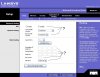
I did some playing around with the settings, and was sucessful...for about 3 seconds. For the destination IP I had 192.168.248.1...the LAN IP of the 2nd router. Subnet: 255.255.255.0. Gateway: 192.168.1.109, the WAN IP of the 2nd router. Hop count: 0 Interface: Local.
I was listening to some MSN Radio on the computer, while I had it hooked up to the 1st router. I left WMP open and unplugged the network cable, and plugged it into the 2nd router's WAN port. After some tinkering, I unplugged the 2nd router for a few seconds, and plugged it in. WMP loaded a song, and thats about the most internet I had on that computer. I heard the song play so I opened IE right away, but I was too late. So this tells me that it did work, at least for a few seconds. I think I'll take the switch back to BB, seeing as how tomorrow is day 30 on the 30 day return policy. Hope I can get this up tonight....thanks to Mr. Nobody. What do I need to do now though?
Right as I was about to hit Post a new song started playing from the MSN Radio. But, I can't ping anything other than the 2nd router, nor will IE or anything else connect outside. Maybe WMP is playing cached songs, but I kinda doubt it.
I was listening to some MSN Radio on the computer, while I had it hooked up to the 1st router. I left WMP open and unplugged the network cable, and plugged it into the 2nd router's WAN port. After some tinkering, I unplugged the 2nd router for a few seconds, and plugged it in. WMP loaded a song, and thats about the most internet I had on that computer. I heard the song play so I opened IE right away, but I was too late. So this tells me that it did work, at least for a few seconds. I think I'll take the switch back to BB, seeing as how tomorrow is day 30 on the 30 day return policy. Hope I can get this up tonight....thanks to Mr. Nobody. What do I need to do now though?
Right as I was about to hit Post a new song started playing from the MSN Radio. But, I can't ping anything other than the 2nd router, nor will IE or anything else connect outside. Maybe WMP is playing cached songs, but I kinda doubt it.
M
Mr. Nobody!
:hotbounce
To: Bloo Ice
To help clarify the fuzziness about “IP Routing Tables” let me tell you what a router does when it receives an “IP Packet” that is “Address” to it, then I’ll answer your questions.
So here we gooo!!!!
When either of your Linksys Routers intercepts an “IP Packet” that is “Addressed” to it, (that is address to either their WAN Ports or LAN Ports---the Default Gateway in Windows is the IP of the Router), it will remove the “Frame” (Layer 2 of OSI Model) and it will then take the “IP Packet” and buffer it into RAM. It will then look at the “Destination IP Address” to see IF it has an “Route” to that “Network” if it does, it will reframe it with the MAC Address of the one the Router WAN/LAN Interfaces that the Routing Table told it to do, IF a MACH to the destination address is NOT IN the Routing Table, there is always Route if all else fails, that is the “Default Route.” Then the ip packet will then take that route and you will have to cross your fingers in hope the ip packet get there!!! That’s all there is to it! Minus all the other techno jobo that really go into routing!!!!
Now when you set the “WAN and LAN Ports” on your linksys routers, you build the default setting in the linksys router “Routing Table.” To see what I mean go to the configuration page and “Setup>Advanced Routing look on that page for a button that says “Show Routing Table,” you should see the default route and the IP’s of the WAN\LAN Ports. So if you look a the First Routers Routing Table, you should see a fourth entry in the routing table to route to your second router Network Segment. ROUTING TABLE ENTRIES ARE VERY VERY INFORTANT!!! If there is no entry for the detonation your ip packet is destine for, the ip packet will NEVER EVERY GET THERE!
I forgot to tell you last time to disable the “NAT” on the Second Router and in the Static Route that you made on the First Router set the “Default Gateway” to the “WAN Port IP” of the Second Router which is: 192.168.247.3. There is much more to all of this but it will take to long to talk about it. So I’ll make up a Network Configuration for you!!!
-----------------------------------------------------------------------------------------------
FIRST ROUTERS IP’S-
Internet Connection Type\WAN Port: assigned by ISP, should be set at: Obtain IP Address Automatically.
Network Setup\LAN Port: 192.168.247.1---Subnet Mask: 255.255.255.0
Now go to the “Status” page to see a summery of the setting you just configured. Make sure they match here.
ROUTING TABLE ENTRY-
Go to “Advance Routing” page and look for the “Static Routing” configuration.
For the setting put:
Make sure “Select Set Number” is on “1.”
Destination LAN IP: 192.168.248.0---Subnet Mask: 255.255.255.0---Default Gateway: 192.168.247.2---Interface: LAN & Wireless (it will send the IP Packet out on the LAN\Wireless Port Interface NOT the WAN Port---this is where you configure which interface MAC Address to reframe the IP Packet with!---each interface has a different MAC Address)
Make sure that the “Destination LAN IP” Address is set to: 192.168.248.0 and NOT TO: 192.168.248.1, you want to ROUTE TO the Network: 192.168.248.0 and NOT TO a Specific Machine on THAT Network. If you do ALL IP Packet “Destine” for the Network: 192.168.248.0 will go to that Specific Machine and NOT TO the Network. If I understand you right, that how you have it configured and it is WRONG!!!
Go to the “Show Routing Table” button to see if the entry you just made is in there!!!
NOTE:
Remember that the Switch Device is one of the Linksys 3-in-1 devices. The “Switch” is a 4-port switch BUT there is a TWIST, that is a “Invisible” Fifth Port that is “Hard Wired” to the “Input” of the Router’s Internal LAN Port. Just thought I would demystify the relationship with the “Routers LAN Port and the Switch!!! Because you can’t see the routers lan port interface (physically)”
---------------------------------------------------------------------------------------------------
SECOND ROUTERS IP’S-
WAN Connection Type\WAN Port: 192.168.247.2---Subnet Mask: 255.255.255.0---Gateway: 192.168.247.1
LAN IP Address\LAN Port: 192.168.248.1---Subnet Mask: 255.255.255.0
Go to the “Dynamic Routing” page and look for a “Working Mode” choose “Router”(this turns off the “NAT” part)
-----------------------------------------------------------------------------------------------------
NETWORK DEVICES IP’S-
Computers: 192.168.248.2-3-4-5-6-7-8-9---Subnet Mask: 255.255.255.0---Gateway: 192.168.248.1---DNS you will have to go to the first router and look on the “Status” page to see WHAT “DNS Servers” your ISP gave you, so that you will be able to connect to the “Internet” just put that info. here!!!)
Xbox: 192.168.248.10---Subnet Mask: 255.255.255.0---Gateway: 192.168.248.1---DNSsame as above)
Tivo: 192.168.248.11---Subnet Mask: 255.255.255.0---Gateway: 192.168.248.1---DNS(same as above)
----------------------------------------------------------------------------------------------------
OTHER INFORMATION!!!
These are ALL “Class C” IP Addresses!!
PING the configuration to make sure you have a connection! Also PING the Internet like www.google.com, this will make sure that you can connect to the internet and that the TCP/IP setting are correct!
Windows Media Player plays a “Live Data Stem” from the MSN Radio Web Server, it only buffers the data, and it is gone after it is played!
Make sure you plug the one end of the Ethernet Cable to the WAN Port of the Second Router and the other end to the Switch Part of the First Router!!!
WARRING !
MAKE SURE THAT YOU CHANGE THESE IPADDRESS AFTER YOU TRIED THEM AN IT WORKS! BECAUSE IF YOU DON’T, ANYONE YOU READS THIS WILL KNOW YOUR IP ADDRESS AND WILL FIND A WAY TO HACK YOU!!! EVEN THOUGH YOU HAVE “NAT” CONFIGURED ON THE FIRST ROUTER, THERE ARE WAY AROUND IT!!!
To: Bloo Ice
To help clarify the fuzziness about “IP Routing Tables” let me tell you what a router does when it receives an “IP Packet” that is “Address” to it, then I’ll answer your questions.
So here we gooo!!!!
When either of your Linksys Routers intercepts an “IP Packet” that is “Addressed” to it, (that is address to either their WAN Ports or LAN Ports---the Default Gateway in Windows is the IP of the Router), it will remove the “Frame” (Layer 2 of OSI Model) and it will then take the “IP Packet” and buffer it into RAM. It will then look at the “Destination IP Address” to see IF it has an “Route” to that “Network” if it does, it will reframe it with the MAC Address of the one the Router WAN/LAN Interfaces that the Routing Table told it to do, IF a MACH to the destination address is NOT IN the Routing Table, there is always Route if all else fails, that is the “Default Route.” Then the ip packet will then take that route and you will have to cross your fingers in hope the ip packet get there!!! That’s all there is to it! Minus all the other techno jobo that really go into routing!!!!
Now when you set the “WAN and LAN Ports” on your linksys routers, you build the default setting in the linksys router “Routing Table.” To see what I mean go to the configuration page and “Setup>Advanced Routing look on that page for a button that says “Show Routing Table,” you should see the default route and the IP’s of the WAN\LAN Ports. So if you look a the First Routers Routing Table, you should see a fourth entry in the routing table to route to your second router Network Segment. ROUTING TABLE ENTRIES ARE VERY VERY INFORTANT!!! If there is no entry for the detonation your ip packet is destine for, the ip packet will NEVER EVERY GET THERE!
I forgot to tell you last time to disable the “NAT” on the Second Router and in the Static Route that you made on the First Router set the “Default Gateway” to the “WAN Port IP” of the Second Router which is: 192.168.247.3. There is much more to all of this but it will take to long to talk about it. So I’ll make up a Network Configuration for you!!!
-----------------------------------------------------------------------------------------------
FIRST ROUTERS IP’S-
Internet Connection Type\WAN Port: assigned by ISP, should be set at: Obtain IP Address Automatically.
Network Setup\LAN Port: 192.168.247.1---Subnet Mask: 255.255.255.0
Now go to the “Status” page to see a summery of the setting you just configured. Make sure they match here.
ROUTING TABLE ENTRY-
Go to “Advance Routing” page and look for the “Static Routing” configuration.
For the setting put:
Make sure “Select Set Number” is on “1.”
Destination LAN IP: 192.168.248.0---Subnet Mask: 255.255.255.0---Default Gateway: 192.168.247.2---Interface: LAN & Wireless (it will send the IP Packet out on the LAN\Wireless Port Interface NOT the WAN Port---this is where you configure which interface MAC Address to reframe the IP Packet with!---each interface has a different MAC Address)
Make sure that the “Destination LAN IP” Address is set to: 192.168.248.0 and NOT TO: 192.168.248.1, you want to ROUTE TO the Network: 192.168.248.0 and NOT TO a Specific Machine on THAT Network. If you do ALL IP Packet “Destine” for the Network: 192.168.248.0 will go to that Specific Machine and NOT TO the Network. If I understand you right, that how you have it configured and it is WRONG!!!
Go to the “Show Routing Table” button to see if the entry you just made is in there!!!
NOTE:
Remember that the Switch Device is one of the Linksys 3-in-1 devices. The “Switch” is a 4-port switch BUT there is a TWIST, that is a “Invisible” Fifth Port that is “Hard Wired” to the “Input” of the Router’s Internal LAN Port. Just thought I would demystify the relationship with the “Routers LAN Port and the Switch!!! Because you can’t see the routers lan port interface (physically)”
---------------------------------------------------------------------------------------------------
SECOND ROUTERS IP’S-
WAN Connection Type\WAN Port: 192.168.247.2---Subnet Mask: 255.255.255.0---Gateway: 192.168.247.1
LAN IP Address\LAN Port: 192.168.248.1---Subnet Mask: 255.255.255.0
Go to the “Dynamic Routing” page and look for a “Working Mode” choose “Router”(this turns off the “NAT” part)
-----------------------------------------------------------------------------------------------------
NETWORK DEVICES IP’S-
Computers: 192.168.248.2-3-4-5-6-7-8-9---Subnet Mask: 255.255.255.0---Gateway: 192.168.248.1---DNS
you will have to go to the first router and look on the “Status” page to see WHAT “DNS Servers” your ISP gave you, so that you will be able to connect to the “Internet” just put that info. here!!!)Xbox: 192.168.248.10---Subnet Mask: 255.255.255.0---Gateway: 192.168.248.1---DNS
same as above)Tivo: 192.168.248.11---Subnet Mask: 255.255.255.0---Gateway: 192.168.248.1---DNS(same as above)
----------------------------------------------------------------------------------------------------
OTHER INFORMATION!!!
These are ALL “Class C” IP Addresses!!
PING the configuration to make sure you have a connection! Also PING the Internet like www.google.com, this will make sure that you can connect to the internet and that the TCP/IP setting are correct!
Windows Media Player plays a “Live Data Stem” from the MSN Radio Web Server, it only buffers the data, and it is gone after it is played!
Make sure you plug the one end of the Ethernet Cable to the WAN Port of the Second Router and the other end to the Switch Part of the First Router!!!
WARRING !
MAKE SURE THAT YOU CHANGE THESE IPADDRESS AFTER YOU TRIED THEM AN IT WORKS! BECAUSE IF YOU DON’T, ANYONE YOU READS THIS WILL KNOW YOUR IP ADDRESS AND WILL FIND A WAY TO HACK YOU!!! EVEN THOUGH YOU HAVE “NAT” CONFIGURED ON THE FIRST ROUTER, THERE ARE WAY AROUND IT!!!
Similar threads
- Replies
- 4
- Views
- 147

- Replies
- 3
- Views
- 181

- Replies
- 27
- Views
- 879
Latest posts
-
 Fox to acquire Roku in $22 billion deal, its largest ever
- NumberNine replied
-
Bitcoin is down nearly 50% and the debate over its value is heating up again
- Theinsanegamer replied
-
 Solar generation beats coal in the US for the first time ever
- Endymio replied


-
TechSpot is dedicated to computer enthusiasts and power users.
Ask a question and give support.
Join the community here, it only takes a minute.