patrickc284
Posts: 18 +0
Hi,
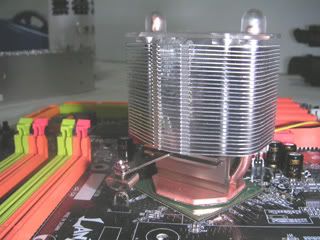
I recently tried installing a new northbridge heatsink and fan to replace the original one on my Abit IS-7 478 motherboard. The old heatsink (some ultra light aluminum piece of trash) was mounted on using a rigid piece of wire for lack of a better description. there are four hooks equidistantly placed around the northbridge for it to hook it across the chipset in a diagonal direction.
The replacement fan I bought was a Vantec CCB-A1C, which came with two plastic clips (which is completely incompatible with the attachment hooks on my motherboard). I noticed it was a VGA cooler, but it seemed about the same as my northbridge cooler. Maybe this was part of my mistake, I don't know.
But, being completely inexperienced with this (aside from attaching the heatsink for my CPU), I found that when I put the thermal tape on that there is only a small area in the center of the chipset where there is actually contact made with the heatsink. The center is raised whereas the rest of the chipset is recessed about 1mm below it. I don't know if I need thicker thermal tape, or if I'm supposed to leave the tape sticky only on one side (and leave the paper on one side of the double-sided tape).
My northbridge temp has gone up from about 32-33C to 35C, not sure if that's a big deal. My P4 3.0C runs about 32 Idle/47 full load.
Maybe I need a heatsink/fan specifically for a northbridge instead of a VGA-style one. Obviously, I could use a little help... So if anyone out there can point me to any articles or give me a heads up on what to do, I would greatly appreciate it. Thanks!
-Pat
Specs:
XP Pro SP2
P4 3.0C HT
Abit IS-7
2x 512 Corsair Value
Masscool 70mm Ball Fan/Copper h/s
Western Digital SATA3 80GB
NEC DVD±RW
Samsung CD-RW/DVD
Audigy 2 ZS
eVGA FX5500 256mb
Trendnet full duplex gigabit
Aspire X-Plorer
I recently tried installing a new northbridge heatsink and fan to replace the original one on my Abit IS-7 478 motherboard. The old heatsink (some ultra light aluminum piece of trash) was mounted on using a rigid piece of wire for lack of a better description. there are four hooks equidistantly placed around the northbridge for it to hook it across the chipset in a diagonal direction.
The replacement fan I bought was a Vantec CCB-A1C, which came with two plastic clips (which is completely incompatible with the attachment hooks on my motherboard). I noticed it was a VGA cooler, but it seemed about the same as my northbridge cooler. Maybe this was part of my mistake, I don't know.
But, being completely inexperienced with this (aside from attaching the heatsink for my CPU), I found that when I put the thermal tape on that there is only a small area in the center of the chipset where there is actually contact made with the heatsink. The center is raised whereas the rest of the chipset is recessed about 1mm below it. I don't know if I need thicker thermal tape, or if I'm supposed to leave the tape sticky only on one side (and leave the paper on one side of the double-sided tape).
My northbridge temp has gone up from about 32-33C to 35C, not sure if that's a big deal. My P4 3.0C runs about 32 Idle/47 full load.
Maybe I need a heatsink/fan specifically for a northbridge instead of a VGA-style one. Obviously, I could use a little help... So if anyone out there can point me to any articles or give me a heads up on what to do, I would greatly appreciate it. Thanks!
-Pat
Specs:
XP Pro SP2
P4 3.0C HT
Abit IS-7
2x 512 Corsair Value
Masscool 70mm Ball Fan/Copper h/s
Western Digital SATA3 80GB
NEC DVD±RW
Samsung CD-RW/DVD
Audigy 2 ZS
eVGA FX5500 256mb
Trendnet full duplex gigabit
Aspire X-Plorer