You are using an out of date browser. It may not display this or other websites correctly.
You should upgrade or use an alternative browser.
You should upgrade or use an alternative browser.
Liquid cooling question
- Thread starter Mkoll
- Start date


CrossFire851
Posts: 714 +0
Okay..
Geforce 7800gt.
500 PSU
1gb Ram
Mobo is an ASUS I forget which one.
And my tempatures. Well here's the thing they're low but the cpu (which the cooling is linked too, duh) just continues to overheat.
Idle Tempature- 38c give or take.
Tempature- 43-45
Randomly the tempature will jump up to 50. Help please
Geforce 7800gt.
500 PSU
1gb Ram
Mobo is an ASUS I forget which one.
And my tempatures. Well here's the thing they're low but the cpu (which the cooling is linked too, duh) just continues to overheat.
Idle Tempature- 38c give or take.
Tempature- 43-45
Randomly the tempature will jump up to 50. Help please

KingCody
Posts: 964 +8
1. those were not full system specs, those were very generic system specs
2. you did not list your CPU in your specs, which is important because after all it's why you're here
3. 50c is not overheating for any CPU. depending on your specific CPU, 50c may be normal or it may be high, but either way it is not overheating.
what are you using to read those temps? and is it the only source you're using?
water cooling on any CPU should yeild better temps than you have, make sure that you:
a. completely remove the old thermal compound or pad with isopropyl alcohol
b. apply a new coating of thermal compound such as arctic silver 5
c. make sure that the water block is seated level on the CPU and has enough pressure holding it down (the tubes can pull the water block from level seating if you don't sucure it properly)
2. you did not list your CPU in your specs, which is important because after all it's why you're here
3. 50c is not overheating for any CPU. depending on your specific CPU, 50c may be normal or it may be high, but either way it is not overheating.
what are you using to read those temps? and is it the only source you're using?
water cooling on any CPU should yeild better temps than you have, make sure that you:
a. completely remove the old thermal compound or pad with isopropyl alcohol
b. apply a new coating of thermal compound such as arctic silver 5
c. make sure that the water block is seated level on the CPU and has enough pressure holding it down (the tubes can pull the water block from level seating if you don't sucure it properly)
KingCody
Posts: 964 +8
so...
P.S. sorry for the "self-spamming"
did you do any of the above?KingCody said:what are you using to read those temps? and is it the only source you're using?
water cooling on any CPU should yeild better temps than you have, make sure that you:
a. completely remove the old thermal compound or pad with isopropyl alcohol
b. apply a new coating of thermal compound such as arctic silver 5
c. make sure that the water block is seated level on the CPU and has enough pressure holding it down (the tubes can pull the water block from level seating if you don't secure it properly)
P.S. sorry for the "self-spamming"
KingCody said:1. those were not full system specs, those were very generic system specs
2. you did not list your CPU in your specs, which is important because after all it's why you're here
3. 50c is not overheating for any CPU. depending on your specific CPU, 50c may be normal or it may be high, but either way it is not overheating.
what are you using to read those temps? and is it the only source you're using?
water cooling on any CPU should yeild better temps than you have, make sure that you:
a. completely remove the old thermal compound or pad with isopropyl alcohol
b. apply a new coating of thermal compound such as arctic silver 5
c. make sure that the water block is seated level on the CPU and has enough pressure holding it down (the tubes can pull the water block from level seating if you don't sucure it properly)
You are right about the above, you should do the following a, b and c but maybe that's not the issue. If the water block is not seated properly the computer would shut down or reboot in a loop. It wouldn't get any further because of very high temperatures.
MKoll, you have to be more specific:
1. What kind of watercooling system are you using?
2. Is it a kit? Did you buy them separately?
3. How big is your radiator?
4. Where do you place you radiator?
5. What is the room temperature?
6. Is your video card and chipset also watercooled?
I never had problems with watercooling except the first time I've used it long time ago. I forgot to tighten the cpu water block intake. It fried my video card and mobo.
I'm running a P4 HT Prescott 3.4Ghz OC @ 4.2Ghz
My temp. reading is 27c-29c Idle and 36c-39c full load, depends on room temp.
My watercooling system:
Radiator: Black Ice Xtreme 2 double 120mm with Evercool 120mm aluminum fans.
PolarFlo CPU, Chipset waterblocks and Danger Den NV-78 video card waterblocks.
Pump Swiftech MCP655.
Reservoir - Custom made 1gal clear acrylic cylinder.
I also added a water wetter with the coolant.
Check out my reservoir https://www.techspot.com/gallery/showphoto.php/photo/1083/cat/500/page/
KingCody
Posts: 964 +8
it didn't fry anything, you did.ModGuru said:I never had problems with watercooling except the first time I've used it long time ago. I forgot to tighten the cpu water block intake. It fried my video card and mobo.
hehe
First.
It came with the computer.
My parents got it for christmas from Ibuypower.
So I was screwed. They got a few things right though.
The cooling came with the computer.
The video card isn't connected to it.
I have a screenshot of what happens! Yeah I know I'm amazing, I got it before the computer froze completely
I don't know ANYTHINg about water cooling. So I'll do my best with these other questions.
The Radiator is *if your looking from the back* wherethe mobo slots for your mouse and keyboard and usb etc. Its to the right of that right below the power supply.
How big is my radiator...
What am I supposed to do? Measure it? lol.
Roughly 4 by 6 give or take.
I know 50c isn't overheating but it keeps spazzing when it reaches temps near there.
Heres the screenie,

It came with the computer.
My parents got it for christmas from Ibuypower.
So I was screwed. They got a few things right though.
The cooling came with the computer.
The video card isn't connected to it.
I have a screenshot of what happens! Yeah I know I'm amazing, I got it before the computer froze completely
I don't know ANYTHINg about water cooling. So I'll do my best with these other questions.
The Radiator is *if your looking from the back* wherethe mobo slots for your mouse and keyboard and usb etc. Its to the right of that right below the power supply.
How big is my radiator...
What am I supposed to do? Measure it? lol.
Roughly 4 by 6 give or take.
I know 50c isn't overheating but it keeps spazzing when it reaches temps near there.
Heres the screenie,
KingCody said:it didn't fry anything, you did.
hehe
Funny.... I just got excited that time firing up my system. It never and wll never happened again.
Mkoll said:First.
It came with the computer.
My parents got it for christmas from Ibuypower.
So I was screwed. They got a few things right though.
The cooling came with the computer.
The video card isn't connected to it.
I have a screenshot of what happens! Yeah I know I'm amazing, I got it before the computer froze completely
I don't know ANYTHINg about water cooling. So I'll do my best with these other questions.
The Radiator is *if your looking from the back* wherethe mobo slots for your mouse and keyboard and usb etc. Its to the right of that right below the power supply.
How big is my radiator...
What am I supposed to do? Measure it? lol.
ANSWER: Radiators mainly come in standard sizes and some are customs in shape and sizes; micro 80mm, double micro 80mm, 120mm, double 120mm, tripple 120mm, quad 120mm and so on...
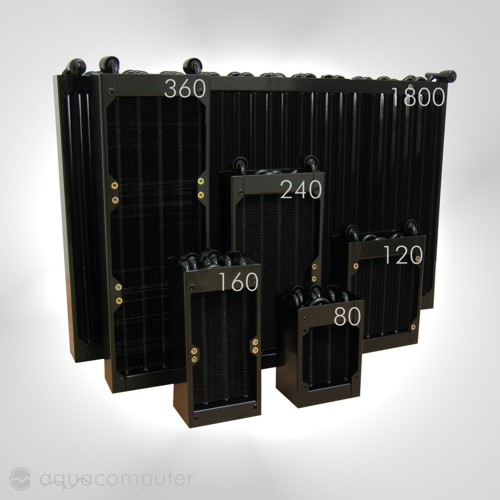
Roughly 4 by 6 give or take.
I know 50c isn't overheating but it keeps spazzing when it reaches temps near there.
Answer: I would take 50C very seriously... If you have a good watercooling system, it should never reach that high, not even near... Sometimes, I see 40C with full load on other systems and OCd...
You never mentioned what brand your watercooling system...
My main advice to you is follow KingCody's steps a, b and c first. Don't forget to get that Arctic Silver 5, it helps a lot! Pour some water wetter mix with your coolant. You can get them at any autoparts store, autoshop or even gas station.
Heres the screenie,
What's with the screenshot? Are you having a GPU issue? Your GPU might be overheating not your processor. Did you have this problem before you switched to Watercooling? Maybe your GPU is not seated properly? Do you have another GPU you can test out?
Give us your full specs, man...
If your looking for a good brand of watercooling:
Swiftech
Danger Den
PolarFlo
Innovatek - German made
Aqua Computers - German made
I'll give you the link on the websites I go to for watercooling:
http://www.frozencpu.com/
http://www.highspeedpc.com/
http://www.sharkacomputers.com/
http://www.voyeurmods.com/
http://www.jab-tech.com/
http://www.performance-pcs.com/catalog/index.php
http://www.xoxide.com
This is a very good reservoir, a friend of mine uses it. It has a built in Aluminum fins!

CMH said:Aluminium fins on a reservoir? If it costs a bomb, I'll just suggest you put in another radiator, its cheaper and probably more effective.
You're going to need a reservoir anyway... That thing can hold more water volume than an average reservoir. Of course you can always add more radiator but that's not my point. My point is, not only it looks cool but it also helps to cool the water down. If you can afford it, why not throw a cool reservoir.
Let me correct you there.
You DON'T need a reservoir. It just makes filling up the system/bleeding easier.
http://forums.extremeoverclocking.com/showthread.php?t=176597
It also takes up a whole lot of space for what it does. I'd recommend the smallest reservior you can get if you want to go watercooling. Personally I'd get one that'll fit into the 5.25" bay, since I've got plenty of those extra.
Any heat dissipation from that cool looking reservior is not going to be very significant.
You DON'T need a reservoir. It just makes filling up the system/bleeding easier.
http://forums.extremeoverclocking.com/showthread.php?t=176597
It also takes up a whole lot of space for what it does. I'd recommend the smallest reservior you can get if you want to go watercooling. Personally I'd get one that'll fit into the 5.25" bay, since I've got plenty of those extra.
Any heat dissipation from that cool looking reservior is not going to be very significant.
KingCody
Posts: 964 +8
That is incorrect...
While it is true that you do not need a reservoir, it is very benificial to have one and does more than simply easy the process of filling and bleeding.
1. Reservoirs provide a reserve for lost liquid (water vapors leak through all types of tubing over time, especially silicone tubing)
2. It will allow for expansion/contraction of water in the enitre system
3. makes for easy filling, draining, bleeding of air bubbles and pockets
4. Reduces the net postive suction head of the pump
The higher the volume of water in the system, the better temps you will get.
Water cools down pretty fast on it's own (even without a radiator). If you had a large enough resivoir, the water would naturally cool down faster then it's turned over and reused into the water block.
I would never recommend anybody build a water cooling system without a reservoir. And I would recommend using the largest reservoir you can fit (unless you will be using it outside the case, then you can go as big as you want!)
While it is true that you do not need a reservoir, it is very benificial to have one and does more than simply easy the process of filling and bleeding.
1. Reservoirs provide a reserve for lost liquid (water vapors leak through all types of tubing over time, especially silicone tubing)
2. It will allow for expansion/contraction of water in the enitre system
3. makes for easy filling, draining, bleeding of air bubbles and pockets
4. Reduces the net postive suction head of the pump
The higher the volume of water in the system, the better temps you will get.
Water cools down pretty fast on it's own (even without a radiator). If you had a large enough resivoir, the water would naturally cool down faster then it's turned over and reused into the water block.
I would never recommend anybody build a water cooling system without a reservoir. And I would recommend using the largest reservoir you can fit (unless you will be using it outside the case, then you can go as big as you want!)
I'd say there's alot of facts you'd need to correct there
Yes, reservoirs provide a reserve for lost liquid, but you don't need a large one.
Yes, it makes for easy filling, draining and bleeding.
But these two uses of the reservoir can be replaced with a tube at the very top of the system, filled with water, and capped. Which is basically also a reservoir, but a small one. The tube is connected by a T junction of course. Which was what my link called a T-line.
It does not reduce the net positive suction head of the pump. If it does, its not significant.
The higher the volume of water in the system, the better temps you will get AT THE START. When the water warms up, you no longer have that advantage, instead, you should find that your temps are slightly higher. Thats because...
... Water doesn't cool down fast on its own. This is why on a cold day, the sea is actually warmer than land.
I think we can actually argue this quite alot I wonder what the conclusion in the end will be.
Also, check in the link I gave earlier, the order of the watercooling components doesn't matter. And its been experimented on.
Let me end this post with this: you can have a watercooling system without a reservoir, but having a reservoir is quite handy for point 3. Bear in mind that a reservoir is a slight inconvenience if you move your comps alot (lan parties?), and is sometimes considered a risk to have them (more connections + more components = more risk something stuffs up).
Yes, reservoirs provide a reserve for lost liquid, but you don't need a large one.
Yes, it makes for easy filling, draining and bleeding.
But these two uses of the reservoir can be replaced with a tube at the very top of the system, filled with water, and capped. Which is basically also a reservoir, but a small one. The tube is connected by a T junction of course. Which was what my link called a T-line.
It does not reduce the net positive suction head of the pump. If it does, its not significant.
The higher the volume of water in the system, the better temps you will get AT THE START. When the water warms up, you no longer have that advantage, instead, you should find that your temps are slightly higher. Thats because...
... Water doesn't cool down fast on its own. This is why on a cold day, the sea is actually warmer than land.
I think we can actually argue this quite alot
I wonder what the conclusion in the end will be. Also, check in the link I gave earlier, the order of the watercooling components doesn't matter. And its been experimented on.
Let me end this post with this: you can have a watercooling system without a reservoir, but having a reservoir is quite handy for point 3. Bear in mind that a reservoir is a slight inconvenience if you move your comps alot (lan parties?), and is sometimes considered a risk to have them (more connections + more components = more risk something stuffs up).
KingCody
Posts: 964 +8
Salt water does not have the same thermal properties as fresh water, which is why you cannot compare a PC water cooling reservoir to a sea of salt water... lol.
Water does indeed cool down naturally reguardless of the size of the resi. The water cools down in the resi while it is waiting to be pumped out, so the water entering the pump will be cooler than water that is pumped directly from a radiator with no resi.
...and yes we can keep arguing this topic til the cows come home, but that's the fun of it. We can bith search the internet and find articles to back up both sides of the debate. My points are derived from first hand experience in an area that many people are just starting to get into. I mean no disrepect, but based on your other posts it seems to me that you have never built or used a water cooling system before so all of your information is from a 3rd party... and I wrong?
I have been building my own water cooling rigs for 7 years now (fist one was on a PIII in 1999). and i have made them with and without reservoirs, and believe me a large* reservoir does keeps your temps lower and more consistant. *=I consider large to be between 750mL and 1L)
Water does indeed cool down naturally reguardless of the size of the resi. The water cools down in the resi while it is waiting to be pumped out, so the water entering the pump will be cooler than water that is pumped directly from a radiator with no resi.
...and yes we can keep arguing this topic til the cows come home, but that's the fun of it
. We can bith search the internet and find articles to back up both sides of the debate. My points are derived from first hand experience in an area that many people are just starting to get into. I mean no disrepect, but based on your other posts it seems to me that you have never built or used a water cooling system before so all of your information is from a 3rd party... and I wrong?I have been building my own water cooling rigs for 7 years now (fist one was on a PIII in 1999). and i have made them with and without reservoirs, and believe me a large* reservoir does keeps your temps lower and more consistant. *=I consider large to be between 750mL and 1L)
Lets just argue this till the cows come home
You are right, my information is from third party. However, I am trained to look for substantiated information, so I trust that my information is true. Besides, unless you're going to challenge the laws of Physics, or maybe even come up with some new theory, chances are what we're discussing here will adhere to the current knowledge of Physics.
I also use my own logic, and knowledge of high school Physics (not much, but its enough) to say that water cannot cool down faster if there's more of it. Back to Surface Area to Volume (SA/V) Ratio: A higher volume will get a smaller SA/V ratio, which results in a slower cooldown (assuming the whole system is heating up).
Given that the whole system will stabilize at a particular temperature, when heat input from components = heat output into atmosphere, the higher SA/V ratio will be beneficial.
Which is why your water cooling rigs with large reservoirs keep your temps lower.
For the consistency, you've got more water to distribute the heat around. I doubt the part on consistency, unless you mean the temperature climbs at a lower gradient. It cannot lose heat any faster, because how fast heat is lost is dependent mainly on total surface area and ambient temperature.
Now, to gather the significant surface area needed to produce lower temps, you'd need alot of volume. Remember high school math? Surface area increase isn't proportional to volume increase, the more water you put in the system, the less surface area increase there is.
Therefore, adding a second radiator will produce better results than getting a reservoir if you're looking for lower temps.
You are right, my information is from third party. However, I am trained to look for substantiated information, so I trust that my information is true. Besides, unless you're going to challenge the laws of Physics, or maybe even come up with some new theory, chances are what we're discussing here will adhere to the current knowledge of Physics.
I also use my own logic, and knowledge of high school Physics (not much, but its enough) to say that water cannot cool down faster if there's more of it. Back to Surface Area to Volume (SA/V) Ratio: A higher volume will get a smaller SA/V ratio, which results in a slower cooldown (assuming the whole system is heating up).
Given that the whole system will stabilize at a particular temperature, when heat input from components = heat output into atmosphere, the higher SA/V ratio will be beneficial.
Which is why your water cooling rigs with large reservoirs keep your temps lower.
For the consistency, you've got more water to distribute the heat around. I doubt the part on consistency, unless you mean the temperature climbs at a lower gradient. It cannot lose heat any faster, because how fast heat is lost is dependent mainly on total surface area and ambient temperature.
Now, to gather the significant surface area needed to produce lower temps, you'd need alot of volume. Remember high school math? Surface area increase isn't proportional to volume increase, the more water you put in the system, the less surface area increase there is.
Therefore, adding a second radiator will produce better results than getting a reservoir if you're looking for lower temps.
mod-newbie
Posts: 26 +0
flow is the most important factor in water cooling. anything that reduces flow should be avoided as much as possible. every twist and tun reduces flow so you want to stay away from corners (use smooth turns instead).
adding a second radiator will reduce the flow significantly and will cancel out the benifit. even if you have a powerful pump that can push the water through 2 radiators and still move fast, the second radiator will at best reduce temps by 1c-2c which is a negligable reduction and does not justify the flow reduction, extra fan noise, and extra cost of a second radiator
also... cooling fins on a reservoir would effectivly make that reservoir into a second radiator without reducing flow, that's a win win in my book.
i made my own water cooling rig, and at first did not a reservoir. but i am a mod freak and i have to keep changing things... lol so i added a reservoir (a 5.25" bay resi). not only does it look super-cool to see the water flowing underneath my DVD-RW drive... but it also reduced my temps by about 1c, which is almost nothing but it proves that adding a decent sized reservoir will help the rig more than hurt it.
...by the way CMH......... "You are right, my information is from third party. However, I am trained to look for substantiated information, so I trust that my information is true"...
i'm sure you think that your info is true, but you should not be telling others what to do and what not to do until you have done it first hand. the best teachers are people who began teaching a certain subject after real world working in the field first.
adding a second radiator will reduce the flow significantly and will cancel out the benifit. even if you have a powerful pump that can push the water through 2 radiators and still move fast, the second radiator will at best reduce temps by 1c-2c which is a negligable reduction and does not justify the flow reduction, extra fan noise, and extra cost of a second radiator
also... cooling fins on a reservoir would effectivly make that reservoir into a second radiator without reducing flow, that's a win win in my book.
i made my own water cooling rig, and at first did not a reservoir. but i am a mod freak and i have to keep changing things... lol so i added a reservoir (a 5.25" bay resi). not only does it look super-cool to see the water flowing underneath my DVD-RW drive... but it also reduced my temps by about 1c, which is almost nothing but it proves that adding a decent sized reservoir will help the rig more than hurt it.
...by the way CMH......... "You are right, my information is from third party. However, I am trained to look for substantiated information, so I trust that my information is true"...
i'm sure you think that your info is true, but you should not be telling others what to do and what not to do until you have done it first hand. the best teachers are people who began teaching a certain subject after real world working in the field first.
CrossFire851
Posts: 714 +0
I'm presenting another option to people who hasn't thought of it yet, with theory to back it up. Besides, its something thats non critical that can be done (not like you NEED a reservoir for a watercooling setup to work).
I did say a large reservoir will work, so don't get me wrong.
I just said that having a radiator instead of a reservoir will be more beneficial, which you agreed to.
You'd still have to fork out money to buy a reservoir, expecially one as fancy as the one with fins. A cheap used heatercore will cost a fraction of something that fancy (albeit a large fraction)
The second radiator doesn't need to have a fan, it should work just as fine. In fact, having the second radiator might just cancel the need for fans on the first radiator, if you can live with a couple of C higher temps.
You do understand that having experience in the real world doesn't mean anything unless you actually fiddled, and stuffed up a system. Following step by step instructions on the net isn't considered experience. My extensive reading into the topic and how others stuff up, as well as the experiments others have done, will prove much more beneficial.
In the end, its up to the readers to differentiate between believable evidence, and the results from someone's single watercooling setup. Its like comparing someone's blog and a research firm, if you get what I mean.
I did say a large reservoir will work, so don't get me wrong.
CMH said:Given that the whole system will stabilize at a particular temperature, when heat input from components = heat output into atmosphere, the higher SA/V ratio will be beneficial.
Which is why your water cooling rigs with large reservoirs keep your temps lower.
I just said that having a radiator instead of a reservoir will be more beneficial, which you agreed to.
mod-newbie said:...the second radiator will at best reduce temps by 1c-2c...so i added a reservoir (a 5.25" bay resi)... it also reduced my temps by about 1c.
You'd still have to fork out money to buy a reservoir, expecially one as fancy as the one with fins. A cheap used heatercore will cost a fraction of something that fancy (albeit a large fraction
)The second radiator doesn't need to have a fan, it should work just as fine. In fact, having the second radiator might just cancel the need for fans on the first radiator, if you can live with a couple of C higher temps.
mod-newbie said:the best teachers are people who began teaching a certain subject after real world working in the field first.
You do understand that having experience in the real world doesn't mean anything unless you actually fiddled, and stuffed up a system. Following step by step instructions on the net isn't considered experience. My extensive reading into the topic and how others stuff up, as well as the experiments others have done, will prove much more beneficial.
In the end, its up to the readers to differentiate between believable evidence, and the results from someone's single watercooling setup. Its like comparing someone's blog and a research firm, if you get what I mean.
CrossFire851
Posts: 714 +0
KingCody said:?? huh ??
?? ??? ??
(It's looks like tape) It something used for pluming and I had a leak on my cpu block were the line in goes.
Similar threads

- Replies
- 10
- Views
- 184

- Replies
- 11
- Views
- 32


Latest posts
-
 Solar generation beats coal in the US for the first time ever
- BuckarooBonzaii replied


-
TechSpot is dedicated to computer enthusiasts and power users.
Ask a question and give support.
Join the community here, it only takes a minute.