also @ TechSpot: Nortel's internal network "owned" by hackers for almost a decade
Welcome to the TechSpot OpenBoards. Please read the FAQ if you have any questions. Sign up or Login to participate.

Go Back   TechSpot OpenBoards > Tech Support > Windows BSOD, Freezing, Restarting Help

Collaborate in the cloud with Office, Exchange, SharePoint, and Lync

Can't solve BSOD issues, need help from the experts

Thread Tools Search this Thread
  #1  
Old 05-28-2006
Newcomer, in training
 
Member since: May 2006, 2 posts
Can't solve BSOD issues, need help from the experts

I have more than 100 minidmp files since Feb. That doesn't include the random lockups without BSOD.

I've tried to troubleshoot this on my own. I've tried to read the dump files. I've bought new memory, swapped, replaced, put in alone, ran memory tests. Nothing. I scrubbed the system and on a new install (with drivers and hardware installed, though), still BSOD.

I need some help on this if someone can provide it, becuase I'm out of ideas. I had two BSOD this morning. One was overnight when I was asleep. The other was within about 5 minutes of me starting the day (I had only opened several tabs in Firefox).

Those two dmp files are attached. Any help is appreciated. Let me know if you need more information.
Attached Files
File Type: zip Mini052806-02.zip (48.8 KB, 3 views)
  #2  
Old 05-28-2006
altheman's Avatar
TechSpot Booster
 
Location: East London
Member since: Nov 2005, 541 posts
the first dump references sptd.sys. this is used is Daemon Tools virtual drive software. if you have this installed, go to "\windows\system32\drivers\" and rename sptd.sys and sptdxxxx.sys (x = random number), to something else, and see if the problems stop.

the second dump says memory corruption, so try running memtest to test for faulty ram.

also, zip a few more of your memory dumps, at least 7, and post back.
  #3  
Old 05-28-2006
Per Hansson's Avatar
TechSpot Server Guru
 
Location: Sweden
Member since: Feb 2002, 1,513 posts
System specs
Sounds like hardware problems, your powersupply might be failing, or the capacitors on your mainboard, or both.

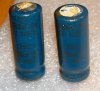
In both cases inspect the capacitors, they should be flat with no electrolyte leaking from the top or bottom...

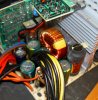
Here is an example of two bad capacitors... And here is the powersupply they came from, now with replaced good capacitors, note the flat shiny tops...
__________________
"The one who says it cannot be done should never interrupt the one who is doing it."
  #4  
Old 05-29-2006
Newcomer, in training
 
Member since: May 2006, 2 posts
As requested, attached are more dumps.
Attached Files
File Type: zip Mini051106-01.zip (38.2 KB, 1 views)
File Type: zip Mini051206-02.zip (51.3 KB, 1 views)
File Type: zip Mini051406-01.zip (70.2 KB, 1 views)

Last edited by gemini100; 05-29-2006 at 10:09 AM.. Reason: Add attachments
  #5  
Old 05-29-2006
kirock's Avatar
TechSpot Guru
 
Location: Hamilton, Canada
Member since: Jul 2005, 1,598 posts
You forgot to attach the minidumps. EDIT: They're there now.
Take a look at the threads in my sig line below. See what power requirements you have and if your PSU is up to the task.
Can you post your system specs please?

Cheers.
Closed Thread

Similar Topics
Topic Replies Forum
Hello Experts 0 Introduce yourself
I can't solve 0x0000008E, BSOD 3 Other Hardware
debug experts needed: BSOD with Bad Pool Header, Bugcheck 19 7 Windows BSOD, Freezing, Restarting Help
I'm stumped, BSOD problem that I can't solve 9 Device Drivers
ASUS MB and SLI Issues, anyone else solve these yet? 11 Processors and Motherboards

Thread Tools Search this Thread
Search this Thread:

Advanced Search
All times are GMT -4. The time now is 12:16 PM.