Welcome to the TechSpot OpenBoards. Please read the FAQ if you have any questions. Login to participate.

Go Back   TechSpot OpenBoards > OS & Software > Gaming and Consoles

Counter Strike Source and SiS 760

Reply
Bookmark / Share this page
Thread Tools
  #1  
Old 08-10-2006
Newcomer, in training
 
Member since: Aug 2006, 7 posts
Counter Strike Source and SiS 760

Half-Life 2: Runs fine for approximatley twenty minutes then crashes the comp.

Counter Strike Source: Loads and will play a game but the menu is black making it next to impossible to navigate to a game.

Hammer: while making a map there is no grid lines, making it impossible to do anything. (If I minimize the screen and re-open it only the top left box will show a grid but still disappears when I mouse over.

I feel all three of these programs are all suffering from the same problem because they all use the same graphics engine.

The computer is a friends and I already know it has nothing to do with system specs even though they are low grade.

COMPAQ SR1550NX
AMD Athlon 64 3400 running at 1.9Ghz (In Ms Info it says 2.4Ghz)(In DxDiag it says 2.4Ghz)
512Mb Ram (In Ms Info it says 512 Mb)(In DxDiag it says 384)

Also my bios states I have 512Mb DDR PC3200, but the System Properties says it's only reading 384Mb

SiS 760 128mb (Driver Version, 3.75)
(Direct X9.0c is installed)


I want an actuall answer to why these things would be happening. I know the computer could use some ****ing upgrades. Everything is compatible with the Source engines specs but when I ran Counter Strike Source for the first time it said I didn't meet specs because the SiS 760 wasn't reading as a DirectX card, but my friends,you and I know there is no other such thing this day in age for PC.

MUCH HELP APPRECIATED,
Last edited by ghost_sinner; 08-10-2006 at 07:11 PM.
Reply With Quote
  #2  
Old 08-10-2006
Newcomer, in training
 
Member since: Aug 2006, 7 posts
More Info...

I have found out a little more information that might be helpfull.

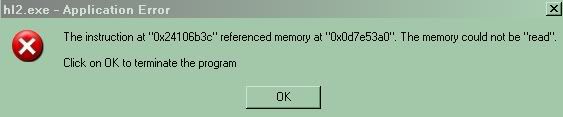
I will get an error after I run Counter Strike Source for about 30 seconds.
(Doesn't occur with the SDK, Or Half-Life 2)


I know someone out there has knowledge of this.

Please and Thank You;

Last edited by ghost_sinner; 08-10-2006 at 06:53 PM.
Reply With Quote
You can remove this banner by registering, join the TS Community for free.
  #3  
Old 08-10-2006
TechSpot Member
 
Location: Lancs, United Kingdom
Member since: Jul 2006, 81 posts
Try updating your Video Card drivers, i had a similar problem with B&W2 crashing after about half an hour.

Start >> Run >> Type "dxdiag" (without the "") and then tell us what it says on the 'System' tab and where it says 'Memory' under 'System Properties'.
Reply With Quote
  #4  
Old 08-10-2006
TechSpot Guru
 
Location: Pennsylvania, USA
Member since: Apr 2006, 2,420 posts
System specs
Probably the SiS 760 is integrated, and you have 512MB of main RAM, but 128 MB of that is allocated for graphics. As for your graphics problem, what version of DirectX do you have in dxdiag?
hoping to help
kitty500cat
Reply With Quote
  #5  
Old 08-10-2006
Newcomer, in training
 
Member since: Aug 2006, 7 posts
DirectX

Thanks for telling me my memory problem Kitty.

My Direct X version is 9.0c

Earlier today I just rolled back all the way and did every update for my video, but no matter what always the same problem in every driver. The highest version for my vid driver I came accross was 3.75 on SiS's official site.

Last edited by ghost_sinner; 08-10-2006 at 07:14 PM.
Reply With Quote
  #6  
Old 08-10-2006
Newcomer, in training
 
Member since: Aug 2006, 7 posts
New Info...

Total Memory: 384 MB
Available Memory: 68 MB

I ran Steams diagnostic tool through there website and it is telling me It's reading 384MB of ram but only 64MB are available.

How can I raise the amount of ram available without purchasing?

I went into the bios and changed the memory settings for the video to 32MB now it says
Total Memory: 480 MB
Available Memory: 156 MB

Can someone tell me where all this memory usage is located... Or how I can find out where all this memory is being used?

What would happen if I dump the System Chache?

Last edited by ghost_sinner; 08-10-2006 at 09:06 PM.
Reply With Quote
  #7  
Old 08-13-2006
TechSpot Guru
 
Location: Pennsylvania, USA
Member since: Apr 2006, 2,420 posts
System specs
Now you have 480MB of system RAM, cuz you changed the video memory size to 32MB (512 - 32 = 480). I think available memory is something like memory that is not being used by the OS, the memory that is available to run other programs. So in your case, the available memory might depend on your operating system.

As for your video problem, do you have access to a video card to put in to see if your SiS 760 is faulty? Also, the driver version 3.75 seems to be the latest one, but maybe it is not as stable. If you could, you might try downloading an earlier driver to see if that is more stable. I don't have a lot of experience w/drivers, though, so I'm not sure if it would work.
hoping to help
kitty500cat
Reply With Quote
You can remove this banner by registering, join the TS Community for free.
  #8  
Old 04-21-2007
cssourceperson's Avatar
Newcomer, in training
 
Member since: Apr 2007, 2 posts
im having problems with my sis 760 card too... the only thing i dont have is 512mb ram for memory... how do i get more memory?
Reply With Quote
  #9  
Old 04-21-2007
cssourceperson's Avatar
Newcomer, in training
 
Member since: Apr 2007, 2 posts
kitty can you help me with my problem for the sis 760 thing
Reply With Quote
  #10  
Old 11-23-2007
Newcomer, in training
 
Member since: Nov 2007, 18 posts
Hi, i had the same problem with the screen going black, but heres how you fix it this should work. It did for me. Open up steam and go to your games, right click on counter strike and go to properties, a box should open up, press set launch options. In the new box there should be a blank line, type in either
"-dxlevel 9.0" or "-dxlevel 8.0", with out the "" on them. I have the same card as you do and i chose the "-dxlevel 9.0" and it fianly worked. This also works on other games you are having trouble with. The only problem is that the players, guns, and some stuff on some maps are multi colored. Im still trying to figure out how to fix that, but it still works fine the colors just messed up a little. If anyone else knows how to fix the color problem that would be great. Hope this helps.

Last edited by smetremont; 11-23-2007 at 12:01 PM.
Reply With Quote
  #11  
Old 11-24-2007
TimeParadoX's Avatar
TechSpot Guru
 
Location: DE_Dust 2
Member since: Aug 2006, 2,474 posts
System specs
Quote:
Hammer: while making a map there is no grid lines, making it impossible to do anything. (If I minimize the screen and re-open it only the top left box will show a grid but still disappears when I mouse over.
Do this:

Go to Map > Entity Report > Goto and it'll fix the grid layout and fix the 3d camera, a thing Valve has been to lazy to fix since hammer has been released for source.

Quote:
"-dxlevel 9.0" or "-dxlevel 8.0", with out the ""
He has to do -dxlevel 8.1 because 8.0 isn't league acceptable and most servers that I been to don't allow anything below 8.1
Reply With Quote
Reply
Thread Tools

Forum Jump

Similar Topics
Thread Thread Starter Forum Replies Last Post
Counter Strike Source Weisai Gaming and Consoles 2 09-30-2007 10:35 PM
Counter-Strike Source Lag GigaByTe Gaming and Consoles 25 01-31-2007 12:55 PM
Counter-strike source NorthRiver Gaming and Consoles 1 10-10-2005 04:14 AM
help with counter strike source fps megazero25 Gaming and Consoles 0 07-10-2005 05:17 PM
Counter Strike Source FPS HELP steve2586 Gaming and Consoles 0 06-22-2005 02:08 AM


All times are GMT -4. The time now is 01:04 PM.