also @ TechSpot: BlackBerry 10 OS revealed in 14-page marketing document
Welcome to the TechSpot OpenBoards. Please read the FAQ if you have any questions. Sign up or Login to participate.

Go Back   TechSpot OpenBoards > Software > Software Apps

Begin your free trial now Pay-as-you-go options starting at $10/user/month

Right click gone wrong...

Thread Tools Search this Thread
  #1  
Old 11-12-2006
TechSpot Member
 
Location: Ottawa
Member since: Aug 2006, 127 posts
Right click gone wrong...

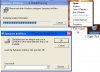
Almost since i've got this computer about a year ago when you right click the desktop, or on an icon for example and the tab comes down after about 10-20 sec. I thought maybe it was just the computer, but now when I right click a Symantic AntiVirus instalation opens, i've all ready had the program since I got the computer. When i wait to just let it install it tells me to insert the install disk, but im not even sure I have it anymore, so i just click cancle every time it comes up. Is there a way I can stop this, I tryed to delete the program but theres an error.

I have a pic attached.
Attached Images
File Type: jpg untitled.JPG (40.0 KB, 9 views)
  #2  
Old 11-12-2006
Rik's Avatar
Rik Rik is offline
Banned
 
Location: UK-Maidenhead
Member since: May 2005, 4,987 posts
System specs
Download either the free AVG or Avast antivirus programmes and either the free Zonealarm or Kerio firewall programmes from within this link - [url]http://www.techspot.com/vb/topic58138.html[/url]

Then, disconnect from the net and completely uninstall Symantec/Norton. If you have any problems in uninstalling the programme, take a look at this thread - [url]http://www.techspot.com/vb/topic57112.html[/url]

Once you`ve completely uninstalled Symantec/Norton, reboot your system and install whichever firewall programme you chose, followed by whichever antivirus programme you chose. Reboot your system the required number of times and reconnect to the net. Run the antivirus updates.
  #3  
Old 11-12-2006
TechSpot Member
 
Location: Ottawa
Member since: Aug 2006, 127 posts
Well, I already have all the other things, but the tool tells me to remove it from add/remove programs, I tryed it acouple times but it says theres a fatal error.
  #4  
Old 11-12-2006
Rik's Avatar
Rik Rik is offline
Banned
 
Location: UK-Maidenhead
Member since: May 2005, 4,987 posts
System specs
Boot into safe mode and try it all again!!!!

To boot into safe mode, press F8 as windows begins to load and select safe mode from the menu!!!!
  #5  
Old 11-12-2006
TechSpot Member
 
Location: Ottawa
Member since: Aug 2006, 127 posts
OH lol, I mean I already have all those other firewalls/Anti virus, whats not working is removing Symantic from add/Remove programs, and you cant do any of that in safe mode. It says theres an error sumtime during the uninstalling process

Last edited by Mekaonija; 11-12-2006 at 10:39 PM..
  #6  
Old 11-12-2006
Rik's Avatar
Rik Rik is offline
Banned
 
Location: UK-Maidenhead
Member since: May 2005, 4,987 posts
System specs
Hmmm, it is certainly being stubborn!!!!

Click start then run and type "msconfig" without the speech marks, then click "startup" and take the tick out of anything to do with symantec and norton then reboot!!!!

You will get a message about changing the startup, click ok!!!

That will hopefully at least stop norton from running!!!!


Have a go at that then we will deal with removing norton!!!!

Let me know how you get on!!!!
  #7  
Old 11-12-2006
TechSpot Member
 
Location: Ottawa
Member since: Aug 2006, 127 posts
LOL!!!
IM waaaaaayyy ahead of u buddy xD !!!
its never rly been on, but it sure as hell wants to stay on my comp, i made sure nuffin that had to do with it was running, but man it dont want to leave!!!
Well at least it isnt anoying and telling me to update and what not, actualy it dont say nuthing at all, that why i just let it chill on my comp, BUT NOW ITS EFFECTING RIGHT CLICK AND JUST SEEING IT MAKES ME MAD, DAMN U SYMANTIC!!!!!!!!!
bah i habn 2 go 2 bed lol school, ill cheak in moring, just tell me everything u can think of, we already killed 4 hours with like 3 posts each i think it would be much more efficiant if u blobed everything down instead of killing 2 hours of time just to reboot k thx night lol

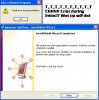
PIKATURE | Why it do say INSTALL? i clicked DELETE T_T meh......
|
\/
Attached Images
File Type: jpg untitled.JPG (43.5 KB, 7 views)

Last edited by Mekaonija; 11-12-2006 at 11:34 PM..
  #8  
Old 11-13-2006
Rik's Avatar
Rik Rik is offline
Banned
 
Location: UK-Maidenhead
Member since: May 2005, 4,987 posts
System specs
With some consultation with Howard, your best course of action is to read this - [url]http://www.techspot.com/vb/topic50981.html[/url] - and follow the instructions and post your HJT log as an [COLOR="Red"][U][B]ATTACHMENT[/B][/U][/COLOR]!!!!
  #9  
Old 11-13-2006
smore9648's Avatar
TechSpot Addict
 
Location: Top Secret Hideout
Member since: Sep 2006, 757 posts
Quote:
Originally Posted by Mekaonija
Almost since i've got this computer about a year ago when you right click the desktop, or on an icon for example and the tab comes down after about 10-20 sec. I thought maybe it was just the computer, but now when I right click a Symantic AntiVirus instalation opens, i've all ready had the program since I got the computer. When i wait to just let it install it tells me to insert the install disk, but im not even sure I have it anymore, so i just click cancle every time it comes up. Is there a way I can stop this, I tryed to delete the program but theres an error.

I have a pic attached.

Sounds like a nasty go to your Norton
  #10  
Old 11-13-2006
TechSpot Member
 
Location: Ottawa
Member since: Aug 2006, 127 posts
Okk, Still the same problem going on. The comp is alot faster now xD But still I am unable to Delete Symantic from Add/Remove programs, I still get the Error message. And Im still geting the Install Wisard for Symantic when I right click on icons, Just on Icons tho dont come up on anything else. All the scans finished, I had but 1 little thing on Ad-aware but other then that everythings fine ;D

Maybe if I post a hjt.log...

Seriously I have no clue how this even started, one day I just got on and it started doing it. I dont think I downloaded or installed anything ither. Ill see if I have any useless files hanging around and run some more stuff, ill let you know how its doing afterward
Attached Files
File Type: log hijackthis.log (3.1 KB, 2 views)

Last edited by Mekaonija; 11-13-2006 at 06:38 PM..
  #11  
Old 11-13-2006
smore9648's Avatar
TechSpot Addict
 
Location: Top Secret Hideout
Member since: Sep 2006, 757 posts
Have you deleted Norton from you registry yet? Thats what I had to do to get rid of it
  #12  
Old 11-13-2006
TechSpot Evangelist
 
Member since: Aug 2004, 25,949 posts
I`m not sure what`s causing your right click issues, but you certainly have a couple of bits of Symantec/Norton still running.

You might want to copy and paste these instructions into a notepad file. Then you can have the file open in safe mode, so you can follow the instructions easier.

Turn off system restore.(XP/ME only) See how here.> http://www.bleepingcomputer.com/forums/tutorial56.html

Boot into safe mode, under your normal user name(NOT THE ADMINISTRATOR ACCOUNT). See how here.> http://www.bleepingcomputer.com/forums/tutorial61.html

In Windows Explorer, turn on "Show all files and folders, including hidden and system". See how here.> http://www.bleepingcomputer.com/forums/tutorial62.html

Click start/run and type services.msc into the run box and press the enter key.

When the window appears, maximise it. Double click on the following services(if there) and select stop if they are running. Set the startup type to disabled. Click apply/ok for each service you disable.

Symantec AntiVirus Definition Watcher

SAVRoam

Close the services window.

Open your task manager, by holding down the ctrl and alt keys and pressing the delete key.

Click on the processes tab and end process for(if there).

DefWatch.exe
SavRoam.exe

Close task manager.

Run HJT with no other programmes open(except notepad). Click the scan button. Have HJT fix the following, by placing a tick in the little box next to(if there).

O23 - Service: Symantec AntiVirus Definition Watcher (DefWatch) - Unknown owner - C:\Program Files\Symantec AntiVirus\DefWatch.exe (file missing)

O23 - Service: SAVRoam (SavRoam) - Unknown owner - C:\Program Files\Symantec AntiVirus\SavRoam.exe (file missing)

Click on the fix checked button.

Close HJT.

Locate and delete the following bold files and/or directories(if there).

C:\Program Files\Symantec AntiVirus

Reboot into normal mode, turn system restore back on and rehide your protected OS files.


Regards Howard
  #13  
Old 11-13-2006
TechSpot Member
 
Location: Ottawa
Member since: Aug 2006, 127 posts
Thx, I think Symantic's files are off my computer, like I said its never really been in use anyway so it hasnt been bothering me, but i still have the right click problem =p and i get the fatal error during uninstalling in add/remove

Its ok if your not sure whats going on, im clueless also. ;D

Last edited by Mekaonija; 11-13-2006 at 07:52 PM..
  #14  
Old 11-13-2006
smore9648's Avatar
TechSpot Addict
 
Location: Top Secret Hideout
Member since: Sep 2006, 757 posts
Do you use a registry cleaner such as registry mechanic?
  #15  
Old 11-13-2006
TechSpot Member
 
Location: Ottawa
Member since: Aug 2006, 127 posts
Nope, Should I?
  #16  
Old 11-13-2006
TechSpot Evangelist
 
Member since: Aug 2004, 25,949 posts
Run a complete disk check. Click start/run and type chkdsk /f /r and press the enter key. Follow the onscreen prompts and reboot your computer. Windows will check your hard drive for problems. Depending on the size of your hard drive, this can take quite some time.

Once you`ve done that, do a disk defrag and see if that helps.

If you still have problems, then maybe doing a Windows repair as per this thread HERE will help.

Regards Howard
  #17  
Old 11-13-2006
smore9648's Avatar
TechSpot Addict
 
Location: Top Secret Hideout
Member since: Sep 2006, 757 posts
Quote:
Originally Posted by Mekaonija
Nope, Should I?
I have it and its saved me a couple times.

I would give it a try, buts thats me.

There are other programs like this one, that are free but I never used those and this one is a shareware.

Just make sure to create a restore point first, registry mechanic, does this for you.
  #18  
Old 11-13-2006
TechSpot Member
 
Location: Ottawa
Member since: Aug 2006, 127 posts
Rofl Registry Mech found 1351 problems ahah

Ohh Still nothing has worked, I can live with it for now until Christmas. Thats when im geting a new comp ;D

Thanks anyway All !!!
  #19  
Old 11-14-2006
smore9648's Avatar
TechSpot Addict
 
Location: Top Secret Hideout
Member since: Sep 2006, 757 posts
Quote:
Originally Posted by Mekaonija
Rofl Registry Mech found 1351 problems ahah

Ohh Still nothing has worked, I can live with it for now until Christmas. Thats when im geting a new comp ;D

Thanks anyway All !!!
It detected it but it will not fix it until you buy it
Closed Thread

Similar Topics
Topic Replies Forum
problem with folder actions on right click / default double click 5 Windows OS
Wrong Song Wrong Name ? 0 Windows OS
cant click on anything. 4 Windows OS
Can't click on Properties when I right click on the Desktop..... 7 Virus and Malware Removal

Thread Tools Search this Thread
Search this Thread:

Advanced Search
All times are GMT -4. The time now is 12:27 AM.