D
DelJo63
If like me, your laptop is your major system, then you might have concerns when
moving from your home LAN to a public hotspot -- at least I sure do!
At home, I have a router as a perimeter defense. By avoiding all port forwarding,
adding MAC filtering for DHCP address assignments, I have a tight environment
and can allow a visiting friend to hook-up without concern.
However, at a public hotspot, I do not have control of the router, loose my
MAC filtering, and get exposed for file/print sharing issues as well as a host
of known Trojans that visit various specific ports.
My sole proactive defense becomes the firewall rules.
My router is on 192.168.0.1 so the whole LAN subnet would normally be
192.168.0.1 -- thru 192.168.0.255.
I've defined {home-lan} as 192.168.0.1-192.168.0.10 and
where MAC filtering ensures only known devices and systems can
reside in this range. Any visitors will be at 192.168.0.11 and above.
{home-brdcst} is 192.168.0.255
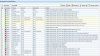
The attachment is a screenshot of my firewall rules and the following text
explains the usage of each.
Firewall Rules:
R0: deny fragmented packets, stopping reassembly attacks
R1: allow all local services on the loopback interface
R2: allow all DNS requests
R3: allow all DNS replies
edit:
allow tcp/udp in/out to ip 255.255.255.255 to port 67 (bootp access)
allow tcp/udp in/out to ip 0.0.0.0 to port 68 (dhcp access)
R4: allow LAN-2-LAN access {restricted to 192.168.0.1--0.10}
R5: allow LAN access to the broadcast address for sharing requests/ print monitoring
R7: allow all access to ftp, http sites
R8: allow all access to smtp, pop3, nttp (ie email + news)
R9: allow IP Protocol GRE (for VPN access)
R10: deny rpc queries
R11: specific site
R12: windows service in hotspots
rules for hotspot protection to trojans known on specific ports:
R13: 1047,1234,1492,1812,1978,1999,2002,2082,2140,2745,2773,2967,3127,3410,4444,5554,
R14: 6129,6711,6712,6713,6771,7215,7300,7301,7302,7303,7304,7305,7306,7307,7308,8787,
R15: 4156,8594,9000,9872,9873,9874,9875,9876,9999,
R16: 17300,27347,31378,36794,
R17-19: allow ICMP (ie ping)
R20-22: deny non-routed private networks
R23: deny everything NOT http (port 80)
Known Issues:
Rules 4-5 expose file sharing and everything else on this LAN.
At a hotspot, this rule would be change to BLOCK or deny access
Rules 21-22 explicitly block private networks 10.*.*.* and 172.16.*.*,
one of which would be required to have any access at all.
Both of these problems could be resolved by a firewall which implements
the concept of a network profile: rules applied depending upon the specific
adaptor and/or IP address configured. Norton IS has that feature, but like
many others, I've elected to dump that product.
Rules 13-16 are really redundant as rule 23 covers these cases.
These are known trojan attack ports that would be defacto defeated just by
the presence of my router. At a hotspot, there are known systems attached
and I can't assume everyone is well intended.
Details on Trojan Ports may be found here.
Personally, I like documentation and this is where I elected to place it.
moving from your home LAN to a public hotspot -- at least I sure do!
At home, I have a router as a perimeter defense. By avoiding all port forwarding,
adding MAC filtering for DHCP address assignments, I have a tight environment
and can allow a visiting friend to hook-up without concern.
However, at a public hotspot, I do not have control of the router, loose my
MAC filtering, and get exposed for file/print sharing issues as well as a host
of known Trojans that visit various specific ports.
My sole proactive defense becomes the firewall rules.
My router is on 192.168.0.1 so the whole LAN subnet would normally be
192.168.0.1 -- thru 192.168.0.255.
I've defined {home-lan} as 192.168.0.1-192.168.0.10 and
where MAC filtering ensures only known devices and systems can
reside in this range. Any visitors will be at 192.168.0.11 and above.
{home-brdcst} is 192.168.0.255
The attachment is a screenshot of my firewall rules and the following text
explains the usage of each.
Firewall Rules:
R0: deny fragmented packets, stopping reassembly attacks
R1: allow all local services on the loopback interface
R2: allow all DNS requests
R3: allow all DNS replies
edit:
allow tcp/udp in/out to ip 255.255.255.255 to port 67 (bootp access)
allow tcp/udp in/out to ip 0.0.0.0 to port 68 (dhcp access)
R4: allow LAN-2-LAN access {restricted to 192.168.0.1--0.10}
R5: allow LAN access to the broadcast address for sharing requests/ print monitoring
edit: add port 138 to access WORKGROUP names, eg
ports {137,138,161}
/edit
R6: allow all print sharingports {137,138,161}
/edit
R7: allow all access to ftp, http sites
R8: allow all access to smtp, pop3, nttp (ie email + news)
R9: allow IP Protocol GRE (for VPN access)
R10: deny rpc queries
R11: specific site
R12: windows service in hotspots
rules for hotspot protection to trojans known on specific ports:
R13: 1047,1234,1492,1812,1978,1999,2002,2082,2140,2745,2773,2967,3127,3410,4444,5554,
R14: 6129,6711,6712,6713,6771,7215,7300,7301,7302,7303,7304,7305,7306,7307,7308,8787,
R15: 4156,8594,9000,9872,9873,9874,9875,9876,9999,
R16: 17300,27347,31378,36794,
R17-19: allow ICMP (ie ping)
R20-22: deny non-routed private networks
R23: deny everything NOT http (port 80)
Known Issues:
Rules 4-5 expose file sharing and everything else on this LAN.
At a hotspot, this rule would be change to BLOCK or deny access
Rules 21-22 explicitly block private networks 10.*.*.* and 172.16.*.*,
one of which would be required to have any access at all.
Both of these problems could be resolved by a firewall which implements
the concept of a network profile: rules applied depending upon the specific
adaptor and/or IP address configured. Norton IS has that feature, but like
many others, I've elected to dump that product.
Rules 13-16 are really redundant as rule 23 covers these cases.
These are known trojan attack ports that would be defacto defeated just by
the presence of my router. At a hotspot, there are known systems attached
and I can't assume everyone is well intended.
Details on Trojan Ports may be found here.
Personally, I like documentation and this is where I elected to place it.