Welcome to the TechSpot OpenBoards. Please read the FAQ if you have any questions. Login to participate.
|
|||||||
Method for removing CPU fan
![]() |
| Thread Tools |
|
#1
|
|||
|
|||
|
Method for removing CPU fan
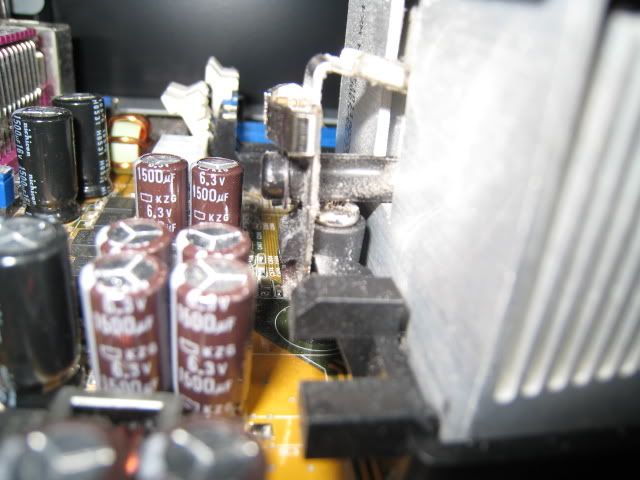
Because I got a new motherboard, I need to transfer my current CPU and fan to the new motherboard. However, the bottom part of the fan/ heat sink:
seems to be stuck to the motherboard. I was wondering if I should pry it out by force with a screwdriver or is there some better method of removal. Thanks. |
|
#2
|
||||
|
||||
|
are you referring to the heatsink itself or the mounting bracket?
it sounds like you mean that the heatsink is "stuck" to the CPU, yet you show a picture of the motherboard mounting bracket? |
|
|
|
#3
|
|||
|
|||
|
I wouldnt prise anything from anywhere with a screwdriver - almost certainly there are some screws you have missed - some mounting brackets are secured from the rear side of the motherboard (god knows why).
If you post a close up of your actual motherboard it would be easier to understand exactly what you mean. Chris |
|
#4
|
||||
|
||||
|
Quote:
|
|
#5
|
|||
|
|||
|
Is the motherboard supposed to come with a mounting bracket? Because the new one I got lacks one. My mounting bracket (my apolegies, I was a little confused with the terminology and called it the heat sink) seems to be stuck to the motherboard near the center. For example, I can use a screwdriver to push the four screwholes out, but the bracket wont budge at the center.
|
|
#6
|
|||
|
|||
|
How do I remove the brackets from the motherboard? Here is a picture to better explain my situation.
![]() As you can see, the silver bracket is hooked on to the black um...fastener? How do I pull the brackets outwards so they can be lifted up? |
|
#7
|
||||
|
||||
|
Use a screwdriver or some thin tool to push down on that bracket. When you push it low enough it will pop out. But be warned, you will need to use an excessive amount of force.
|
|
|
|
#8
|
|||
|
|||
|
Was that an answer to my question, or this new guy?
|
|
#9
|
||||
|
||||
|
Quote:
) are messing up our terminology. The (usually) black thing in your last picture is the mounting bracket. As far as I know, it stays on the motherboard and each motherboard that requires one should come with one.The heatsink is attached to the mounting bracket, as you can see. To unattach the heatsink use a flat-head screwdriver to press down on the metal part and then as you press down push it a bit outwards so it pops out. Refer to this picture: ![]() +-------------------------------------------------------------------------------------------------------------------+ Wait a second, there's two people here? Sorry OP, didn't realize. @OP: Quote:
Theres also the possibility that you got a motherboard with a different socket. Not all sockets require a separate mounting bracket. Make sure you got the same socket. For example, S A heatsinks attach to part of the socket itself. S AM2 heatsinks attach to a seperate mounting bracket. Last edited by agi_shi; 02-22-2007 at 10:21 AM. |
|
#10
|
|||
|
|||
|
Thanks a lot for the method. I didnt realize it would be the same method to use as putting the heatsink fan in.
|
|
#11
|
|||
|
|||
|
This is the motherboard that I have:
http://www.newegg.com/Product/Produc...82E16813128322 I dont think it came with a mounting bracket or any of the sort, but on the user manual, it said something about attaching a heat sink with pins. |
|
#12
|
|||
|
|||
|
Anyone? Please?
|
|
#13
|
||||
|
||||
|
Can you send a link for your old motherboard? Cheers, Allan.
|
|
#14
|
||||
|
||||
|
Quote:
(extra words so it will let me post ) |
|
#15
|
|||
|
|||
|
My old board can be seen here:
http://h10025.www1.hp.com/ewfrf/wc/d...c00361570#N804 I find it rediculous that HP didnt leave the PCIe slot inside in the first place as there is clearly a space meant for it on the mb. |
![]() |
| Thread Tools | |
|
| Similar Topics | ||||
| Thread | Thread Starter | Forum | Replies | Last Post |
| Is this the best method to network a printer | hnsexeter | Storage & Networking | 1 | 07-29-2006 10:27 AM |
| Rendering Method Perference | bl1nked | Device Drivers | 0 | 11-03-2005 07:49 PM |
| Querying the method of moderating posts. | Maurice | Site Feedback & Suggestions | 4 | 12-02-2004 03:00 PM |
| Safest copy method | PSLog | Misc. Software & Utilities | 9 | 08-21-2003 12:16 AM |
| Alternative Unlocking Method for AXPs... Anyone? | lokem | Overclocking, Cooling and Modding | 0 | 05-08-2002 10:16 PM |
All times are GMT -4. The time now is 12:34 PM.


) are messing up our terminology. The (usually) black thing in your last picture is the mounting bracket. As far as I know, it stays on the motherboard and each motherboard that requires one should come with one.
)