I've asked on a number of different forums and still no luck. Hoping someone in here mught be able to shed some light on the subject.
First off, Laptop Specs:
Toshiba Portege 3480CT
PIII 600MHz
128MB RAM
20GB HDD
Ok so heres my problem:
When I try to install Windows 2000 Pro[With SP4] it will boot from the CD fine and do all the normal things until it gets to the options menu where it asks what you want to do;
- To set up Windows 2000 now, press ENTER.
- To repair a Windows 2000 installation, press R.
- To quit Setup without installing Windows 2000, press F3.
So I press enter and it goes to this screen;
Setup did not find any hard disk drives installed on your computer.
Make sure any hard disk drives are powered on and properly connected to your computer, and that any disk-related hardware configuration is correct. This may involve running a manufacturer-supplied diagnostic or setup program.
Setup cannot continue. To quit Setup, press F3.
So I have to quit, I've tried a few times and this happens every time.
I have managed to install a few different Operating Systems on it, just to test it out, and have had success with Windows 98, Windows XP and Debian. So I'm not quite sure why I'm having problems with Windows 2000. It's an IDE storage controller so I don't need any 3rd party RAID or SCSI drivers, I'm a bit stumped.
Whilst having Debian installed I used the lspci command to try and identify the IDE chipset/controller, the output is below;
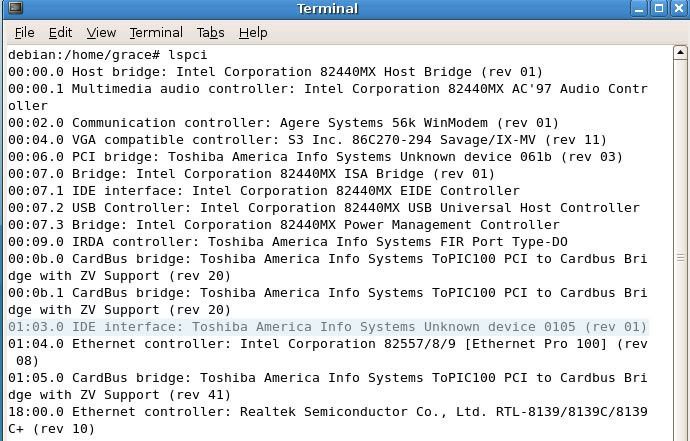
Is the highlighted line likely to be the source of the problem? If so any ideas on how to fix it?
Any help or suggestions would be nice =0]
First off, Laptop Specs:
Toshiba Portege 3480CT
PIII 600MHz
128MB RAM
20GB HDD
Ok so heres my problem:
When I try to install Windows 2000 Pro[With SP4] it will boot from the CD fine and do all the normal things until it gets to the options menu where it asks what you want to do;
- To set up Windows 2000 now, press ENTER.
- To repair a Windows 2000 installation, press R.
- To quit Setup without installing Windows 2000, press F3.
So I press enter and it goes to this screen;
Setup did not find any hard disk drives installed on your computer.
Make sure any hard disk drives are powered on and properly connected to your computer, and that any disk-related hardware configuration is correct. This may involve running a manufacturer-supplied diagnostic or setup program.
Setup cannot continue. To quit Setup, press F3.
So I have to quit, I've tried a few times and this happens every time.
I have managed to install a few different Operating Systems on it, just to test it out, and have had success with Windows 98, Windows XP and Debian. So I'm not quite sure why I'm having problems with Windows 2000. It's an IDE storage controller so I don't need any 3rd party RAID or SCSI drivers, I'm a bit stumped.
Whilst having Debian installed I used the lspci command to try and identify the IDE chipset/controller, the output is below;
Is the highlighted line likely to be the source of the problem? If so any ideas on how to fix it?
Any help or suggestions would be nice =0]


