also @ TechSpot: Microsoft Office 2010 public beta available for download
Welcome to the TechSpot OpenBoards. Please read the FAQ if you have any questions. Login to participate.

Go Back   TechSpot OpenBoards > TechSpot Community > Guides and Tutorials

How to repair Windows XP/2000 if you are unable to boot into Windows

Closed Thread
Page 10 of 19 « First 6789 10 11121314 Last »
Bookmark Thread Tools
  #181  
Old 07-18-2005
apell's Avatar
Newcomer, in training
 
Location: Dallas Texas
Member since: Mar 2005, 24 posts
Windows problems

Ummm .......i think you want to go to search and and type windows prolems then post a message .. iam kind green and perplexed why windows OS is so complicated and has problems
  #182  
Old 07-20-2005
Newcomer, in training
 
Member since: Jul 2005, 2 posts
Moved wininet.dll files to recycle and can't reboot system; no recovery disk... HELP!

My system was infested with a virus (trojan-spy.smtl....then it said w32.blaster.worm virus, then bloodhound.w32.ep...i am not that computer literate yet...). I was trying to download norton internet security, and the scan would keep saying files missing. then i moved the wininet.dll files that were supposed to house these viruses to the recycle bin(careful not to delete them yet), but now i see that i can't get past the ctl-alt-del security login for my laptop. i inherited this compaq laptop from a third party, and was using a wireless card to access the internet. through my online research to fix this problem, i keep coming to your great threads of helpful info and now it's the time for me to join. can any of you help me? i am stymied.

forgot to say that my system is windows 2000 nt professional with no recovery disks...all info was probably installed at corp. level.

Last edited by tatiana; 07-20-2005 at 03:03 PM..
  #183  
Old 07-20-2005
Mictlantecuhtli's Avatar
TS Special Forces
 
Location: Finland
Member since: Feb 2002, 4,852 posts
System specs
Welcome to TechSpot, tatiana

You need a Windows 2000 CD to boot from, to replace the infected / removed files.
  #184  
Old 07-20-2005
Newcomer, in training
 
Member since: Jul 2005, 1 posts
I am having with the same problem. I got fatal error from the system, which unable to login into windows. After reviewing all the discussions, I would like to know whether there are steps I can do to fix this problem for my Window 2000.

thanks for your help...
  #185  
Old 07-20-2005
Newcomer, in training
 
Member since: Jul 2005, 2 posts
How can I reboot if I don't have the original disks...

Can I download somewhere...files that the system will read upon start up? How do I do that so the files are readable?
Any suggestions?
  #186  
Old 07-21-2005
Newcomer, in training
 
Member since: Mar 2005, 21 posts
XP disk a no boot

Ok did all that your post said to do, Now I am getting after I try to reinstall this messege

Setup did not find any hard disk drives installed in your compter.

The problem is that I can boot off the hard drive however my problem is after it boot I can not run any programs. Such as I can double click a desk top icon for macAfee to run a virus check but it never runs
  #187  
Old 07-28-2005
Newcomer, in training
 
Member since: Jul 2005, 8 posts
What if using this method repair installation method doesn't work?

Despite being a novice to customisation I recently overhauled my 3yr old el-cheapo P4 Dell with:
  • Motherboard (ASUS A8N-E replacing horrid Dell Micro ATX)
  • Memory (Geil 2x512mb DDR replacing horrid Dell 256mb RDRam)
  • CPU (Athlon 64) replacing pentium 4
  • Radeon x800 PCIe graphics card (replacing a rubbish NVidia X400 AGP one)

I know: it's about as different an architecture as I could have without going to Mac - so hardly surprising it's been a bit troublesome.

I tried a method for motherboard-switching-without-XP-noticing-at-all (I'm an optimist, okay!) that I found elsewhere, but it didn't work - so I tried to Repair Install the installation exactly as suggested above. Though it copied over the files, on the first re-boot, BSOD about 20 seconds, and I haven't been able to get any further than that.

As a work-around I have performed a clean install on my D Drive - hence my ability to post at all - which suggests there's nothing too wrong with my build or hardware (I have one boot anomaly which I'll post on another thread, but it's a slight inconvenience rather than a big issue).

It would obviously be "nice" to get back my old installation, but I think I'll cope if I can't. Can anyone see what else I could do?

Ray
  #188  
Old 07-29-2005
Newcomer, in training
 
Member since: Jul 2005, 1 posts
i've hit a snag in the repair system.


It got up to 3% of the repair setup where things are to be copied...

and it says that the wow32.dll file could not be copied....

i tried it again and it still wouldn't copy...so now the computer has paused on the "retry to copy file" "continue without copying file" & 'exit setup".

I'm not sure whether to continue without copying that file as i've read that it may cause my comp to continously crash.

I'm just really wanting to burn everything in "my documents" onto cd and then leave my computer to rot (it got hit with the 'oneclickersearch' trojan....the one with popuper.exe, msole32.exe, intmonp.exe etc).

Anyone know whether i should continue..or is there another way?
  #189  
Old 07-31-2005
poertner_1274's Avatar
TS Special Forces
 
Location: Saint Louis, MO, USA
Member since: Feb 2002, 4,646 posts
System specs
Marzie: Try cleaning the CD off, it could be dirty and causing you problems. You can also check to make sure the IDE cable is still hooked up properly, as they could become loose over time.

BTW
Welcome to TechSpot
  #190  
Old 08-02-2005
Newcomer, in training
 
Member since: Aug 2005, 2 posts
Help with Sony Vaio laptop

Help!!!

I am using a Sony Vaio laptop running XP Pro with a centrino 1.6 and 60gb hard drive. Over the last few days I have been having problems restoring when I try to start up from standby mode. I get "Operating System Not Found" message. After several attempts I can sometimes get the F8 key to work or get the machine to fire up. Not sure if it is related (shouldn't be but could) but problems started after I loaded the new MSN search. Now need to try to back up everything while I still have it running before I start further trouble shooting but would appreciate some advice.

1 Coul the problem be with the hard drive? It seems to be running a lot and the machinbe seems to have slowed down a bit (but I usually have a lot of windows open)
2 If I use the Sony OEM system restore disks will it wipe my hard disk or just reinstall the oeprating system?
3 Any suggestions what sequence I should follow for trouble shooting after I get my back-up completed?

Apologies if this sounds kinda basic. I am usually fairly competent at sorting PC problems but this is my business machine with all my data on it and I am pretty nervous!!!
  #191  
Old 08-05-2005
Newcomer, in training
 
Member since: Aug 2005, 1 posts
My girlfriend has a 3-4 year old Dell laptop (which is more boat anchor then computer). She cant boot into her Windows 2000 as it hangs up and contnues to try and reboot after the blue screen of death. The message it gives is STOP : C0000218 (Regitry File Failure) the registry cannot load the hive (file) \SystemRoot\System32\Config\Software or its log or its alternate. It is corrupt, absent or not writeable. Her brother the "computer guy" gave it to her without and disks backups or partitions. Any ideas of how to boot into safe mode or anything to try and recover her data for her. Im at a loss to help her.

Okay I tried Winternals ERD 5 and it allows me to access the files. Unfortunately since there are only external drives I cant take the ERD cd out and attach the floppy drive to copy files to. Does anyone know if it is possible to reload Windows 2000 without losing her data? I would assume that if i was to try reinstalling the OS that it will wipe out the prexisitng data. Anyone who knows of something I can try to restore the software hive would be appreciated. Just understand that I am not a programmer and wouldn't be able to write my own registry etc. and this is not the way i want to try and learn more about computers.

Last edited by caprickorn17; 08-15-2005 at 02:23 PM..
  #192  
Old 08-10-2005
Newcomer, in training
 
Member since: Aug 2005, 2 posts
After system restore WinXP Pro wont start

I work for a kid's shelter where the kids have had access to the computer as an administrator. I used system restore and went back maybe 4 or 5 months. Now the computer won't start. We have another computer that was donated that is essentially the same as the other and therefore I tried creating a boot floppy from the functioning computer (both have PROFESSIONAL INSTALLED). This didn't work and I did set the boot sequence.
I know one can repair using the Installion CD. We were never given this.

I have gotten to the recovery console and have tried all w/last known config going into a loop of restarting and the others (safe mode w/or w/o command prompt and the others) and it just hangs when loading.

The only other options I have is to
1. Install win 98 se (this is our only copy of an OS) or possibly
2. I could install my version of XP Home and try tp repair PRO from there?

Please help

Vince
  #193  
Old 08-17-2005
Newcomer, in training
 
Member since: Aug 2005, 8 posts
I tryed but failed.
  #194  
Old 08-18-2005
Newcomer, in training
 
Member since: Aug 2005, 2 posts
Problem with XP PRO setup

Im installing XP PRO on a 50GB Seagate Barracuda. Im able to do the initial setup. then im prompted to restart. after it restarts it goes back into the initial setup, it doesnt finish the installation.

This is my first time Installing Windows XP PRO on a SCSI hard drive.

any help?

thanks

Last edited by chicksrules69; 08-18-2005 at 03:15 AM.. Reason: typo
  #195  
Old 08-18-2005
Mictlantecuhtli's Avatar
TS Special Forces
 
Location: Finland
Member since: Feb 2002, 4,852 posts
System specs
Quote:
Originally Posted by caprickorn17
My girlfriend has a 3-4 year old Dell laptop (which is more boat anchor then computer). She cant boot into her Windows 2000 as it hangs up and contnues to try and reboot after the blue screen of death. The message it gives is STOP : C0000218 (Regitry File Failure) the registry cannot load the hive (file) \SystemRoot\System32\Config\Software or its log or its alternate. It is corrupt, absent or not writeable. Her brother the "computer guy" gave it to her without and disks backups or partitions. Any ideas of how to boot into safe mode or anything to try and recover her data for her.
How to Troubleshoot a Stop 0xC0000218 Error Message
  #196  
Old 08-18-2005
Mictlantecuhtli's Avatar
TS Special Forces
 
Location: Finland
Member since: Feb 2002, 4,852 posts
System specs
Quote:
Originally Posted by chicksrules69
Im installing XP PRO on a 50GB Seagate Barracuda. Im able to do the initial setup. then im prompted to restart. after it restarts it goes back into the initial setup, it doesnt finish the installation.
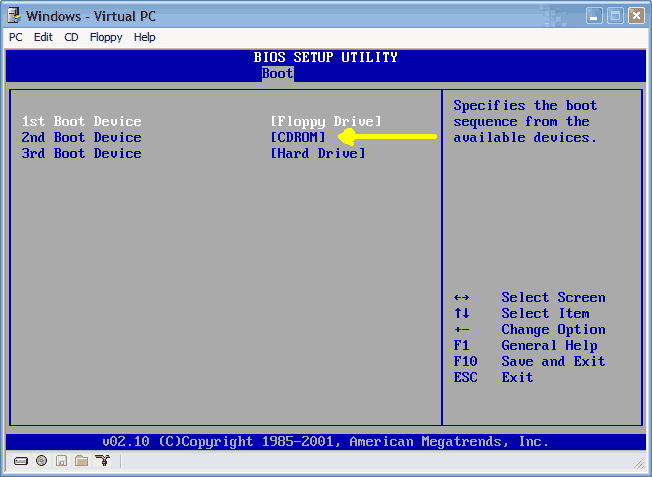
That sounds like it can't boot from the SCSI drive - have you checked BIOS settings for the startup disk?
  #197  
Old 08-25-2005
Newcomer, in training
 
Member since: Aug 2005, 1 posts
My computer is Gone Nutz!!!

Alright, I have several questions..... but first i'll explain the problem breifly.
I am experiencing the hal.dll error which you explain in the first post. After deleting some software it came back with this message.

Ok.. I have tried to do what was explained in your original post, but i'm afraid it wont work for me. I get the partition message instead of repair, at which point I stop. I would like to also state that my computer uses Windows XP Media Center Edition, which did'nt come with a cd. I was able to get a set but it doesnt do what was stated in the first post so as I stated, I just stop.

I am able to get to my c:\ prompt with my Nortorn Systemworks Cd. I would like to know if there is a way you can show me how to make a cd with the files needed on it so that i can copy them into my directories. I have MagicISO and am able to burn bootable cds, but im not sure what to do. When I take the Nortorn disk out and switch directories, it says General Failure reading drive A. I dont have a floppy so that is out the question.

The other thing is, can I use Knoppix to boot into my computer then copy the files into their proper places from there??? And I see another user used Winternals ERD 5, can this help me???

I cant loose my data!! The funny thing is most of it is backed up, and I was in the process of cleaning my computer up and backing things up when all of this happend. SORRY MY POST IS SO LONG....
  #198  
Old 08-25-2005
Newcomer, in training
 
Member since: Aug 2005, 1 posts
Problem with Windows XP

I recently tried to upgrade from Windows XP Home to Windows XP Pro. I started the setup before leaving work. When I came in the next day, I found that it was constantly restarting. It would show the windows xp logo with the little blue line underneath and then it would go to the blue setup screen and it said setup is being restarted............. Then it would go to a blank screen where all I can see is a mouse pointer. Then it restarts and starts all over again. I tried using going into safemode and all that and none of that works. When I boot with a boot disk or a bootable cd it doesnt show drive C. I tried this one program I found called active undelete and it showed the drive and all the files on it. I tried also using a boot disk and also a bootable cd and the C drive still doesnt show up. Anyone have any ideas? Please email me at Dave@wowcoolstuff.com or at DoctorXX@wi.rr.com. People who use yahoo IM can IM me, DoctorXX_98 or DoctorXX2000 with Aol Im.
  #199  
Old 08-28-2005
Newcomer, in training
 
Location: UK
Member since: Aug 2005, 1 posts
Dell Laptop in deadly embrace

Have read all the posts and tried all the suggestions that seemed appropriate to no avail. My Dell C600 laptop (XP Professional, 256 Mb RAM, 20Gb Hitachi HDD) stopped booting for no apparent reason. It circles through booting as far as the XP splash screen and then restarts. None of the Safe Mode options works either although booting with command lines shows that it gets as far as WINNT\SYSTEM32\DRIVERS\IOMDISK.SYS before restarting.

Have tried booting from the XP Pro disk. Can't do a fresh install as it says the partition has insufficient space (think there's about 4Gb free) or is too damaged to do so and suggests a reformat (trying to salvage some recent data files so don't want to do that if it's avoidable). Picking the Repair option gets me nowhere and the recovery console doesn't give me anything that makes a difference (FIXBOOT completed okay but made no difference.)

So.....HELP!!!! please. I really only want to recover some recent data files and am then happy to rebuild from scratch - but I can't access the file system to copy them. Any suggestions?
  #200  
Old 08-30-2005
TechSpot Member
 
Member since: Dec 2004, 202 posts
Quote:
Originally Posted by dawsy
Have read all the posts and tried all the suggestions that seemed appropriate to no avail. My Dell C600 laptop (XP Professional, 256 Mb RAM, 20Gb Hitachi HDD) stopped booting for no apparent reason. It circles through booting as far as the XP splash screen and then restarts. None of the Safe Mode options works either although booting with command lines shows that it gets as far as WINNT\SYSTEM32\DRIVERS\IOMDISK.SYS before restarting.

Have tried booting from the XP Pro disk. Can't do a fresh install as it says the partition has insufficient space (think there's about 4Gb free) or is too damaged to do so and suggests a reformat (trying to salvage some recent data files so don't want to do that if it's avoidable). Picking the Repair option gets me nowhere and the recovery console doesn't give me anything that makes a difference (FIXBOOT completed okay but made no difference.)

So.....HELP!!!! please. I really only want to recover some recent data files and am then happy to rebuild from scratch - but I can't access the file system to copy them. Any suggestions?

If that is an original dell install there are 2 partitions. One is a tiny fat partition that is for management and repair tools. The other one is the main system partition. Make sure you are trying to install on the correct partition.

There are kits you can get that can make your laptop drive an external usb drive. If you have another computer that could also be an option.
Closed Thread
Page 10 of 19 « First 6789 10 11121314 Last »

Tip: Download Advanced SystemCare 3 Freeware - 1 Click A Day to Clean, Repair, Protect & Optimize your PC.

Thread Tools


Similar Topics
Topic Category Replies Last Post
HOW TO: Install Windows 2000 (or XP perhaps) from DOS without a bootable CDROM Guides and Tutorials 44 4 Weeks Ago 04:36 AM
Microsoft Jokes The Meeting Spot - Chat & Socialize 126 05-27-2008 08:45 PM
Windows will not boot (Help) Processors, Chipsets and Motherboards 10 01-04-2007 04:00 PM
Dual Boot to DOS partition Windows OS 27 02-03-2006 07:20 AM
HELP please! Windows dont boot no more! The Alternative OS 3 11-09-2003 07:41 PM


All times are GMT -4. The time now is 10:35 PM.