Welcome to the TechSpot OpenBoards. Please read the FAQ if you have any questions. Sign up or Login to participate.
Collaborate in the cloud with Office, Exchange, SharePoint, and Lync
|
|||||||
Collaborate in the cloud with Office, Exchange, SharePoint, and Lync
How to repair Windows XP/2000 if you are unable to boot into Windows
|
|
Thread Tools | Search this Thread |
|
#201
|
|||
|
|||
|
Hello, I decided to post here after seeing all the great advice people had to offer. My problem is much like the earlier ones with xp pro hanging up after the logo. Well right now my main hard drive which is an 80gb Western Digital can't load xp pro. I'm on a smaller hard drive at the moment.
I tried to repair the hard drive with the cd but it doesn't even come up on the list just the one I'm using right now. I can't use any of the safe mode, safe mode with networking, last known configuration. It just hangs up. I went into Automated System Recovery with the cd but it'll just hang up after choosing the harddrive. I have the hard drive as my slave right now and it's detected by windows. I even ran a diagnostics from data life guard and it reports it as functional and working. Please help me fix this problem as it just happened a few days ago. |
|
#202
|
|||
|
|||
|
OK, So, I hate the hateful blue screen UNMOUNTABLE_BOOT_VOLUME issue. Seems I had a power outtage or a virus that corrupted some startup data, so I can't boot. I am all set with going forward to repair the OS as outlined in this thread. But, I'd like to grab the data off the HD before I do that *just in case.* In addition to the affected desktop, I also have a lap top with plenty of HD space that I can transfer the data to. Just have no clue how to hook the non-booting CPU to the lap top as a slave so I can grab the data. Any advise on how to hook up a master/slave for data transfer is GREATLY appreciated.
Of course my backups are old. What's the general consensus recommendation for Back-up software? |
|
#204
|
||||
|
||||
|
Welcome to TechSpot, I hate windows
Quote:
|
|
#205
|
|||
|
|||
|
Hi there
I`ve got an IBM thinkpad pentium II 300. Its quite old. 64mb. About a year ago i tried upgrading from windows 98 to Xp Pro. I went through all the stages of loading it but right near the end before it finishes it restarts by itself. When it came back it said that it cannot find the CD and it cannot continue with loading and press F3 to quit. Then when it came back on it asked me if i wanted to start xp or xp set up , so i chose xp but when it comes up it says: "this copy of windows must be activated with microsoft before you can log on. Do you wish to activate windows now" i clicked yes. Then a window comes (window product Activattion): " a problem is preventing windows from accurately checking the license for this computer. Error code: 0X80004005." there was only OK there so i clicked it and it went back to the welcome page. I couldn`t get back into windows. so i just left it. A Year later i thought i`d get it out and try it again. I put the CD in and it doesn`t ask me if i want to boot from the CD. Then i tried going in safe mode and wanted to remove windows xp from the computer. But it is not there in the add and remove. The think pad is not connected to the internet. Do you think it is too old to upgrade? Or not enough memory? I really want to get it working on xp so i can connect it wirelessly with the other computers. Thank you to anyone that helps. x Bang |
|
#206
|
|||
|
|||
|
BSOD persists
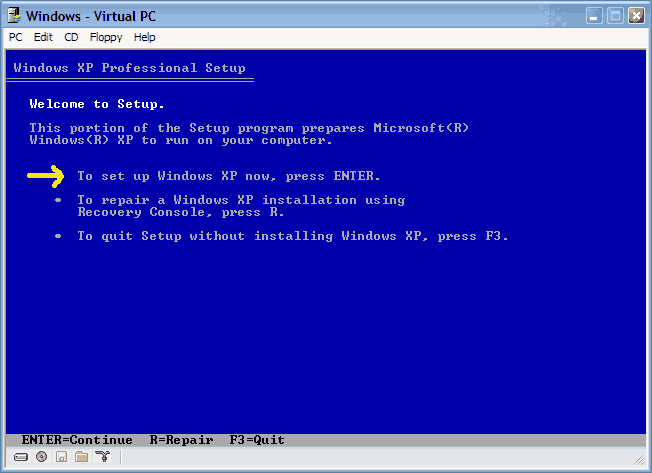
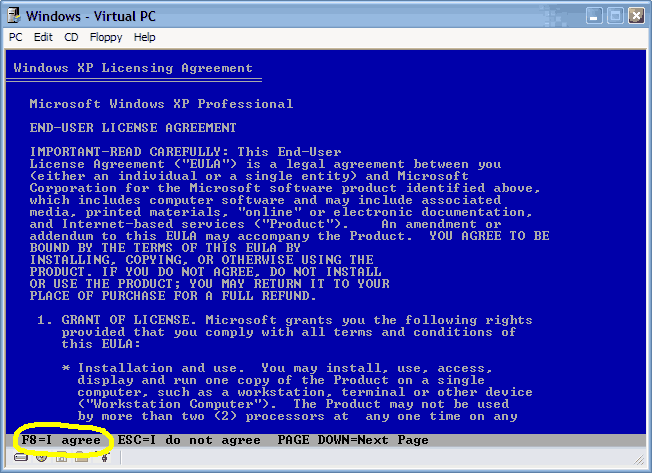
I'm runing XP professional SP2. I followed instructions to reinstall using XP disk up to selecting Enter to reinstall, not R for repair. Instead of license agreement page, at that point the machine reverts to BSOD. Any advice on how to proceed?
Thanks. R |
|
#207
|
|||
|
|||
|
Very useful program to boot up my XP without any programming knowledge
I had the same problem before didn't able to repair my C: drive using XP CD, and I didn't want to format my drive either. I received all kind of error message after accidently renamed all my drives' name and defraged my drives with errors and power outage (really bad luck).
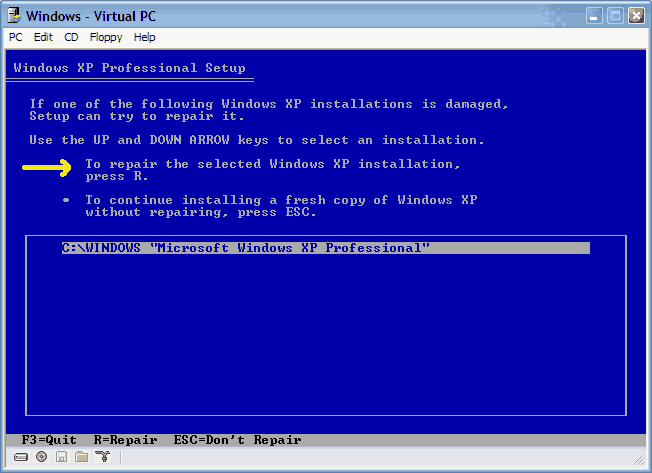
After 2 days (I mean really 48hrs) searching online trying all kinds of possible rescues. I finally got back most of my data (not all as I'm still trying now in day 2). And I really feel that people are so kind to share their expertise to help the others on this problem (especially those who made the program and let people use it for free, like PTedit.exe and TestDisk.exe, they should really get credits). I tried Norton Antivirus 05 rescue bootable disks and hope it would fix my drive somehow but no luck on that (or it did, but I just didn't notice, cuz still unbootable after that). Later I tried Partition Magic 8 resuce disk (you have to have PartitionMagic to make that resuce floppy) and once it loaded in DOC, it realized there's error in my boot drive and fixed the partition table. So I tried to reboot but still XP didn't bootup. But this time I was able to repair my XP using XP CD (repair XP I don't mean using "Automated Recovery Console" which is kinda technical, even I did try some comment like fixboot, fixmbr. Luckily I didn't erase all my data in my drive. I suggest try this at last after you have tried all I said in this message) I mean using XP CD to boot and don't hit "R" for repair, instead hit "Enter" to install XP, go to lincese agreement page, press F8, then you MIGHT have the option to "repair previous version of Windows" or "just F3 to quit". If you don't see the repair option, try to use TestDisk.exe, which I mention above, or PTedit.exe (which is downloadable for free and included in Nortion Antivirus Resuce Disk and PartitionMagic 8 resuce disk)to modifiy the PartitionTable, change the "Type" to 07 (which means unhide NTFS, You can find your TYPE using "set type" button in PTedit if you use other format instead of NTFS). After that I was able to boot to Windows XP but my other 3 drives are gone. After this I found the TestDisk.exe (I wish I found this before, it might have fixed everything in the first place) and it fixed two of my drives. I give up on the third one since there's only some songs in that drive. Only problem is some of my programs don't run anymore and I think I have to reinstall them. But I think a better way is to format all my drive and reinstall everything again after I save the data that I need. |
|
#208
|
|||
|
|||
|
Windows XP Media Center Restore/Repair disc freezes
Hey, guys....having a big issue...my nice Gateway system was infected with a ton of trojans...i used Spybot, Ad-Aware and McAfee 8.0 to clean them out...then although nothing else was found, my system would still do funky things like: 1) when the desktop and icons would appear, the screen would be moved in to the right about 6 inches...it would do this every time I booted up or rebooted. I followed the instructions on here to try and restore the lost or deleted Windows XP files that were needed...However, when doing the restore, my system gets past the "Collecting Info", "Dynamic Update" and "Preparing Installation" steps...then while it's in the "Installing Windows" stage, it pops up a Windows Logo Compatability warning about my Hauppage WinTV PVR PCI 2 Encoder. The system then freezes and will not allow me to choose either yes or no...the mouse freezes, and no buttons will work...when I reboot, it just goes right back to start the restoration and freezes at the identical point. I can't even boot into Safe mode because of this. Any suggestions? Thanks!
Wes LeROY lawless33@insightbb.com |
|
#209
|
|||
|
|||
|
Try to remove your Video Card!!
It seems like your video card has some conflict which i don't think it should, or you can try to flash your BIOS: either remove the round battery from your motherboard for about 30 sec (don't forget to unplug the power first) and try using the same video card, or try a new video card directly. :angel:
|
|
#210
|
|||
|
|||
|
Would that be happening even if this Hauppage thing isn't my video card? My vid card is an Nvidia brand...the Hauppage just has to do with my Gateway pc with XP Media Center Edition's ability to record live TV. Thanks!
|
|
#211
|
|||
|
|||
|
Can't get to log on screen with Windows XP
My computer was working incorrectly and I decided to just restart everything. I deleted un-needed files and remove SP2 because my SP1 disc wouldn't reinstall with SP2 on it. I went through the setup and it made me restart my computer. I restart it and as usual i get a dell screen. Then, a Windows screen with Windows XP Home Edition comes up. After that, a light blue screen comes up saying "Setup is restarting...........................". Then the screen goes black for about 20 seconds and I get a blue screen. This screen says:
"STOP: c000021a {Fatal System Error} The Windows Logon Process system process terminated unexpectedly with a status of 0x0000005 (0x00000000 0x00000000). The system has been shut down." I have a fairly new Dell Dimension XPS and nothing has ever happened like this before. Your help would be deeply appreciated. Sincerely, Redux
|
|
#212
|
||||
|
||||
|
This is good info, however, my system comes up with system not formatted properly or drive could be damaged.
It advises me to format the system. Not an option at the moment. Can boot to dos using an old win98se disk, but then I cant open the winnt dir as it isnt there. Any advise how I can backup files using dos and network. I know there is a netuse command in there somewhere! Thank you |
|
#213
|
||||
|
||||
|
You clould always take the drive out and put it into a different computer (spare at home, friends, etc.). Set it as a slave and copy your data to their computer then burn to CD or DVD. Then you can format and do whatever you want to do to your current computer to get it working again.
BTW Welcome to TechSpot
|
|
#214
|
||||
|
||||
|
Quote:
|
|
#215
|
||||
|
||||
|
Quote:
Thank you kindly. And thank you for your advise, problem is, Im getting disk I/O errors now, so I believe the drive is cream crackered. OH well back to the shops I go! |
|
#216
|
|||
|
|||
|
Black Screen after upgrading windows xp in my HP Laptop
Hi.
Please I am having similar problem and I can not find any solution. I tried to upgrade windows xp and in the middle of the process just appeard a black screen without any message and with the mouse cursor on center. I tried to use F8 to retore everything and nothing happend. Also I can go to the safety mode but still the same problem . My computer is a Laptop HP pavilion,and it was running windows xp professional and I just wanted to upgrade it. Please someone can help me? |
|
#217
|
|||
|
|||
|
Still having the black screen, after following the steps of reinstall windows xp
Hi.
Please I still having the problem and I can not find any solution. I tried to upgrade windows xp and in the middle of the process just appeard a black screen without any message and with the mouse cursor on center. I tried to use F8 to retore everything and nothing happend. Also I can go to the safety mode but still the same problem . My computer is a Laptop HP pavilion,and it was running windows xp professional and I just wanted to upgrade it. I followed all the steps in order tu solve this but after the computer is copying all files like a new installation, and the system boot itself, the black screen is back. Please someone can help me? |
|
#218
|
|||
|
|||
|
Repairing/Reinstalling XP without losing existing My Docs...
I had a power outage recently and now my Dell Dimension 8100 does not boot in safe mode, last existing config, etc... When I tried the repair option for XP, it didn't seem to do anything. Is it safe to choose the Install option for XP. I understand that this would probably reset certain files and updates, but will all of the data in My Docs still be there? What about the other non-system programs that were already loaded?
Thanks, Rich rnbcarter@comcast.net aol im: jobusrum73 |
|
#219
|
||||
|
||||
|
can someone please help me!!!
i have winxp home and i have loaded optimal setting on my bios. after doing this i reset my computer and when it starts to boots it says at the bottom : NVIDIA boot agent 201.0462 PXE-E61: media test failure, check cable PXE-MOF: exiting NVIDIA boot agent. wat do i do? |
|
#220
|
||||
|
||||
|
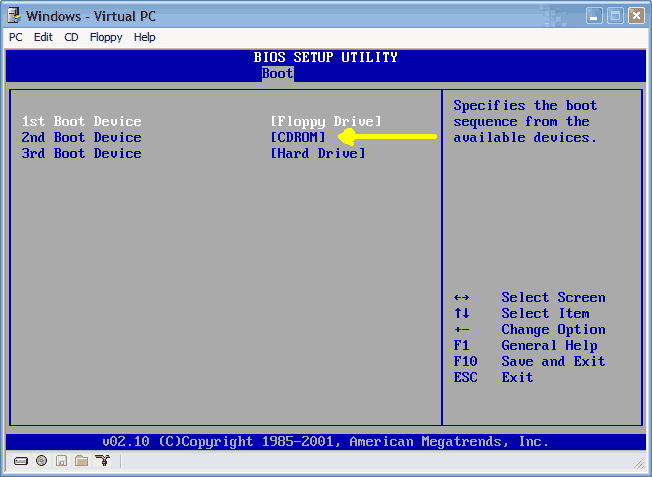
That's not related to Windows, it's just saying that network cable is unplugged. Change the BIOS boot order so that it won't try to boot from LAN first.
|
![]() |
| Similar Topics | ||||
| Topic | Replies | Forum | ||
Unable to log in as Administrator to Windows 2000
|
2 | Windows OS | ||
Unable to repair windows XP after system rebuild
|
11 | Other Hardware | ||
Unable to select windows 2000 from startup after windows XP was installed. Critical!!
|
1 | Windows OS | ||
unable to boot-install windows xp pro sp2 unable to repair pci.sys file missing
|
2 | Windows OS | ||
Unable to Repair Windows XP Home SP2, still Blue screens with Critical Errors.
|
4 | Windows OS | ||
| Thread Tools | Search this Thread |
|
|
All times are GMT -4. The time now is 03:35 PM.


Welcome to TechSpot
Unable to log in as Administrator to Windows 2000