also @ TechSpot: Nortel's internal network "owned" by hackers for almost a decade
Welcome to the TechSpot OpenBoards. Please read the FAQ if you have any questions. Sign up or Login to participate.

Go Back   TechSpot OpenBoards > TechSpot Community > Guides and Tutorials

Download Now:

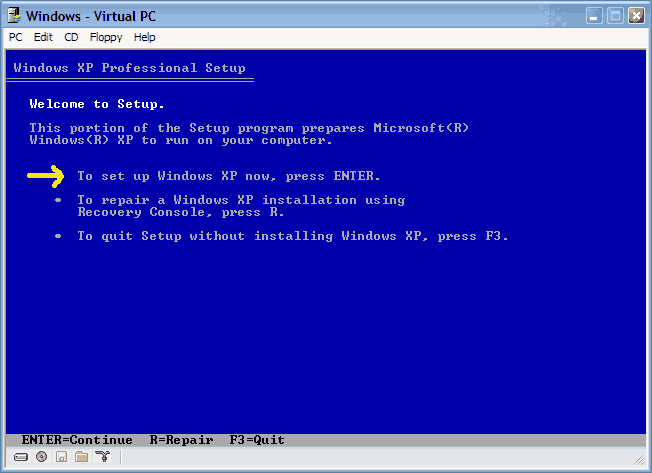
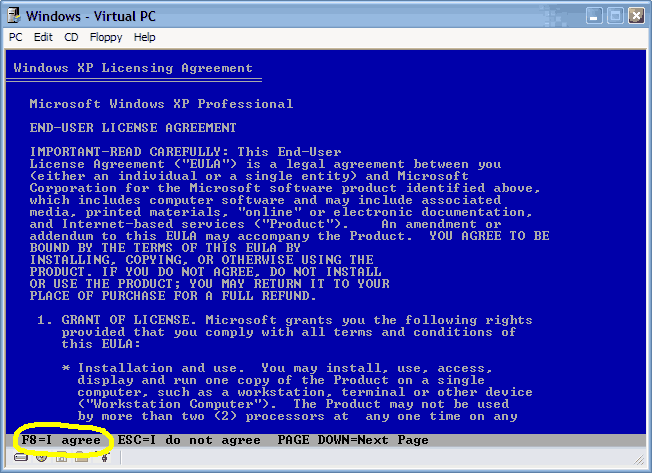
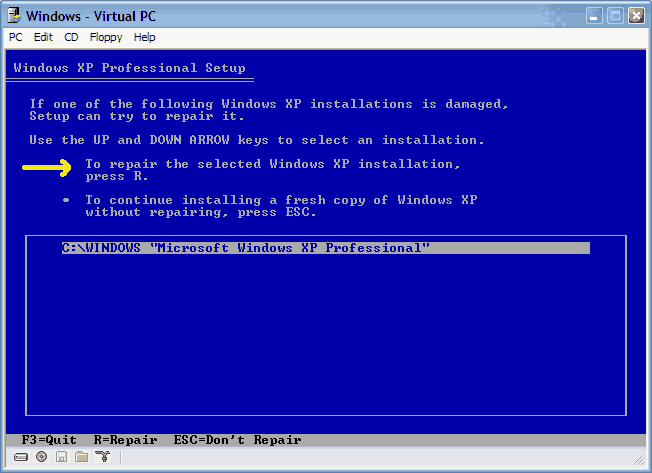
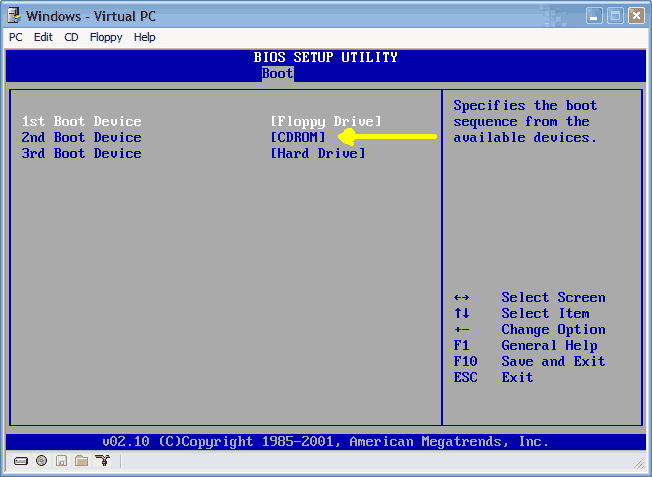
How to repair Windows XP/2000 if you are unable to boot into Windows

Page 14 of 19 « First 410111213 14 15161718 Last »
Thread Tools Search this Thread
  #261  
Old 04-20-2006
Newcomer, in training
 
Member since: Apr 2006, 5 posts
Page Fault In Non Paged Area

i am a pc technition myself and really stuck!
i keep getting the blue screen of death!
the message is always the same "page_fault_in_non_paged_area"
it wont let me start in any mode including safe mode
i have tried to repair my xp with the win cd
completly reboot
still the same problem.
i know the fault is with the page file.
i know the fix(right click on mycomputer, properties,advanced,performance,disable the page file, restart do the same process and enable it)
i cant even get into safemode!
i know i can fix this problem by formatting, but i dont want too loose my files
i have a 250 gig sata
with 3 partitions
boot
restore
and drivers
please can someone email me the fix as im always on the move
mikex83x@yahoo.co.uk
thanks
  #262  
Old 04-20-2006
sw123's Avatar
TechSpot Addict
 
Location: USA
Member since: Feb 2006, 752 posts
System specs
Ummm...try booting from your recovery partition. Then transfer the drivers again. Then reformat your boot partition and transfer recovery files and drivers to boot partition.
  #263  
Old 04-28-2006
Newcomer, in training
 
Member since: Apr 2006, 2 posts
I've read through 10 pages of this thread without finding an answer to my WinXP repair problem - ultimately I can't install a new copy of WinXP on the original C: (new mobo now) since I no longer have access to Admin which resides on that drive - a wierd Boot up error: black screen with the Boot.ini page scrolling forever ... So I partitioned D: (20GB) to a 5GB E: to create a new OS, and try to repair the original OS from there.

At any rate ... when I work through the various options of booting from CDROM (like I said I read 10 pages of this thread and many other threads!), following various repair options from the WinXP CDROM, ultimately I run up against this:
Quote:
Setup cannot setup the required Windows XP configuration information. This indicates an internal systen setup error.


Which may or may not be a result of the 'new to me' mobo.

Or,

Which may be related to a boot up error which is a locked black screen page scrolling the boot.ini text.

Or,

When I installed a new OS on E: I had to contact friggin MS for new authentification, to validate my ongoing new WinXP SP2 installation (this only effects SP2 users).


At any rate all I really want is this: To regain access to the Administrator's (me!) files in the "My Documents" folder on C:. Then I can move those personal doc's into "My Documents" folder on E:. Then I can simply format C: and use it for storage.


Ay help will be greatly appreciated since I have spent over 40 hours trying to either fix the installation, or simply copy my Admin files to the new drive.


System:
Award BIOS: v6.00PG
AMD Sempron 3300+
Gigabyte GA-K8NS F13 nForce3 mobo
nVidia 6600 GT
WinXP SP2.
- all drivers, BIOS, mobo etc are current.

Last edited by Para-dice; 04-28-2006 at 02:14 AM..
  #264  
Old 04-28-2006
Newcomer, in training
 
Member since: Apr 2006, 2 posts
ownership of a file - gaining access

ZOMG problem solved:

How to take ownership of a file or folder in Windows XP
ownership of a file
http://support.microsoft.com/?id=308421


LOL TY "ask and u shall recieve"

Now I'll look up how to delete the old Winxp OS and uma happy that I have access to those docs!
  #265  
Old 05-03-2006
Newcomer, in training
 
Location: Burnsville, MN
Member since: May 2006, 7 posts
Cannot repair windows

I must first start by apologizing, I am not able to get very much information about my computer at this time. For the last several weeks my computer has crashed to the blue screen of death, It would say "windows has encountered a serious error etc..." The problem appeared to be that my wireless network adapter (Linksys WUSBG) and my video card (NVIDIA GForce) weren't compatable. To make a long story short I stopped using the internet until I could buy a new wireless adapter, however my girlfriend decided to use it one day and it crashed with the same blue screen 5 times in a row, everytime she would open internet explorer it would crash. The last time it crashed, it took a dump. Now when I start the computer it gets to the windows xp logo, and then right as it is about to go to the login prompt the screen goes black, no error messages nothing, I have to do a cold re-boot to restart. So, I tried to start in safe mode, and I get these multiple lines of what appear to be codes followed by names of a bunch of dll files and then it stalls, cannot ctl-alt-del or anything, I have to cold re-boot. So I insert the WinXP pro cd, try to install windows again to get to the repair function, and it stalls at a blue window that says "starting windows"!! I am so depressed, as I was a complete ***** and didn't backup my music files or pictures. Any help would be great. P.S when my computer would encounter a serios error it read IRQL_NOT_LESS_OR_EQUAL. I would love to give more info, but seeing as how I cannot get into my pc to disect the log of errors I don't know what else to say.

Since I dont know if I am in the right thread to get my question answered, I am also going to start a new thread. Thanks for any help!!

Last edited by ckoecher; 05-03-2006 at 08:01 PM..
  #266  
Old 05-27-2006
CarlB's Avatar
Newcomer, in training
 
Location: Manchester
Member since: Jun 2005, 14 posts
Similar but different!!

Hi, I have been reading through some of these threads but can not see an answer to my problem. My missus PC wont boot, she bought it pre-installed with win XP a number of years ago and not get original disc's, she has a restore CD but as I can not get into Windows it's no help. Every time the PC boots she gets a message saying a device attached to the PC is not working proberly. I assumed (in my ignorance) that it was an OS problem but I am unable to fix the problem. I have read the thread about installing if xp wont boot etc (even from safe mode) but the original disc is required. I have a new DELL PC which again came pre installed. I have a restore CD also but when I try to boot from CD it doesn't work (although I have used t on my PC and it worked fine). I can not get into BIOS either, whoever built the computer pass word protected the BIOS.
Any suggestions would be very grateful.
  #267  
Old 05-28-2006
sap sap is offline
Newcomer, in training
 
Member since: May 2006, 3 posts
unable to boot from cd(2000 server).

hi friends

I am using Dell dimension 5150,in that i have removed
dell hard disk,and i am connecting new samung hard disk (power cable & ribbon cable)
(and i have removed master pin also from hard disk).since CD-rom is acting as master.
And in boot sequence i have changed the order
1. Onboard Or USB CD-ROM drive
2.Onboard IDE hard drive.
3. Onboard or USB Floppy drive.
4. Onboard SATA drive.


now i will place the cd(2000 server) in CD-rom and restart
but i am unable to get ...boot from CD why?
where is the mistake...


It says that

Drive 0 not found : serial ATA, SATA-0.
Drive 2 not found : parallel ATA, PATA-0 (Pri-IDE Master).
strike F1 to continue, F2 go to setup utility.
  #268  
Old 05-31-2006
Newcomer, in training
 
Member since: May 2006, 1 posts
Fixit oldschool Carl

Carl, if this is for the old computer, you are probably in luck. Open your case, use a high power shopvac to remove the dust that makes your pci cards look like members of zz top, and look on the board for the jumper that has password written near it (directly below or above). Remove the jumper, plug everything back in, and power it back up. It should allow you to enter the BIOS. If it is for the newer computer, check with Dell or the previous owner. If that doesnt work, go to the manufacturer of the boards website, and download a BIOS flash. If that doesnt work, check out the specs on the board to find out how hard you have to throw it against a wall to break it. Anything beyond these two things are probably going to be time consuming and counter productive without having a super geek nearby.
  #269  
Old 06-02-2006
Mictlantecuhtli's Avatar
TechSpot Special Forces
 
Location: Finland
Member since: Feb 2002, 4,886 posts
System specs
Quote:
Originally Posted by sap
(and i have removed master pin also from hard disk).since CD-rom is acting as master.
The hdd should be master and CD-ROM slave.
  #270  
Old 06-06-2006
Newcomer, in training
 
Member since: Jun 2006, 10 posts
i jus have a quick question, i recently bought a laptop, the specs are on my profile, and i jus cant seem to boot it from a windows xp professional cd, i dont have any of the original cds avaiable, so what can i do to make my laptop work? the boot stops, and windows cant seem to copy some important files, so what would u suggest i do?thank you for your help.
  #271  
Old 06-06-2006
Newcomer, in training
 
Member since: Jun 2006, 10 posts
the specs of my laptop are at:
http://laptopmag.com/Review/HP-Pavil...900.htm?Page=0
i jus have a question, i recetly bought a laptop from my friedn, but he did not give my any of the original cds. the laptop will not boot from a new windows xp professional cd because i belive it didnt have professional, but rather the originla xp version, blue scren pops up saying that windows cannot copy file sor find the, so what would u suggest i do?thank you for ur hlep
  #272  
Old 06-06-2006
Newcomer, in training
 
Member since: Jun 2006, 1 posts
Googled and Threaded Out - Advice Welcomed

Hi, I've been through all of this thread and spent most the day Googling answers but unfortunately have not yet found a solution to my XP problem and so would ask for your help and advice.

My problem sounds similiar to Anthonyarena's, posted on this thread back in April 04. Very briefly, I can't load XP in any mode. In Safe (and other modes) it appears to hang at AGP440 and so I disabled this to no effect. I have also disconnected everything other than the screen and keyboard, again with no effect. I have tried the the XP Recovery CD but get to exactly the same point as Anthonyarena where it issues a warning not to load two OS's on the same drive and so this scares me off progressing.

I have a Fujitsu Scaleo T 3.2gb desktop and did have a overheating problem which I fixed today by cleaning out the fan (the fan problems on these machines are well documented). I'm not sure if this is related but thought it might be useful to let you know.

Any advice would be appreciated.

Thanks,
Dinsdale
  #273  
Old 06-06-2006
Newcomer, in training
 
Member since: Jun 2006, 10 posts
ur rite, we do have similar problems, i wish someone could help us, it would be greatly appreaciated because i reeally dont kno anytihn about computers, or laptops,
  #274  
Old 06-07-2006
Newcomer, in training
 
Member since: Jun 2006, 1 posts
Hello --

Using Win2000 on IBM T20 laptop ...

I followed the procedure through the last screen shot.
The install (Repair) seemed to be going OK, until the blue screen appeared, showing the STOP: 0x0000001E KMODE_EXCEPTION_NOT_HANDLED error.

I repeated the process several times, with the same result.

Does anyone know of resources from which I can learn about what in my system is causing the error?

The last message I recall seeing before the machine became un-bootable was something about the registry size needing to be increased. Is there a way to increase the size, perhaps using the Repair Console on the W2000 CD?

I browsed this thread only through page 4 of 14 pages, and posted this before quitting for the night, in the hopes that someone might respond overnight or early morning. I normally search an entire thread before posting, and will continue searching in the morning.

Thanks for any help or direction.

Larry Mehl
  #275  
Old 06-08-2006
Newcomer, in training
 
Member since: Jun 2006, 6 posts
I'm getting desperate here.

I don't know whats wrong with my computer, according to diagnostics my hard drive is fine, but i cannot install windows.

everytime i try to run a windows installation i either get a BSoD or the computer restarts without warning.

I'm currently booting from a cd (bartpe ultimate boot disc for windows) as my windows xp disc doesn't have a setup from boot.

it's completely frustrating, i don't know what's causing the problem, i haven't installed any new hardware since i got the computer, but the computer just keeps restarting itself and not allowing me to install windows.

if anyone could offer any help that'd be fantastic.
  #276  
Old 06-08-2006
Newcomer, in training
 
Member since: Jun 2006, 1 posts
More of the same

Hello I am new and as everyone before me I've bene reading this post for hours. And I got nothin. I've seen a lot of similarities but none are my problem or I havent seen my solution. One day, I was playing music and songs started "skipping" I guess due to too much cpu usage. So I tried to restart and I got a blue screen error. It said your computer is being shut down.....blah blah....physical memory dump. I think we've all seen it. I restarted and when I did; before it got to the windows screen with the green bar, i got a small message on a black screen that said "disk read error press cntrl+alt+delete to restart". I tried restart again and got the same message. So I used the windows cd like in the tutorial on the 1st page. I first did recovery console (like a tard) and it ran fine, I even was able to type ckdsk and run a check disk and it said everything was fine. So then I tried to repair an existing windows install, identical to the tutorial. However after I press F8, it goes to the next screen but I do not have c:\windows. I have a partition and again as I've seen before it says I shouldnt install 2 OSes to the partition, it could cause errors. So like others before me I pressed esc and quit. This is where I am now. If i try to boot in safe mode it starts but then goes to a black screen and then automatically restarts, it will continue to do this for any type of windows boot (normal, safe mode, last know good config). So as of now I have tried everything I've seen so far and I am lost as to what to do next. I really dont want to have to reformat or lose any files, but it doesnt look good.

*I have to mention this is my 2nd hard drive on this laptop. My first one apparently melted or fried or something. Im hoping this is not a re-occurence.

Dell lattitude D600 Laptop
40g HD
512 mb ram
pentium M processor
or check dell.com for specs
  #277  
Old 06-10-2006
Newcomer, in training
 
Member since: Jun 2006, 1 posts
I need help too...

Well I turn on my darn computer and everything appears fine, then it asks if i want to start computer in safe mode, safe mode with networking and so on but none of those settings work... when i select any of them windows "pretends" to be loading and then there's a flash and the computer restarts and I go through this process all over again. When i try to press F10, which is system recovery nothing happens and i get an error and they ask me to press f1 to setup and f2 to resume... i resume and the same thing happens. It's a compaq computer and xp home OS, i have no cd's for it... but my hp laptop came with an XP operating cd, and an application and driver recovery dvd... can any of these help me...

I want to try and fix it myself of course, I mean it's not like my computer can get any worse, it's already not working. Any help would be greatly appreciated. Thank you.
  #278  
Old 06-14-2006
Newcomer, in training
 
Member since: Jun 2006, 1 posts
javeed iqbal

I have some problems
1> In my outlook express a sender send me a email but one email i received
multiple times so how to stops and close perticular email ID.
2> I loadown a file name unknwn.unk it does not open hopefully you will
help me.
thanks.
javeed as
andheri, Mumbai.
  #279  
Old 06-15-2006
Newcomer, in training
 
Member since: Jun 2006, 3 posts
Quote:
Originally Posted by gooderguy
Try to backup your data before attempting any kind of repair to your system. Here is a simple and cheap suggestion. Buy an external USB hard drive enclosure, they can be found for around $29. This way, you can temporarily remove your hard drive from your computer, install it in the USB enclosure and connected via USB to any other system and copy over your data. Note if your file system is NTFS, as is the case most of the time with Windows XP and 2000, you won't be able to access the files if you plug it onto a Windows 9x/ME system.
The files you want to backup will likely be within your user(s) profile. After connecting the USB enclosure with your hard drive in it to another system preferably running Windows XP or 2000, it will assign a drive letter for it. You can then access that drive through “My Computer” or Windows Explorer. You might want to scan that drive for viruses before going any further. Once you open your drive, go to “Documents and Settings” folder then find your username folder, it may have your name or be called “Owner” or “User”.
Say the user has administrator privileges and is password-protected.
Either external enclosure or you install the hard drive (ntfs) as a second one in another computer with another XP Pro installation. How do you access his documents and settings in order to back them up?
  #280  
Old 06-15-2006
TechSpot Member
 
Location: midland,GA
Member since: Jun 2006, 33 posts
not to be sarcastic

but how are u going to read that if u cant get into windows. I know what ur going to say but my question still stands