Welcome to the TechSpot OpenBoards. Please read the FAQ if you have any questions. Sign up or Login to participate.
Collaborate in the cloud with Office, Exchange, SharePoint, and Lync
|
|||||||
Collaborate in the cloud with Office, Exchange, SharePoint, and Lync
How to repair Windows XP/2000 if you are unable to boot into Windows
|
|
Thread Tools | Search this Thread |
|
#321
|
|||
|
|||
|
NTLDR missing...
Is this msg, or something like it comin up?
"NTLDR is missing, press any key to restart" Your problem happened to me, the hanging windows loading screen, ... and after i a while, i got that msg... but apparently, there is a solution. it didnt work for me.. but lots off people on other forums seem to have had sum success with it. anyway, heres da url.. hope it helps... http://tinyempire.com/notes/ntldrismissing.htm or http://ntldrismissing.com |
|
#322
|
|||
|
|||
|
Doing the repair using an old XP disk?
I have an XP Pro CD only, but my system is using XP SP2, can I do the repair with only the XP Pro CD? Am I going to lose SP 1 and SP2 if I do that? Is there a way to make a bootable CD for SP2 to do the repair?
Thanks. |
|
#323
|
|||
|
|||
|
yea, u can.. itz called a Slipsteam CD...
go here http://www.winsupersite.com/showcase...slipstream.asp or http://www.helpwithwindows.com/Windo...p2-bootcd.html should be all u need.. gud luck |
|
#324
|
|||
|
|||
|
But do I need to do that or can I use the XP CD I have without SP2 on it? Does it matter?
|
|
#325
|
|||
|
|||
|
well.. i've neva done a repair before, so i dont no what happends to all the updates and serviz packz... but just to be on the safe side, you might as well do it the slipstream way.
it makes sense that the updates would get lost if you use your normal XP Cd.. cause importaint files are probably being replaced by older files... |
|
#326
|
|||
|
|||
|
NTLDR is missing
hi
I'm new here and need your help well,2 days ago I bought a new DVD RW and did some changes in the cables inside the pc in order to make the drive function properly.Everything worked just fine for 1 day. so today I tried to reboot my pc and got the horrible message "NTLDR is missing" so,should I try and do what the very first post says(with my WinXp CD) or is there another solution which has something to do with my new drive? thanx! |
|
#327
|
||||
|
||||
|
Microsoft FAQ says
? How do you perform a reinstallation of Windows XP, sometimes called a repair installation?
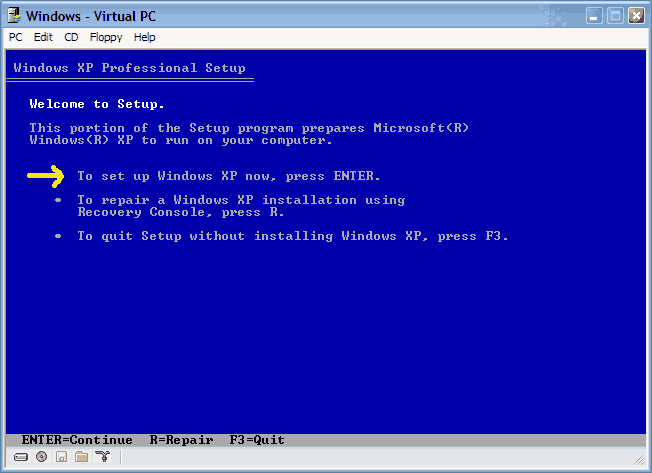
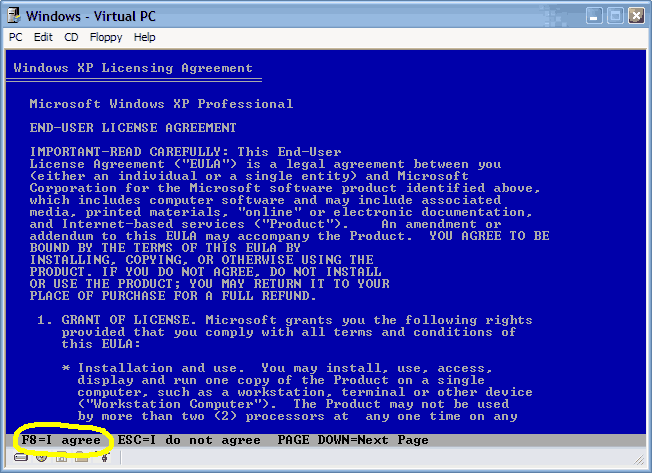
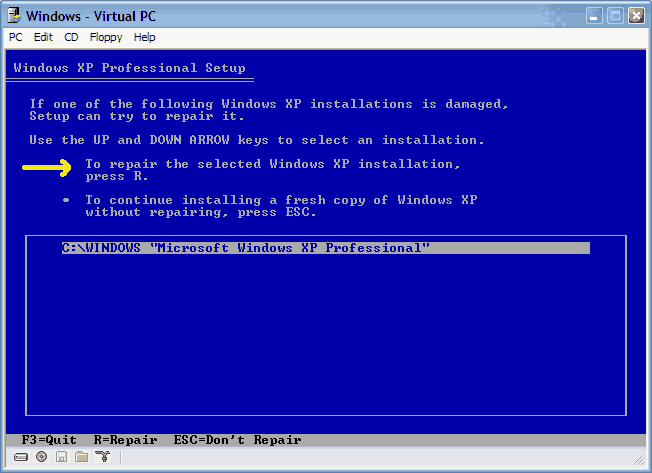
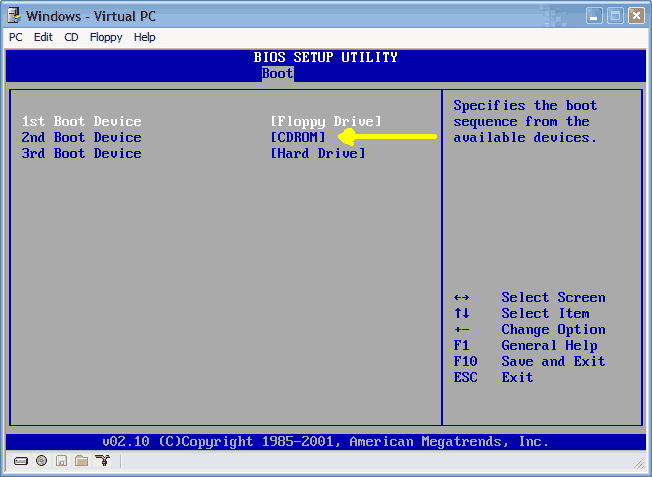
A. Configure your computer to start from the CD-ROM drive. For more information about how to do this, refer to your computer's documentation or contact your computer manufacturer. Then insert your Windows XP Setup CD, and restart your computer. 1. When the Press any key to boot from CD message is displayed on your screen, press a key to start your computer from the Windows XP CD. 2. Press ENTER when you see the message To setup Windows XP now, and then press ENTER displayed on the Welcome to Setup screen. 3. Do not choose the option to press R to use the Recovery Console. 4. In the Windows XP Licensing Agreement, press F8 to agree to the license agreement. 5. Make sure that your current installation of Windows XP is selected in the box, and then press R to repair Windows XP. 6. Follow the instructions on the screen to complete Setup. I havn't tried it yet.Best i can suggest. |
|
#328
|
|||
|
|||
|
Greetings from WV
Hi there. I was trying to find out what's wrong w/my Dell laptop. It worked perfectly last night but today when I turned it on I'm getting a STOP: C000021a (Fatal system Error)
There are a couple error #s, Ox0000135. Anyway, I can't find my disc to repair and was just wondering what I could do. I forget how to start in safe mode, can any of you tell me? My email address is mkn1948@gmail.com also should anyone need it. Thxs for any help, mary |
|
#329
|
||||
|
||||
|
Dell Smells
It's either XP or 2000,not both unless you have dual boot.
It's nothing new,they want you to pay them,but you should take better care of your cd's. You might need a full version CD.$$$,and a new install. Safe mode requires F8 to be pressed twice. It's difficult to explain when,but watch your bootup screen closely. Use the Pause key if it's too quick. But what steps will you take in Safe Mode ? Go to Microsoft.com and search for error messages. Probably in FAQ. Or contact Dell for a new disk. |
|
#330
|
|||
|
|||
|
problem with task manager which shows only the end process button and nothing else and of course the tasks only. one has only one option to end process and nothing else . if somebody helps it would be very nice
|
|
#331
|
||||
|
||||
|
Have another look
Click the the option Shutdown.Learn to use the Menu Bar.
|
|
#332
|
|||
|
|||
|
Hi.
I tried the OP's suggestions today. I went AFK for a while when it was going through the repair process. When I came back to it, it was installing windows... I let it continue then it asked me for a disk I didn't have (Nvidia bus something...I tried it with the ASUS cd I have which has most drivers I need on it - that's the stage I am at right now), after awhile I rebooted and booted from HD again to see if things had fixed, this took me back to the windows installation. Not sure what to do... Please could someone confirm whether setting up windows again is the normal procedure when trying to repair windows in this way? EDIT: Well I assume the ASUS CD was the correct one because it meant I bypassed that stage. Anyway not I'm asked for a the product key. Bear in mind that it was the shop I bought it from that installed XP in the first place, I don't have this certificate anywhere amongst the documentation they gave me. Surely they gave it to me... Anyway I will have to take it there tomorrow and I expect I'll get a good verbal battering. Should I expect them to be able to rectify the situation? Can the data on my HDD be salvaged and placed on a new one? Last edited by Kua; 04-22-2007 at 02:54 PM.. |
|
#333
|
|||
|
|||
|
Black screen
Hi i gote some cind of HD error that windows xp tryed to fix. I didnt see much of the error becaues i wasnt there the whole time it hapend.
The result is that i get a black screen after the the windows logo/windows loading screen when ime starting upp the computer. The safe modes and VGA modes dosent wurk, when i try to repair windows with the window instalation disc i gote the message that it codent find the HD and the it dosent help to use another video card and the numlock freezes upp when the screen becomes black. Someon help pleas
Last edited by Morvind; 04-24-2007 at 05:28 PM.. |
|
#334
|
||||
|
||||
|
My repair post
Did you follow this procedure i posted above ? Print it out to follow the steps properly.
I got it from Microsoft. ================================== ? How do you perform a reinstallation of Windows XP, sometimes called a repair installation? ===================================== It's pretty clear and simple if you have a Windows disk as first boot.Quote : Safe mode didn't work.Did you get to the desktop ? Didn't work is not very helpfull to know why. Do you mean you didn't get to Windows,or do you mean you couldn't change your video setting and restart ? Quote : becaues i wasnt there the whole time it hapend. Thats dumb if you want help. And what the heck does Numlock have to do with this ? Next ? Is it XP or 2000 ? Can't be both. I don't think i can be of anymore help at this rate.
|
|
#335
|
|||
|
|||
|
Quote:
If this is the wrong thread for this cind of problem i wil move it. This post is cinda longe but pleas read it. I apologise in advance for any posible miss spellings. If you hade read the post more cearfuly you wode have noticed that i wrote Windows xp at the begining of the post. What i didnt mention in my last post that i probobaly shud have is that the computer is a desktop computer and that it has bin wurking without problems for 2 years with windos xp Home edition. What i ment with safe/vga modes dosent wurk, was that they gave exactly the same result as starting the computer in normal mode. The result i get when i start it in normal mode is a black screen with nothing, as i said in the first post. I get the black screen after the Windows xp loading screen with the huge windows xp logo = when i am supost to get my desktop i get a nice black screen. I know that other people have exsperienced similar problems but they simply have a black screen with a wurking desktop, they just codent see the desktop on the screen. This is why i mentioned that the numlock key dose not wurk because that means that my desktop is not upp and running. And if a computer has compleatly frozen upp the Num Lock key dose not wurk. Before i get the black screen the numlock key wurks exactly as it shud wurk. Quote: Quote: because i wasnt there the whole time it hapend. Thats dumb if you want help. Do you watch your computer start upp every singel time it starts upp. Have you ever pushed the start button and then made a sandwich before you walk back to the computer exspecting it to have started upp just as it always dose. When i came back to my cumputer exspectin the normal desktop, the computer hade started to scann the hard drive for corupt files/information/code then it deleted this information in a 2d step and fixed som of it in the 3d step, ime prety shure all of this hapend before the computer loaded the desktop. I dont know exactly what it hade scaned fixed and deleted because it hapend rather quickly and most of it was just numbers. after this it told me to wait patiently for the computer to restart. i waited 3 hours then used the restart switch on the computer and gote the black screen when it started upp. After this i tryed to use a difrent graphick card that i a 100% know that wurks, but exactly the same ting hapend with this card. Then i tryed to use the windows xp cd to repair windows, i gote to the repair screen and started the repair but it simply said that it codent find my hard drive. At the moment i think that the problem code be with my hard drive but ime wery uncertain on this and what exactly the problem with my hardrive is bescause i dont have any cind of exsperienc with this cind of problem. Can someon pleas help me fix this problem or help me figuer out exactly whats wrong. Last edited by Morvind; 04-25-2007 at 04:22 PM.. |
|
#336
|
||||
|
||||
|
Yes and NO
Do you watch your computer start upp every singel time it starts upp. Have you ever pushed the start button and then made a sandwich before you walk back to the computer exspecting it to start upp just as it always dose.
But i would in your case.I don't have your problem(s) or i would to note error messages etc to post here.Give us something to go on. It was intended for a Windows repair. I gave you the XP steps to follow,you have to be watching,not stuffing your gut. You are given key press options along the way. that time out while you grab a beer. Normal operating machines like mine don't need to be gazed at,but once in a while i do to verify my boot options. Is that the best reply you have for my proven suggestions ?
|
|
#337
|
|||
|
|||
|
Thanks for your help Rick.I have tried this but it does not give me the option to repair XP after the recoved console screen.
|
|
#338
|
|||
|
|||
|
Hello
I was hoping someone could help me.I have a very old(and awful) Dell latitude laptop with windows NT installed.Recently it just stopped booting up. Ive tried in safe mode, last known good config etc etc and it keeps crashing about half way through the starting windows screen.I have no real important docs on it so i dont mind formating the entire disk and reinstalling windows xp home edition. Yet the partition is a unknown partition and it wont let me install windows over it or anything,Including runing chkdsk etc. I do not have a windows NT disk to run a repair. If any1 has any suggestions on how to resolve this issue. id be most grateful Thank you ^^ |
|
#339
|
|||
|
|||
|
Strange problem
I am new here and my knowlage of computers is not the best but I know enough to normally sort things out.
My problem is along the same lines of the one mentioned here. What happens is every time i try to load up windows it gets to the loading screen where it says windows XP and has the loading bar then a split second after it blue screens and resets. This is an old machine AMD K-7 650, was built in 1999 and has had some upgrades since to RAM and graphics hardware. I intend to replace the motherboard soon and keep my hard drives and my dvd and cd drives. My problem is that my budget is low and i cant affored to replace everything and i have a feeling my computer is experienceing this problem because of faulty drives. I have tryed to load in safe mode and last good configeration. both failed with the same blue screen. I then tried to install windows again. this also fails just after selecting to install windows the same blue screen pops up. I have disabled automatic reset so i can see what the lue screen says. Tells me to disable anti virus and other things then under technical information it has 2 lines *** STOP: 0x00000024 (0x001902FE, 0xF986A6C, 0xF98A3D8, 0xF8FFAF81) *** ntfs.sys - address F8FFAF81 base at F8FAB000, Datestamp 41107eea I guess this is some sort of hardware failure. Is there anything i can do to repair what has gone wrong and most importantly can anyone explain to me what is broken so i may be able to replace it. oh and also allot of the time when it resets it starts to bleep a single long bleep with a pause then it repeats. Or sometimes a 4 bleep that it does not repeat. Then other times it just loads up as normal till the loading screen. any help would be apreciated Thanks. Added info: I can run linux live and i have a laptop i can use to download anything to help my computer get started. |
|
#340
|
|||
|
|||
|
Stop blue screen: a new solution
I think it is deplorable that when you search Microsoft help for crash messages, they have nothing on most of the errors. My computer was progressively crashing with varying messages--the Stop 0x0000008E, with subcategories 0xC, 0x805F48D9, 0xEE5226B80). Then today it began crashing about every 10 minutes, then 5. The last error was 0x0000007F and 0x0000000A. Someone in the forum said to check the Bios to be sure it was updated; (my computer wouldn't allow me to start in any diagnostic mode, because the arrows wouldn't work.) Low and behold: part of the Bios, which I didn't even know existed, said my power supply fan was not working, and the temperature was 135 F! I ran to the store, showed them the power supply, which they pointed out was fried, replaced it with a new one, and now: no more Stop crashes! anyone ever hear of that? My first post!
|
![]() |
| Similar Topics | ||||
| Topic | Replies | Forum | ||
Unable to log in as Administrator to Windows 2000
|
2 | Windows OS | ||
Unable to repair windows XP after system rebuild
|
11 | Other Hardware | ||
Unable to select windows 2000 from startup after windows XP was installed. Critical!!
|
1 | Windows OS | ||
unable to boot-install windows xp pro sp2 unable to repair pci.sys file missing
|
2 | Windows OS | ||
Unable to Repair Windows XP Home SP2, still Blue screens with Critical Errors.
|
4 | Windows OS | ||
| Thread Tools | Search this Thread |
|
|
All times are GMT -4. The time now is 05:19 PM.


Unable to log in as Administrator to Windows 2000