also @ TechSpot: EU, US approve Google's $12.5 billion buyout of Motorola Mobility
Welcome to the TechSpot OpenBoards. Please read the FAQ if you have any questions. Sign up or Login to participate.

Go Back   TechSpot OpenBoards > TechSpot Community > Guides and Tutorials

Download Now:

How to repair Windows XP/2000 if you are unable to boot into Windows

Page 18 of 19 « First 814151617 18 19
Thread Tools Search this Thread
  #341  
Old 06-13-2007
Newcomer, in training
 
Member since: Jun 2007, 1 posts
Spyware Caused "lsass.exe error - the endpoint is invalid"

Hello, I am new to the forum and desperately hope someone can help me out. A close friend’s computer is having serious problems, and she can't afford to get it fixed. Since I'm the only person she knows that is decent with computers, she's come to me for help. However, this problem is *way* out of my league.
When she ran her Anti-Spyware software (I believe it was Spyware Blaster) she saw that her machine was infected with a lot of spyware, and went to remove them. Now, the machine is stuck in a loop. It will not boot into Safe Mode, it merely gives the message "lsass.exe error - The endpoint format is invalid" and then reboots. Looking around online I've seen several people with the problem all for different reasons, and no functional solutions for our case. Her machine is running XP Pro, however - the most devastating flaw of all - she no longer has her XP Pro cd to repair from, only the code which clearly does no good.
My biggest concern/desire is to retrieve her pictures from the hard drive. Obviously followed by getting her machine back up and running. I have XP home discs, but know that I can't use them to repair her XP pro. Is there anything I can do? I am very bad with hardware & DOS, but seeing her suffer the loss of her computer is killing me (she is recently disabled and her machine is all that gets her through the day) so I desperately want to be able to help her get back to a functioning machine as soon as possible.
I've gone over several things in my head - getting another hard drive and installing XP home on it, and trying to access her old drive as a slave drive to get the data off it. But as I said I don't know anything about hardware, so I'm not even sure that's possible. Is it safe for me to put her hard drive in my machine as a slave and try and access the data, or will I just bring the same problem upon myself? Would it even work??
Is there any easier way to fix this?? I beg, please, if anyone has any ideas or suggestions to let me know as soon as possible~!! Thank you for reading my request~ I hope someone can help. *looks desperate*
  #342  
Old 06-14-2007
Newcomer, in training
 
Member since: Jun 2007, 3 posts
reply to Adora2420--I think I know the answer

First, your name is rather adorable. (sorry)
All of the antispyware programs can remove something that they shouldn't, leaving your computer inoperable. That's why they all usually have an "undo" removal to restore the computer to the prior state. Your friend should google the spyware website to find out how to restore. Perhaps, if she has XP, she can just press a button (I forget which, but they always show when windows boots) and use "system restore" to the date prior to her spyware use.
  #343  
Old 06-21-2007
Wil 0' Wisp's Avatar
Newcomer, in training
 
Location: Wiltshire
Member since: Jun 2007, 3 posts
Take her hard drive out of her PC and mount it in yours, Provided She has not password protected her account, and or made her file private You should be able to recover her pics and all by coppying them to your disk thence to a CD DVD, flash drive etc etc.

If She has done all of the above, you may/should be able to recover them by Ghosting the disk if you have Norton Ghost and then fishiong the files from the image.

Which ever way get the DATA first. If the disk is FAT32 not NTFS you can mount it and then read it from a Win98 boot

Note that this procedure assumes that Windows XP is installed to the C:\Windows folder. If you installed Windows to a different location, make sure to change C:\Windows in the following directions to the appropriate windows folder if it's at a different location.

Or If you can use the susytem restore to go way back try this But only after backing the data up, you head be on the block if you don't.

You can carry the cut n' paste routine out on the disk if you mount in another PC

Browse to C:\WINDOWS\system32\config

Create a origdate ie orig7621 easy to spot and find

Back up the existing files! to a origdate by copying them

Use the trick to share the system volume infomation
(Your words)
Right click on the “System Volume Information” folder and select the Sharing and Security option. Then click the Security tab if there is one. (If there is no security tab available to select then skip down to the paragraph that starts with “But what if no security tab is available to select?” If you do see a security tab then click Add, and then in the box that says "Enter the object names to select," type the name of the user that's at the top of the Start menu which is probably you. Make sure you type the name the way it's listed on the Start Menu. I made the mistake of typing my first name only and it wouldn't let me in. Type first and last name if that's how it's written on the top of the Start menu. After you've typed that in, click OK until you are back to looking at the folder that wouldn’t let you in and double click it again to open it.

You should be in it now. If not then you didn’t type the name exactly as it is listed on top of the start menu. It has to be the same for the folder to open for you.

“But what if no security tab is available to select?” Do this: Click to put checks in BOTH checkboxes in the "Network sharing and security" area. One of them is labeled "Share this folder on the network" and the other is labeled "Allow network users to change my files." Change the share name from “System Volume Information to something short, like SysVolInf as in only the first three letters of the words “System and Volume and Information. Click Apply and you will get an error possibly. If you get the error then just do it again and it will let you in the second time. Put a star next to this section on your print out because you’ll want to come back after you are restored and make sure to put this back to the way it was if the restore doesn’t do it for you. Just double check this when you’re running again is all I’m saying. Double click the folder now to get in it.


copy a good set of

copy _registry_machine_sam c:\windows\system32\config\sam
copy _registry_machine_security c:\windows\system32\config\security
copy _registry_machine_software c:\windows\system32\config\software
copy _registry_machine_system c:\windows\system32\config\system


to the C:\WINDOWS\system32\config directory

Delete the existing ones and rename the new files to sam,security,software,system

shut down and replace the drive in the original PC, boot the PC
  #344  
Old 06-21-2007
Newcomer, in training
 
Member since: Jun 2007, 3 posts
removing hard drive probably not necessary

Newbies helping newbies here. This info is from the Microsoft XP online help
and if I am not clear enough, I'm sure you can take the computer to a repair place and they will have everything up and running in a few minutes--but check their minimum cost! But I think you can do it.

First, boot the computer, but as soon as the black screen appears, consistently tap the F8 key, which will prevent Windows from booting. The screen should then show you a number of alternatives on how to boot.

Easyist: From Microsoft Windows XP online Help: “To troubleshoot startup problems"
1. Restart your computer. Immediately after the screen goes blank for the first time, press the F8 key repeatedly. The Windows Advanced Options menu appears. If the menu does not appear, restart your computer and try again. Use the cursor keys on your keyboard (your mouse will not work) to select Last Known Good Configuration, and then press ENTER. Windows XP attempts to start.”


My word of caution for this method. The disadvantage is that you will lose any unsaved information prior to the time of the first crash, including any unsaved data fromwhatever programs you were using at the time. It will tell you the date of the last known good configuration. That will likely restore the functioning computer. If you need to save valuable data after that date see next:

"For a software problem which causes windows XP to fail to boot:
Restart your computer and press F8 again. This time, choose Safe Mode and press ENTER. Windows XP attempts to start in Safe Mode, which does not automatically start programs and hardware, and displays very primitive graphics. If Windows XP starts successfully in Safe Mode, you can remove any programs or updates you have recently installed. Then, restart your computer normally." In this way, if you remove the spyware program, you likely would have to remove the spyware program. BUT if you can selectively start the spyware program in Safe mode, you will be able to click on its program which undoes the removal which caused all the trouble, and then on rebooting, everything will be back to normal. But TELL YOUR FRIEND TO CAREFULLY READ THE DIRECTIONS ON HOW TO USE THAT PARTICULAR PROGRAM.
Regards
  #345  
Old 06-23-2007
Newcomer, in training
 
Member since: Jun 2007, 3 posts
Quote:
Originally Posted by Rick
[COLOR=Navy]HOW TO PERFORM AN 'IN PLACE UPGRADE' / SYSTEM REPAIR[/COLOR]

Is your system unable to boot into Windows XP/2000 or even Safe Mode? Whether you get a blue screen or XP/2000 just hangs, then this information is for you. This will allow you to repair your Windows XP/2000 installation (hopefully) without having to losing your data or settings.

Indications:
  • May allow Windows to load properly if there are critical driver, software or registry problems which have rendered the system unbootable. (Blue screens, hanging, errors etc..)
  • May repair/reinstall missing Windows components or solve otherwise quirky behavior
  • May allow drive to be installed on another system or motherboard with different chipset
  • May allow you to install new motherboards or make other large hardware changes that XP may not readily accept with PnP.

Note: The system repair function will remove any updates you have previously installed that are not included on the CD. Drivers will also be reverted to their original XP versions, as well as some settings (Including by not limited to network & performance settings). It may be necessary to reactivate your Windows XP as well.

Step 1: Determine the problem
  • First, figure out what CAUSED the problem. Often times, when Windows is rendered unbootable, there is a good reason. This can often be due to hardware failure (bad hard disk, memory or CPU for example). In these cases, the system repair function will not work. System repair will only repair your software.

    I strongly recommend you run a disk utility on your hard drive before performing a system repair. You can find more information about disk utilities here:
    http://www.techspot.com/vb/showthrea...&threadid=7602

    Memory can also cause these problems. A good memory test can be found here: http://www.memtest.org

Step 2: Begin the repair process
  • You must boot from your XP or 2000 CD. Please make sure it is the same version of Windows that is currently installed on your computer (ex. XP Home cannot repair XP Professional). Place the CD in your CDROM and start your computer. Newer versions will work as well (ie. Windows XP Pro SP2 CD will work on an older WinXP Pro SP1 installation)

    Before the Windows logo appears, you will be asked to press any key to boot from CD, so do just that.

    If you are unable to boot from the XP/2000 CD, then please check the last step in this short guide.

Step 3: System repair steps
  • A blue screen will appear and will begin loading XP setup from the CD.

    RAID/SCSI/Unsupported UDMA users:
    You will be prompted to "press F6 to install any third party SCSI or RAID drivers". Most users will not have to press F6, but if you are running RAID, SCSI or unsupported ATA controllers, then you need your controller drivers on a floppy disk. If you are unsure whether you have RAID/SCSI, then simply let the CD load without pressing F6.

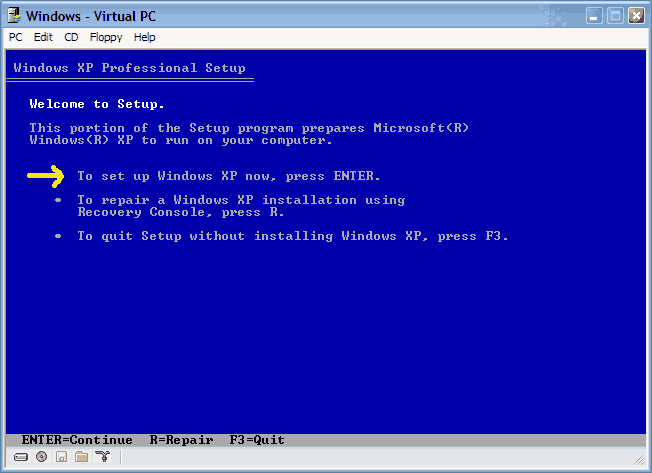
    Once completed, you will be confronted with "Windows Setup". You will be asked to setup up Windows, or repair Windows with the recovery console. Choose the FIRST option, NOT recovery console.


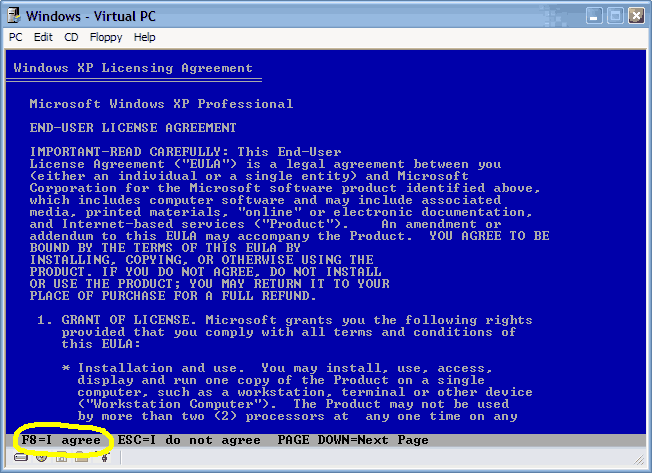
Choose F8 to continue.


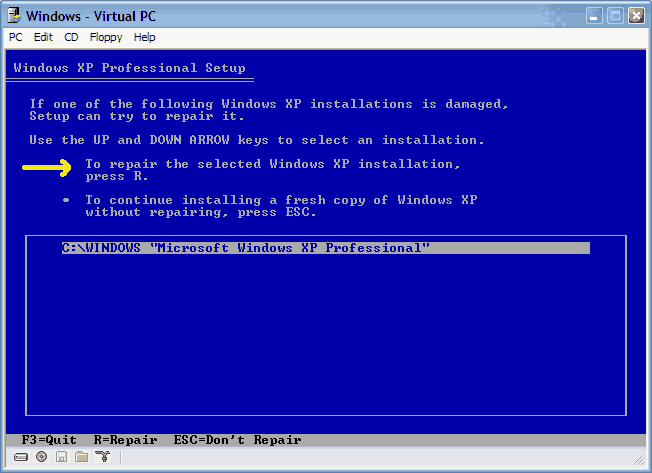
  • Next, Windows Setup will find existing Windows XP/2000 installations. You will be asked to repair an existing XP installation or install a fresh copy of Windows XP/2000.

    If no installations are found, then you will not be given the option to repair. This may happen if the data or partition on your drive is too corrupted.


  • That should be it. Windows XP/2000 will appear to be installing itself for the first time, but it will retain all of your data and settings. Just follow the prompts, have your CD-KEY handy and hope for the best!
hi rick,

i've been trying to follow your response to the above post but i've ranned into a problem. if you can, please help.

so i get the "Welcome to Setup" screen, i choose option 1, ENTER

i then accept the "License Aggreement"

in your post, your screen shots for "Windows XP Pro Setup" screen shows these options:
1) To repair the selected Windows XP installation, press R
2) To continue installing a fresh copy ... press ESC.
** then it list:
C:\windows "Microsoft ... Professional"


this quiet different from what i get on that particular screen:
1) To setup Windows XP on the selected item, press ENTER
2) To create a partition in the unpartitioned space, press C
3) To delete the selected partition, press D
**then it list my drives (partitions):
C: Partition1 [NTFS] ...
D: Partition2 [NTFS]
.
.
.
etc.

i have windows installed on C drive. i tried selecting C, ENTER but it wanted to install a fresh, which mean i will end up loosing all my files. i cannot afford to do that.

now, as you can see, i don't have the "1) To repair the selected Windows XP installation, press R" option. what do i do?

PLEASE HELP!
Much Thanks,
  #346  
Old 06-24-2007
zipperman's Avatar
TechSpot Maniac
 
Location: Mississauga,ONT.
Member since: Dec 2006, 1,423 posts
System specs
Microsoft FAQ

How do you perform a reinstallation of Windows XP, sometimes called a repair installation?

Configure your computer to start from the CD-ROM drive. For more information about how to do this, refer to your computer's documentation or contact your computer manufacturer. Then insert your Windows XP Setup CD, and restart your computer.

1.
When the Press any key to boot from CD message is displayed on your screen, press a key to start your computer from the Windows XP CD.

2.
Press ENTER when you see the message To setup Windows XP now, and then press ENTER displayed on the Welcome to Setup screen.

3.
Do not choose the option to press R to use the Recovery Console.

4.
In the Windows XP Licensing Agreement, press F8 to agree to the license agreement.

5.
Make sure that your current installation of Windows XP is selected in the box, and then press R to repair Windows XP.

6.
Follow the instructions on the screen to complete Setup.
  #347  
Old 06-24-2007
Newcomer, in training
 
Member since: Jun 2007, 3 posts
hi zipperman,

i'm not sure if you were responding to my post. if so, i have the following to say.

1. i did everything you said, 1-6
2. when i get to (your) point #6, it lists all my partition. my windows xp is installed on the C:\ drive but i don't get an option to "Repair ..."

now, whenever i boot up i somethings get pass the "Windows is starting up ..." message but after a while, i get a blue screen with the following message:

BLUE SCREEN MESSAGE:
A problem has been detected and windows has been shut down to prevent damage to your computer.

SESSION5_INITIALIZATION_FAILED

If this is the first time you've seen this stop error screen, restart your computer. If this appears again, follow these steps:

Check to make sure any new hardware or software is properly installed. If this is a new installation, ask your hardware or software manufacturer for any windows updates you might need.

If the problem continues, disable or remove any newly installed hardware or software. Disable BIOS memory options such as caching or shadowing. If you need to use Safe Mode to remove or disable components, restart your computer, press F8 to select Advance Startup optoins, and then select Safe Mode.

Technical information:

*** STOP: 0X00000071 (0X00000000, 0X00000000, 0X00000000, 0X00000000)

<end of message>

i've done everything listed above but keeps getting the same blue screen. i even tried swapping memory module ... but still.

please guys, is there anyone out there that can help me out? i know i will have to get an new computer at some point but for now, i need to access that data on my computer.

thanks,
  #348  
Old 06-25-2007
zipperman's Avatar
TechSpot Maniac
 
Location: Mississauga,ONT.
Member since: Dec 2006, 1,423 posts
System specs
Yes i was

I have not tried this or had to,but it's a direct copy from Microsoft's
FAQ.Frequently Asked Questions.
Not a 3rd party or forum post.See if Microsoft can give you more details.
This is not found at Windows update.but,
www.microsoft.com
Try a search for windows repair.
It is a tricky precise procedure.
Print it out to read as you go through the steps.
  #349  
Old 06-25-2007
Newcomer, in training
 
Member since: Jun 2007, 3 posts
thanks zipperman,

i've never felt help-less in a long time. i've read so many FAQs, forum post and everything else there's. all seem to point to each other so it's more like chasing my own tail.

i checked out your recommendation but i've already tried those. i don't have problem re-installing, but before i can do that, i need to get my data first. obviously, i can't get the data unless i can get windows to boot properly.

thanks
  #350  
Old 06-26-2007
zipperman's Avatar
TechSpot Maniac
 
Location: Mississauga,ONT.
Member since: Dec 2006, 1,423 posts
System specs
It seems your best option is to get a new hard drive and make at least
2 partitions,1 for a new OS install and 1 for your previous hardrive data.
It will still be readable as a slave,
But then you can format the old one and still use it.
Note : If you get a new hard drive,remove any others then install your OS,

Then connect the old one as slave to retrieve your data.
If you get a boot choice select the new one.
Best i can do.

why do you title it XP/2000 ? It's one or the other and is a factor in replying.
  #351  
Old 06-27-2007
Newcomer, in training
 
Member since: Jun 2007, 1 posts
Greetings All,

I was not allowed to post a new thread since this is my 1st post.

XP will not boot and this is the scenario:

1st display I got was a safe mode/last configuration/start normally display.

I chose safe mode and a list of about 30 system drive files appear with a long pause then for a split second (I had to video record this and pause it to read it):

--
STOP: c0000218 (Registry File Failure)
The registry cannot load the hive (file):
or its log or alternate.
it is corrupt, absent, or not writable.
Beginning dump of physical memory
Physical memory dump complete.
Contact your system administrator or etc for assistant
--

The the averatec (manufacturer) logo appears for 2 seconds then returns to the safe mode/last configuration/start normally display.

When I choose anything other than safe mode, it basically does the same thing though the MS*ft logo appears instead acting like it will load then returns to the safe mode/last configuration/start normally display.

I F8 to set the load to CD to see if I would get a message telling me to insert a CD but it just returns to the safe mode/last configuration/start normally display.

Thanks for being online!

- JZ - http://mobile-democracy.net
  #352  
Old 07-08-2007
Newcomer, in training
 
Member since: Jul 2007, 1 posts
refusalto boot with Windows XP Home edition

When I turn on computer - Advent laptop - it refuses to boot into Windows XP just get following two alternatives Delete Restoration Data and proceed to system boot memory or Continue with system restart neither will respond in any way.Solution?refusal to bootwith Windows XP Home edition
  #353  
Old 07-08-2007
zipperman's Avatar
TechSpot Maniac
 
Location: Mississauga,ONT.
Member since: Dec 2006, 1,423 posts
System specs
Is this any help ?

This is from Microsoft FAQ's
Quote :
How do you perform a reinstallation of Windows XP, sometimes called a repair installation?

Configure your computer to start from the CD-ROM drive. For more information about how to do this, refer to your computer's documentation or contact your computer manufacturer. Then insert your Windows XP Setup CD, and restart your computer.

1.
When the Press any key to boot from CD message is displayed on your screen, press a key to start your computer from the Windows XP CD.

2.
Press ENTER when you see the message To setup Windows XP now, and then press ENTER displayed on the Welcome to Setup screen.

3.
Do not choose the option to press R to use the Recovery Console.

4.
In the Windows XP Licensing Agreement, press F8 to agree to the license agreement.

5.
Make sure that your current installation of Windows XP is selected in the box, and then press R to repair Windows XP.

6.
Follow the instructions on the screen to complete Setup.
  #354  
Old 07-11-2007
Newcomer, in training
 
Member since: Jul 2007, 2 posts
Hey people, I just registred here since I saw you guys help everyone and i have kkind of he same problem ,but can't get it to work...
I run windows 2000, and I'm missing a file from the system32 folder, now windows can't load, not even safe mode.
I tried to boot with the windows 2000 cd but it asks for the windows repair disc, which I don't have...Any other way to repair it?
Thanks
  #355  
Old 07-11-2007
zipperman's Avatar
TechSpot Maniac
 
Location: Mississauga,ONT.
Member since: Dec 2006, 1,423 posts
System specs
Why not just do it over again.You can't have any thing to lose.
Just overwrite what you have now.I think you might get a repair option.
Watch closely during the process.
If you never got it to load.How do you know a file is missing though.
What is it's name ?
  #356  
Old 07-13-2007
Newcomer, in training
 
Member since: Jul 2007, 2 posts
It's a file called "systemced" in the folder: Windows\system32\config.
It's trying to boot from the hard disk and it can't because it's missing this file.
For now what I did was reinstall Windows on another partition, but it's kind of annoying...
And I can't find this file in my current Windows, so I can't really repair it...
  #357  
Old 07-15-2007
Newcomer, in training
 
Member since: Jul 2007, 1 posts
disk error occured

Ok Ladies and Gentlemen,

Here is my problem.

Started up PC last night and it began to go through multiple reboots, turned it off, disconnected the power for a few minutes to see what would happen. I still reboots.

I pop out the XP disk to repair, it prompts: hit any key to start diagnostics, it then says it is inspecting the system...then black screen.

Did some digging on the Western Digital site and downloaded the harddisk tool, reset boot device back to cd rom and waited. Nothing.

I have tried starting with floppy, cd rom and hard drives.

Comp is a ViciousPC (just learned they may be out of business)

MB - P5ND2-SLI
Proc - 2.8 dual core
2 gig of memory
videocard - 7600 overclocked (factory)
HD - 2 western digital SATA II 160 gb in raid 0 config

No matter what I try, I get the "disk error occured" and hit ctrl+alt+del to reboot.

The harddrives feel like they are spinning. I have pulled and reset every SATA cable, plus reset the bios jumpers. Even pulled the battery out overnight to clear the cmos. I am at a loss at what to do. I would go and buy new harddrives, but would hate to not be the problem.

My next step is to disconnect one of the drives and try the xp disk, I am going to lose the data anyways!

Thanks for any help you guys can provide
  #358  
Old 07-17-2007
Newcomer, in training
 
Member since: Jul 2007, 1 posts
the guide here is just what i was looking for but i have a quick question, if you have vista installed on a partition separate from your xp partition, will any problems arise, i ask this because i heard that the new bootloader that comes with vista screws up the installation of older versions of windows. I personally don't think it should have any impact but i really don't want to screw up my computer and end up having to format every thing. Sorry if this question has already been asked but i really don't want to search through all these pages.

Last edited by LEDHED; 07-17-2007 at 11:52 PM..
  #359  
Old 07-20-2007
Rick's Avatar
TechSpot Special Forces
 
Location: Los Angeles, CA
Member since: Feb 2002, 5,596 posts
Quote:
Originally Posted by LEDHED
the guide here is just what i was looking for but i have a quick question, if you have vista installed on a partition separate from your xp partition, will any problems arise, i ask this because i heard that the new bootloader that comes with vista screws up the installation of older versions of windows. I personally don't think it should have any impact but i really don't want to screw up my computer and end up having to format every thing. Sorry if this question has already been asked but i really don't want to search through all these pages.
During the repair process, a new MBR and boot loader will be added by the XP install. I don't know if the XP boot loader can load Vista or not, since I've never tried it. This means you may have to repair your Vista MBR / boot loader using the Vista install disc.
  #360  
Old 08-10-2007
Newcomer, in training
 
Member since: Aug 2007, 11 posts
Quote:
Originally Posted by Rick
CDROM NOT BOOTABLE: If the XP/2000 CD does not boot...
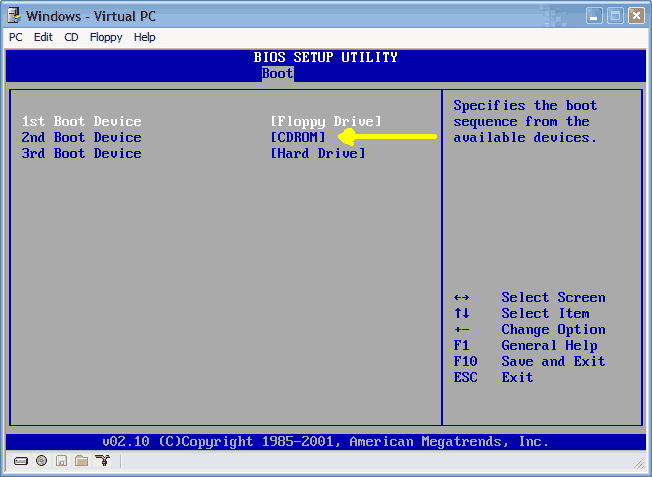
  • Many computers out there are not configured to boot from the CDROM. If you cannot boot from the CDROM, this is probably due to the boot order of your computer being incorrect for CDROM booting.

    You have two options:

    1.) You can change this in the BIOS during POST, which is usually the very first screen displayed by your computer when you turn it on.

    2.) Many newer computers have a selectable boot menu by tapping F8, F10 OR F12 right during/after the first POST screen. This will allow you to temporarily boot from a CDROM.


    To enter your BIOS, most users here will press the DEL key.

    Most users with Dell, Gateway, Sony & HP systems will press F2.

    Many Toshiba laptops are F2 or require you hold the ESC key when you turn the system on. Your notebook will report an error and prompt to press F1 to enter setup. Do exactly that.

    Compaq users will usually have to press F10.

    IBM typically uses F1 or F2.

    Other brands may have different keys to press to enter setup, but F1, F2, Del, Tab and CTRL+S or CTRL + ALT + S are the most common ones I'm familiar with. Often, the BIOS will display what button to press to "enter setup" during POST.

When you enter the BIOS setup, you need to change the boot order. The CDROM should be setup before the Hard Drive. Each BIOS is different, but here is an example:

Ok, I did all of that, but my computer still fails to boot from the CD. It goes to the POST screen, then says "Boot from CD:_" and then to "Press any key to boot from CD...."

It then goes to a pure black screen for about 30 seconds. Next, multiple, white progress bars pop up. After about 5 or so minutes of that it says, "Windows could not start because the following file is missing or corrupt:
\Windows\System32\Config\System

You can attempt to repair this by putting in the CD etc."

Now that is fine and dandy and all, but I can't get it to boot from the CD! Any other suggestions that you guys could give?

(Just as a side note, what causes this to happen? I was just talking on aol instant messenger, when my computer started going very very slow and unresponsive. So I tried to restart my computer and it just went completely unresponsive. I ended up just clicking the restart button, and then got into this whole mess. HILF MIR BITTE!!!)