|
#21
|
||||
|
||||
|
i put in the cd and went through the steps to repair windows. it repaired windows (to my knowledge) since it said it was finished and put on a count down to restart. my comp then restarted and went straight to windows installation screen. i thought it was weird but i let it continue. it was installing pretty quickly when an error came up. it said "unregmp2.exe - entry poinjt not found. procedure entry point GetIUMS could not be located in the dynamic link library MSDART.DLL" i restarted my comp and windows tried to install again and the same error came up. any ideas that might save my data or am i screwed and will have to format. any help will be greatly appreciated. much thanks.
Last edited by SornyPanafonic; 01-17-2004 at 09:19 PM.. |
|
#22
|
|||
|
|||
|
Artical on this error unregmp2.exe on MS site.
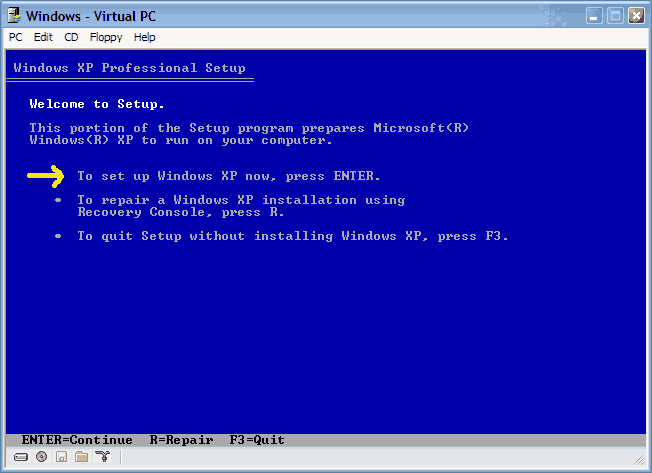
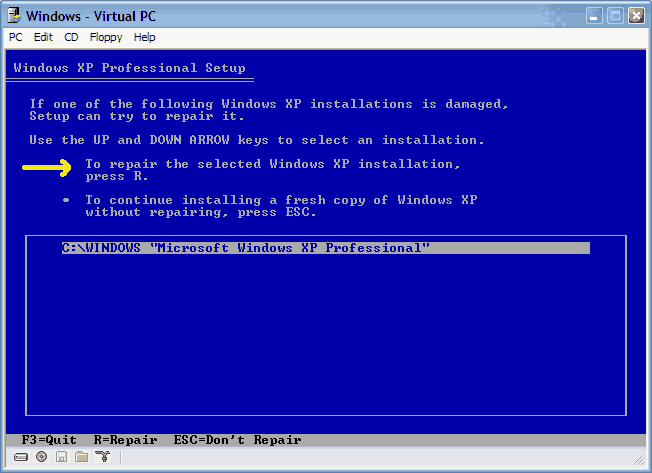
http://support.microsoft.com/default...5BLN%5D;329771 MSDART.DLL try this or from same recovery console try bootfix. At c promt type dir it will list programs you can run to recover. At the Welcome to Setup screen, press R to start the Recovery Console. Press the number key that corresponds to the installation that you want to repair, and then press ENTER. Type the Administrator password, and then press ENTER. With the Windows XP CD-ROM still in the CD-ROM drive or DVD-ROM drive, type the following commands, pressing ENTER after each command: cd system32 ren msdart.dll msdart.old CD-ROM_or_DVD-ROM_Drive_Letter: cd \i386 expand msdart.dl_ BootDriveLetter:\windows\system32 exit This error is the type of errors that make repairing a hit and miss. Even if you do get it to boot your best bet is to back up everything that you want to keep and than do a clean install. Hope you can get in to recover your programs and files. Last edited by grog; 01-18-2004 at 03:35 PM.. |
|
|
|
#23
|
||||
|
||||
|
thanks grog - i actually got it to install - i just pressed esc + enter and installation moved on and finished. when i boot now tho it seems to take forever. it seems like my comp got slower when it should have gotten faster. ehh. i got the same error in my desktop. but i just pressed ok and it went away. im thinking of just dragging out this problem till im forced to fully reinstall windows. thanks again.
|
|
#24
|
|||
|
|||
|
Check your drivers after a system repair some will have to be reloaded. I had to repair a lap top that had picture that the guy didn't want to lose this way. He had picture of his new baby on it. After the repair it too was very slow but found that keyboard wasn't installed or thouchpad. It also had so dll errors. Norton one button check showed 36 errors and repaired them, had to run it a few times.
Like I said before after you get it up and save all your inportant stuff do a clean install. Last edited by grog; 01-18-2004 at 06:51 PM.. |
|
#25
|
||||
|
||||
|
yeah im def backing up all my data as soon as i install this dvd burner. whats weird is that i tried to update my bios and its says something about the chips not being right or matching. will try again thought. thanks again.
|
|
#26
|
|||
|
|||
|
When updating or flashing Bios be sure you get the right one.
There can be more than one board using the same name with some minor differance. The Bios number should be simpler to the one you have. Mine was 7.2 and the newest was 7.6. There is another K7N2 board called L not delta and it's Bios numbers our like 5.4. |
|
#27
|
|||
|
|||
|
Mere24 the SISAGP file is coming from the discovery phase of the install. It's finding the SIS video Chipset/slot on your mobo and asking for the drivers it needs. It was correct to bypass the driver install unless you where using the on-board mobo AGP port (which I don't think anyone has ever used).
|
|
#28
|
||||
|
||||
|
Hi to all...
Nice to see bunch of information in a single thread.. Good work indeed.. Thanks on the behalf of all new-comers who want to the know all the sfuffs which you guys mentioned at this thread. I have one little issue in win2k professional.. I was trying to install the IIS on my machine using win2k CD. I wasn't getting any single error during installtion. After Successful installation when i was trying to run the IIS.. it says.." Page can't be display". In order to rectify the error, i went into Internet Service Manager to find the reason.. What i saw there was that Default Web site under Machine name showing that service(Default Website) is stopped..So is default ftp site. I was trying to start it but after few minutes it prompt me the following error... [COLOR=orangered]The Service didn't respond to Start or Control request in timely fashion [/COLOR] Can any helping soul put some light why i am getting the above mentioned error ? And how i can fix it ? With thanks ! Newkid |
|
#29
|
||||
|
||||
|
It can be a number of things from corrupt config files to a firewall blocking its desired port. We can't just guess out of the blue without knowing more about your installation.
PS. I do not think this is the proper thread to talk about this. |
|
|
|
#30
|
||||
|
||||
|
Thanks Didou for reply and Sorry for posting the message at this thread which i perceived the right place to asked the same question.
Now, From here, http://www.techspot.com/vb/showthread.php?s=&threadid=10795. you can post your comments With Thanks! NewKid |
|
#31
|
|||
|
|||
|
Xp repair problem
I tried to repair of my windows XP O/S and it got 3/4 of the way thorugh and hit a fatal error.
It says, "An error has been encountered that prvents setup from continuing. One of the components that Windowes needs to continue setup could not be installed. Incorrect Function" So I press OK to see the log and I get this. Fatal error could not register OLE control C:\Windows\system32\rsaenh.dll because of the following error Load Library returned error 193(cl). The signature for Windows XP Home edition Upgrade is invalid. The Error code is 800b0100. This all happens on the Installing Windows part of the repair. I then press ok and the computer restarts and continues to do the same think. Can any one help. Thanks |
|
#32
|
|||
|
|||
|
Check the CD sounds like it might have some smugges on it which will cause this kind of error.
|
|
#33
|
|||
|
|||
|
I've got a problem similar to the one described but with a twist. After copying a drive with drive image 7, I rebooted and everything seemed fine. That is until I tried to disconnect an external firewire drive. After that, whenever I try to logon to my user in XP, the computer beeps once and then I've got to hit ctrl-alt-del in order to get to the desktop. If I reconnect the external drive the problem goes away. I've pretty much isolated to a problem with the pagefile, or the lack thereof. The pagefile.sys on the c-drive is gone and the only one that exists is on the d-drive. I've attempted every conceivable way to reconfigure it to the c-drive but no luck. The registry says it's on c, but the computer will only work if the d-drive (external) is connected. Is this possibly a case where a re-install would work.
Ed System Specs: AMD Athlon 1400MHZ Asus A7M266 512mb Mushkin DDR Ram WDC 80GB HD (NTFS) Maxtor 8GB on external firewire drive kit (FAT32) PNY Geforce4 4200 video card SB Audigy Linksys NIC WinXP w/SP1 and all updates |
|
#34
|
||||
|
||||
|
try connecting D: then boot into windows(so you don't get any beeps) and change the PF settings, make sure you set the PF setting for D: to none, as well as setting the PF size on the C drive. If you still have a setting in there for D: it will continue to look for a PF on D:
|
|
#35
|
||||
|
||||
|
Re: Xp repair problem
Quote:
One being bad hard disk. Others being corrupted file system, bad CD or if you used a different version of XP home (a different disc than your original). While most XP home discs are the same, if you try to upgrade using an OEM like Dell with a different service pack version, you may have simliar problems. |
|
#36
|
|||
|
|||
|
I had already tried that combination of disabling the pf on D: and activating it on C: It won't delete it from D or even allow me to delete it. The registry even shows the location of the pf on C: .I'm starting to think that when I cloned the main drive with DI 7, it copied everything but the pf from C: If all else fails I may be left with no alternative than to do a repair install (unless someone knows of a way to put a copy of pagefile.sys on the drive manually.
I appreciate the help. I had asked Microfrost for help. Well 2 days and $35 later I'm still waiting for a reply to the original solution they had given me (which I had also tried). |
|
#37
|
|||
|
|||
|
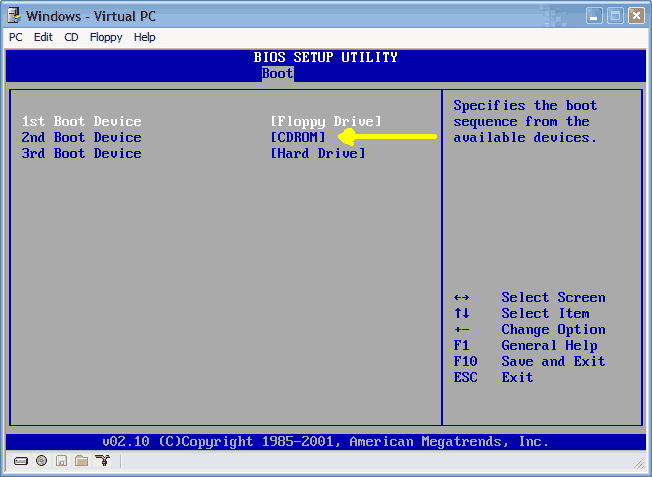
i did everything you told me to do in order to boot from cd-rom,i put it in front of my hardrive as 2nd boot device and it doesnt even give me an option to boot from cd it just keeps going back to the sorry for the incconvince,and i dont think i have bad hardisk or anything.I think thr problem is a program i installed called battle craft vetinam,a modding tool for battlefield veitnam...but im sure that is the problem...i hope you understand me!
![]() |
|
#38
|
|||
|
|||
|
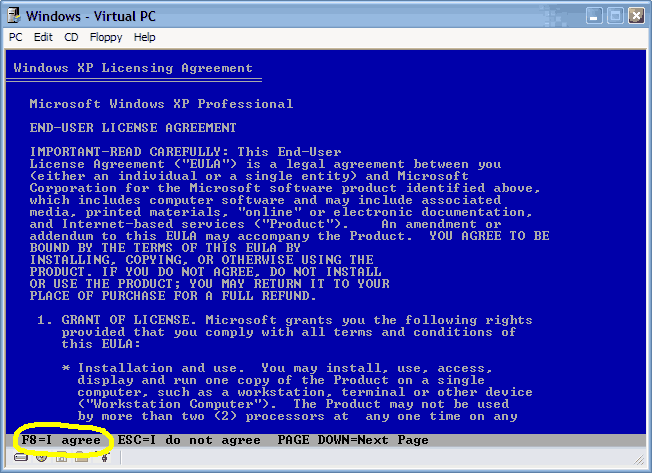
I don't get the option to recover after I press Enter to install instead of selecting 'r' for recover. I do get the license screen, and I hit F8. I then get a screen that requires me to choose between the partitions I created when I originally set up the XP installation. I can set up Windows XP on the selected partition, delete the selected partition or create a partition in the unpartitioned space. If I select the large partition and shoose to set up Windows XP on the large partition, I get a screen that gives me a warning that I may not want to install windows twice on the same partition. This is where I stop, because I am scared that I will wipe out my data if I select to continue at this point.
If I select r for recovery, Windows XP asks me for the administrators password. I don't remember what the password is that I set. After three tries, I have to reboot and go through the setup again. Does anyone know how to get a password that will override my administrator's password? What do I do? |
|
#39
|
||||
|
||||
|
Your Administrator password should be blank. Try pressing enter without typing anything.
If Windows does not give you the option to repair, then you may have some very large problems. This is generally caused by the inability for Windows XP or 2000 to properly detect a previous version. This may be because many of your system files have been deleted. |
|
#40
|
|||
|
|||
|
Quote:
|
![]() |
| Thread Tools | |
|
|
| Similar Topics | ||||
| Topic | Category | Replies | Last Post | |
| HOW TO: Install Windows 2000 (or XP perhaps) from DOS without a bootable CDROM | Guides and Tutorials | 44 | 4 Weeks Ago 04:36 AM | |
| Microsoft Jokes | The Meeting Spot - Chat & Socialize | 126 | 05-27-2008 08:45 PM | |
| Windows will not boot (Help) | Processors, Chipsets and Motherboards | 10 | 01-04-2007 04:00 PM | |
| Dual Boot to DOS partition | Windows OS | 27 | 02-03-2006 07:20 AM | |
| HELP please! Windows dont boot no more! | The Alternative OS | 3 | 11-09-2003 07:41 PM | |
All times are GMT -4. The time now is 03:58 PM.