also @ TechSpot: Tech Tip: Turn Off your Display Using a Windows Shortcut and More
Welcome to the TechSpot OpenBoards. Please read the FAQ if you have any questions. Login to participate.

Go Back   TechSpot OpenBoards > TechSpot Community > Guides and Tutorials

How to repair Windows XP/2000 if you are unable to boot into Windows

Closed Thread
Page 4 of 19 123 4 567814 Last »
Bookmark Thread Tools
  #61  
Old 07-13-2004
Mictlantecuhtli's Avatar
TS Special Forces
 
Location: Finland
Member since: Feb 2002, 4,852 posts
System specs
Have you checked if there's an update for RAID firmware?
  #62  
Old 07-13-2004
Newcomer, in training
 
Member since: Jul 2004, 4 posts
Well, i went to Intel's site and got the latest Floppy Configuration Utility Raid Edition for Win XP Pro (IAAR2 Floppy.exe) and made a new floppy with the 'IntelŪ 82801ER Serial RAID Controller'. I F6'ed it during the XP setup but my PC still freezes when i get to the Welcome to Setup screen !
Thanks anyway !
Any other idea ?
To remove this ad, sign in. To register for a new account, click here.
  
  #63  
Old 07-13-2004
Newcomer, in training
 
Location: Auburn Hills, MI
Member since: Jul 2004, 6 posts
HI.... I'm new here, and I wanted to give this information, just in case one day it might help someone. I have done numerous repairs and attempted repairs of Windows XP...some are successful, but not always. I have found that the information in the MS Knowledgebase has helped me as a last resort, be able to get into XP with a minor loss of any program. I guess I can't guarantee it will always work, but it has not failed me yet. At least if it's due to registry corruption and not a driver/program issue that even prevents entering windows in safe mode. If someone already posted this...sorry about that...but I have had this work!! And it's always worth a try. Just read the following link:

http://support.microsoft.com/default...&Product=winxp


Hope this can help even one of you from doing a complete format and losing data....otherwise...there's always Norton Ghost! hehe...at least to back up the HD....
  #64  
Old 07-14-2004
Newcomer, in training
 
Member since: Jul 2004, 4 posts
Thanks Rowdy. I already knew about that but since i can't access the recovery console i cannot do the procedure described in that article. I even tried making the 6 start-up diskettes but it gets me to the same point where my PC freezes at the Welcome to set-up screen so i can't get anywhere. Lol, i come to regret the old days of Win98 where i could go in DOS to try to fix things up.
  #65  
Old 08-01-2004
Newcomer, in training
 
Member since: Aug 2004, 2 posts
hello I am having some major PC problems hopefully someone can help. Heres the story I have an FX 5900 graphics card and everynow and then i have been getting a notice that it isn't reciveing enough power and it tells me that it is shutting down part of the card so no damage will occur to it I don't remember the exact message. the problem I had next was when I tried to play any games it would freeze up on me. I checked all my connections in the pc and all of them were ok including the extra power cable for the card. so I thought maybe something was messed up with the drivers so I found the newest drivers and installed them it didn't help. So I tried to instal a previous set of drivers I had and once I rebooted the screen was a bunch of diffrent colors and I couldn't see a thing. When I tried rebooting to get into safemode I remembered I didn't know the key to hit to get to it I tried all the usuals F1 F2 and others it didn't work but windows tried to boot up but it said it couldn't because the file \windows\system32\config\system was missing or corrupt. I tried to go through and repair windows similar to one of the posts earlier it showed that my partition was there but it didn't give me the option to repair it. windows suggested that I use the repair option you get when you first boot windows with the cd but I have no idea how to use the recovery console. If anyone has any suggestions i am willing to try anything right now except reformatting of course. thanks for taking the time to read this
P.S. I am using my grandmothers MAC <shivers> to try and find the information I need. thanks again for reading my problem
  #66  
Old 08-01-2004
Rick's Avatar
TS Special Forces
 
Location: Los Angeles, CA
Member since: Feb 2002, 5,272 posts
Rabbidnad:
If you check the first post in this thread, it shows you how to repair windows without the recovery console.

Your graphics card problem is probably caused by a weak power supply or having too many devices connected to a single a "rail". There are typically 3 rails.. 3.3v, 5v and 12v. What this means is you may need to upgrade your power supply. The 5900 draws a considerable amount of power... From which rail I'm not sure though.

If you disconnect some unnecssary devices, that might be good enough to get rid of the power problems. If that is the case, then you'll definitely need to upgrade your power supply.

Another consideration is some sort of funny hardware failure that may be causing the card to report low power, such as a bad CPU, card or motherboard. These things are more unlikely though.

And software is also possible, but I'm betting that is even more unlikely than the above. And while I've never seen that happen, I certainly wouldn't rule it out.
  #67  
Old 08-02-2004
Newcomer, in training
 
Member since: Aug 2004, 2 posts
Thanks for the suggestions but I guess I forgot to mention I tried to repair windows using the method in the first post but I am unable to repair windows it dosn't give me the option to repair it but I know it detects that there is a partition there and that windows is aleady installed on it. I only get the option to delete the partition or install windows or create a new partition.
I was thinking that I might be able to get another small HD and install windows on it and then make the non working one a slave and see if I couldn't get the information I need off the slave and then reformat the slave to be a perminent slave and have the small one with just windows on it. Another option I was thinking about was getting a small HD and installing windos on it and then copying the windows files over to the large HD and see if windows would then boot up off the large one. I don't know if any of these options would work or not they were just some things I was thinking about.

If you have any other ideas I am more than willing to try anything thanks again for the help.
  #68  
Old 09-01-2004
GIRLIEGIRL's Avatar
Newcomer, in training
 
Location: MICHIGaN
Member since: Sep 2004, 2 posts
no cd

my computer did not come with a windows xp cd. so how do i go about fixing this problem. should i go n buy a windows xp home edition cd to fix it or what.
any n all suggestions would help. thx.
  #69  
Old 09-01-2004
StormBringer's Avatar
TechSpot Guru
 
Location: USA
Member since: Apr 2002, 2,871 posts
Re: no cd

Quote:
Originally posted by GIRLIEGIRL
my computer did not come with a windows xp cd. so how do i go about fixing this problem. should i go n buy a windows xp home edition cd to fix it or what.
any n all suggestions would help. thx.
I would try borrowing an XP CD from a friend and use the instructions for installing the recovery console. that would save you from having to buy a CD just because the manufacturer is too cheap to give you a real copy of XP.
To remove this ad, sign in. To register for a new account, click here.
  
  #70  
Old 09-01-2004
GIRLIEGIRL's Avatar
Newcomer, in training
 
Location: MICHIGaN
Member since: Sep 2004, 2 posts
THX

i will try to see if ne one i know owns a copy, if not im resorting to buying one. this problem is stupid n complex. urgh.....
  #71  
Old 09-01-2004
poertner_1274's Avatar
TS Special Forces
 
Location: Saint Louis, MO, USA
Member since: Feb 2002, 4,643 posts
System specs
Sorry to hear that, but maybe if you tell us a little more of your problem, we might be able to help.

BTW,
Welcome to TechSpot
  #72  
Old 09-04-2004
Rizzano's Avatar
Newcomer, in training
 
Location: Tennessee
Member since: Sep 2004, 3 posts
I have read all of this thread

I've read this entire thread and have a lot of similar issues but have not see anything exactly like what I am experiencing.

All I was doing was writing down some things on notepad, hadn't installed anything new, then I rebooted.

My screen loads the Microsoft Windows XP Home Edition loading screen. The three green bars move and stop, move and stop, move and stop. There is no sound or notice of activity coming from my hard drive (ie, the light isn't blinking) so I reboot.

Upon second reboot, it gives me the option of rebooting to safe mode, safe mode to command prompt, safe mode to network, last known working specs, or as normal. I choose as normal, and reach the same "hangtime" on the XP Load screen.

After a few more reboots, I try safe mode. It loads some drivers and then at the bottom it says "press esc to cancel loading a347bus.sys" which disappears rather I press it or not, then hangs on "multi(0)disk(0)partition(2)\WINDOWS\System32\Drivers\Mup.sys" and hangs and hangs.

So I came here, and saw about trying stuff. I have tried pressing F12 and going into the diagnostic menu, which has the "symptoms" testing, I chose OS Fails to load, it ran a 30 minute multitude of tests all which passed, as did the extended test that tested everything.

I also tried booting from the XP CD, and tried both repairing, which fails to work because it hangs on "Examining 250000 Disk:0 Partition 0" and the same goes for trying to do a fresh install. I cannot even boot to the command prompt.

So basically, I hang at the OS load screen, cannot get into any type of safe mode, the internal diagnostics tested everything fine, and I cannot repair or install a fresh copy of XP, so I have 2 questions.

1-Is it possible, since I was able to safely unhook my hard disk to make sure it was clean with canned air, to hook it up to a second computer to see if it loads, or will it just do the same thing since it's all on the hard disk.

2-Are there any fresh ideas on what to try that I have not listed. Nothing I have seen as a solution has worked, or I just can't do them, is it possible my processor is fried, or my drive, or maybe the cross cables, and how much would it cost to fix those (rough estimate) and is it easy to do with instructions or would it be better handled by a tech.

Sorry for the long posts and all the questions, and any help would be most appreciated.
  #73  
Old 09-04-2004
poertner_1274's Avatar
TS Special Forces
 
Location: Saint Louis, MO, USA
Member since: Feb 2002, 4,643 posts
System specs
No worry about the long post mate, you've gotta get your question out there somehow And if you wouldn't have given all the information the first time, chances are we would have asked for it the second time. :P

For your first question, you can put the drive into another computer as a slave and see if it is reconginzed in Windows. But to try to boot it into another computer would be a bit harder. The other computer would have to be the exact same components and chipset on your mobo as the currentcomputer.
Some things you can try would be o do a bare bones boot, and see what happens. I know I used to hang on mup.sys for a while, and after installing a new patch, don't remember which one, it fixed itself.
Maybe this will let you get your data back for now, and maybe someone else will help you resolve the issue.

BTW,
Welcome to TechSpot
  #74  
Old 09-04-2004
Rizzano's Avatar
Newcomer, in training
 
Location: Tennessee
Member since: Sep 2004, 3 posts
Ok, what exactly is and how do I do a "bare bones boot" and also, how do I set my hd as a slave in another computer?

Thanks for the info.
  #75  
Old 09-04-2004
Phantasm66's Avatar
TechSpot Evangelist
 
Location: Glasgow, Scotland
Member since: Feb 2002, 6,703 posts
i guess a bare bones boot is where you try to boot with just motherboard, processor, memory and graphics card. And of course PSU. You don't connect anything else.

you make a hard drive a slave by changing the jumper setting on its back. there is a little cap thingy over two pins. you move that little cap. it will be written on the drive what position designates slave, master, cable select, etc.
  #76  
Old 09-04-2004
Rizzano's Avatar
Newcomer, in training
 
Location: Tennessee
Member since: Sep 2004, 3 posts
Well I took my hard drive out of my computer and put it on my second computer (they are both the same model, bought at the same time, same setting and everything) as primary, and still the drive would not boot. It did the same thing hooked to that, so confirms the hard drive is the problem. Now what else I found was that someone said I could boot to a recovery console and do a repair to the boot write (or something like that) but you have to get into windows to boot into the recovery console correct?)

Lastly, I put my drive as a slave on the secondary computer and it would not even recognize it.

I am open to any more suggestions, but something tells me for some reason my HD is toast since I cannot get in to "patch" the mup.sys hang, or install the recovery console, and I would rather avoid paying $50 an hour to the cheapest tech in town.

Thanks for the help guys, unless you can offer me some more suggestions.
  #77  
Old 09-04-2004
poertner_1274's Avatar
TS Special Forces
 
Location: Saint Louis, MO, USA
Member since: Feb 2002, 4,643 posts
System specs
Well it sounds to me like the hard drive is going out, especially since it can't be recognized as a slave in your good computer.
  #78  
Old 09-06-2004
BadBoy's Avatar
Newcomer, in training
 
Location: NY
Member since: Sep 2004, 1 posts
Hey All!

i too am having probs, with my work computer. the tech guy quit on friday, so i'm on my own! well here it goes...
one day last week i downloaded some real media clips on my lunch break. didn't have anything to play them, so i downloaded\installed real player. it had been a while since i used real player; i forgot how much crap goes along with it. so i watched the clips (stupid), and decided to uninstall real player. i did, and it gave me a warning about some other files (didn't pay attention at the time). i just clicked yes and went along with the uninstall. well a little while after, i noticed that the network icon in the notification area (by the clock) was missing. so i go to network connections. nothing, no window, nothing... i click it like 3 more times, then a blank window pops up; no wizzard, no connections, nothing. reboot. no change. well, i'll figure it out later, i'm still connected to the network. as the day progresses, i notice that things are slowing down. like using windows explorer takes forever. so i figured real player took some windows files with it when i uninstalled it. i'll just do a repair of windows to replace the missing files. started well enough, then:
"setup cannot copy the file:"
wzcsapi.dll
wzcsvc.dll
cryptui.dll
wzcdlg.dll

i had to skip them, had no choise. setup restarted the computer, came to a grainy blue setup screen, with "setup is being restarted". reboot. grainy blue setup screen, with "setup is being restarted". reboot. grainy blue setup screen, with "setup is being restarted". reboot. (i left the cd in BTW)
now i'm stuck in a loop. i don't know if i can get to safe mode or anything?! HELP!!! if i don't get any work done tomorrow, i'll get fired!!! i spent half my 3 day weekend researching this, without much luck. i have to go in tomorrow and fix this. i can't do a full install of windows; we have a third party login software (Netware), and will render it useless. damn real player.

thanks,

BadBoy
  #79  
Old 09-07-2004
MrGaribaldi's Avatar
TechSpot Ambassador
 
Location: Babylon 5, Grid Epsilon
Member since: Feb 2002, 2,802 posts
Hello and Welcom to TechSpot

What OS are you using?
If it's XP you should be able to find most of the files in your driver.cab, which can be opened by winzip/winrar or similar.
Extract them and copy them to %windir%\system32

If you are using windows 2000 pro and can't find the files, PM me and I'll send them to you...
(Note, mine will be updated to SP4 as I can't find the originals)

Last edited by MrGaribaldi; 09-07-2004 at 08:55 AM..
  #80  
Old 09-09-2004
Newcomer, in training
 
Location: California
Member since: Sep 2004, 2 posts
missing or corrupt ??

Hi all,
I was wondering if anyone can assist me with my problem. My Gateway laptop all of a sudden wont boot anymore. It gives me this message ( Missing or Corrupt file ) \windows\system32\config\system
I have an XP cd to repair it, I just need guidlines on what to do.
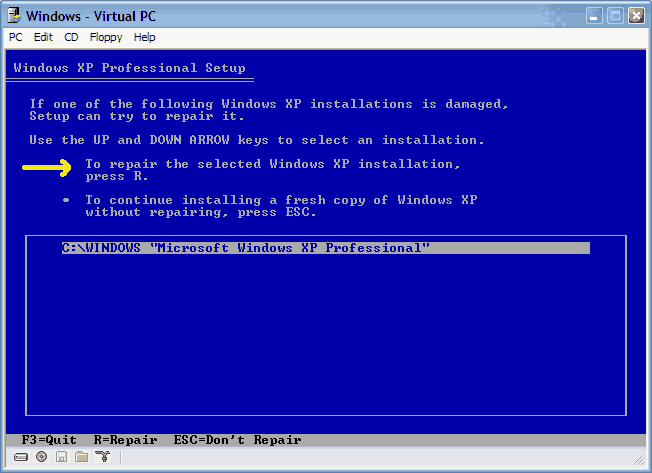
So far Ive gotten to the part where it says ( Install XP on this Partition or Repair XP ) need help on what to do after that.

Any other way I can acces my files in that HD?? I need to recover my homework and other documents.

Thanks all.
Closed Thread
Page 4 of 19 123 4 567814 Last »

Tip: Download Advanced SystemCare 3 Freeware - 1 Click A Day to Clean, Repair, Protect & Optimize your PC.

Thread Tools


Similar Topics
Topic Category Replies Last Post
HOW TO: Install Windows 2000 (or XP perhaps) from DOS without a bootable CDROM Guides and Tutorials 44 2 Weeks Ago 04:36 AM
Microsoft Jokes The Meeting Spot - Chat & Socialize 126 05-27-2008 08:45 PM
Windows will not boot (Help) Processors, Chipsets and Motherboards 10 01-04-2007 04:00 PM
Dual Boot to DOS partition Windows OS 27 02-03-2006 07:20 AM
HELP please! Windows dont boot no more! The Alternative OS 3 11-09-2003 07:41 PM


All times are GMT -4. The time now is 09:00 AM.