also @ TechSpot: Call of Duty: Modern Warfare 2 Graphics Card Performance
Welcome to the TechSpot OpenBoards. Please read the FAQ if you have any questions. Login to participate.

Go Back   TechSpot OpenBoards > TechSpot Community > Guides and Tutorials

How to repair Windows XP/2000 if you are unable to boot into Windows

Closed Thread
Page 5 of 19 1234 5 678915 Last »
Bookmark Thread Tools
  #81  
Old 09-16-2004
MrGaribaldi's Avatar
TechSpot Ambassador
 
Location: Babylon 5, Grid Epsilon
Member since: Feb 2002, 2,802 posts
Inaccessible_boot_device

Hello!

Just received my MSI K8N Neo Plat and A64 3k+, and decided to use my current W2k installation.
Removed all the motherboard specific devices I found in Device Manager and installed the new mobo.

Only problem is that I didn't remember to remove the harddrives and cd/dvd players. And since I do not have enough IDE connectors, I had to let the DVD-rom sit this one out until I buy a SATA->PATA converter.

And now every time I try to boot into win2k I get a lovely BSOD proclaiming that I've got an "INACCESSIBLE_BOOT_DEVICE".

I've tried to repair it by doing a fast repair, manual repair and through the recovery console. In the latter I've also turned off all the VIA services I could find (as the new motherboard is nforce based).

I've installed win2k in a new location (or rather, I tried to re-install, win2k chose another harddrive alltogether), and from there tried to copy all the driver information gathered into the old installation.
Still won't load.

I am currently investigating any possible solution on the net (I would very much like to get back into that installation), and any help you can give me is greatly appreciated.

EDIT:
Oh, and I know there isn't a problem with the drive itself, as it has W98SE installed and I can boot into that (or rather safemode, but that's another story entirely), and from my new win2k installation I have full access to all the files on the C: drive.

Yes, I know, do a fresh installation, and yes I do plan on doing that, but that's at the earliest when my X800pro arrives...

Last edited by MrGaribaldi; 09-16-2004 at 05:43 AM..
  #82  
Old 09-16-2004
MrGaribaldi's Avatar
TechSpot Ambassador
 
Location: Babylon 5, Grid Epsilon
Member since: Feb 2002, 2,802 posts
Nevermind, fixed that problem.

I'll post up details on how to move a system disk from one motherboard to another later on.
Now I've got to figure out how to fix the infinite loop I've gotten.
To remove this ad, sign in. To register for a new account, click here.
  
  #83  
Old 09-16-2004
Newcomer, in training
 
Member since: Sep 2004, 1 posts
What if CD-ROM drive isn't bootable??

SO, I'm sitting here starting a repair on an XP box that just reports "corrupt or missing SYSTEM" on boot, and I've searched threads here and elsewhere.

Everyone assumes that one can boot from the XP CD. Well, what if the CD-ROM drive isn't bootable (old IBM)??? Seems all the executables don't run in DOS mode, so how does one start the SETUP routine to get to the repair console?!?!?!?!

Help!
Jack
  #84  
Old 09-16-2004
MrGaribaldi's Avatar
TechSpot Ambassador
 
Location: Babylon 5, Grid Epsilon
Member since: Feb 2002, 2,802 posts
I don't know if this will work or not, as I've never touched an XP cd, but it does work on win2k cd's, so I figure it'll work here too...

Boot with a bootdisk (which includes cd-rom drivers).
Navigate to i386 on the xp cd, and launch winnt.exe (or winnt32.exe).

That should launch the install program.

Note: you will get faster copying if you enable smartdrv before you launch setup.
  #85  
Old 09-26-2004
Newcomer, in training
 
Location: Racine, WI
Member since: Sep 2004, 4 posts
I've got the missing or corrupt windows\system32\config\system message...I can boot to safe mode but can't use the safe mode with command prompt option. The message "can attempt repair by starting Windows Setup using the original setup CD-ROM, select 'r' for repair"...the only CD's I have are the HP system recovery discs. I'll lose all my data if I use these, right? Are there other Windows discs that I'm supposed to have?

Help.
  #86  
Old 10-13-2004
Newcomer, in training
 
Location: Punk Rockz0r Vancouver
Member since: Oct 2004, 10 posts
Another method would be to d/l the Knoppix ISO and boot the CD. It's a complete operating system on a disk.

Restore any really important data, then re-install everything.

This also works for retreiving WIN2k/ME/98se passwords and l0phtcracking them. Another reason Admins shouldn't have CDroms on dummy workstations
  #87  
Old 10-15-2004
Newcomer, in training
 
Member since: Oct 2004, 2 posts
One for the PRO's

Please see my post "One for the PRO's" in a new thread if u think you are an expert...


Good luck!

o0clocks0o
  #88  
Old 11-07-2004
Newcomer, in training
 
Member since: Nov 2004, 11 posts
Hi,

I have many problems with image errors ect, my whole system32 .dll files are pretty messed up. I would like to repair my windows but as i have an emachines system, i recieved 2 restore disks with it, with all files and drivers i need (including windows). Does anyone know how i can repair?

Thanks

ps. sfc /scannow does not work, it says it requires the windows xp home edition disk, either of my restore disks do not work in this stage, need another solution to repairing.
  #89  
Old 11-21-2004
Newcomer, in training
 
Member since: Nov 2004, 2 posts
I have an unusual situation

Here's what i'm working with...

My girlfriend's Dad bought a computer that does not have any recovery discs, etc. His computer is experiencing very similar symptoms as described above.

1. The unit constantly attempts to boot and makes it to the windows screen (the one with the moving blue bar at the bottom)...the screen goes black, then comes back with the same windows screen before restarting.

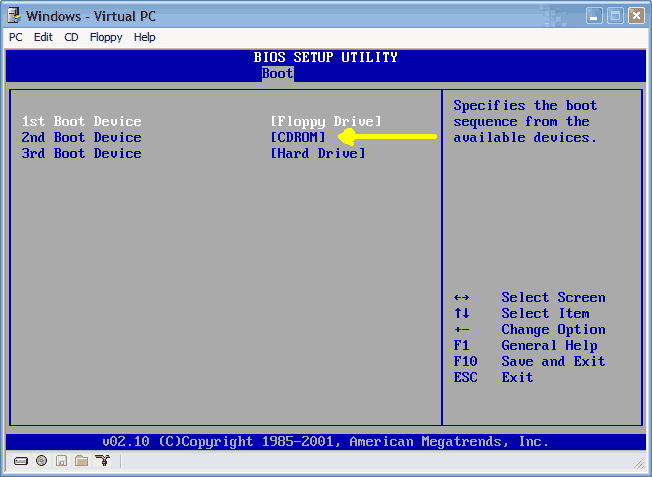
2. I have tried hitting the F8 button to try the safe mode stuff, and it takes me to the screen where I can try the different boot options..however, I cannot move the cursor up and down using my keyboard or anything else...i'm completely baffled by this because I know the keyboard works when I'm in the BIOS screen (I have already made sure my CDROM has higher boot priority too).

3. Obviously, I'm completely at a loss of what my next step should be...Oh, I forgot to tell you, I personally own a newer Compaq Presario and I've been trying to use my Windows recovery CD on his computer. We both had XP Home OSes.

What would you guys recommend? Should I ditch the HD and buy a whole new copy of Windows and simply start over? If so, what should I keep in mind moving forward with this plan of action.

Thanks all.
David
To remove this ad, sign in. To register for a new account, click here.
  
  #90  
Old 11-21-2004
Mictlantecuhtli's Avatar
TS Special Forces
 
Location: Finland
Member since: Feb 2002, 4,852 posts
System specs
Quote:
Originally Posted by QCTimes.com
2. I have tried hitting the F8 button to try the safe mode stuff, and it takes me to the screen where I can try the different boot options..however, I cannot move the cursor up and down using my keyboard or anything else...i'm completely baffled by this because I know the keyboard works when I'm in the BIOS screen
Check if BIOS has an option to set USB keyboard or legacy device support to be controlled by BIOS instead of OS.
  #91  
Old 11-22-2004
Newcomer, in training
 
Member since: Nov 2004, 19 posts
Quote:
Originally Posted by Rick
[size=3]How to perform an "in place upgrade" or system repair.[/size]

Is your system unable to boot into Windows XP/2000 or even Safe Mode? Whether you get a blue screen or XP/2000 just hangs, then this information is for you. This will allow you to repair your Windows XP/2000 installation (hopefully) without having to losing your data or settings.

Indications:[list=a][*]May allow Windows to load properly if there are critical driver, software or registry problems which have rendered the system unbootable. (Blue screens, hanging, errors etc..)[*]May repair/reinstall missing Windows components or solve otherwise quirky behavior[*]May allow drive to be installed on another system or motherboard with different chipset


This information will also allow you to install new motherboards or make other large hardware changes that XP may not readily accept with PnP.

Note: The system repair function will remove any updates you have previously installed that are not included on the CD. Drivers will also be reverted to their original XP versions, as well as some settings (network & performance settings may sometimes be reset to their defaults). It may be necessary to reactivate your Windows XP as well.

Step 1: Determine the problem
  • First, figure out what CAUSED the problem. Often times, when Windows is rendered unbootable, there is a good reason. This can often be due to hardware failure (bad hard disk, memory or CPU for example). In these cases, the system repair function will not work. System repair will only repair your software.

    I strongly recommend you run a disk utility on your hard drive before performing a system repair. You can find more information about disk utilities here:
    http://www.techspot.com/vb/showthrea...&threadid=7602

    Memory can also cause these problems. A good memory test can be found here: www.memtest86.com


Step 2: Begin the repair process
  • You must boot from your XP or 2000 CD. Please make sure it is the same version of Windows that is currently installed on your computer (ex. XP Home cannot upgrade XP Professional). Place the CD in your CDROM and start your computer. Newer versions will work as well (ie. Windows XP Pro SP1 CD will work on an older WinXP Pro non-SP1 installation)

    Before the Windows logo appears, you will be asked to press any key to boot from CD, so do just that.

    If you are unable to boot from the XP/2000 CD, then please check the last step in this short guide.


Step 3: System repair steps
  • A blue screen will appear and will begin loading XP setup from the CD.

    RAID/SCSI/Unsupported UDMA users:
    You will be prompted to "press F6 to install any third party SCSI or RAID drivers". Most users will not have to press F6, but if you are running RAID, SCSI or unsupported UDMA controllers, then you will have to have your controller drivers on a floppy disk. If you are unsure whether you have RAID/SCSI, then simply let the CD load without pressing F6.

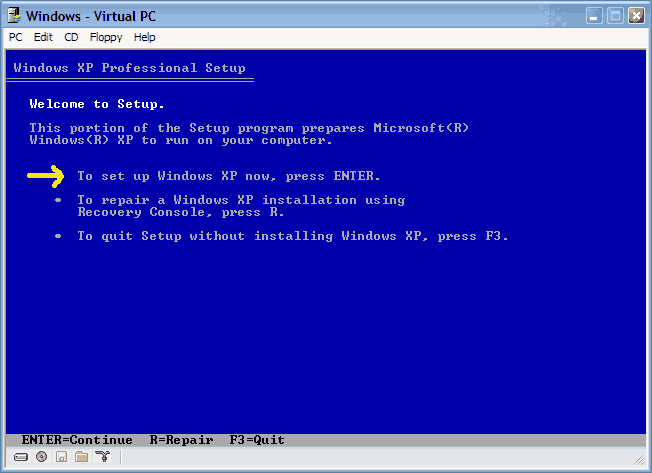
    Once completed, you will be confronted with "Windows Setup". You will be asked to setup up Windows, or repair Windows with the recovery console. Choose the FIRST option, NOT recovery console.


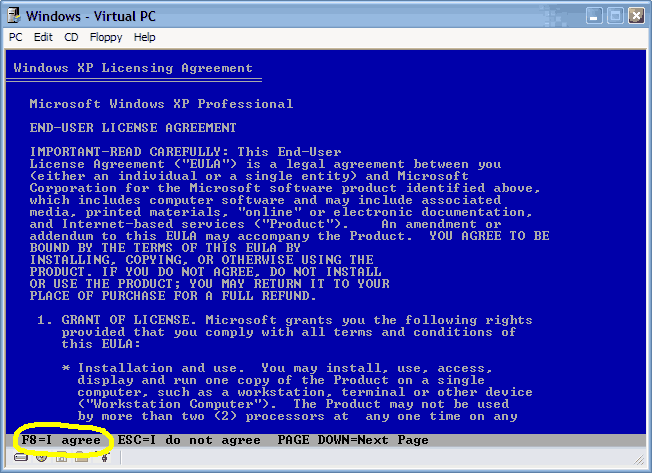
Choose F8 to continue.


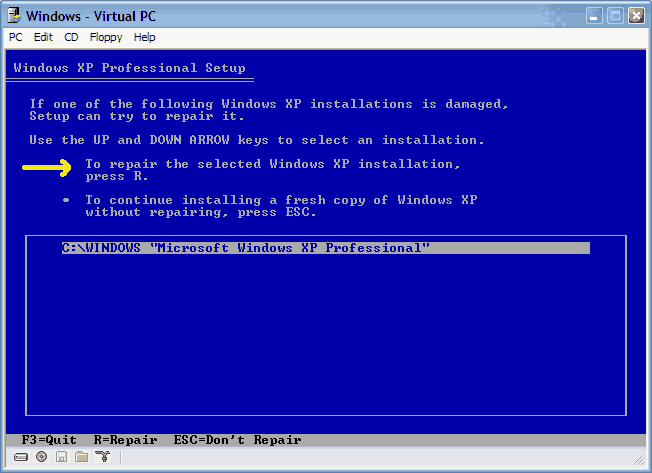
  • Next, Windows Setup will find existing Windows XP/2000 installations. You will be asked to repair an existing XP installation or install a fresh copy of Windows XP/2000.

    If no installations are found, then you will not be given the option to repair. This may happen if the data or partition on your drive is too corrupted.


  • That should be it. Windows XP/2000 will appear to be installing itself for the first time, but it will retain all of your data and settings. Just follow the prompts, have your CD-KEY handy and hope for the best!

Hope you can help me out Rick. I am doing the repair process you described above because I had to have my motherboard replaced.

During the installation process, it would hang at "34 minutes remaining". It would then ask me for a DLL file for my soundcard. I locate the file and click OK but the installation process goes no further. The system reboots and the installation process restarts. It goes to 34 minutes remaining again and then just hangs for a while and the computer restarts and this process continues. Should I try something else? I wanted to install fresh but got a message saying that my files and folders would be lost so I decided to stop.
  #92  
Old 11-23-2004
poertner_1274's Avatar
TS Special Forces
 
Location: Saint Louis, MO, USA
Member since: Feb 2002, 4,646 posts
System specs
There are a few things you can try. Since it is asking for a DLL for your soundcard you can just SKIP this file and continue with the intallation, then install the drivers for the soundcard after you have XP up and running again.

Another thing is next time it restarts try taking out your XP CD and see what happens, if it hangs when it is supposed to restart on purpose, then it is trying to boot form CD and it needs to boot from the install files on the hard drive instead.

Give that a shot and post back whether it helped or not. Thanks.
  #93  
Old 11-23-2004
Newcomer, in training
 
Member since: Nov 2004, 19 posts
Quote:
Originally Posted by poertner_1274
There are a few things you can try. Since it is asking for a DLL for your soundcard you can just SKIP this file and continue with the intallation, then install the drivers for the soundcard after you have XP up and running again.

Another thing is next time it restarts try taking out your XP CD and see what happens, if it hangs when it is supposed to restart on purpose, then it is trying to boot form CD and it needs to boot from the install files on the hard drive instead.

Give that a shot and post back whether it helped or not. Thanks.

Yup....i tried the first suggestion the very first time it tried to do the repair process. I clicked CANCEL when it asked for my DLL file. However, the prompt just stayed there and wouldn't go away. Soon after the system rebooted and the installation process restarted. The second time I went and got my DLL file and clicked OK. XP seemed to recognized it because the prompt window went away but the installation process hung at 34% complete even though the user friendly window shots kept changing. Then the system would reboot.

As for the 2nd option, I tried that as well. The system would restart and it would get to the installation process and then it would prompt me to put the windows CD back in.
  #94  
Old 11-24-2004
Newcomer, in training
 
Member since: Nov 2004, 19 posts
Well I removed my sound card and the installation process did not continue. Same problem with hanging and then restarting. I will do a clean installation on a reformatted HD.
  #95  
Old 11-27-2004
Newcomer, in training
 
Member since: Nov 2004, 1 posts
Same problem as fretman

I am working on a friends computer and what started as a loss of sound and trying to run th xp repair has now turned ugly. I am getting exactly where fretman got in the process(34Minutes) and the screen just shut off. After a few minutes the hd stops all activity and I am working from a dark screen. When I reboot, it starts all over again. I hate to start with a clean install and lose all my friends date, but the way it continues to freeze up at 34 min. I'm not sure that would work either.

Any ideas? HD? thanks for any help you may have
  #96  
Old 11-27-2004
Newcomer, in training
 
Member since: Nov 2004, 19 posts
Quote:
Originally Posted by hotwilzz
I am working on a friends computer and what started as a loss of sound and trying to run th xp repair has now turned ugly. I am getting exactly where fretman got in the process(34Minutes) and the screen just shut off. After a few minutes the hd stops all activity and I am working from a dark screen. When I reboot, it starts all over again. I hate to start with a clean install and lose all my friends date, but the way it continues to freeze up at 34 min. I'm not sure that would work either.

Any ideas? HD? thanks for any help you may have
Yup...when I tried to repair XP-Professional it would hang at 34 minutes during the installation process and then reboot and restart the installation process again and again. The first time it prompted me for a DLL file for my audio card. I installed the DLL file but that didn't work. I then removed the audio card and that still didn't work. I finally had to do a clean install on another harddrive which I keep handy in case of emergencies like this. I did find however that the installation process even on a new drive seemed to hang a bit at 34% before continuing.

However, when I connected the old drive that I was doing the repair on as the slave so I could copy the contents over to the new drive the system scanned the old drive upon boot up for consistency and found an error with the pagesys file.

Anyways, if you don't want to lose your friends data then just buy another hard drive and install XP on it and then copy your friends drive contents onto the new one. It's always good to have an extra drive anyways and you can just get a 40gig for a relatively low price these days.
  #97  
Old 11-27-2004
Mictlantecuhtli's Avatar
TS Special Forces
 
Location: Finland
Member since: Feb 2002, 4,852 posts
System specs
You could also try hitting F8 in the beginning when the setup says "Press F6 to install new SCSI drivers" (or something like that) and choose "Standard PC" from the list that follows.

I think most of the hardware problems stem from poorly implemented / designed ACPI. It was a nice idea but MS couldn't get it to work properly (hello PnP).

In plain English, use the old working method where devices don't try to share resources aggressively.
  #98  
Old 12-06-2004
Newcomer, in training
 
Member since: Dec 2004, 2 posts
First post on this board ....

I have been trying to repair the "corrupted pci.sys file" problem ..... eventually ended up with an access denied statement after trying to copy the pci.sys from the install CD to the windows\system32\drivers directory.

So .... I gave up and decided to reinstall. I pushed L to wipe out the settings etc and now at the screen "Setup examines your disks" it just sits there.

Any suggestions and pointers would greatly be appreciated.

Haasman
  #99  
Old 12-06-2004
Rick's Avatar
TS Special Forces
 
Location: Los Angeles, CA
Member since: Feb 2002, 5,288 posts
"Corrupted PCI.SYS file" is very common to memory errors.

I wouldn't be surprised if your memory is either bad or not compatible with your system board.
  #100  
Old 12-10-2004
IanTechGuru's Avatar
Newcomer, in training
 
Location: Mountain Home, ID, USA
Member since: Dec 2004, 1 posts
Repair a Missing HIVE with a SATA ViaRaid 0 Config

Quote:
Originally Posted by Blorpuncle
A couple days ago i got this message when i booted my PC : Windows could not start because the following file is missing or corrupt : \WINDOWS\SYSTEM32\CONFIG\SYSTEM.
I do not have a recovery CD or ASR disk.
I cannot go in safe mode or back to a previous good config, i always get the same error message.
When i boot from the Win XP CD, installing the VIARAID driver on the way since my HDs are in Raid 0, my PC freezes when i get to the Setup screen where i could select to setup XP again or repair it.
I consulted the Microsoft Knowledge Articles about that problem (like #307545, 308041 and 822705, among others) but it doesn't help in my situation since i cannot start the recovery console or anything else for that matter ! Can anyone help ?
Thanks
Blor...

Here's what you need to do... 1st you had the right idea on adding the ViaRaid drivers for the RAID Stripe 0 config, but you missed the SATA drivers.

You need to feed 2 drivers to windows upon install:
1. Fastrack
2. ViaRaid

After that you should be able to get to the Recovery Console by hitting "R" at the 1st screen that you come to after the message Starting Windows.

You will need to do a ChkDsk /R which repairs errors and attempts to recover data. Do this repeatedly until you no longer get any errors.

The directory \WINDOWS\SYSTEM32\CONFIG\ is the Location of the Registry Hive Files IF you can't get the system to boot after doing the ChkDsk then the ONLY option is to replace the SYSTEM file with the ORIGINAL file that is stored elsewhere in the Windows Directory. If you have to Replace the Hive File, 1st make a backup of the SYSTEM file by copying it to another location and renaming it to SYSTEM.BAK. Then copy the SYSTEM file from the \Windows\Repair\ folder.

That should get your system back into Operation. However the System settings stored in the Registry WILL be missing.

Hope this helps

Ian
Closed Thread
Page 5 of 19 1234 5 678915 Last »

Tip: Download Advanced SystemCare 3 Freeware - 1 Click A Day to Clean, Repair, Protect & Optimize your PC.

Thread Tools


Similar Topics
Topic Category Replies Last Post
HOW TO: Install Windows 2000 (or XP perhaps) from DOS without a bootable CDROM Guides and Tutorials 44 4 Weeks Ago 04:36 AM
Microsoft Jokes The Meeting Spot - Chat & Socialize 126 05-27-2008 08:45 PM
Windows will not boot (Help) Processors, Chipsets and Motherboards 10 01-04-2007 04:00 PM
Dual Boot to DOS partition Windows OS 27 02-03-2006 07:20 AM
HELP please! Windows dont boot no more! The Alternative OS 3 11-09-2003 07:41 PM


All times are GMT -4. The time now is 09:12 PM.