Welcome to the TechSpot OpenBoards. Please read the FAQ if you have any questions. Login to participate.
|
|||||||
How to repair Windows XP/2000 if you are unable to boot into Windows
![]() |
|
|
|
Thread Tools |
|
#141
|
|||
|
|||
|
Thank you
I have try like you said and it happen as you say.
Thank you for advise... |
|
#142
|
|||
|
|||
|
Help!
Hi, I'm pretty new to all this so any help would be great!
When I try to run XP I get the message 'Invalid boot.ini' then it goes to 'the following file is missing or currupt Windows\System32\hal.dll' I've tried using recovery console to recopy this file but it says Access denied. I don't receive a prompt to enter an administrator password either. I tried using the xp install disk but it doesn't give me a repair option, only to install. Anyone got any ideas how I might be able to fix this without formating the harddrive? Or even a way I could retrieve some files before I format it. Any help is most appreciated! Last edited by Dan1; 03-01-2005 at 09:56 AM.. |
|
#143
|
||||
|
||||
|
Quote:
I would simply connect that HD to another PC as a slave (make sure you set the jumpers on both HD's correctly). Preferably a PC with a cd or dvd burner (unless the pc you use is on the same network in which case you would only need to copy the files you want to the Master HD to be transferred later, over the network, to the newly formatted HD). If the PC you decide to use is not on your network (i.e. at a friends house) then you simply burn whatever files you want to keep to disc, put the HD back into your PC (make sure you set the jumpers back to Master or Cable Select), format the drive, and install windows. Simple enough? The only problem with this method is that you will need the Installation Discs (or Setup files, if the software was dl'd from the internet) to reinstall all of your software (i.e. Microsoft Office, Adobe Acrobat, Antivirus, etc.). Be careful when doing a fresh install on a newly formatted HD. Make sure you install the Hardware drivers in the proper order (I know with Dell systems this is particularly important. If you call Dell, a tech rep will tell you exactly what to install and when for your particular system.). Chipset drivers should be installed first. Good luck ![]() |
|
#144
|
||||
|
||||
|
Quote:
|
|
#145
|
|||
|
|||
|
Repair installs are nice, but aren't always available.
How to repair your system HIVE files (the registry) using the recovery console http://www.tweaksforgeeks.com/HIVEConsole/index.html If you use Barts PE it's a hint easier than the recovery console. Follow the same steps, but don't have to type as much. (Good ole A43 File management proggy) |
|
#146
|
|||
|
|||
|
Thanks for all the advice guys.
I tried running a repair from the windows disk but it ended up installing a new version of windows with a new user id. I can still see my old user names in Documents and Settings but appart from that it looks as if everything else is gone. I was about to format the drive and start again but when I checked the properties of the hard drive it says 40 gig is used. This is how it was before the crash so does this mean my files are still there I just can't see them? Any help is most appreciated as I really don't want to lose everything! Thanks |
|
#147
|
||||
|
||||
|
Does your Desktop still have shortcuts to programs you had previously installed? If so, do they work?
when you open My Computer and look at your hard drive, do you see more than these 3 folders: <Documents and Settings> <Program Files> <WINNT>? If you open Program Files, do you see any folders containing programs you had previously installed? If so, when you goto Control Panel then Add or Remove Programs, are your old programs listed there? This is kinda hard to troubleshoot when we don't know what you're seeing. If the HD properties says that 40G is used, then I would assume your old files are on there. goto the My Documents folder of one of your old usernames. is there anything there? did you try searching for an old file you know the name of? an mp3 or something? "need more input" "johnny 5 is ALIVE!" ![]() |
|
#148
|
|||
|
|||
|
Typically, an install over a previous installation keeps all files not associated with the windows install. That is to say that if you installed Windows over your current installation, as it seems you did, and you previously had loose files (images, documents, movies, etc.) those files are still there.
However, when you reinstall you will create and log into a new profile when windows starts. This means that all your desktop, my documents, bookmarks for ie, and the like will not show up. All that stuff is still there it's just in another profile. To find it explore to C: and look in documents and settings for another named profile. If the name you gave it during this new install is the same as the old one there will be 2 similar named profiles in Documents and Settings. For instance, if one is Dan1 the other may be DA~2 or something similar. The main problem with installing over your current installation is installed program functionality. Many programs that were previously installed may not show up in Add/Remove programs to properly remove. Additionally, many programs may not actually work anymore. This is due, primarily, to those installs modifiying system files that have now been restored to their previous state. Also many of those programs will no longer be reflected in the registry. Sorry for the rambling. Hope this helps. |
|
#149
|
|||
|
|||
|
I can see all the previous user ID's. The programs I had previously installed are showing in add/remove software but not in any program file folders. When I try to remove or change them on add/remove it says file not found.
There's nothing in any My Document folders but there are a couple of shortcuts that I'd previously saved on the in the root directory but they don't work. I tried searching for a few old files but nothing was found. Should I try some kind of file recovery program? Thanks for your help! |
|
#150
|
|||
|
|||
|
its always real good after you do that to dowload new antivrus and registy checkers spyware checkers adware checkers firewalls etc. do a complete scan of everthing possible i've done this b4 very good post
![]() |
|
#151
|
||||
|
||||
|
That needs to be the very first thing you do is get a firewall and activate it, then go directly to Windows Update and update everything. Then once that is done get your scanners, then use your internet carefully. This will help keep all that spyware and such out.
|
|
#152
|
||||
|
||||
|
.hey Rick i just read thru your solution which is what i have been trying to do the whole week before coming here but i failed to start still . so anyway i decided to use the A drive to boot my Pc but i am going as far as A:/> ....... then it asks me to type a command ... so what command should i type from that DOs prompt to reboot my PC from the A drive ?
|
|
#153
|
||||
|
||||
|
Hey Rick i am kind of new here .. did you get my message about failure to Boot win XP from A drive after getting the A:/>... prompt ...... ?i dont know what command to type ..if you did my apologies
|
|
#154
|
||||
|
||||
|
Thanks
Thanks .....will do
|
|
#155
|
||||
|
||||
|
Um....I'm assuming you are responding to an email sent to Rick, and will let this go :.p
BTW Welcome to TehcSpot apell![]() |
|
#156
|
||||
|
||||
|
Ok
Y eah kind of >> i also just wanted to share my experience .....thanks
|
|
#157
|
|||
|
|||
|
Quote:
|
|
#158
|
|||
|
|||
|
Try Another reinstall
how about if try another reinstall , it might get further
and might help and give you an idea what is wrong. Internet Cleaning Tool |
|
#159
|
||||
|
||||
|
Please help me... I am so confused
Hi... this seems like the right forum that I should be on but I'm not sure so I'm sorry if I am on the wrong one.
Anyway... I really don't know anything at all about computers, and I need help with a lot of details please. I have Windows XP Home. My power went out the other night while my computer was in the middle of restarting. It was connected to the surge protector but when the power came back and I went to start up, my computer wouldn't work. When I turn it on it goes to the "your computer was not shut down properly" screen (I don't know what the technical name for that screen is, I'm sorry). I went though each of the options (start up normally, last known good configuration, safe mode, etc) and every time (except with the safe modes... I'll get to that in a second) it would start to start up (with the little flag and the bar under it with the blue things scrolling across while you wait for it to start up... again I don't know the technical name) but then in the middle of that (before it got to the screen where you pick a user and type in your password) the screen would just go black, shut down, turn itself on again, and go back to the "your computer was not shut down properly" screen again. In safe mode, it would start to do all the comand prompts (I think that's what they're called... the little words and codes that show up in white font on the black screen while you are starting up in safe mode) and then in the middle it would just stop, go black, shut off, turn back on, and go back to that screen where you choose the startup mode. I tried all of the different start up modes, gave up for a few days, went back and tried again, and now when I try to start in regular mode it does all the same things but right before it turns black and shuts off, a blue screen with something written on it in white pops up for literally like half a second and then my computer shuts down again, etc. I have absolutely no idea what to do about it. I talked to my dad (he's not a realy computer whiz either) but he said to take it to CompUSA. I just took it there and they want to charge me $200 to save my files, delete my entire hard drive, and then only reinstal the original Windows XP Home programs. I don't want to pay $200, have all of my programs deleted (some are downloaded from forever ago and others I have no idea where the installation CDs are), and I don't want people playing with my computer if I can possibly do it myself. As soon as I found out I came home and stearched on google, found this site, read a little, and it seems like this site is very helpful. So PLEASE help me!! Before I do anything, should I go back to CompUSA and take my coputer back? Once again, I'm sorry that I don't know any technical terms and that I am so unfarmiliar with computers. I'm also sorry if this is the wrong place for me to be posting. Please, help help help!!! Last edited by l00percent; 06-13-2005 at 06:08 PM.. Reason: spelled "please" wrong and it was bothering me |
|
#160
|
||||
|
||||
|
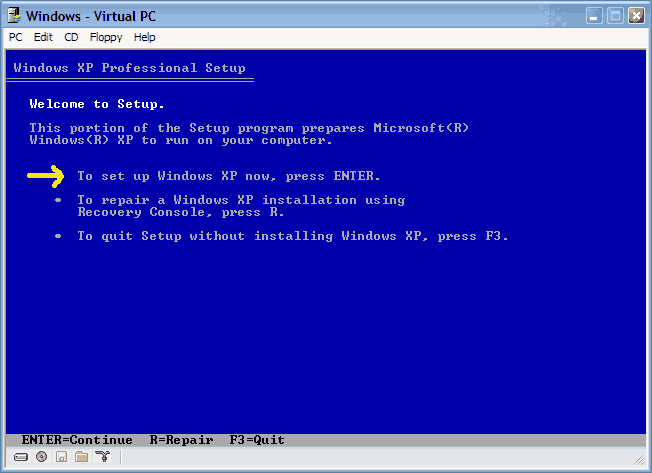
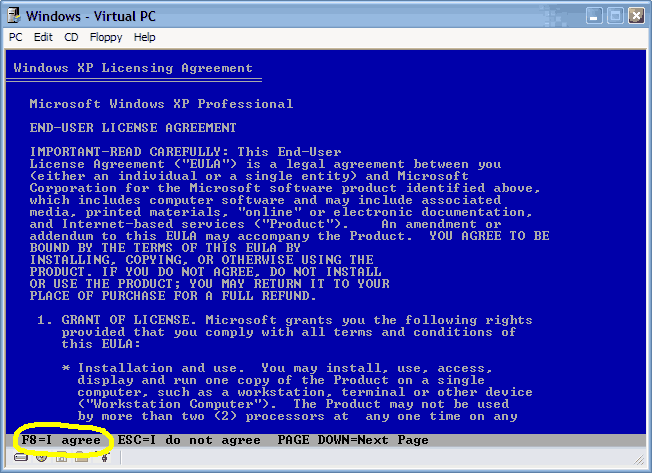
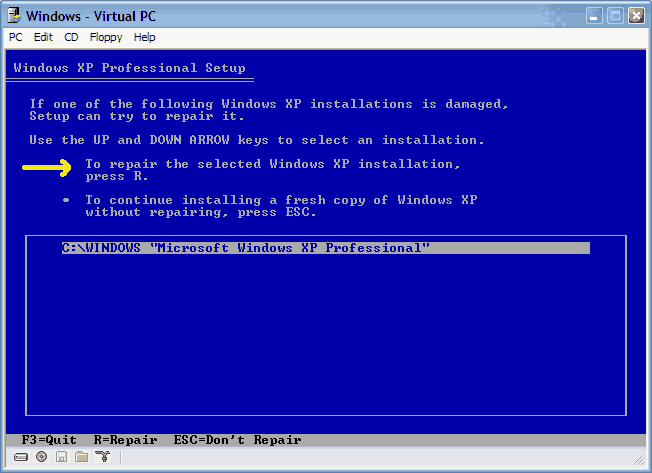
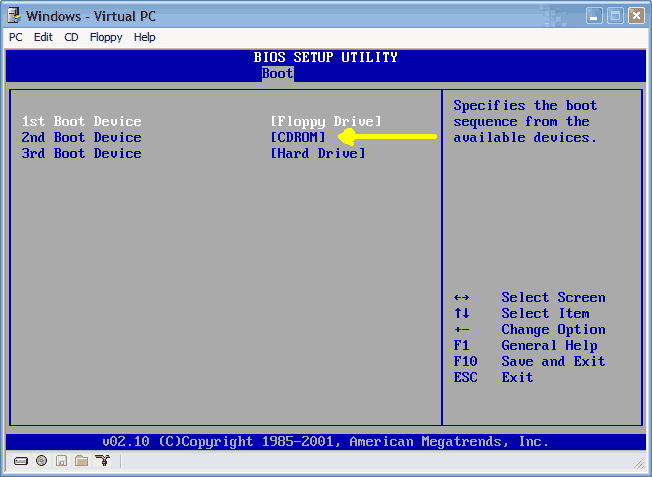
Well I think you posted this in the correct thread. But did you read the beginning part of it? I think a repair of XP should take care of your problem. Go back to page one and read the first few posts.
BTW Welcome to TechSpot![]() |
![]() |
| Thread Tools | |
|
|
| Similar Topics | ||||
| Topic | Category | Replies | Last Post | |
| HOW TO: Install Windows 2000 (or XP perhaps) from DOS without a bootable CDROM | Guides and Tutorials | 44 | 4 Weeks Ago 04:36 AM | |
| Microsoft Jokes | The Meeting Spot - Chat & Socialize | 126 | 05-27-2008 08:45 PM | |
| Windows will not boot (Help) | Processors, Chipsets and Motherboards | 10 | 01-04-2007 04:00 PM | |
| Dual Boot to DOS partition | Windows OS | 27 | 02-03-2006 07:20 AM | |
| HELP please! Windows dont boot no more! | The Alternative OS | 3 | 11-09-2003 07:41 PM | |
All times are GMT -4. The time now is 03:00 AM.


Welcome to TehcSpot apell