also @ TechSpot: Seven Intel P55 Motherboards Compared, Reviewed
Welcome to the TechSpot OpenBoards. Please read the FAQ if you have any questions. Login to participate.

Go Back   TechSpot OpenBoards > TechSpot Community > Guides and Tutorials

How to repair Windows XP/2000 if you are unable to boot into Windows

Closed Thread
Page 9 of 19 « First 5678 9 10111213 Last »
Bookmark Thread Tools
  #161  
Old 06-16-2005
Newcomer, in training
 
Member since: Jun 2005, 2 posts
it wont let me push f8 so i cant get past that window please help :eek:
  #162  
Old 06-16-2005
Newcomer, in training
 
Member since: Jun 2005, 2 posts
never mind ifound the flock button on my keyboard hold thumbs its fixing it now
  #163  
Old 06-26-2005
Newcomer, in training
 
Location: Vancouver, BC
Member since: Jun 2005, 3 posts
Windows XP repair

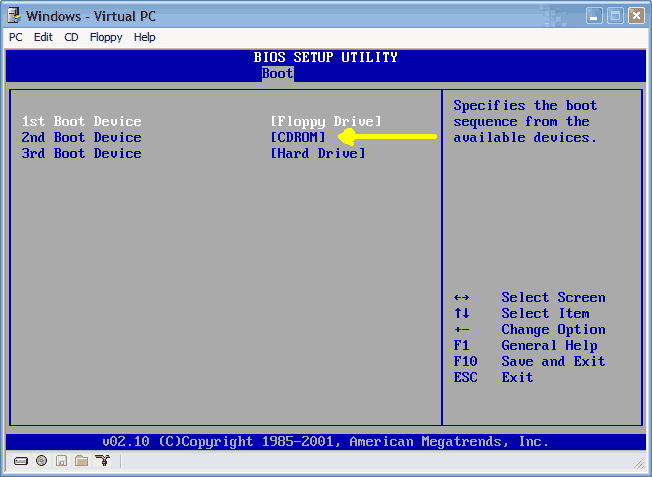
I was installing a program the other day and once done it says I need to restart the computer, so I did and it wouldn't boot, it said ntldr is missing press ctrl+alt+del to restart. I do this and it is just a loop going back to the same message. I change the settings to boot from CD and put in Win XP and follow everything you stated in the beginning of this thread to do a repair. I arrived at a screen with options not mentioned and need to know which one to choose so I do not lose my data. This is what it says:

CAUTION: A \WINDOWS folder already exists that may contain a Windows installation. If you continue, the existing Windows installation will be overwritten.
All files, subfolders, user accounts, applications, security and desktop settings for that Windows installation will be deleted. The "My Documents" folder may also be deleted.
To use the folder and delete the existing Windows installation in it Press L

To use a different folder press ESC

To quit Setup press F3

What do I do at this point?
  #164  
Old 06-26-2005
TechSpot Addict
 
Location: London
Member since: Apr 2005, 1,267 posts
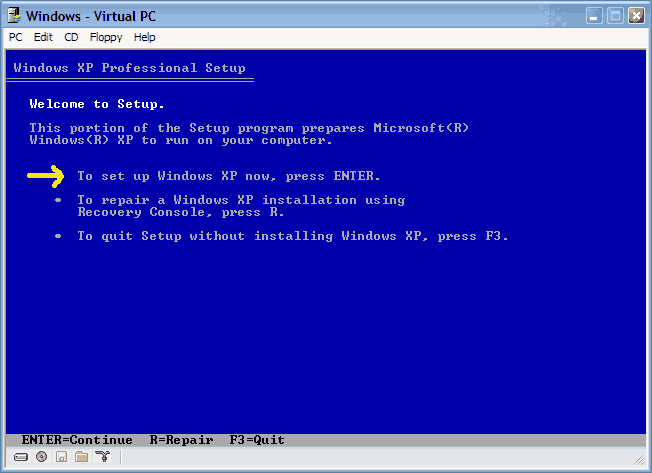
In setup the first choice should be [Enter] to set up XP.

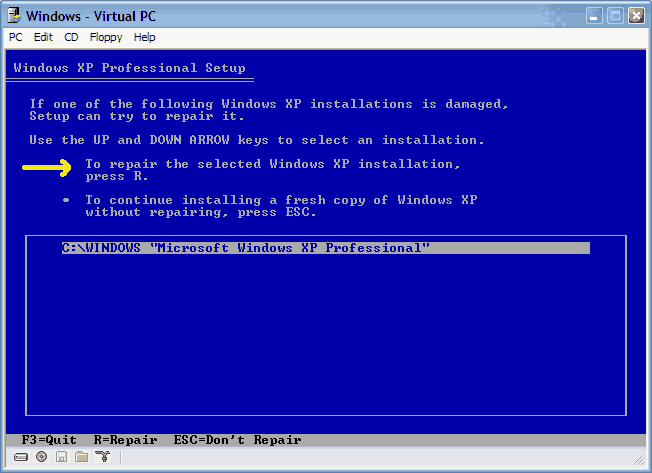
The next choice should be [R] for a repair on this screen if should be offering you C:\WINDOWS.

Try again and see if you arrive here.
  #165  
Old 06-26-2005
Newcomer, in training
 
Location: Vancouver, BC
Member since: Jun 2005, 3 posts
I was following the steps recommended at the beginning of this thread which is what brought me to the screen I mentioned.

Now I have started over and am at the Windows XP recovery console screen

it asks which windows installation I want to log onto

C:\WINDOWS being my only choice, then past administrators password
now at
C:\WINDOWS>

What do I do at this point?
  #166  
Old 06-26-2005
TechSpot Addict
 
Location: London
Member since: Apr 2005, 1,267 posts
1 Step to far. You should have pressed [Enter] instead of [R].

Welcome to setup = [Enter]
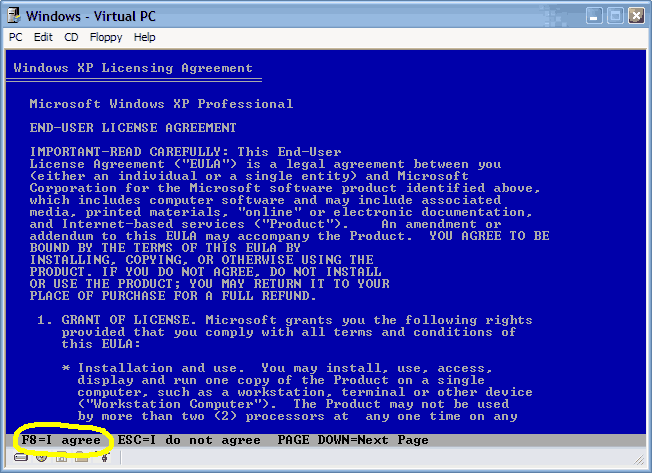
F8 - to agree licence
XP Professional Setup - I think Home is the same.
Here you should see C:\Windows highlighted = [R]
Now it should setup replacing its files on top of the existing.

I hope this is OK.
  #167  
Old 06-26-2005
Newcomer, in training
 
Location: Vancouver, BC
Member since: Jun 2005, 3 posts
Thats not what I get, it says:

The following list shows the existing partitions and unpartioned space on this computer

To set up Windows XP on the selected item press ENTER

to create a partition in the unpartioned space press C

to delete the selected partition press D

C: Partition1 (NTFS) - is the only option I have to select
  #168  
Old 06-27-2005
poertner_1274's Avatar
TS Special Forces
 
Location: Saint Louis, MO, USA
Member since: Feb 2002, 4,646 posts
System specs
For some reason to me it sounds like it isn't recognizing your current Windows installation. There could be any number of reasons that cause this, but at this point I would suggest taking that HDD out and putting it into another computer and backing up all your important data, then reinstalling windows.

BTW
Welcome to TechSpot
  #169  
Old 06-27-2005
TechSpot Member
 
Member since: May 2005, 100 posts
Good idea, and if it still doesn't work on that computer, back all that stuff up on another harddrive and take it down to one of your local computer stores and ask them to erase everything foryou.

That should get rid of the problem (maybe is a bad sector on the disk in the os partition)
Its not encrypted is it

If the drive is encrypted (the files and folders labels are green instead of black) Windows partition then the bios will not read it because it can't ( on the computer that encrypted it )

So if you can't get it done there im sure there is a hard drive shreeder or something like that that will bring that baby back to factory condition

Good Luck
  #170  
Old 06-28-2005
Newcomer, in training
 
Member since: Jun 2005, 1 posts
Another problem with SISAGP.SYS

Hello. I am currently having the same problem as Mere24 had with the SISAGP.SYS file but I am having no luck at all. I will explain the current situation.

2 days ago my computer was working pretty much perfectly. Apart from a little lag I could see no symptoms of any problems happening with my computer. I left the room to make a cup of coffee and I came back to see a blue screen saying that an unexpected error had occured causing the system to shut itself down.

I tried restarting it several times, but when it got to the Windows Logon screen it stalled for a few seconds before coming up with the blue screen again.

I got out my WinXP (home) CD and ran the recovery setup on the first page when I was asked to locate a SISAGP.SYS file that was on the SiSA CD. On the drop down menu it said it was looking for it in the C:\WINDOWS folder but there's nothing like that there. Not knowing what the file was or where it could be found I pressed ESC and the setup process continued, and completed. The computer restarted and got to the Windows Logon screen again.

Instead of coming up with a blue screen my system does one of 2 things:

1. It stalls for a few seconds, the screen goes black and the system restarts itself.

2. An error message saying something similar to:

"winlogon.exe has encountered an unexpected error. Press OK to terminate or Cancel to Debug"

bug before I get to press either OK or Cancel the system stalls for a couple of seconds and restarts.

I have tried running in safe mode, and I have tried going through the recovery setup countless times but still no luck. I think all I need is this one file, and I have no idea where it is. The only CDs I have that would be of any use is my WinXP CD and a support CD. When I try to run the support CD however, it won't run unless I format, and I really do not want to reformat (I can move all of my essentials to other drives when prompted for the SISAGP file but I would rather I kept it all).

Does anyone know a place where I could find this file, or the directory for the file, or even a way to get around this problem? Any help would be deeply appreciated.
Thank you.
  #171  
Old 06-28-2005
TechSpot Member
 
Member since: May 2005, 100 posts
Internet

Try going on to the enternet and search yahoo for the file that you need.

Download file

Then try putting the file on a disk and installing it or look for "what directory is File suppssed to be in."

doing this has helped me when I accidently erased some dll files.
  #172  
Old 06-28-2005
TechSpot Addict
 
Location: London
Member since: Apr 2005, 1,267 posts
Looks like the graphics driver. Try here.
  #173  
Old 06-28-2005
TechSpot Member
 
Member since: May 2005, 100 posts
video

Just take a picture of the inside of your pc and post the pic
  #174  
Old 06-29-2005
TechSpot Addict
 
Location: London
Member since: Apr 2005, 1,267 posts
If you know where the drivers are you can specify the location when asked.
  #175  
Old 06-29-2005
Newcomer, in training
 
Member since: Jun 2005, 2 posts
Still can't boot into XP!!!

Hi everyone

I have read all 174 posts in this thread which has proved really informative :giddy:, I have tried lots of the solutions posted here however, I still find that my problem is not solved. Please can anyone help?

My XP laptop won't boot into Windows, it gets to the blue screen after the Windows XP screen and sometimes comes up with applying network settings and applying computer settings, but it always ends with the following message and then restarts itself.

It was coming up with Winlogon.exe
The exception 0xc00000fd occurred in the application at loc 0x01253bba. Click OK to terminate, Click Cancel to debug. Neither of these options worked, the pc just restarted it self again.

But then I repired the O/S using the XP CD and now I get this blue screen of death:
STOP: c000021a {Fatal System Error}
The Windows Logon Process system process terminated unexpectedly with a status of 0x00000080 The system has been shut down. Then the system hangs.

I get the same error when I try to boot into Safe mode. I have tried using the Ultimate Boot Cd and still no luck

I need to get the data off the HDD before formatting it, the only problem is I don't seem able to connect it to another pc as a slave drive as it is a laptop and doesn't appear to have the correct connectors.

Can anyone suggest a way to copy the data off the HDD or boot into windows.

Any ideas would be very gratefully received.

Many thanks

Mikky G

Last edited by Mikky G; 06-29-2005 at 12:49 PM..
  #176  
Old 07-03-2005
Mictlantecuhtli's Avatar
TS Special Forces
 
Location: Finland
Member since: Feb 2002, 4,852 posts
System specs
Quote:
Originally Posted by Mikky G
I need to get the data off the HDD before formatting it, the only problem is I don't seem able to connect it to another pc as a slave drive as it is a laptop and doesn't appear to have the correct connectors.
You could buy a 2.5" - 3.5" hdd adapter which would allow installing it as a slave.
  #177  
Old 07-03-2005
Newcomer, in training
 
Member since: Jul 2005, 1 posts
XP Pro was contantly booting, now really messed up.

Help me folks!!
I have a Gateway 710XL with 2 (250MB SATA) drives and Win XP Pro initially installed. The computer was working fine, until last week. Then when I booted up, it went into a boot loop, constantly rebooting. I could not go into any of 'SAFE' modes. I attempted repair with the OEM Win XP Pro SP1 disk, but it didn't give repair option. I use the "R" option and attempted to fix the registry as per one of MS papers without success. I checks RAM memory, and HDD (chkdsk, etc.) and all working well. I unplugged all external devices, e.g., USBs attached. Nothing has worked. I tried unplugging the SATA drives and running from another IDE-ATA drive that had Win XP already installed and that didn't work. I didn't want to reformat because (you guessed it) I need to get data out of my drives first. Yesterday, out of despiration I ran the "fixmbr" command in the "r" c:\ (I think this was BIG mistake). I then ran a repair on the Win XP Pro using Win XP HOME disk (even BIGGER mistake). Now I have Win XP installed where XP Pro was, it doesn't reconized part of my partition in one of my drives, and doesn't read data in another partition (telling me drive needs to be formatted, thought the drive is formatted NTSF and the data is still there when I check via the "r" by doing a "dir f:\" command. I have the dreaded yellow question-mark on my DVD-RW and CD-RW drives, and it doesn't let me access the internet.

Sorry for long discussion. Can anyone help me get to the information on my drive to backup and then I can reformat both drives and start over with Win XP Pro?? Please help, I'm exhausted.

PS: I should have read this thread before. Never try to repair XP Pro with XP Home or viceversa.
  #178  
Old 07-08-2005
Newcomer, in training
 
Member since: Jul 2005, 1 posts
Unable to restore XP - System file missing

Great service to the novice...

Live in S. Florida - continual power problems appear to have corrupted the system file for XP Home - I attempted to reload XP on the same existing partition and am unable to - errors out. Tried loading into a separate directory, again with no luck.

Had a hack here trying to fix the problem - the system file is gone - no system file in teh windows directory or in the repair directory.

Any help would be greatly appreciated.

Thanks.
  #179  
Old 07-11-2005
Newcomer, in training
 
Member since: Jun 2005, 2 posts
Quote:
Originally Posted by Mictlantecuhtli
You could buy a 2.5" - 3.5" hdd adapter which would allow installing it as a slave.
Thanks Mictlantecuhtli, I'll give that a try :-)
  #180  
Old 07-18-2005
SreepYeldarb's Avatar
Newcomer, in training
 
Location: Deland, FL
Member since: Jul 2005, 2 posts
Motherboard problems

Hi, I am new to this webiste so bare with me.
I previously bought a new motherboard and processor for my computer that I am using now. I am running my computer on a Intel Legend-V Pentium 2 processor with Windows XP Professional on it. I got the computer from a college so I don't have the Windows CD for it, if I were to need it to repair anything. Does anybody know where I can get the information to do this?
I went out and bought a ASUS MEB-VM Motherboard with Celeron processor.
However, I am having trouble getting the new motherboard to work. I install it and it doesn't work, the OS doesn't boot up. I then take it out and put the old motherboard back in it and it works fine.

When I turn on the computer boot up with the new motherboard and processor in it everything starts fine, but it never gets to the windows loading screen it stops right after you hear the post sound that it makes. The screen just goes blank with a little white blinking cursor in the upper left hand corner.

I had read some articles about this. They had said that I should make a Windows XP boot up disk. I am confused on how to do this though.

lLike I said previously, I am using Windows XP Professional, I am not sure if it is the way that Microsoft designed the program to make you re-install the OS everytime you install new hardware or something is the reason why it won't work.

I would really love to get this new motherboard and processor to work.

Thanks for your help,
Bradley
Forward Message
Closed Thread
Page 9 of 19 « First 5678 9 10111213 Last »

Tip: Download Advanced SystemCare 3 Freeware - 1 Click A Day to Clean, Repair, Protect & Optimize your PC.

Thread Tools


Similar Topics
Topic Category Replies Last Post
HOW TO: Install Windows 2000 (or XP perhaps) from DOS without a bootable CDROM Guides and Tutorials 44 4 Weeks Ago 04:36 AM
Microsoft Jokes The Meeting Spot - Chat & Socialize 126 05-27-2008 08:45 PM
Windows will not boot (Help) Processors, Chipsets and Motherboards 10 01-04-2007 04:00 PM
Dual Boot to DOS partition Windows OS 27 02-03-2006 07:20 AM
HELP please! Windows dont boot no more! The Alternative OS 3 11-09-2003 07:41 PM


All times are GMT -4. The time now is 03:11 AM.