|
|
|
|
Welcome to the TechSpot OpenBoards. Please read the FAQ if you have any questions. Login to participate.
|
How to repair Windows XP/2000 if you are unable to boot into Windows

10-20-2003, 02:05 AM
|
 |
TS Special Forces
|
|
Location: Los Angeles, CA
Member since: Feb 2002, 4,750 posts
|
|
|
How to repair Windows XP/2000 if you are unable to boot into Windows
HOW TO PERFORM AN 'IN PLACE UPGRADE' / SYSTEM REPAIR
Is your system unable to boot into Windows XP/2000 or even Safe Mode? Whether you get a blue screen or XP/2000 just hangs, then this information is for you. This will allow you to repair your Windows XP/2000 installation (hopefully) without having to losing your data or settings.
Indications: - May allow Windows to load properly if there are critical driver, software or registry problems which have rendered the system unbootable. (Blue screens, hanging, errors etc..)
- May repair/reinstall missing Windows components or solve otherwise quirky behavior
- May allow drive to be installed on another system or motherboard with different chipset
- May allow you to install new motherboards or make other large hardware changes that XP may not readily accept with PnP.
Note: The system repair function will remove any updates you have previously installed that are not included on the CD. Drivers will also be reverted to their original XP versions, as well as some settings (Including by not limited to network & performance settings). It may be necessary to reactivate your Windows XP as well.
Step 1: Determine the problem- First, figure out what CAUSED the problem. Often times, when Windows is rendered unbootable, there is a good reason. This can often be due to hardware failure (bad hard disk, memory or CPU for example). In these cases, the system repair function will not work. System repair will only repair your software.
I strongly recommend you run a disk utility on your hard drive before performing a system repair. You can find more information about disk utilities here:
http://www.techspot.com/vb/showthrea...&threadid=7602
Memory can also cause these problems. A good memory test can be found here: http://www.memtest.org
Step 2: Begin the repair process- You must boot from your XP or 2000 CD. Please make sure it is the same version of Windows that is currently installed on your computer (ex. XP Home cannot repair XP Professional). Place the CD in your CDROM and start your computer. Newer versions will work as well (ie. Windows XP Pro SP2 CD will work on an older WinXP Pro SP1 installation)
Before the Windows logo appears, you will be asked to press any key to boot from CD, so do just that.
If you are unable to boot from the XP/2000 CD, then please check the last step in this short guide.
Step 3: System repair steps- A blue screen will appear and will begin loading XP setup from the CD.
RAID/SCSI/Unsupported UDMA users:
You will be prompted to "press F6 to install any third party SCSI or RAID drivers". Most users will not have to press F6, but if you are running RAID, SCSI or unsupported ATA controllers, then you need your controller drivers on a floppy disk. If you are unsure whether you have RAID/SCSI, then simply let the CD load without pressing F6.
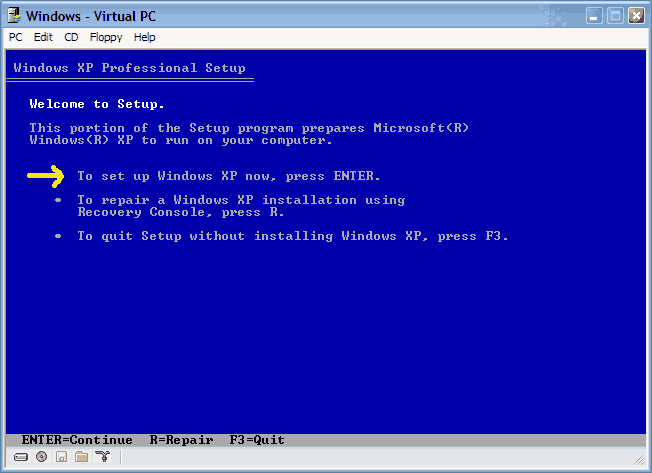
Once completed, you will be confronted with "Windows Setup". You will be asked to setup up Windows, or repair Windows with the recovery console. Choose the FIRST option, NOT recovery console.
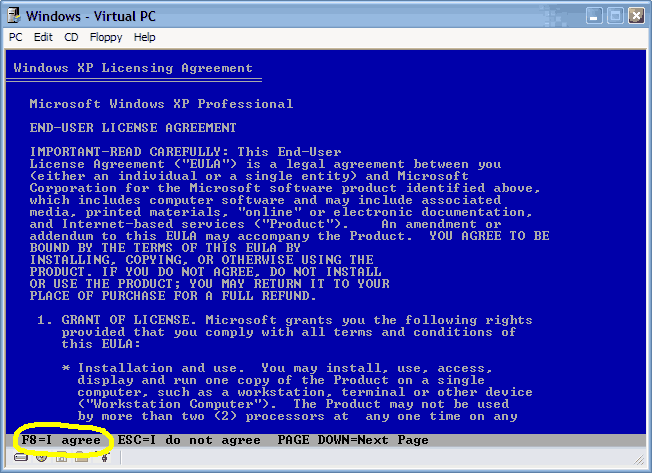
Choose F8 to continue.
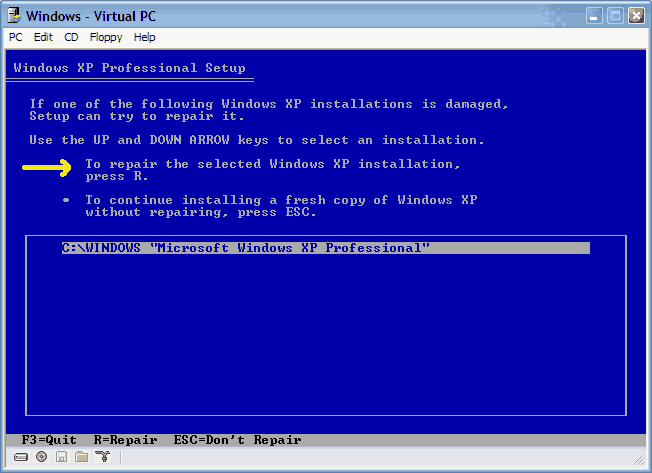
- Next, Windows Setup will find existing Windows XP/2000 installations. You will be asked to repair an existing XP installation or install a fresh copy of Windows XP/2000.
If no installations are found, then you will not be given the option to repair. This may happen if the data or partition on your drive is too corrupted.
- That should be it. Windows XP/2000 will appear to be installing itself for the first time, but it will retain all of your data and settings. Just follow the prompts, have your CD-KEY handy and hope for the best!
Last edited by Rick : 02-07-2007 at 09:12 PM.
|

10-20-2003, 02:06 AM
|
 |
TS Special Forces
|
|
Location: Los Angeles, CA
Member since: Feb 2002, 4,750 posts
|
|
CDROM NOT BOOTABLE: If the XP/2000 CD does not boot...- Many computers out there are not configured to boot from the CDROM. If you cannot boot from the CDROM, this is probably due to the boot order of your computer being incorrect for CDROM booting.
You have two options:
1.) You can change this in the BIOS during POST, which is usually the very first screen displayed by your computer when you turn it on.
2.) Many newer computers have a selectable boot menu by tapping F8, F10 OR F12 right during/after the first POST screen. This will allow you to temporarily boot from a CDROM.
To enter your BIOS, most users here will press the DEL key.
Most users with Dell, Gateway, Sony & HP systems will press F2.
Many Toshiba laptops are F2 or require you hold the ESC key when you turn the system on. Your notebook will report an error and prompt to press F1 to enter setup. Do exactly that. 
Compaq users will usually have to press F10.
IBM typically uses F1 or F2.
Other brands may have different keys to press to enter setup, but F1, F2, Del, Tab and CTRL+S or CTRL + ALT + S are the most common ones I'm familiar with. Often, the BIOS will display what button to press to "enter setup" during POST.
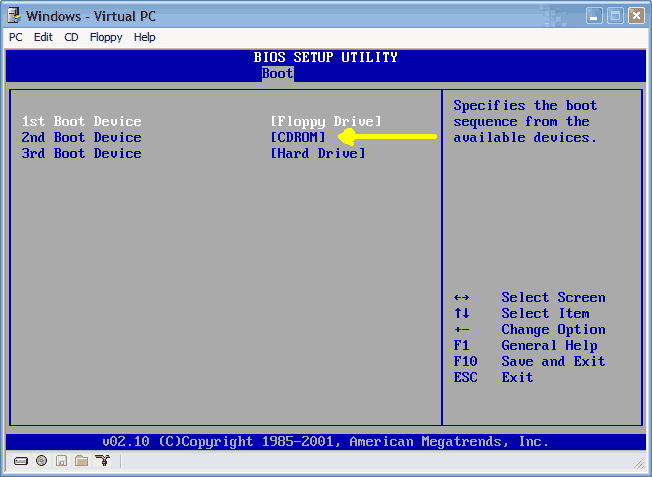
When you enter the BIOS setup, you need to change the boot order. The CDROM should be setup before the Hard Drive. Each BIOS is different, but here is an example:

Last edited by Rick : 11-16-2005 at 07:44 PM.
|
 You can remove this banner by registering, join the TS Community for free. |
|
|

10-20-2003, 02:47 AM
|
 |
TechSpot Evangelist
|
|
Location: Glasgow, Scotland
Member since: Feb 2002, 6,562 posts
|
|
|
Well done, my dark apprentice....
|

10-20-2003, 05:04 AM
|
 |
TechSpot Paladin
|
|
Location: UK
Member since: Jan 2003, 1,919 posts
|
|
|
Don't forget to mention the 87MBs of windows updates (you need to do this several times because there are updates for some of the updates, really!) that will be optionally required after install. I can't wait for winxp sp2 to be released, so that I can slipstream my CD and avoid the large update requirements. Glad I have broadband.
|

10-25-2003, 05:44 PM
|
|
Newcomer, in training
|
|
Location: Nebr.
Member since: Oct 2003, 25 posts
|
|
|
In a lot of the newer computers with 1 gig of ram fast ram, several drives, tons of lights and big coolers can over tax the power supplys that where working just fine before.
Power supplys problem can cause random reboots if theres not enogh power to run everything. This can also blow voltage control Caps. for the memory or 5 volt side.
If your computer shuts off and won't even post the bios, look at your power supply it my be at it's limit.
Last edited by grog : 01-18-2004 at 05:49 PM.
|

11-05-2003, 10:13 AM
|
|
Newcomer, in training
|
|
Member since: Nov 2003, 6 posts
|
|
|
i am on the new set up but stuck. it asks for a SISAGP.SYS file to be installed on Silicon Integrated Systems Installation disk. I cannot find what that could be. is it in the Win XP folders somewhere and I cannot find it? Help! Thanks! Meredith
|

11-05-2003, 12:46 PM
|
 |
TS Special Forces
|
|
Location: Los Angeles, CA
Member since: Feb 2002, 4,750 posts
|
|
Quote:
Originally posted by mere24
i am on the new set up but stuck. it asks for a SISAGP.SYS file to be installed on Silicon Integrated Systems Installation disk. I cannot find what that could be. is it in the Win XP folders somewhere and I cannot find it? Help! Thanks! Meredith
|
If you are repairing your Windows XP installation, then this can happen. You should be able to just simply cancel the message and it will continue installing as normal.
If this is a fresh installation of Windows XP and not an upgrade/repair, then this may mean your Windows CD is damaged.
|

11-06-2003, 06:49 AM
|
|
Newcomer, in training
|
|
Member since: Nov 2003, 6 posts
|
|
|
got it!!!
Rick,
Thanks a bunch! It worked and all my files are there! When it kept asking me for that SIS file, I went to the SIS site to download it, but they said it was a custom file on the CD that came with my pc. So I found the CD with the file and went on easily. I am so happy I didn't lose anything. Thanks for your help!It was easy with all of the steps to follow. I saved money for a tech to come and visit!
Meredith
|

11-06-2003, 09:38 AM
|
|
Newcomer, in training
|
|
Member since: Nov 2003, 6 posts
|
|
|
Now I have only 1 minor problem. All files are still there but I cannot connect to the Internet. When I try to manually set up a connection, it won't let me do so. And everytime I restart, a msg tells me to go to the control panel and configure some stuff but I don't know what it wants me to. Any thoughts? Thanks, Meredith
|
 You can remove this banner by registering, join the TS Community for free. |
|
|

11-06-2003, 06:11 PM
|
|
Newcomer, in training
|
|
Member since: Nov 2003, 6 posts
|
|
|
I had a problem with WIN XP and recovered everything but I cannot get onto the Internet. I run the Internet Connection Wizrd and try to install a new connection. Here is what happens: I create a new connection and press NEXT and select Copnnect to the Internet. I choose the set up my connection manually selection. When I get to this next screen the first 2 selections won't allow me to click on them for Connect using a dial-up modem. The only one that it selects is connect using a broadband connection. How do I allow the dial up modem selection to be chosen when it won't let me? Can Anyone help? Thanks
|

11-09-2003, 05:56 PM
|
|
Newcomer, in training
|
|
Member since: Nov 2003, 20 posts
|
|
Quote:
|
When I get to this next screen the first 2 selections won't allow me to click on them for Connect using a dial-up modem. The only one that it selects is connect using a broadband connection. How do I allow the dial up modem selection to be chosen when it won't let me?
|
If you repaired Windows XP that had Service Pack 1 installed with a CD without Service Pack, your network connections through your ISP will not function. Only direct connections will still work.
You must install Service Pack 1 to fix this problem.
Hopefully you have it burned on some CD or saved it on your HD.
|

11-24-2003, 11:09 PM
|
|
Newcomer, in training
|
|
Member since: Nov 2003, 10 posts
|
|
|
one question here....
is it the same as formatting ur pc when using the method u list out here????
|

11-24-2003, 11:55 PM
|
 |
TS Special Forces
|
|
Location: Los Angeles, CA
Member since: Feb 2002, 4,750 posts
|
|
Quote:
Originally posted by RyonanGT
one question here....
is it the same as formatting ur pc when using the method u list out here????
|
No. Although the process is very simliar, there is a major difference - Formatting destroys ALL of your data. This method of reinstalling XP saves most of your settings and files.
|

12-08-2003, 05:34 PM
|
 |
TechSpot Member
|
|
Member since: Jun 2003, 195 posts
|
|
|
You can also install the recovery console to your PC and have it show up as a boot option.
To install the Recovery Console as a startup option
With Windows running, insert the Setup CD into your CD-ROM drive.
CLick Start and select Run.
Type the following where D: is the CD-ROM drive letter:
D:\i386\winnt32.exe /cmdcons
Probably won't help if you can't boot into windows but it may save you from having to dig out your cd and it should load pretty fast.
Nice work Rick, well done.
|

12-08-2003, 05:43 PM
|
 |
TechSpot Member
|
|
Location: Why do you wanna know ?
Member since: Oct 2003, 184 posts
|
|
|
|

12-08-2003, 06:05 PM
|
 |
TechSpot Member
|
|
Member since: Jun 2003, 195 posts
|
|
[homervoice] DOH [/homervoice] 
|

12-15-2003, 05:21 AM
|
|
Newcomer, in training
|
|
Member since: Dec 2003, 6 posts
|
|
|
all very nice but backing up data before possibly losing the lot probably a good idea
- however, not easy to burn cds when you're booting from cd eh?
I'm going to try and make a floppy linux distro that can read ntfs and burn cds... gulp!
|

01-17-2004, 04:10 AM
|
 |
TechSpot Member
|
|
Location: Bronx, NY
Member since: Jan 2004, 159 posts
|
|
|
hi i installed a new motherboard and now it wont boot windows - all i get is this windows didnt strat properly screen and when it tries to boot all i see is a windows logo with a random blue background for a split second and then it disappears. its a new mobo put into an existing comp. i was told i would have to reinstall windows but i dont want to lose my data cause i love it so (ahem porn ahem). would this work (fixing windows instead of reinstalling) or do i just bite the bullet and redo it . also if i do have to redo it - if i get another hard drive and just install windows on that one is there a way i can get my programs and files transfered over without digging out all the cds and stuff. any help would be greatly appreciated. much thanks.
|

01-17-2004, 08:53 AM
|
|
Newcomer, in training
|
|
Location: Nebr.
Member since: Oct 2003, 25 posts
|
|
|
When installiing a new mobo into a computer that already has windows installed will always be problem matic.
The drivers for the IDE controler will not work if changing from say a VIA chip set to Nvidia or SIS etc.
XP does a better job that the other OS's but it is still hit and miss.
Install the OS disc and boot from it than run through as if you are doing an install.
But when you get to the last window before formating your drive and starting over windows will offer you a chance to repair.
Do this it will look like its installing a new OS but when done, if it works you will be able to start windows. Even if it works You will probly have to reinstall some of your hardware and drivers. So have them ready.
But there is always the chance that it won't even boot. If not booting you will have to do a new install.
As always it is best to backup everything you want to keep before doing this or a new install.
A new install will clean all the junk out but it will mean redoing all your tweaking again.
|

01-17-2004, 10:47 AM
|
 |
TS Special Forces
|
|
Location: Saint Louis, MO, USA
Member since: Feb 2002, 4,531 posts
|
|
|
SornyPanafonic, please do not double post. Your question will get answered as quickly as possible. Thank you.
|
| Thread Tools |
Search this Thread |
|
|
|
Posting Rules
|
You may not post new threads
You may not post replies
You may not post attachments
You may not edit your posts
HTML code is Off
|
|
|
Similar Threads
|
| Thread |
Thread Starter |
Forum |
Replies |
Last Post |
| Microsoft Jokes |
Phantasm66 |
The Meeting 'spot' |
< | |