Hey,
Right... First things first. I got this PC for Christmas 3 years ago. It was supposedly a 5-star computer... Doesn't seem so true now that the company who made the PC's has gone bust :| If anyones wondering who, it's 'Aries'.
Ok, so for the first year of having this PC, it ran perfect. No problems, no loud noises, no system hangs, what you expect of your shiny new PC. However, once the year was out, I attempted to play LOTR: Battle for Middle Earth. I loaded the campaign, and after 2 minutes of playing, the whole PC just went down on me. Like it would when I hit 'Shut Down'. I was so confused, and I just thought I'd knocked something. I opened the case and checked everything. T'was all fine. I tried again, and it hung on me again.
We called an engineer from Aries around, and he replaced all the parts with exactly the same parts. For 2-3 weeks, perfect, again. Then it hung, and since my warranty had gone, I couldn't get it looked at again for free... And being a 14 year old, it was quite hard at the time to go and buy brand new parts.
I decided to get learning some PC basics myself. I've learnt about most of the BIOS, as well as several graphical settings and common problems. However, I'm thinking that the graphics card may be the problem. It's only a Radeon 9550 128MB... Quite cr*p to be honest. At first when I actually managed to get it working (turning off FastWrite made it work) for a few months! Then again, the problem returned. Fast write didn't help. I spent months and months trying to change settings to make it work, but with no success. I've now reached the point of wanting to throw the PC our the window. So I've decided to come and ask some Pro's for some help... Here's a few things you need to know:
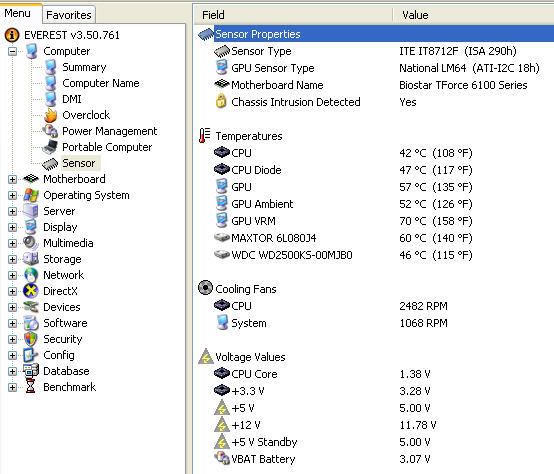
http://img101.imageshack.us/my.php?image=readingspq5.png
As you can see, Temp 2 is alarmingly high, and Temp 3 isn't far behind.. I can't figure out what's what though >.<
By the way, that's just idle... With firefox open, a file downloading and that's it.
System:
Microsoft Windows XP
Home Edition
Version 2002 <--- Is it me or did Aries give me a bit of an erm... 'Old' system?
Service Pack 2
Computer:
Intel Pentium 4
CPU 3.00GHz <--- That isn't too bad.. Is it?
512MB Ram
Display:
Model: ATI Radeon 9550 / X1050 Series
Driver: ati2mtag.sys
04 September 2007
Supported
And if your used to half a the jargon that I don't understand, here it is:
OS Name Microsoft Windows XP Home Edition
Version 5.1.2600 Service Pack 2 Build 2600
OS Manufacturer Microsoft Corporation
System Name DEZPC
System Manufacturer MICRO-STAR INC.
System Model MS-6788
System Type X86-based PC
Processor x86 Family 15 Model 3 Stepping 4 GenuineIntel ~3042 Mhz
Processor x86 Family 15 Model 3 Stepping 4 GenuineIntel ~3042 Mhz
BIOS Version/Date American Megatrends Inc. V5.4 on 07.00T, 02/07/2004
SMBIOS Version 2.3
Windows Directory C:\WINDOWS
System Directory C:\WINDOWS\system32
Boot Device \Device\HarddiskVolume2
Hardware Abstraction Layer Version = "5.1.2600.2180 (xpsp_sp2_rtm.040803-2158)"
User Name DEZPC\Dez
Time Zone GMT Standard Time
Total Physical Memory 512.00 MB
Available Physical Memory 212.33 MB
Total Virtual Memory 2.00 GB
Available Virtual Memory 1.93 GB
Page File Space 1.45 GB
Page File C:\pagefile.sys
And so.. Help would be appreciated..
If possible, without having to spend any cash... If I asked about spending money on a PC, I'm pretty sure my dad would hit the roof (He's a bit of an Apple Mac guy )
)
Thanks in advance
Dez
Right... First things first. I got this PC for Christmas 3 years ago. It was supposedly a 5-star computer... Doesn't seem so true now that the company who made the PC's has gone bust :| If anyones wondering who, it's 'Aries'.
Ok, so for the first year of having this PC, it ran perfect. No problems, no loud noises, no system hangs, what you expect of your shiny new PC. However, once the year was out, I attempted to play LOTR: Battle for Middle Earth. I loaded the campaign, and after 2 minutes of playing, the whole PC just went down on me. Like it would when I hit 'Shut Down'. I was so confused, and I just thought I'd knocked something. I opened the case and checked everything. T'was all fine. I tried again, and it hung on me again.
We called an engineer from Aries around, and he replaced all the parts with exactly the same parts. For 2-3 weeks, perfect, again. Then it hung, and since my warranty had gone, I couldn't get it looked at again for free... And being a 14 year old, it was quite hard at the time to go and buy brand new parts.
I decided to get learning some PC basics myself. I've learnt about most of the BIOS, as well as several graphical settings and common problems. However, I'm thinking that the graphics card may be the problem. It's only a Radeon 9550 128MB... Quite cr*p to be honest. At first when I actually managed to get it working (turning off FastWrite made it work) for a few months! Then again, the problem returned. Fast write didn't help. I spent months and months trying to change settings to make it work, but with no success. I've now reached the point of wanting to throw the PC our the window. So I've decided to come and ask some Pro's for some help... Here's a few things you need to know:
http://img101.imageshack.us/my.php?image=readingspq5.png
As you can see, Temp 2 is alarmingly high, and Temp 3 isn't far behind.. I can't figure out what's what though >.<
By the way, that's just idle... With firefox open, a file downloading and that's it.
System:
Microsoft Windows XP
Home Edition
Version 2002 <--- Is it me or did Aries give me a bit of an erm... 'Old' system?
Service Pack 2
Computer:
Intel Pentium 4
CPU 3.00GHz <--- That isn't too bad.. Is it?
512MB Ram
Display:
Model: ATI Radeon 9550 / X1050 Series
Driver: ati2mtag.sys
04 September 2007
Supported
And if your used to half a the jargon that I don't understand, here it is:
OS Name Microsoft Windows XP Home Edition
Version 5.1.2600 Service Pack 2 Build 2600
OS Manufacturer Microsoft Corporation
System Name DEZPC
System Manufacturer MICRO-STAR INC.
System Model MS-6788
System Type X86-based PC
Processor x86 Family 15 Model 3 Stepping 4 GenuineIntel ~3042 Mhz
Processor x86 Family 15 Model 3 Stepping 4 GenuineIntel ~3042 Mhz
BIOS Version/Date American Megatrends Inc. V5.4 on 07.00T, 02/07/2004
SMBIOS Version 2.3
Windows Directory C:\WINDOWS
System Directory C:\WINDOWS\system32
Boot Device \Device\HarddiskVolume2
Hardware Abstraction Layer Version = "5.1.2600.2180 (xpsp_sp2_rtm.040803-2158)"
User Name DEZPC\Dez
Time Zone GMT Standard Time
Total Physical Memory 512.00 MB
Available Physical Memory 212.33 MB
Total Virtual Memory 2.00 GB
Available Virtual Memory 1.93 GB
Page File Space 1.45 GB
Page File C:\pagefile.sys
And so.. Help would be appreciated..
If possible, without having to spend any cash... If I asked about spending money on a PC, I'm pretty sure my dad would hit the roof (He's a bit of an Apple Mac guy
)Thanks in advance
Dez