I have had a problem with my system overheating for as long as Ive owned it.
I blow it out for dust almost daily (its a habit now), all my fans are working, I have replaced the stock thermal paste with arctic silver once myself and once by the local computer store.
My system specs;
Gigabyte k8nf-9 v2 mobo
AMD Athalon 64 3200+
AMD ATHLON64 certified CPU fan & heatsink
Nvidia Geforce 7800GT 256 mb 16x pci-e
NZXT PF-500 500Watt Power Supply
2Gb Corsair Value Select Dual Channel ddr
Aspire X-Navigator Aluminum ATX Mid-Tower Case
I had an extra fan mounted to the northbridge sink because the guy at the local shop noticed how hot it ran but unfortunatly this didnt fix the problem.
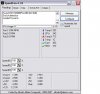
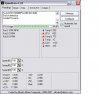
I took a couple screens of speedfan at idle and again after a short while of gaming. I had to stop gaming quickly to catch the temp as close to failure as I could.
https://www.techspot.com/vb/attachment.php?attachmentid=22092&stc=1&d=1189654518
idle temp.JPG
https://www.techspot.com/vb/attachment.php?attachmentid=22093&stc=1&d=1189654518
gaming temp.JPG
As soon as the one listed as core gets to 120 my whole system shuts down.
I also run Core Temp 0.95 and It lists only one temp and it is always the same as the one listed as core.
The only way I can play my game is to sit the system on top of the A/C vent in the floor with the a/c unit running. My problem now is that its getting cooler outside and the a/c isnt running as much so I crash alot sooner and more often.
Please, any help would be apreciated.
I blow it out for dust almost daily (its a habit now), all my fans are working, I have replaced the stock thermal paste with arctic silver once myself and once by the local computer store.
My system specs;
Gigabyte k8nf-9 v2 mobo
AMD Athalon 64 3200+
AMD ATHLON64 certified CPU fan & heatsink
Nvidia Geforce 7800GT 256 mb 16x pci-e
NZXT PF-500 500Watt Power Supply
2Gb Corsair Value Select Dual Channel ddr
Aspire X-Navigator Aluminum ATX Mid-Tower Case
I had an extra fan mounted to the northbridge sink because the guy at the local shop noticed how hot it ran but unfortunatly this didnt fix the problem.
I took a couple screens of speedfan at idle and again after a short while of gaming. I had to stop gaming quickly to catch the temp as close to failure as I could.
https://www.techspot.com/vb/attachment.php?attachmentid=22092&stc=1&d=1189654518
idle temp.JPG
https://www.techspot.com/vb/attachment.php?attachmentid=22093&stc=1&d=1189654518
gaming temp.JPG
As soon as the one listed as core gets to 120 my whole system shuts down.
I also run Core Temp 0.95 and It lists only one temp and it is always the same as the one listed as core.
The only way I can play my game is to sit the system on top of the A/C vent in the floor with the a/c unit running. My problem now is that its getting cooler outside and the a/c isnt running as much so I crash alot sooner and more often.
Please, any help would be apreciated.