ok i need some serious help i overclocked my intel e6300 cpu using bios saved settings it rebooted then nothing i cant even get back on to the bios screen my comp starts but just gets nowhere my monitor keyboard and mouse dont work (on my lappy at moment) any help please i think i might of screwed it up.
You are using an out of date browser. It may not display this or other websites correctly.
You should upgrade or use an alternative browser.
You should upgrade or use an alternative browser.
Overcloked disaster please help
- Thread starter jimmi1
- Start date

AlbertLionheart
Posts: 1,997 +3
Get the manual for the motherboard and use this to find the jumpers to reset the BIOS - sometimes near the CMOS battery. This will reset all the BIOS values to ex factory default so if you have done no damage it should restart OK. If no manual, tell us what the board is and we should be able to find a spec for it - or you could look yourself on Google.
AlbertLionheart
Posts: 1,997 +3
manual buggery is an offence in Somerset. Anywhere else is at your own risk.
I have never been confident that taking out the battery is as good as shorting the jumpers - besides (if you know where the jumpers are) is it quicker!
I have never been confident that taking out the battery is as good as shorting the jumpers - besides (if you know where the jumpers are) is it quicker!


k.jacko
Posts: 483 +1
lol....is that before or after 6 points of soiderrr? 
"shorting the jumpers". Sounds pretty borderline sleazy to me ;P
If you taker the battery out, you'll need a screwdriver to flip it. If you move the jumper you need small fingers.
Have you tried putting underpants on your head and kicking the pc from a westerly direction?
Seriously though, short the jumpers or remove the battery, that will reset the cmos for you. Shouldn't need a manual..............not after you've buggered it anyway. be all sticky!
"shorting the jumpers". Sounds pretty borderline sleazy to me ;P
If you taker the battery out, you'll need a screwdriver to flip it. If you move the jumper you need small fingers.
Have you tried putting underpants on your head and kicking the pc from a westerly direction?
Seriously though, short the jumpers or remove the battery, that will reset the cmos for you. Shouldn't need a manual..............not after you've buggered it anyway.
be all sticky!
AlbertLionheart
Posts: 1,997 +3
It is easier with a desktop - and you need to take the side off to get at the battery or the jumpers - keyboard no good.
I 'll get back with help on the board if you need it? I would prefer you to use the jumpers as tmagic is right about the battery socket.
I 'll get back with help on the board if you need it? I would prefer you to use the jumpers as tmagic is right about the battery socket.
k.jacko
Posts: 483 +1
huh! well i've never damaged the battery socket before. Although nearly took my frikkin eye out when the battery flipped up when i gave it a good shoeing with a screwdriver.
Ok, as the other have said, your cmos jumper should be near the battery, the label for it will be printed on the pcb in tiny writing next to it.
Ok, as the other have said, your cmos jumper should be near the battery, the label for it will be printed on the pcb in tiny writing next to it.
AlbertLionheart
Posts: 1,997 +3
yes k.jacko but you have seen a motherboard before. From what has been said, jimmi1 has never seen the inside of a PC.
has anyone got any idea of the settings i would use to overclock properly
apparently i can get 3.2ghz out of my intel e6300 but messed up following this
http://www.legionhardware.com/document.php?id=606&p=2
pics info on my motherboard and cpu
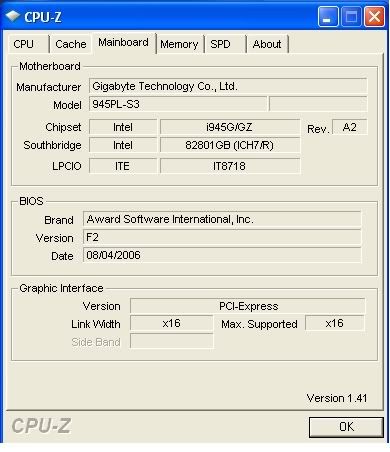

apparently i can get 3.2ghz out of my intel e6300 but messed up following this
http://www.legionhardware.com/document.php?id=606&p=2
pics info on my motherboard and cpu
k.jacko
Posts: 483 +1
holy cow! that voltage seems a little high for a B2 stepped E6300. It's recommended max. is 1.5v, yet you've not overclocked it yet?
The 945 chipset aint the best overclocker for the core2duo's as oposed to the 965's but you should get some oooommmph out of it.
Hmmm.....personally i wouldn't press ctr+f1 just yet. You don't need to be altering the ram timings yet. Get the pc to boot stably by just altering your multiplier and fsb 1st. Sure you will need to alter your mem multiplier just to take the memory out of the equation.
Post your system specs so we can help further.
The 945 chipset aint the best overclocker for the core2duo's as oposed to the 965's but you should get some oooommmph out of it.
Hmmm.....personally i wouldn't press ctr+f1 just yet. You don't need to be altering the ram timings yet. Get the pc to boot stably by just altering your multiplier and fsb 1st. Sure you will need to alter your mem multiplier just to take the memory out of the equation.
Post your system specs so we can help further.
no that wasnt overclocked voltage although since i removed my cmos battery the voltage has droped down to 1.2v but my core speed has also droped to 1.2ghz from 1.8
is this the the info you are after k.jacko

if not please tell me what you need and i will post it for you
cheers
is this the the info you are after k.jacko
if not please tell me what you need and i will post it for you
cheers
Phil Harris
Posts: 22 +0
With Gigabyte boards there is a utility called Easytune. If it was installed it will be under Gigabyte in your start programs list. If it wasn't installed when the computer was built, you can install it yourself from the motherboard utility disc.
It's useful for mild to moderate overclocking as you can simply raise the FSB and CPU voltage.
My suggestion is that you experiment with that for a while and see if you can achieve what you want that way. Overclocking through the BIOS is more flexible and can get better results, but requires a bit more understanding of how your system works.
Thankfully there are lots of motherboard specific overclocking guides just a google search away.
It's useful for mild to moderate overclocking as you can simply raise the FSB and CPU voltage.
My suggestion is that you experiment with that for a while and see if you can achieve what you want that way. Overclocking through the BIOS is more flexible and can get better results, but requires a bit more understanding of how your system works.
Thankfully there are lots of motherboard specific overclocking guides just a google search away.
k.jacko
Posts: 483 +1
Yup, i agree with Phil. I use easytunes to monitor my overclocks once i've done it in the bios.
But its a good way to start by just upping your fsb bit by bit without worrying about other stuff.
Now then, the info we could really do with is basically a screenie of the other tabs from cpu-z, not just CPU and MAINBOARD, we need the MEMORY and SPD ones as well. Don't worry about CACHE.
Post them up and we'll have another look see.
But its a good way to start by just upping your fsb bit by bit without worrying about other stuff.
Now then, the info we could really do with is basically a screenie of the other tabs from cpu-z, not just CPU and MAINBOARD, we need the MEMORY and SPD ones as well. Don't worry about CACHE.
Post them up and we'll have another look see.
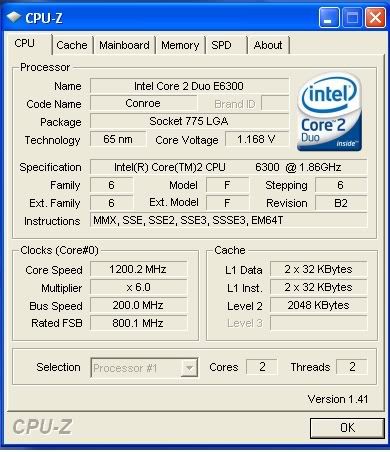

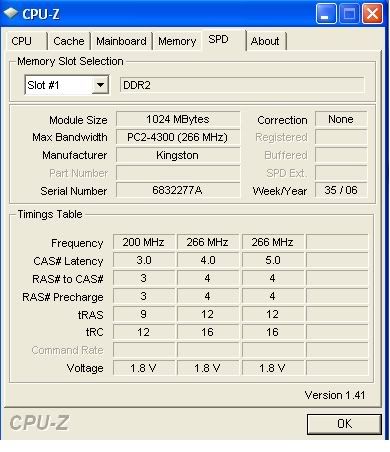
k.jacko
Posts: 483 +1
jimmi1, that looks much better.
Your readings are now correct for your cpu.
The core2duo's reduce their multiplier and speed according the load that is required, thats why your core reading is 1200MHz with a multiplier of x6.
What i would do first is check what bios updates are available and what they actually do. If any pertain to helping you overclock the E6300 or has better support for it, then update to it before trying to overclock.
Do that then come back to us.
Your readings are now correct for your cpu.
The core2duo's reduce their multiplier and speed according the load that is required, thats why your core reading is 1200MHz with a multiplier of x6.
What i would do first is check what bios updates are available and what they actually do. If any pertain to helping you overclock the E6300 or has better support for it, then update to it before trying to overclock.
Do that then come back to us.
k.jacko
Posts: 483 +1
jimmi1, in that case, and as Phil suggested, use EasyTune 5, to do an 'easy' overclock, by just clicking on the 'up' arrow. I'd do maybe 100 at a time then hit GO. Then monitor your temps and see what you get.
Even with using the easy mode, you still need to stresst test it.
If i were you, i'd do the easy overclock, reboot, then run 'Orthos' or 'Prime95' for good 6 hours or so. If it's stable with nice acceptable temps and no errors, then up it another 100, rinse and repeat.
The EASY mode deals with the cpu voltage for you.
Once you're a little more versed with overclocking, its pitfalls and benefits.
Try doing it from the bios, because the lowest cpu voltage you can get away with, the lowers your temps are. EASY mode will tend to over-exaggerate.
I still would not bother with ram timings as yet. Get used to how you overclock the systm in general. Let the stability come from oc'ing the fsb, then start looking at your ram clocks. Get as near to 1:1 (fsb:ram) as you can, when you do.
Even with using the easy mode, you still need to stresst test it.
If i were you, i'd do the easy overclock, reboot, then run 'Orthos' or 'Prime95' for good 6 hours or so. If it's stable with nice acceptable temps and no errors, then up it another 100, rinse and repeat.
The EASY mode deals with the cpu voltage for you.
Once you're a little more versed with overclocking, its pitfalls and benefits.
Try doing it from the bios, because the lowest cpu voltage you can get away with, the lowers your temps are. EASY mode will tend to over-exaggerate.
I still would not bother with ram timings as yet. Get used to how you overclock the systm in general. Let the stability come from oc'ing the fsb, then start looking at your ram clocks. Get as near to 1:1 (fsb:ram) as you can, when you do.
Gavin_Capacitor
Posts: 47 +0
I'm glad you got you comp working again! What i cant believe is that no one noticed the thread is spelled wrong - "overcloked" lol. And when they say the battery in your computer, their not talking about the battery that powers a laptop computer, their talking about the batter that provides power so the BIOS keeps its settings. Its a button battery on the motherboard about the size of a quarter.
Daveskater
Posts: 1,412 +0
I don't mean to interrupt here but there's a thread on TS about overclocking:
Read Before Asking "How Do I Overclock?"
It might help jimmi1 in his endeavors.
Btw, Hello, jimmi1, and a belated welcome to Techspot :wave:
Read Before Asking "How Do I Overclock?"
It might help jimmi1 in his endeavors.
Btw, Hello, jimmi1, and a belated welcome to Techspot :wave:
Similar threads


- Replies
- 2
- Views
- 2K

Latest posts
-
 SanDisk's massive 8TB SD cards are finally close to launch
- dualkelly replied


-
TechSpot is dedicated to computer enthusiasts and power users.
Ask a question and give support.
Join the community here, it only takes a minute.