Welcome to the TechSpot OpenBoards. Please read the FAQ if you have any questions. Sign up or Login to participate.
|
|||||||
Begin your free trial now
Pay-as-you-go options starting at $10/user/month
How to install .key files?
|
|
Thread Tools | Search this Thread |
|
#1
|
|||
|
|||
|
How to install .key files?
I have just installed a program, and while trying to install the .key files, I recieved an error message, shown in the screenshot below. It told me it was not a registry script and I could only import binary files from regedit. So I went into regedit and File>Import, and found the keys I wanted, but it told me that the key will be restored on top of the key that regedit was on when I opened it, deleting all subkeys. Obviously I don't want to do this, so how do I correctly install these?
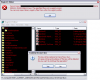
Last edited by BlackScarlet; 12-01-2007 at 06:52 PM.. |
|
#2
|
||||
|
||||
|
only keys I use go in a specific file for that software and on run the software finds it and loads to registry.
open key in txt editor open registry where key is compare may be you can modify. back up reg first of course |
|
#3
|
||||
|
||||
|
Software piracy is bad. Please buy the software - you will receive detailed instructions on how to activate your purchase.
Thread closed. |
![]() |
| Similar Topics | ||||
| Topic | Replies | Forum | ||
Mysterious files after XP re-install
|
3 | Windows OS | ||
Can't see files after Win2K re-install
|
3 | Windows OS | ||
how to install .iso files
|
4 | Gaming | ||
xp pro install went bad...many files cannot be copied
|
6 | Windows OS | ||
getting rid of XP SP2 install & backup files??
|
9 | Windows OS | ||
| Thread Tools | Search this Thread |
|
|
All times are GMT -4. The time now is 04:31 PM.


Mysterious files after XP re-install