also @ TechSpot: Bill Gates is once again the richest person in the world

A user or not a user?

Discussion in 'Windows OS' started by redmike, Oct 27, 2012.

Post New Reply
  1. redmike Newcomer, in training Posts: 20

    Just getting ready to take my old Vista laptop on vacation with me and I noticed ..

    If I go to to users, then only my Administrator name is there.

    And if I try to change log-in to a different user. then only my name is there.

    But if I go to C: users, then an additional user name and folder are listed there.

    Any help with either removing, or preventing the additional name and folder from showing would be much appreciated.

    Michael
  2. gbhall TechSpot Chancellor Posts: 2,069   +15

    It may just be me, but I'm not sure your post is clear enough to get good responses. Can you be more explicit about what you are doing when you say you 'go to users' and if you 'go to c: users' ?

    If possible, screen shots would be good.
  3. redmike Newcomer, in training Posts: 20

  4. St1ckM4n TechSpot Maniac Posts: 1,499   +195

    Hit Start, and type in "Edit local users" and click the first entry. I'm doing this on Win7, so I dunno how you'll go on Vista sorry..

    Alternatively, on your first screeny: click 'configure advanced user profile properties'. Or, 'manage another account', hit the advanced tab, then the advanced button.


    You could have some user accounts that WERE there, but got deleted, etc.
  5. redmike Newcomer, in training Posts: 20

    Th
    My pc has W7 but this is just an old (4 years) old laptop to take on vacation.

    Alternative solution brought results; but what should I delete?

    http://i47.tinypic.com/23tzcg.jpg
  6. St1ckM4n TechSpot Maniac Posts: 1,499   +195

    The first one.

    Doesn't look like it's linked to the folder in c:\users, though.

    You can either delete it, or leave it there. No harm in leaving it.
     
  7. redmike Newcomer, in training Posts: 20

  8. Doctor John TechSpot Enthusiast Posts: 247   +15

    It looks rather as if "kds" is your admin account, renamed? (No idea why!)
  9. redmike Newcomer, in training Posts: 20

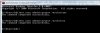
    The user panel says that the user (administrator) is Michael but look what the dos prompt says.

    Thanks

    Michael

    net user.jpg
  10. Doctor John TechSpot Enthusiast Posts: 247   +15

    I'm not sure what you can do about it, but at least it looks as if "kds" isn't a foreigner! :)
  11. redmike Newcomer, in training Posts: 20

    OK it's working 100% now.

    The problem was a corrupted profile.

    I could have continued with the way it was (Streisand?) but I've learned to pay attention to surface things like icebergs.

    You hear a squeak in your car and don't fix it and suddenly your radiator blows, the engine overheats and ...

    Thank you all for your help.

    http://i50.tinypic.com/73mhjs.jpg
  12. St1ckM4n TechSpot Maniac Posts: 1,499   +195

    Good job! :)