Cannot find drive D after reinstall Windows XP SP2

Heng Sea Hong

Posts: 32   +1
Hi all!

I have one problem need help.
My computer before have 2 drives (80 GB) drive C is 40 GB, my pc is got virus so I decide to reinstall win xp sp2 after I setup I cannot find my drive D: even on Disk Management,
I also take my Hard Disk to connect with other computer still cannot find it,
Please help me,
thank
 
Sounds like the Hive info for the D: is corrupted or not found on C:. If you want to recover that data off D: you need to take out the HDD use some sort of USB to HDD to PC adapter or dock. You might find those on ebay for your country. Since you won't be able to recovery this Hive info because you redid your OS due to virus attack for C:.
 
Hive data is corrupted that's why.. If you didn't re-install XP SP2 you could have fix the issue with D, but now that you did it's lost. If you had a USB to HDD then connect that to another PC, mostly I would use another system.
 
Hive data is corrupted that's why.. If you didn't re-install XP SP2 you could have fix the issue with D, but now that you did it's lost.
Hive data corruption? Aren't the partitions written to and defined on the physical disk? Plus I think OP has already tried connecting the disk to another computer in post #8

heng
When you reinstalled XP, do you recall
1) Did Windows recognize an existing Windows partition?
2) Did you reformat the partition when re-installed XP?

Also, here's how to provide info about your current disks and drive configurations
Click Start->Run, enter msinfo32 then
1) Click Components->Storage->Drives then click the info in the right pane, Ctl-A to select All, then paste in next post
2) Repeat but this time Click Components->Storage->Disks and copy/paste this info as well
 
When I reinstall I see only drive c and also format,
also I check on BIOS set up my hard disk space have only 30GB too,
I don't know why my hard disk have only one and 2 partitions and windows can install on drive c

Here the disk and Drive info attach file
 

Attachments

Now I already connect my HD by USB device still not found my second drive, please get info and help me
 
Go back to the Disk Manage under Windows and post an image (picture) of what the system is showing you have A, C, D, E an etc..? Somehow whatever you did to install Windows XP again has wiped out the Hive info for D: I've seen this happen when I was using XP myself and had to restore XP. When you have 1 or more partitions.
 
I looked at your Disk.txt file. There's something very odd and I think another problem that must be solved first.
Code:
Description    Disk drive
Manufacturer    (Standard disk drives)
Model    ST380011A
Bytes/Sector    512
Media Loaded    Yes
Media Type    Fixed	hard disk media
Partitions    1
SCSI Bus    0
SCSI Logical Unit    0
SCSI Port    0
SCSI Target ID    1
Sectors/Track    51
Size    31.50 GB (33,820,157,952 bytes)
Total Cylinders    12,698
Total Sectors    66,054,996
Total Tracks    1,295,196
Tracks/Cylinder    102
Partition    Disk #0, Partition #0
Partition Size    31.49 GB (33,817,468,416 bytes)
Partition Starting Offset    26,112 bytes

Based on that info, it looks like your disk is a Seagate ST380011A? I looked online and from what I can tell it's an 80GB disk as you mentioned in your first post. But your disk report says disk size is only 32GB! Note line item in report that says
Size 31.50 GB (33,820,157,952 bytes)


Did you reformat to FAT32 or NTFS?? Look in Disk Management. What File System does it report for the partition on the drive??
 
Based on that info, it looks like your disk is a Seagate ST380011A? I looked online and from what I can tell it's an 80GB disk as you mentioned in your first post. But your disk report says disk size is only 32GB! Note line item in report that says
Size 31.50 GB (33,820,157,952 bytes)


Did you reformat to FAT32 or NTFS?? Look in Disk Management. What File System does it report for the partition on the drive??

Thats interesting, and it reminded me of something magical about 32 gig, but I couldn't remember, so I googled. Came across this where a guy has almost the identical 80 gig hd. Wonder if the OP's issue is related to that.
 
Thats interesting, and it reminded me of something magical about 32 gig, but I couldn't remember, so I googled. Came across this where a guy has almost the identical 80 gig hd. Wonder if the OP's issue is related to that.
Thanks SNGX for the extra help with this mystery!
1) Looked at the OP's drive.txt report (provided in post #12). It appears it's formatted NTFS
2) Based on your info, I googled Seagate ST380011A 32gb. Seems many others have had this same 32GB vs 80GB problemas well :confused:

@Heng Sea Hong
I don't know why your disk is now 32GB vs 80GB. Someone with more hardware knowledge then I might be able to help there.

As for data recovery, try Easus Data Recovery to see if it can find any lost data. The first 1GB it can find is free.
 
Yes I ever change from Master to Slave Because before re-install my pc cannot open so I need some data that store on drive c so I connect to other computer by using IDE data,
thank for your help alot
 
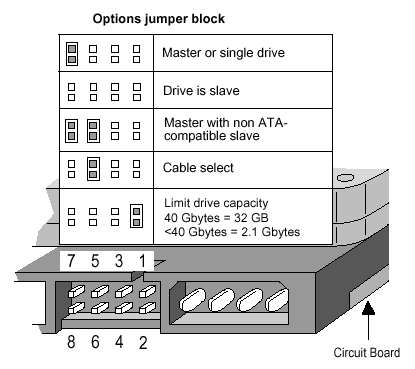
Yeah, my link mentioned jumpers. Sorry, I should have just mentioned that in my post but I was being lazy.

Heng - The master/slave jumpering here is different than the 32gig jumpering. Check out the link my above post (post #17).
 
3048-1.gif


Remove the jumper from the right side.
 
Now I can get it back for 80GB, after I set Jumper to Master and format it to FAT32 by using IDE Cable to USB adapter
Thank you for your help me, more thank to lookinaround so much also SNGX1275
 
Technical specs on this HDD shows it as 80 GB formatted capacity. 80GB should be around 60GB to 70GB in size. Changing the Master to Slave on the HDD not going to change the fact you have that other partition you said you did on this drive.

Product Features

  • 8.5 ms average access time
  • 80 GB formatted capacity
  • 4.16 ms average latency
  • 2 MB buffer
  • 7200 RPM spindle speed

Technical Details

  • Brand Name: Seagate
  • Model: ST380011A
  • Hard Disk Size: 80 GB
  • Warranty: 1 year warranty
  • Hardware Platform: PC
  • Hard Disk Description: Internal hard drive
  • Form Factor: Internal
  • Hard Disk Interface: IDE
  • Hard Disk Rotational Speed: 7200
  • Buffer Size: 8 MB
 
Back