also @ TechSpot: OCZ Vertex 450 SSD Review

Cannot find drive D after reinstall Windows XP SP2

Discussion in 'Storage and Networking' started by Heng Sea Hong, Oct 29, 2012.

Post New Reply
  1. SNGX1275 TS Special Forces Posts: 11,893   +117

    Yeah, my link mentioned jumpers. Sorry, I should have just mentioned that in my post but I was being lazy.

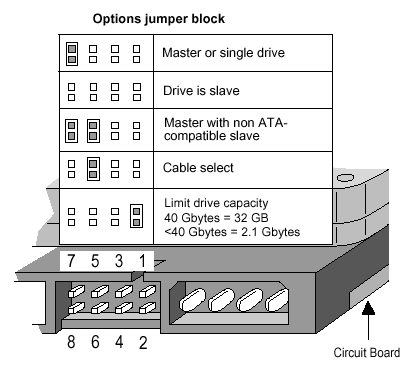
    Heng - The master/slave jumpering here is different than the 32gig jumpering. Check out the link my above post (post #17).
  2. Heng Sea Hong Newcomer, in training Posts: 47

    I just read the information it limit to 32GB, How can I reset it back?
  3. SNGX1275 TS Special Forces Posts: 11,893   +117

    [IMG]

    Remove the jumper from the right side.
  4. Heng Sea Hong Newcomer, in training Posts: 47

    Now I can get it back for 80GB, after I set Jumper to Master and format it to FAT32 by using IDE Cable to USB adapter
    Thank you for your help me, more thank to lookinaround so much also SNGX1275
  5. tipstir TS Ambassador Posts: 3,668   +15

    Technical specs on this HDD shows it as 80 GB formatted capacity. 80GB should be around 60GB to 70GB in size. Changing the Master to Slave on the HDD not going to change the fact you have that other partition you said you did on this drive.

    Product Features

    • 8.5 ms average access time
    • 80 GB formatted capacity
    • 4.16 ms average latency
    • 2 MB buffer
    • 7200 RPM spindle speed


    Technical Details

    • Brand Name: Seagate
    • Model: ST380011A
    • Hard Disk Size: 80 GB
    • Warranty: 1 year warranty
    • Hardware Platform: PC
    • Hard Disk Description: Internal hard drive
    • Form Factor: Internal
    • Hard Disk Interface: IDE
    • Hard Disk Rotational Speed: 7200
    • Buffer Size: 8 MB