also @ TechSpot: Microsoft wants Xbox to be the entertainment hub for all your devices

TechSpot

Can't delete old file!

Discussion in 'Software Apps' started by Doctor Gallop, Nov 7, 2006.

Thread Status:
Not open for further replies.
  1. Doctor Gallop TechSpot Enthusiast

    Hello everyone,
    I recently tried a Spyware program called "Super AntiSpyWare Romover' and hated it.
    I uninstalled it through the control panel then went in and sent the folder to the Recycle Bin.
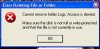
    Now when I try to empty the Bin It refuses to empty! I get a pop up window which says: [Image is attached.]
    Does anyone have any advice [in laymans terms] on how to get rid of this annoyance.

    Thank you.
    Attached Files:

  2. howard_hopkinso Newcomer, in training

  3. Doctor Gallop TechSpot Enthusiast

    I followed your instructions to the letter but the problem remains.
    Thank you for your help anyway Howard.
  4. howard_hopkinso Newcomer, in training

    Can you restore the file from the recycle bin?

    If so, try renaming it and deleting it again.

    If that still doesn`t work, go HERE and read the instructions.

    Post a HJT log as an attachment and I`ll advise.

    Regards Howard :)
  5. tomrca Newcomer, in training

    hi Doctor Gallop
    my experience of that message, usually indicates that the file you are attempting to remove/delete, is still being used with or by another programme. make sure that all files are closed that could contain that programme, ie, my docs or my briefcase etc. you may also need to look in your programme start up, and stop all the processes connected to that programme, using run and msconfig. see if that works..
  6. panos_gr Newcomer, in training

    try this file "MOVE ON BOOT" or something like that.anyway google it, download it and run the program.select the file that you want to remove and then reboot your computer.after the reboot is finished, the file is gonna be gone.:) :) :)
Thread Status:
Not open for further replies.