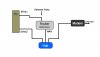
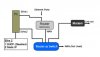
HI! sorry but I am a little confused. The router2 that you are referring too, is this the "Router as Switch" in the diagram.
NO. Router#2 is from my post
and the code. is this a command code that I enter into the Router as Swich command line"?
NO. We is the CODE tag to preserve white space in our comments
And then do I disable DHCP in the "Router as switch"?
YES, but the PC has no DHCP service as shown in your picture
Your picture is frought with issues and will not perform as you expect.
The Gateway router in your picture (aka my router#1) is normally directly connected to the modem.
If you attempt to use Router as a Switch per your picture,
no traffic flows to Ether#2 by the design of a switch.
If you replace the Switch with a HUB,
the wan side of the Gateway router will be given the DHCP address from the ISP,
and Ether#2 will see all traffic in+out
Caveat Emptor: your Ether#2 will be directly attached to the Internet (by virtue of the Missing NAT from an upstream router ) and subject to attack.
The more I look at this, an alternative seems a better solution, but let's define the objectives.
- Multiple systems need to share one ISP connection
- For whatever reason, it is desireable to monitor ALL network traffic to and from the ISP
=================================================
YES this is complicated
Code:
isp==modem==Router#1---hub---router#2---systems to be monitored
                        |
                        +---------->{Ether#2.static IP address}--the monitoring.system
* Router#1 wan takes the ISP public DHCP assignment
* has an active DHCP to control router#2 wan assignment
* is connected ONLY to a HUB which replicates all traffic
* Hub is connected to router #2 with its active DHCP service to assign PC addresses
* hub is also connected to the Ether#2 which is statically configured entirely isolated from router#2 addresses
EG:
Router#1 address 192.168.1.1 , DHCP range 2-4
Router#2 address 192.168.2.1, DHCP range 2-10
... the wan side of #2 will become 192.168.1.2 and is part of router#1 subnet
(hope that's already understood)
Ether#2 gets a static address
192.168.3.1,
netmask 255.255.0.0
gateway 192.168.1.1
DNS just doesn't matter
the netmask allows all 192.168.x.y traffic to be seen on ether#2
(
might as well show you ALL the issues)
Netmask 255.255.0.0 on Ether#2 may not be doable for 192.168.x.y subnet.
If Not, change the Addresses from 192.168.x.y => 10.10.x.y
- 192.168.1.1 becomes 10.10.1.1
- 192.168.2.1 becomes 10.10.2.1
- 192.168.3.1 becomes 10.10.3.1
and then you will be able to use netmask 255.255.0.0 or even 255.0.0.0