also @ TechSpot: Building a Thin Mini-ITX PC: Small and Silent Performance

Data drive question

Discussion in 'Storage and Networking' started by Modena, Sep 12, 2012.

Post New Reply
  1. Modena TechSpot Enthusiast Posts: 182

    I have a Crucial 128GB SSD as my OS/Program drive, and a 750GB WD Black drive which contains all my music/movies/photos etc. My issue is that it goes offline or into like a stand-by mode after a certain period of time. So lets say I go to open itunes, it will take 8-10 seconds for it to access the drive and load up the program with my music. It's definitely going into some stand-by type mode, because I can hear when it goes into it, and when it comes out of it when I open a program or file that happens to be on the HDD. So I wanted to know if there is a way to disable that so my access is instant. Any info appreciated, thank you.
  2. Rabbit01 TechSpot Enthusiast Posts: 763   +12

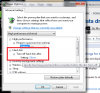
    Could it be the "Turn off hard disk after" setting in the Power Options?

    Untitled.png
  3. Leeky TechSpot Moderator Posts: 4,344   +59

    Aye, it will be what Rabbit01 said, I used to have the same problem as well. Since changing the option it hasn't been an issue.
  4. alexe3831 TechSpot Enthusiast Posts: 113

    With issues with devices going into stanby mode, checking the power settings is always a good idea, I found that out the hard way when my external SSD kept powering down in the middle of a backup x.x.

    But I hope the proposed solution works for you :)

    ~Alex
  5. Modena TechSpot Enthusiast Posts: 182

    Perfect worked well, thank you guys.
  6. Rabbit01 TechSpot Enthusiast Posts: 763   +12